Cloudron makes it easy to run web apps like WordPress, Nextcloud, GitLab on your server. Find out more or install now.


Skip to content
  • Categories
  • Recent
  • Tags
  • Popular
  • Bookmarks
  • Search
Skins
  • Light
  • Brite
  • Cerulean
  • Cosmo
  • Flatly
  • Journal
  • Litera
  • Lumen
  • Lux
  • Materia
  • Minty
  • Morph
  • Pulse
  • Sandstone
  • Simplex
  • Sketchy
  • Spacelab
  • United
  • Yeti
  • Zephyr
  • Dark
  • Cyborg
  • Darkly
  • Quartz
  • Slate
  • Solar
  • Superhero
  • Vapor

  • Default (No Skin)
  • No Skin
Collapse
Brand Logo

Cloudron Forum

Apps | Demo | Docs | Install
  1. Cloudron Forum
  2. Dawarich
  3. Family Member cannot activate sharing

Family Member cannot activate sharing

Scheduled Pinned Locked Moved Dawarich
3 Posts 3 Posters 103 Views 4 Watching
  • Oldest to Newest
  • Newest to Oldest
  • Most Votes
Reply
  • Reply as topic
Log in to reply
This topic has been deleted. Only users with topic management privileges can see it.
  • D Offline
    D Offline
    DualOSWinWiz
    wrote last edited by
    #1

    Even thhough shared on phone the additional member sharing location comes as disabled

    1 Reply Last reply
    1
    • jamesJ Offline
      jamesJ Offline
      james
      Staff
      wrote last edited by
      #2

      Hello @DualOSWinWiz
      I am not fully sure what additional member sharing location is.
      But I installed the app, configured the admin to use the iPhone app.
      Created a second account.
      With the admin created a family and added the second account to the family and enabled location sharring for the admin.
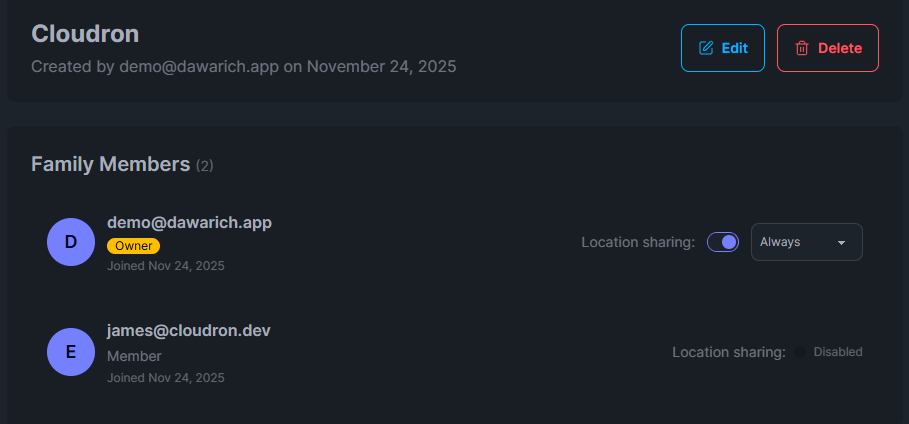
      a2ef5911-1c9d-4799-99c7-67b565bda423-image.png

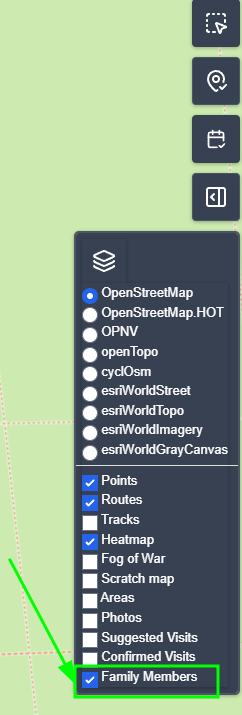
      Now as the user james@cloudron.dev I have to enable Family Members in the filter overview:
      046ee445-79ab-47d7-90d4-8439c0bce58d-image.png
      And I am able to see the admin user location.

      I 1 Reply Last reply
      1
      • jamesJ james

        Hello @DualOSWinWiz
        I am not fully sure what additional member sharing location is.
        But I installed the app, configured the admin to use the iPhone app.
        Created a second account.
        With the admin created a family and added the second account to the family and enabled location sharring for the admin.

        a2ef5911-1c9d-4799-99c7-67b565bda423-image.png

        Now as the user james@cloudron.dev I have to enable Family Members in the filter overview:
        046ee445-79ab-47d7-90d4-8439c0bce58d-image.png
        And I am able to see the admin user location.

        I Offline
        I Offline
        IniBudi
        wrote last edited by
        #3
        This post is deleted!
        1 Reply Last reply
        0
        Reply
        • Reply as topic
        Log in to reply
        • Oldest to Newest
        • Newest to Oldest
        • Most Votes


        • Login

        • Don't have an account? Register

        • Login or register to search.
        • First post
          Last post
        0
        • Categories
        • Recent
        • Tags
        • Popular
        • Bookmarks
        • Search