Cloudron makes it easy to run web apps like WordPress, Nextcloud, GitLab on your server. Find out more or install now.


Skip to content

Dawarich

12 Topics 88 Posts
  • Dawarich - Package Updates

    Pinned Locked
    35
    0 Votes
    35 Posts
    4k Views
    Package UpdatesP
    [1.12.6] Update dawarich to 1.7.8 Full Changelog Self-hosters running OIDC-only sign-in: the ALLOW_EMAIL_PASSWORD_REGISTRATION env var no longer doubles as a login gate. Email/password sign-in is now controlled by the new ALLOW_EMAIL_PASSWORD_LOGIN env var (defaults to true). To preserve OIDC-only sign-in after upgrade, set ALLOW_EMAIL_PASSWORD_LOGIN=false. Visit detection now uses PostGIS spatial clustering for faster, more accurate stops; the iteration-based detector is removed. Places are now strictly per-user. Suggestion, photo-geotagging, and reverse-geocoding all use your own place catalogue exclusively; no places are shared across users. Existing shared places have been backfilled to their most-active owner. Self-hosted single-user instances see no behaviour change. "Re-run detection on full history" button under Settings Visits. Confirmed visits and named places are preserved. Account lockout after 10 failed 2FA attempts (30-minute auto-unlock or password reset). Applies to both the mobile API (POST /api/v1/auth/otp_challenge) and the web sign-in flow. Backup codes still work during a lockout so users with one stored can recover immediately. A notification email is sent to the account owner when a lockout is triggered. #2575 Fix support of FIT files from Garmin Connect. #2686 Email/password login is now shown alongside the OIDC button on self-hosted instances by default, instead of being hidden whenever OIDC is configured. Operators who want to enforce OIDC-only sign-in can set ALLOW_EMAIL_PASSWORD_LOGIN=false. See the upgrade note above. #2495 GPX import now streams the file rather than loading the entire XML into memory, so multi-hundred-MB GPX files (e.g. long-running activity exports) no longer OOM the Sidekiq worker. #2296 Tracks recorded by multiple devices on the same account (phone + watch + GPS unit) no longer get merged into one zigzagging track on the map. Each device's points are kept on their own track, and Map v2 draws routes per-device. #337, #1726 Importing a Google Records.json export with positions from more than one device no longer "teleports" between devices and inflates distance travelled; points are scoped per-device using Google's deviceTag. #337
  • Dawarich signup env doesn't prevent from signing up

    Solved
    3
    2 Votes
    3 Posts
    117 Views
    jamesJ
    Hello @imc67 Thanks for the information, updating the docs.
  • How to use the Rails Console

    Solved
    5
    0 Votes
    5 Posts
    603 Views
    imc67I
    @james wow, this was the trick! Thanks!!
  • Dawarich now has native Android and iOS apps

    5
    1 Votes
    5 Posts
    445 Views
    RoundHouse1924R
    @necrevistonnezr said in Dawarich now has native Android and iOS apps: The iOS app is more than a year old I know. The purpose of this topic is to show that Dawarich now has apps for BOTH mobile OSes.
  • Memory Requirement incorrect in Cloudron

    3
    3 Votes
    3 Posts
    372 Views
    RoundHouse1924R
    @girish don't forget the App Store description
  • User Management

    2
    2 Votes
    2 Posts
    278 Views
    girishG
    https://git.cloudron.io/packages/dawarich-app/-/merge_requests/12
  • How to set reversed geocoding?

    3
    0 Votes
    3 Posts
    583 Views
    imc67I
    no ...
  • Password reset not working - http error 500

    3
    2 Votes
    3 Posts
    339 Views
    jamesJ
    Hello @lividly3510 I have identified the issue and an app update will be available soon. This app update will also include OIDC support. But, if you want to use OIDC, you will have to reinstall the @dawarich app, then you can select if Cloudron should handle users or the app should self mange its users.
  • Family Member cannot activate sharing

    3
    1 Votes
    3 Posts
    399 Views
    jamesJ
    Hello @DualOSWinWiz I am not fully sure what additional member sharing location is. But I installed the app, configured the admin to use the iPhone app. Created a second account. With the admin created a family and added the second account to the family and enabled location sharring for the admin. [image: 1763987083004-a2ef5911-1c9d-4799-99c7-67b565bda423-image.png] Now as the user james@cloudron.dev I have to enable Family Members in the filter overview: [image: 1763987150492-046ee445-79ab-47d7-90d4-8439c0bce58d-image.png] And I am able to see the admin user location.
  • GPX file upload error

    bug readonly
    21
    2 Votes
    21 Posts
    3k Views
    imc67I
    @luckow said in GPX file upload error: @imc67 What? Almost half the distance to the moon in 2023? Haha that’s impossible, I did a double check. I was in October on a car trip to Bavaria and somehow GPS was swapping many times between my home (NL) and location there, maybe because of bad GPS reception and VPN? I’ll have to manually correct them because this is nonsense of course.
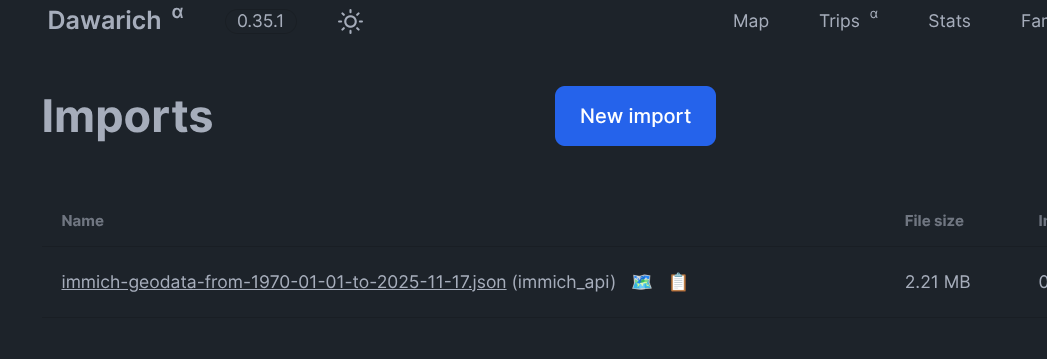
  • Importing immich geo data does not create a file.

    Solved
    2
    1
    4 Votes
    2 Posts
    537 Views
    nebulonN
    With the latest package versions, I was able to import and display all image geolocations.
  • Your Redis network connection is performing extremely poorly.

    Solved
    3
    0 Votes
    3 Posts
    660 Views
    nebulonN
    Indeed, I've also seen my instance crash with out-of-memory. Fixed the package to have 512 MB minimum now.