
Old backup not found when updating app
-
@frenchybear Do you have a screenshot? Cloudron does not look for old backups during app updates, so I am a bit confused.
@joseph First, I have this message on system backup
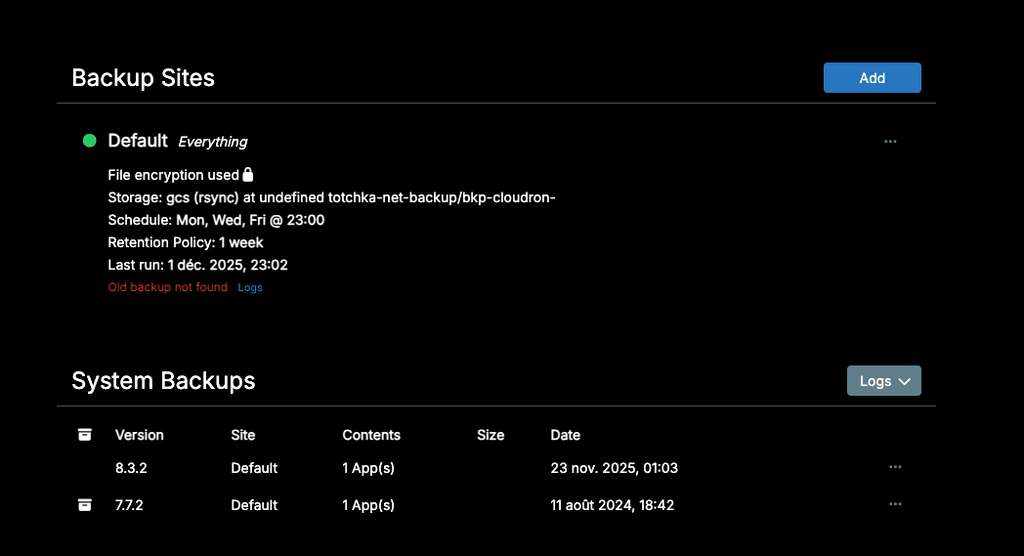
The backup files are present on the backup volume (gc bucket), but are not listed.
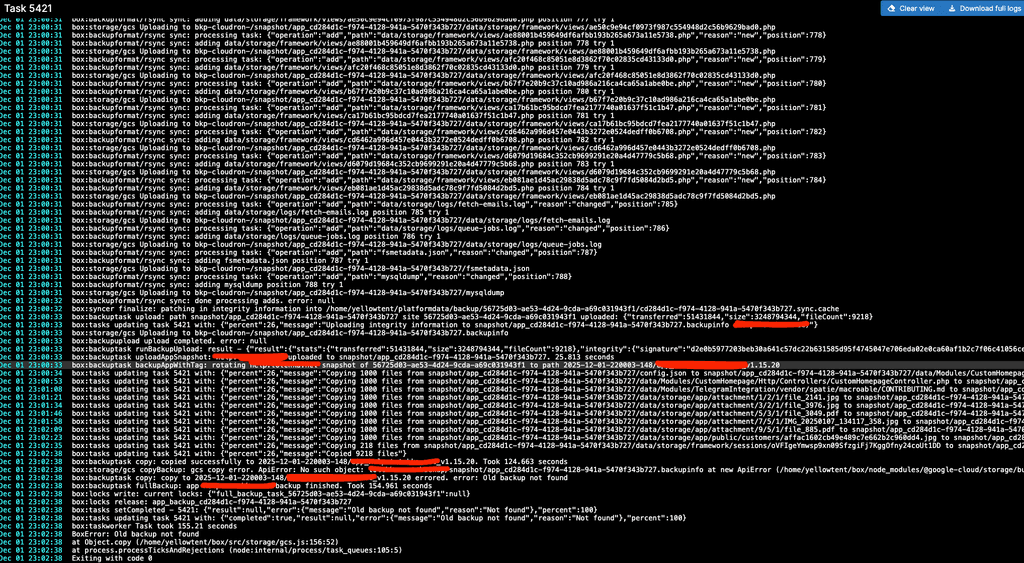
Logs look like this :
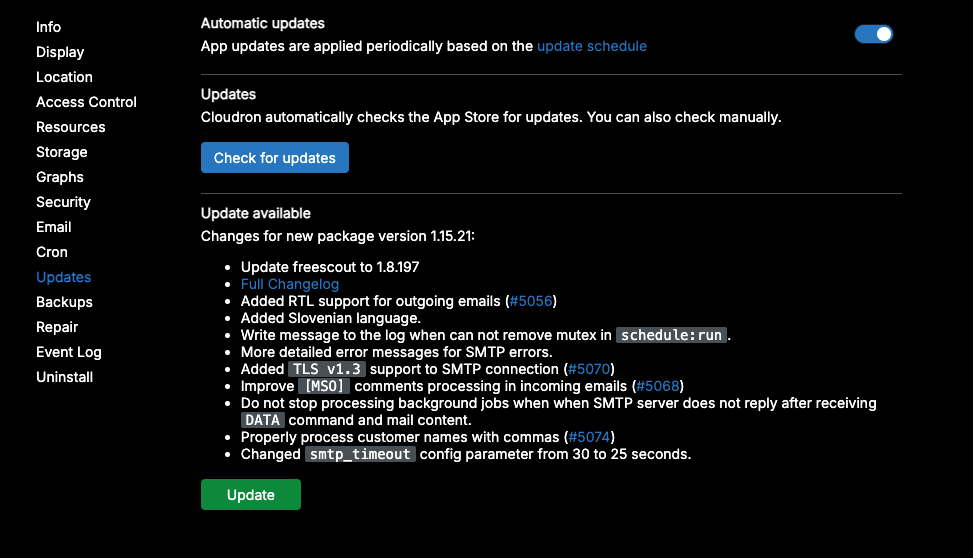
What concerns App update (freescout), I have the same problem. THere's an update available, but the process cannot be completed. After several tries, still have this screen :
In the app logs, same error message "Old backup not found" even if I check the "skip backup" option -
@frenchybear I have been interacting with @tecbox on support . I could reproduce it with the specific S3 service that @tecbox is using . Are you able to share which S3 provider you are using?
@girish I use a google bucket
-
@frenchybear @tecbox are you able to contact support@cloudron.io ? We can investigate what the issue is.
@joseph I received an answer from support asking to write here...
-
@tecbox thanks for the report. The fix is https://git.cloudron.io/platform/box/-/commit/b759fdb6e35762ef5586c3e552a387c4aef15a42#da95ffafbc09b42991a792cd9824d5814e1ec274_373_372 . You just need that one line change.
Edit
/home/yellowtent/box/src/storage/s3.js. Then change line 372. Basically, remove the leading slash at the front. No need to restart anything after making the change. Make a new backup, it should work. Can you please let me know?return `${bucket}/${output}`;In Cloudron 9, we upgraded the AWS library from v2 to v3. It's possible that v2 library automatically removed this trailing slash. Maybe in v3, they don't do this anymore. Hard to find any info, but it seems in other providers both works.
-
 G girish has marked this topic as solved
-
@tecbox thanks for the report. The fix is https://git.cloudron.io/platform/box/-/commit/b759fdb6e35762ef5586c3e552a387c4aef15a42#da95ffafbc09b42991a792cd9824d5814e1ec274_373_372 . You just need that one line change.
Edit
/home/yellowtent/box/src/storage/s3.js. Then change line 372. Basically, remove the leading slash at the front. No need to restart anything after making the change. Make a new backup, it should work. Can you please let me know?return `${bucket}/${output}`;In Cloudron 9, we upgraded the AWS library from v2 to v3. It's possible that v2 library automatically removed this trailing slash. Maybe in v3, they don't do this anymore. Hard to find any info, but it seems in other providers both works.
@girish said in Old backup not found when updating app:
/home/yellowtent/box/src/storage/s3.js
I'm sorry, but the fix didin't work for me, even after reboot...
-
@girish said in Old backup not found when updating app:
/home/yellowtent/box/src/storage/s3.js
I'm sorry, but the fix didin't work for me, even after reboot...
-
@girish said in Old backup not found when updating app:
/home/yellowtent/box/src/storage/s3.js
I'm sorry, but the fix didin't work for me, even after reboot...
@FrenchyBear @tecbox and you got the same error message but the issues were totally different.
The fix I posted was for S3 (used by @tecbox). In your case, you are using gcs. It's a slightly bigger fix - https://git.cloudron.io/platform/box/-/commit/99c14533a5930a6175630b6c299a577d64f2decb .
You can get the raw file from https://git.cloudron.io/platform/box/-/raw/99c14533a5930a6175630b6c299a577d64f2decb/src/storage/gcs.js and replace
/home/yellowtent/box/src/storage/gcs.js. -
@FrenchyBear @tecbox and you got the same error message but the issues were totally different.
The fix I posted was for S3 (used by @tecbox). In your case, you are using gcs. It's a slightly bigger fix - https://git.cloudron.io/platform/box/-/commit/99c14533a5930a6175630b6c299a577d64f2decb .
You can get the raw file from https://git.cloudron.io/platform/box/-/raw/99c14533a5930a6175630b6c299a577d64f2decb/src/storage/gcs.js and replace
/home/yellowtent/box/src/storage/gcs.js.This post is deleted! -
@FrenchyBear @tecbox and you got the same error message but the issues were totally different.
The fix I posted was for S3 (used by @tecbox). In your case, you are using gcs. It's a slightly bigger fix - https://git.cloudron.io/platform/box/-/commit/99c14533a5930a6175630b6c299a577d64f2decb .
You can get the raw file from https://git.cloudron.io/platform/box/-/raw/99c14533a5930a6175630b6c299a577d64f2decb/src/storage/gcs.js and replace
/home/yellowtent/box/src/storage/gcs.js.@girish Thanks ! I replaced the /home/yellowtent/box/src/storage/gcs.js with the patched version and don't get the "old backup not found" error. the backup is listed in System backups. everything seems to be fine ! Thanks a lot for your help !
