
Best Backup Technology + Small UI Wish for Separating Technologies vs. Providers

-
Is there a technology you prefer for network-based deployments (where no physical/direct access to the server is possible)? For example, would you recommend SSHFS, S3-compatible storage, or something else for remote backup scenarios?
I would appreciate some personal opinions
Also, @girish regarding the backup setup: it might improve usability if the storage provider list were divided into technologies (self-hostable/generic protocols) and providers (cloud services). Perhaps a simple separator like --- could visually split the dropdown:
CIFS Mount
External/Local Disk (EXT4 or XFS)
EXT4 Disk
Filesystem
Filesystem (Mountpoint)
Minio
NFS Mount
S3 API Compatible (v4)
SSHFS Mount
XFS Disk
---
Amazon S3
Backblaze B2 (S3 API)
Cloudflare R2
Contabo Object Storage
DigitalOcean Spaces
Exoscale SOS
Google Cloud Storage
Hetzner Object Storage
IDrive e2
IONOS (Profitbricks)
Linode Object Storage
OVH Object Storage
Scaleway Object Storage
UpCloud Object Storage
Vultr Object Storage
Wasabi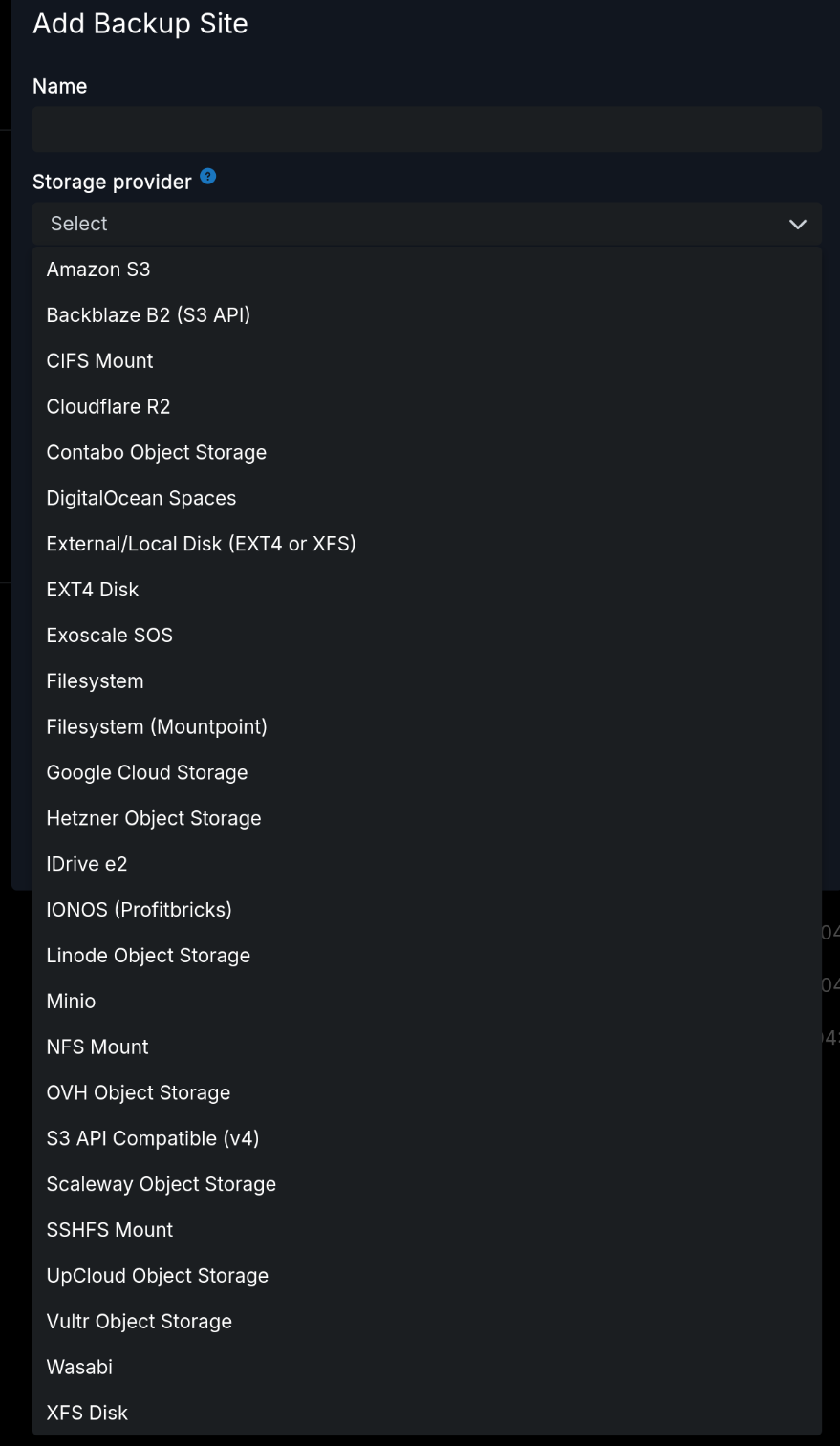
-
-
Dividing into technologies and providers, I think, would continue to be confusing as it suggests that the providers DO NOT offer those technologies. Cloudron gets a lot of ppl new to self-hosting using it, which is a good thing, and the fewer the questions and confusions the better. The list, currently alphabetical, works perfectly fine.
-
-
@joseph OK. But I have one question regarding S3: is 'Amazon S3' a preconfigured S3 API Compatible (v4) variant? Maybe you could add a note to the documentation. What is the difference between "Minio" and "S3 API Compatible V4", or are they the same?
@timka S3 is a pseudo-standard. Tthere is no spec for s3. AWS made a service and then lots of other services made compatible services by reverse engineering. Because of this, there are subtle differences in various implementations. The provider type is just a way for the code to add some provider specific hacks in the code. With that in mind "S3 API Compatible V4" just gets your the generic s3 protocol without any hacks
I think it's complicated to document what the hacks are but it's all inside https://git.cloudron.io/platform/box/-/blob/master/src/storage/s3.js?ref_type=heads -
@timka S3 is a pseudo-standard. Tthere is no spec for s3. AWS made a service and then lots of other services made compatible services by reverse engineering. Because of this, there are subtle differences in various implementations. The provider type is just a way for the code to add some provider specific hacks in the code. With that in mind "S3 API Compatible V4" just gets your the generic s3 protocol without any hacks
I think it's complicated to document what the hacks are but it's all inside https://git.cloudron.io/platform/box/-/blob/master/src/storage/s3.js?ref_type=heads@joseph said in Best Backup Technology + Small UI Wish for Separating Technologies vs. Providers:
@timka S3 is a pseudo-standard. Tthere is no spec for s3. AWS made a service and then lots of other services made compatible services by reverse engineering. Because of this, there are subtle differences in various implementations. The provider type is just a way for the code to add some provider specific hacks in the code. With that in mind "S3 API Compatible V4" just gets your the generic s3 protocol without any hacks
I think it's complicated to document what the hacks are but it's all inside https://git.cloudron.io/platform/box/-/blob/master/src/storage/s3.js?ref_type=headsThank you very much for the information. I did not know it.
-
Everything I'm about to say is independent of your actual needs and what you want to achieve. Are you hosting for others? Do you need to be able to restore within hours? Then some of what I say is not for you. If you're instead looking for some "I messed up, everything is gone, and I need a way to recover, even if it takes me a few days," then some of what I say will be more applicable.
I have generally built my backups in tiers, for redundancy and disaster recovery.
- I would backup the first tier to something close and "hot." That is, use
rsyncor direct mount to your instance's local disk. - I would consider SSHFS mounted disk a second option, if #1 does not have enough space.
- I would have a cron that then backs up your backup. If you backup 3x/day using Cloudron (using hardlinks, to preserve space), I would then do a daily copy to "somewhere else." That could be via restic/duplicati/etc. as you prefer.
- I would weekly dump to S3 (again, via cron if possible), and consider doing that as a single large file (if feasible), or multiple smaller files. Those could be straight
tarfiles, ortar.gzif you think the data is compressible. Set up a lifecycle rule to move it quickly (one day?) to Glacier if you're thinking about cost. - At the end of the month, keep only one monthly in Glacier. Not sure what the deletion costs would be if you delete that quickly, so some thought may need to be given here.
That's perhaps a lot, but it depends on your data/what you're doing.
You could also go the other way: if you think your cloud backup costs will be too high, you could do the following:
- Pick up a $300 NAS and a pair of 8-16TB hard drives
- Install TrueNAS on it, and put the disks in a ZFS Mirror
- Set up a cron on the NAS to pull down your Cloudron backups on a periodic (daily/weekly) basis.
resticor similar will be your friend here.
That's the... $800 or so solution, but you would weigh that cost against how much you're going to be paying in cloud storage. (That is, if you decide you're going to be paying $200+/year for backups, perhaps the NAS is going to start to look attractive.) The incremental backups should get smaller once you get the initial pull done (in terms of size to pull down).
A version of the NAS is where you buy one external drive, run your backups locally, and pray the drive doesn't go underneath you, or worse, when you have to do a restore. I would personally chuck a single drive out the window, but some people love to gamble.
Recovery from the offline backup will be annoying/painful. You'd have to upload it, and then configure your restore to point at it. However, it would be your "last ditch" recovery approach. This would be to my opening point: your backups are dictated, in no small part, by your budget and needs.
If you have money to spare, use direct- or SSHFS-mounted disk, and just backup to it. If you are looking for some savings, you can price out S3-based storage (B2 tends to be cheapest, I think, but don't forget to estimate how many operations your backup will need---those API calls can get expensive if you have enough small objects in your backup.) Moving to Glacier is possible if you use AWS, which is significantly cheaper per TB. Having at least one disconnected backup (and a sequence) matters in the event of things like ransomware-style attacks (if that is a threat vector for you). Ultimately, each layer adds cost, complexity, and time to data recovery.
Finally, remember: your backups are only as good as your recovery procedures and testing. If you never test your backups, you might discover you did something wrong all along, and have been wasting time from the beginning. I find Cloudron's backups to be remarkably robust, and was surprised (pleasantly!) by a recent restore. But, if you mangle backups via cron, etc., then you're just spending a lot of money moving zeros and ones around...
- I would backup the first tier to something close and "hot." That is, use


Hello! It looks like you're interested in this conversation, but you don't have an account yet.
Getting fed up of having to scroll through the same posts each visit? When you register for an account, you'll always come back to exactly where you were before, and choose to be notified of new replies (either via email, or push notification). You'll also be able to save bookmarks and upvote posts to show your appreciation to other community members.
With your input, this post could be even better 💗
Register Login