
Unable to setup a functional SMTP account with local cloudron mailbox
-
@overclockmp I would say first test using
swaks. Open a web terminal and use swaks to test your credentials. Something like:swaks --server my.domain.com -p 587 --from "from@domain.com" --body "Test mail" --auth-user "from@domain.com" --auth-password "password" -
Hi @joseph, thanks for the assistance.
Running the command above with--server mail.domain.com, I get "Network Unreachable".
Running it with--server my.domain.com, I get "Connection Timeout".
Under Email > Domain > Status, the outbound SMTP is green.The more I look into this, the more it seems that I would have to use mailjet directly instead of going through the outbound SMTP, but I am not sure if it's a good approach.
-
Hello
 , just following up here to see if there are any other ideas...
Thanks for the help -
-
Hi @joseph, thanks for the assistance.
Running the command above with--server mail.domain.com, I get "Network Unreachable".
Running it with--server my.domain.com, I get "Connection Timeout".
Under Email > Domain > Status, the outbound SMTP is green.The more I look into this, the more it seems that I would have to use mailjet directly instead of going through the outbound SMTP, but I am not sure if it's a good approach.
@overclockmp said in Unable to setup a functional SMTP account with local cloudron mailbox:
Running the command above with --server mail.domain.com, I get "Network Unreachable".
Running it with --server my.domain.com, I get "Connection Timeout".I would start here... Can you ping/host/dig mail.domain.com ? Can you
telnet mail.domain.com 587? -
Apologies for the delay, I must have missed the notification with the holidays. Thanks for your answer.
Can you ping/host/dig mail.domain.com?
Yes, using
digfrom n8n web terminal:# dig mail.domain.com ; <<>> DiG 9.18.30-0ubuntu0.24.04.2-Ubuntu <<>> mail.domain.com ;; global options: +cmd ;; Got answer: ;; ->>HEADER<<- opcode: QUERY, status: NOERROR, id: 27695 ;; flags: qr rd ra; QUERY: 1, ANSWER: 2, AUTHORITY: 0, ADDITIONAL: 1 ;; OPT PSEUDOSECTION: ; EDNS: version: 0, flags:; udp: 65494 ;; QUESTION SECTION: ;mail.domain.com. IN A ;; ANSWER SECTION: mail.domain.com. 0 IN CNAME my.domain.com. my.domain.com. 0 IN A 192.168.1.3 ;; Query time: 44 msec ;; SERVER: 127.0.0.11#53(127.0.0.11) (UDP) ;; WHEN: Sat Dec 27 16:19:45 UTC 2025 ;; MSG SIZE rcvd: 81Using
hostfrom n8n web terminal:# host mail.domain.com mail.domain.com is an alias for my.domain.com. my.domain.com has address 192.168.1.3 my.domain.com has IPv6 address 2606:4700:130:436c:6f75:6466:6c61:7265Can you telnet mail.domain.com 587?
No, it hangs and times out on the web terminal and connection is refused through ssh:
# telnet mail.domain.com 587
Trying 192.168.1.3...
Connection failed: Connection timed out
Trying 2606:4700:130:436c:6f75:6466:6c61:7265...
telnet: Unable to connect to remote host: Network is unreachable
It is probably worth noting that I am using a pihole as local DNS. Not sure if it has any impact...
-
Hello @overclockmp
Could you please share a screenshot of your N8N configuration for SMTP?Hi @james, here is a redacted screenshot that should match my description at the beginning of this thread:
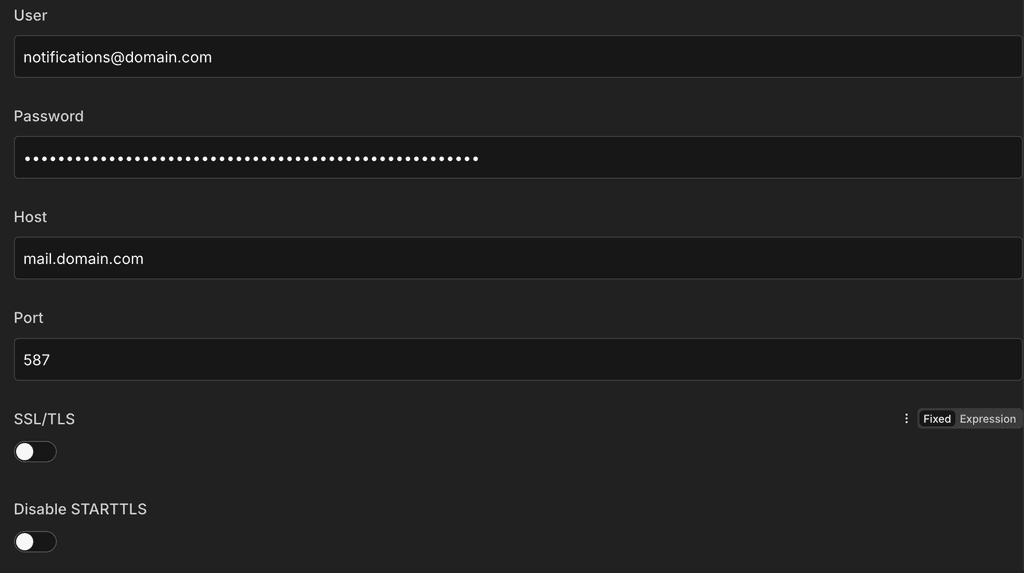
-
@overclockmp so the problem is that connection to port 587 is not working. This is not a DNS problem (from what I can tell). You can try
telnet 192.168.1.3 587. This is not working and it's some networking issue in your set up. Maybe the VM/hypervisor settings should allow port 587 to be looped back? -
Thank you. I shall investigate the host OS iptables config then.
The thing that I fail to understand is that other apps seem to be able to send emails without any issues, through that mailjet relay. So I don't quite understand what's different here with this current configuration in n8n. My apologies if I am missing something very trivial here... -
Ok, so after looking into open ports a bit more, it turns out that there is nothing listening on port 587. As such, there is no SMTP server running or listening to any port whatsoever. I figure that an SMTP server may only start running if I enable incoming emails (setting which was not enabled, purposefully). When I enabled incoming email setting,
sudo netstat -tlnp | grep 587was finally returning something and n8n configuration worked fine.So to sum up, if my understanding is correct, when only using outbound mail, there isn't an actual SMTP server running, but only some kind of abstraction that containerized apps can use to send email directly through the mail relay (the internals of this are fuzzy to me...), so I need to enable incoming emails in order to send emails...

But I'm glad I was at least able to make this work before going into 2026. Thanks for the help and for putting me on the right path here.
Thank you for all the great work you do Cloudron Team, and wishing you all the best for the new year :).

Hello! It looks like you're interested in this conversation, but you don't have an account yet.
Getting fed up of having to scroll through the same posts each visit? When you register for an account, you'll always come back to exactly where you were before, and choose to be notified of new replies (either via email, or push notification). You'll also be able to save bookmarks and upvote posts to show your appreciation to other community members.
With your input, this post could be even better 💗
Register Login