
uninstalled app not deleted
-
Hello guys not an expert of these but we got some leftovers on the server and we notice that when you uninstalled the app it does not actually delete the files so is there a way to delete uninstalled app data?
Platform Versionv7.7.1 (Ubuntu 20.04.5 LTS)
VendorLinode
ProductCompute Instance
CPU16 Core "AMD EPYC 7542 32-Core Processor"
Memory33.66 GB RAM & 4.29 GB SwapRunning Apps: 39
Uninstalled Apps: 21
Total Entries Listed: 68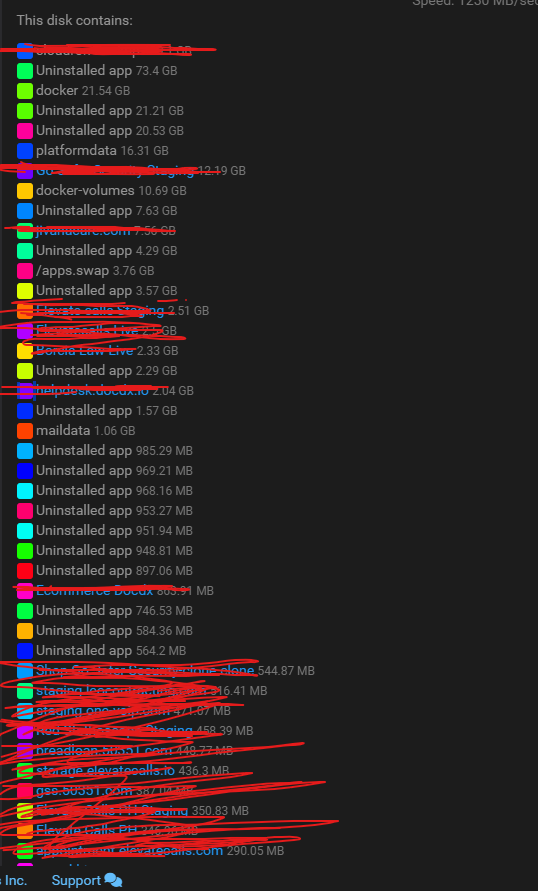
-
Hello @jcalag
@jcalag said in uninstalled app not deleted:
(Ubuntu 20.04.5 LTS
Ubuntu 20 LTS has reached its EOL, you should upgrade to Ubuntu 22 or even better Ubuntu 24.
See: https://ubuntu.com/blog/ubuntu-20-04-lts-end-of-life-standard-support-is-coming-to-an-end-heres-how-to-prepare
and:@jcalag said in uninstalled app not deleted:
Platform Versionv7.7.1
You are two mayor versions behind.
It is highly advised to update to Cloudron 8 and Cloudron 9.
The disk usage view is not automatically refreshed and can take some time to display the actual changes. -
-
-
-
J joseph has marked this topic as solved on
-
When we update the ubuntu to 22 it shows these error and we tried to update it to 24 to see if it might fix but it still shows the same error.
Errors were encountered while processing:
nginx-core
nginx-common[OK] node version is correct
Docker is down. Trying to restart docker ...
[OK] docker is running
[OK] MySQL is running
[OK] nginx is running
[FAIL] Could not load dashboard website with loopback check -
When we update the ubuntu to 22 it shows these error and we tried to update it to 24 to see if it might fix but it still shows the same error.
Errors were encountered while processing:
nginx-core
nginx-common[OK] node version is correct
Docker is down. Trying to restart docker ...
[OK] docker is running
[OK] MySQL is running
[OK] nginx is running
[FAIL] Could not load dashboard website with loopback check@jcalag said in uninstalled app not deleted:
Errors were encountered while processing:
nginx-core
nginx-commonIt can't load the dashboard because nginx is not running. You can try some of the methods here - https://superuser.com/questions/1386209/how-to-solve-this-dependencies-apt-fix-broken-install


Hello! It looks like you're interested in this conversation, but you don't have an account yet.
Getting fed up of having to scroll through the same posts each visit? When you register for an account, you'll always come back to exactly where you were before, and choose to be notified of new replies (either via email, or push notification). You'll also be able to save bookmarks and upvote posts to show your appreciation to other community members.
With your input, this post could be even better 💗
Register Login