
Cloudron makes it easy to run web apps like WordPress, Nextcloud, GitLab on your server. Find out more or install now.


Skip to content
  • Categories
  • Recent
  • Tags
  • Popular
  • Bookmarks
  • Search
Skins
  • Light
  • Brite
  • Cerulean
  • Cosmo
  • Flatly
  • Journal
  • Litera
  • Lumen
  • Lux
  • Materia
  • Minty
  • Morph
  • Pulse
  • Sandstone
  • Simplex
  • Sketchy
  • Spacelab
  • United
  • Yeti
  • Zephyr
  • Dark
  • Cyborg
  • Darkly
  • Quartz
  • Slate
  • Solar
  • Superhero
  • Vapor

  • Default (No Skin)
  • No Skin
Collapse
Brand Logo

Cloudron Forum

Apps - Status | Demo | Docs | Install
  1. Cloudron Forum
  2. Support
  3. uninstalled app not deleted

uninstalled app not deleted

Scheduled Pinned Locked Moved Solved Support
disk usage
7 Posts 4 Posters 42 Views 4 Watching
  • Oldest to Newest
  • Newest to Oldest
  • Most Votes
Reply
  • Reply as topic
Log in to reply
This topic has been deleted. Only users with topic management privileges can see it.
  • J Offline
    J Offline
    jcalag
    wrote last edited by joseph
    #1

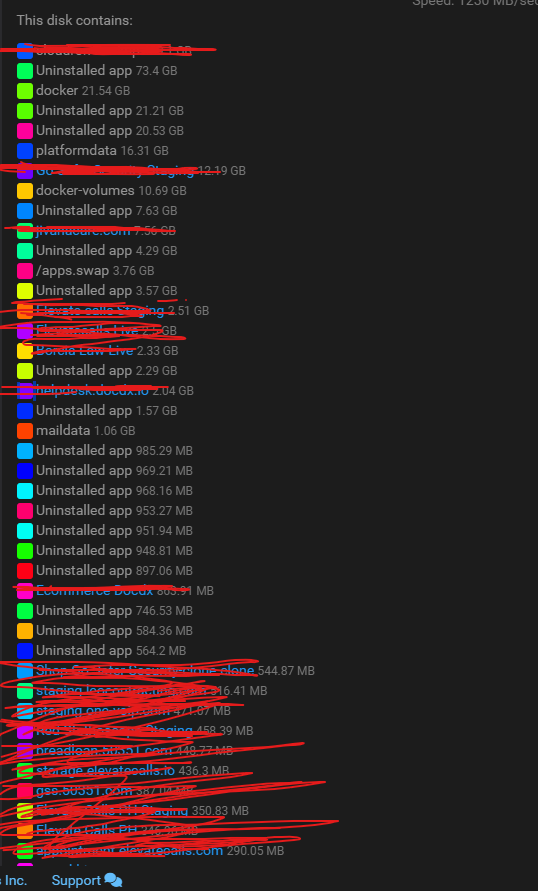
    Hello guys not an expert of these but we got some leftovers on the server and we notice that when you uninstalled the app it does not actually delete the files so is there a way to delete uninstalled app data?

    Platform Versionv7.7.1 (Ubuntu 20.04.5 LTS)
    VendorLinode
    ProductCompute Instance
    CPU16 Core "AMD EPYC 7542 32-Core Processor"
    Memory33.66 GB RAM & 4.29 GB Swap

    Running Apps: 39
    Uninstalled Apps: 21
    Total Entries Listed: 68
    b342a5e0-d16d-434a-9873-b62969578627-image.png

    1 Reply Last reply
    1
    • jamesJ Offline
      jamesJ Offline
      james
      Staff
      wrote last edited by
      #2

      Hello @jcalag

      @jcalag said in uninstalled app not deleted:

      (Ubuntu 20.04.5 LTS

      Ubuntu 20 LTS has reached its EOL, you should upgrade to Ubuntu 22 or even better Ubuntu 24.
      See: https://ubuntu.com/blog/ubuntu-20-04-lts-end-of-life-standard-support-is-coming-to-an-end-heres-how-to-prepare
      and:

      • https://docs.cloudron.io/guides/upgrade-ubuntu-22
      • https://docs.cloudron.io/guides/upgrade-ubuntu-24

      @jcalag said in uninstalled app not deleted:

      Platform Versionv7.7.1

      You are two mayor versions behind.
      It is highly advised to update to Cloudron 8 and Cloudron 9.
      The disk usage view is not automatically refreshed and can take some time to display the actual changes.

      1 Reply Last reply
      2
      • J Offline
        J Offline
        jcalag
        wrote last edited by
        #3
        This post is deleted!
        1 Reply Last reply
        0
        • J Offline
          J Offline
          jcalag
          wrote last edited by
          #4

          btw can we jump an update fron 7.7.1 to cloudron 8?

          1 Reply Last reply
          1
          • nebulonN Offline
            nebulonN Offline
            nebulon
            Staff
            wrote last edited by
            #5

            Cloudron will only update from one version to the next, no skipping. The reason is, that we cannot test realiably jumping versions like this.

            As @james suggested, first update the Ubuntu system to ideally 24 and then update Cloudron one-by-one.

            1 Reply Last reply
            3
            • J joseph has marked this topic as solved
            • J Offline
              J Offline
              jcalag
              wrote last edited by jcalag
              #6

              When we update the ubuntu to 22 it shows these error and we tried to update it to 24 to see if it might fix but it still shows the same error.

              Errors were encountered while processing:
              nginx-core
              nginx-common

              [OK] node version is correct
              Docker is down. Trying to restart docker ...
              [OK] docker is running
              [OK] MySQL is running
              [OK] nginx is running
              [FAIL] Could not load dashboard website with loopback check

              J 1 Reply Last reply
              0
              • J jcalag

                When we update the ubuntu to 22 it shows these error and we tried to update it to 24 to see if it might fix but it still shows the same error.

                Errors were encountered while processing:
                nginx-core
                nginx-common

                [OK] node version is correct
                Docker is down. Trying to restart docker ...
                [OK] docker is running
                [OK] MySQL is running
                [OK] nginx is running
                [FAIL] Could not load dashboard website with loopback check

                J Online
                J Online
                joseph
                Staff
                wrote last edited by
                #7

                @jcalag said in uninstalled app not deleted:

                Errors were encountered while processing:
                nginx-core
                nginx-common

                It can't load the dashboard because nginx is not running. You can try some of the methods here - https://superuser.com/questions/1386209/how-to-solve-this-dependencies-apt-fix-broken-install


                1 Reply Last reply
                0
                Reply
                • Reply as topic
                Log in to reply
                • Oldest to Newest
                • Newest to Oldest
                • Most Votes


                • Login

                • Don't have an account? Register

                • Login or register to search.
                • First post
                  Last post
                0
                • Categories
                • Recent
                • Tags
                • Popular
                • Bookmarks
                • Search