
Unresponsive Server
-
today i found my server the second time this month unresponsive. I had to restart it manually. It was not able to connect, not via web nor via ssh. After the restart the server is available as expected. Only the mongodb was not running, but after a restart of this it was there.
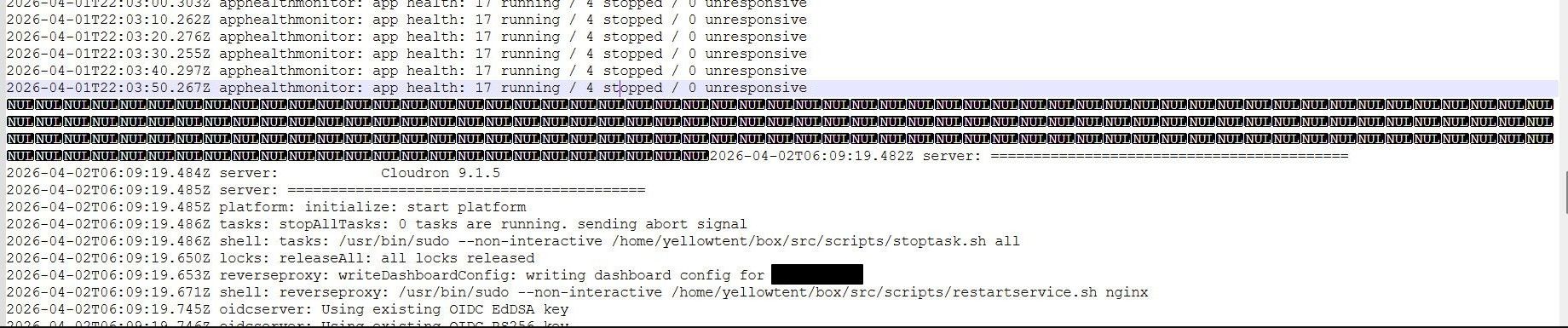
What i found was a cryptic line in the server logs. I just put some lines before and one after here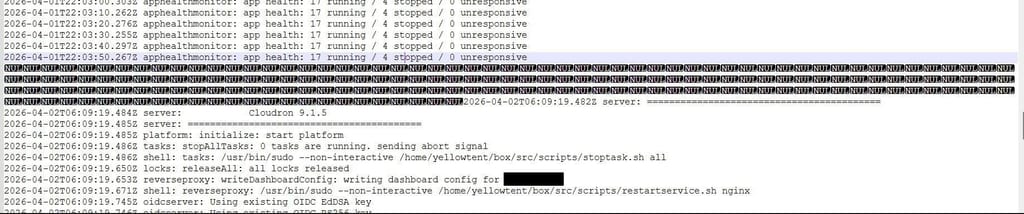
Im not shure what to do?
-
Hello @sebgg
Can you share more about your setup and provider?
This sounds and looks almost like the server did freeze up. Could be a memory corruption issue or fault.
To analyse what happened here the syslog and dmesg on the time of the crash / freezeup would need to be analyzed.ps: I just edited your post to make the screenshot visible.
-
its a home server
Cloudron Version
9.1.5
Ubuntu Version
Ubuntu 22.04.5 LTS Linux 5.15.0-173-generic
Anbieter
Shuttle Inc.
Produkt
DS20U
CPU
4 Core "Intel(R) Core(TM) i3-10110U CPU @ 2.10GHz"
Arbeitsspeicher
16.5 GB RAM & 4.29 GB Swapi never had problems like this, but maybe due to the newer cloudron versions?
-
Hello @sebgg
I have edited your screenshot to redact the domain to prevent private data leaking through the domain.
Since you have just stated this is a home server the domain could expose your home IP address.Please run
cloudron-support --troubleshootand post the output here as well. -
thank you!
here the output:
Vendor: Shuttle Inc. Product: DS20U Linux: 5.15.0-173-generic Ubuntu: jammy 22.04 Execution environment: none none Processor: Intel(R) Core(TM) i3-10110U CPU @ 2.10GHz x 4 RAM: 16116532KB Disk: /dev/sda2 627G [OK] node version is correct [OK] IPv6 is enabled in kernel. No public IPv6 address [OK] docker is running [OK] docker version is correct [OK] MySQL is running [OK] netplan is good [OK] DNS is resolving via systemd-resolved [OK] unbound is running [OK] nginx is running [OK] dashboard cert is valid [OK] dashboard is reachable via loopback [OK] No pending database migrations [OK] Service 'mysql' is running and healthy [OK] Service 'postgresql' is running and healthy [OK] Service 'mongodb' is running and healthy [OK] Service 'mail' is running and healthy [OK] Service 'graphite' is running and healthy [OK] Service 'sftp' is running and healthy [OK] box v9.1.5 is running [OK] Dashboard is reachable via domain name [WARN] Domain -------- expiry check skipped because whois does not have this information -
its a home server
Cloudron Version
9.1.5
Ubuntu Version
Ubuntu 22.04.5 LTS Linux 5.15.0-173-generic
Anbieter
Shuttle Inc.
Produkt
DS20U
CPU
4 Core "Intel(R) Core(TM) i3-10110U CPU @ 2.10GHz"
Arbeitsspeicher
16.5 GB RAM & 4.29 GB Swapi never had problems like this, but maybe due to the newer cloudron versions?
-
Hello @sebgg
Thanks.
That looks good so far.Other possibility - Blame the electricity
Since you have stated this is a home server setup, I assume you do not have an Uninterruptible Power Supply (UPS) for your home server?
To be more precise, this hardware specifically:Vendor: Shuttle Inc. Product: DS20U=> https://global.shuttle.com/products/productsDetail?pn=DS20U/DS20U V2 SERIES&c=xpc-fanless, correct?
If so, it could also be that you have experienced a brown out (a drop in the magnitude of voltage in an electrical power system) which could also lead into your server behaving in a strange behaviour and causing faults.
Or even a power outage lasting a few milliseconds could cause the system to fault in such a way.Check the drive health
If your drive support this, might be good first step to check the drive health with:
sudo smartctl -a /dev/sdaSave the previous boot log messages
For listing all available boot logs:
journalctl --list-bootsIf you know this issue is from before the last boot, retrieve previous boot kernel logs with:
journalctl -k -b -1For full system logs:
journalctl -b -1Example:
journalctl --list-boots
IDX BOOT ID                          FIRST ENTRY                 LAST ENTRY
 -1 815f78c0ba13430691bcdf498ae53059 Thu 2026-03-26 14:20:00 UTC Wed 2026-04-01 08:00:58 UTC
  0 5eea15164bdc4738ad28b02336a7a195 Wed 2026-04-01 08:01:14 UTC Thu 2026-04-02 07:24:45 UTC
journalctl -k -b -1
[... logs ...]
Save the previous boot logs to a file and save it to your local computer.
Note: I directly pipe the output into GZIP to compress the output to save time when downloading the logs.
Diff of size with and without GZIP:-rw-r--r-- 1 root root 437K Apr 2 07:27 dmesg-lastboot.gz -rw-r--r-- 1 root root 4.8M Apr 2 07:27 dmesg-lastboot.txt# saving the kernel messages journalctl -k -b -1 --no-pager | gzip > dmesg-lastboot.gz # saving all messages journalctl -b -1 --no-pager | gzip > fulllog-lastboot.gzWith these logs you could use ChatGPT or check the log files manually to analyse for any strange log behaviour before the system stopped working.
Test your memory
To test the memory you could use memtest86plus or if you'd like a GUI memtest86.
-
Hello @jdaviescoates
I wouldn't be surprised if you ran out of memory.
This would normally result in the system throttling and increased load and not full system freeze. Normally!
But also without ECC memory even a solar storm / sun flare / aurora borealis could cause memory corruption resulting in such a behaviour. -
hi, thanks, i found the failure. It occured during a app (talk sfu) update. Before the app is updated the current state is backuped. During this, something happend with the backup disk and the server freezed.
this was 2h after a normal backup, were everything was fine.
The disk is ok, i checked the intergrety.what i now did is , do toogle the server to a restart when this happens again. I will monitor this and give feedback if this happens again.
-
J joseph has marked this topic as solved on


Hello! It looks like you're interested in this conversation, but you don't have an account yet.
Getting fed up of having to scroll through the same posts each visit? When you register for an account, you'll always come back to exactly where you were before, and choose to be notified of new replies (either via email, or push notification). You'll also be able to save bookmarks and upvote posts to show your appreciation to other community members.
With your input, this post could be even better 💗
Register Login