
Can't list users in Vikunja with Cloudron access control
-
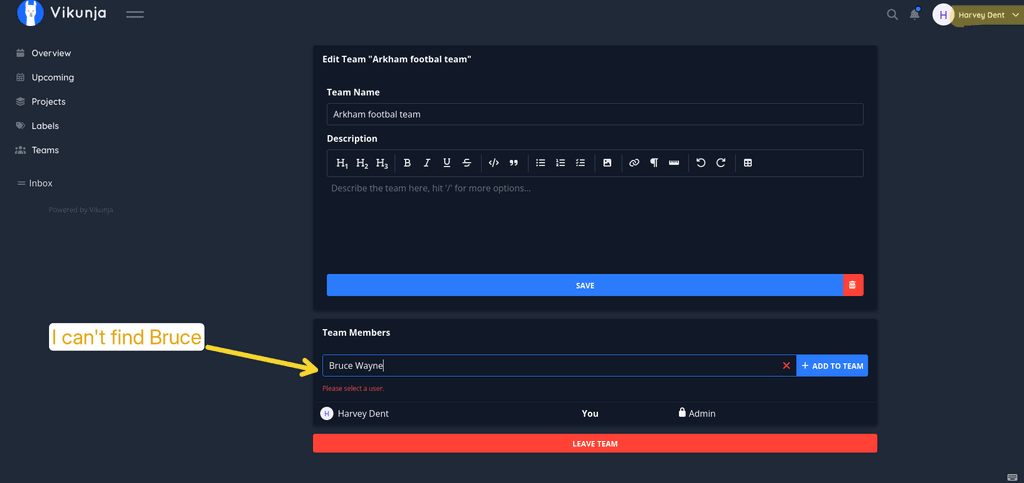
Hi @james and @nebulon, I tried again and confirm that it is not possible to find any user within Vikunja when installing the app with cloudron access control.
Steps to reproduce I just did:- install vikunja
- log in using cloudron
- in another browser container or browser, log into cloudron as another user
- log into vikunja using cloudron as well
- create a team and try adding the other user: the list remains empty
Thanks
-
Hi @james and @nebulon, I tried again and confirm that it is not possible to find any user within Vikunja when installing the app with cloudron access control.
Steps to reproduce I just did:- install vikunja
- log in using cloudron
- in another browser container or browser, log into cloudron as another user
- log into vikunja using cloudron as well
- create a team and try adding the other user: the list remains empty
Thanks
This post is deleted! -
-
Hi, I gave it another try, it is very weird on my side:
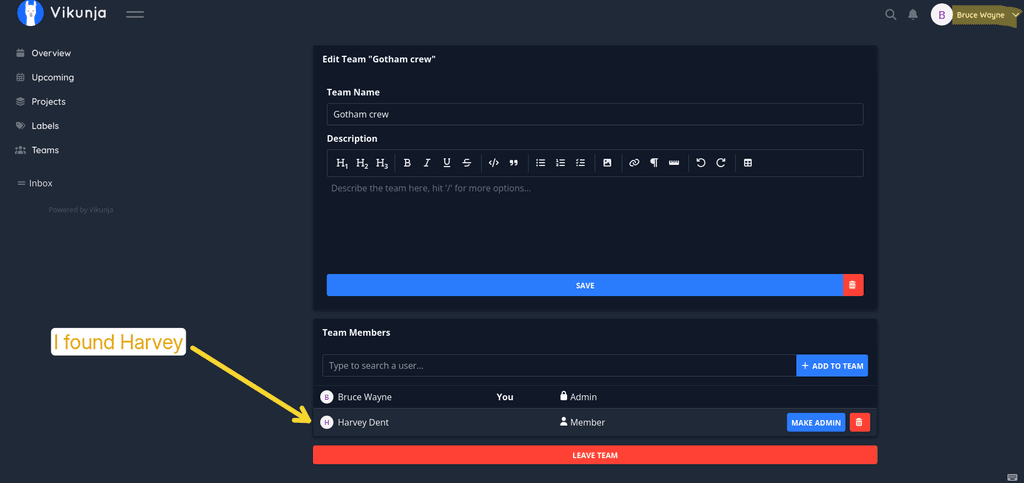
- I can add the other user from one account but not the other way around (with another team of course)
- Sometimes I can't find the user by entering its name, or I have to enter it completely, or even have to enter the username instead of the display name to find it
- I tried with 3 accounts in total, I manage to find the 2 other accounts only with one of those test accounts, for the others I can only find 1
- Also, when I find the user to add, clicking on it doesn't work, I have to press Enter



Hello! It looks like you're interested in this conversation, but you don't have an account yet.
Getting fed up of having to scroll through the same posts each visit? When you register for an account, you'll always come back to exactly where you were before, and choose to be notified of new replies (either via email, or push notification). You'll also be able to save bookmarks and upvote posts to show your appreciation to other community members.
With your input, this post could be even better 💗
Register Login