
🚀 OpenBao on Cloudron: Community Package now available
-
TL;DR: OpenBao is the Linux Foundation fork of HashiCorp Vault: a central, audited place to store, generate and control access to secrets (API keys, passwords, certificates), with a web UI, CLI and Vault-compatible HTTP API. This package ships OpenBao 2.6.1 on integrated raft storage with auto-unseal: it initialises itself on first start and comes back unsealed and serving after every restart, update and restore — which matters because Cloudron restarts apps unattended, and a Vault that seals itself on every restart is an ornament. Backups ride on hourly raft snapshots (OpenBao's own supported restore mechanism), and the health check reports a sealed instance as unhealthy. Manual-unseal (Shamir) mode is available for operators who want the key material off the server. Verified on Cloudron 9.2.0; unofficial and community-maintained.
Links
 Project homepage: https://openbao.org
 Docs: https://openbao.org/docs/
 Upstream repo: https://github.com/openbao/openbao
- 🧱 Cloudron package repo: https://github.com/OrcVole/openbao-cloudron
 Container image:
 ghcr.io/orcvole/openbao-cloudron
No public demo, because a secrets manager is the last thing anyone should try on someone else's instance.
 How to install
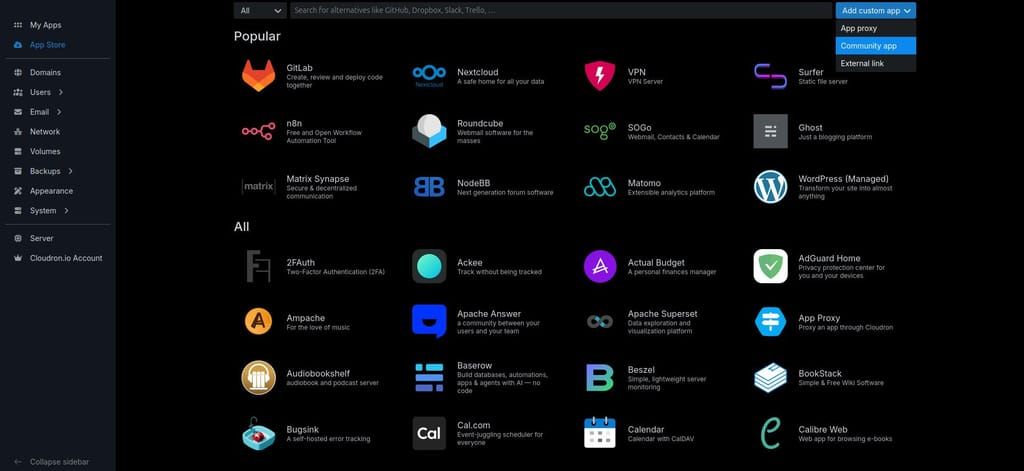
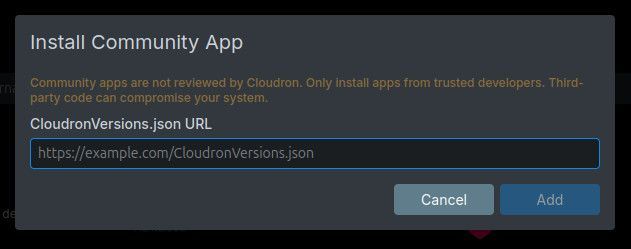
From the dashboard: click Add custom app (top right in the App Store), choose Community app, and paste this URL:
https://raw.githubusercontent.com/OrcVole/openbao-cloudron/main/CloudronVersions.json

Apps installed this way receive automatic updates. It is also listed in the Community Apps directory (ca.cloudron.io), or from the CLI:
cloudron install \
  --versions-url https://raw.githubusercontent.com/OrcVole/openbao-cloudron/main/CloudronVersions.json \
  --location bao.example.com
Requirements: 1 GB RAM default (measured peak was 85 MiB under a 1500-secret soak), no database addon, no extra subdomain, amd64 only. Works with or without Cloudron user management.
First run: no wizard, nothing to unseal. The app arrives initialised and serving, with a KV v2 secrets engine at
secret/, a file audit device enabled, and credentials in/app/data/.secrets(File Manager or Web Terminal). Log in with method Token using the root token from that directory, or with OIDC if installed with Cloudron user management. Then do three things:- Copy
/app/data/.secretsoff the server (root token, recovery keys, unseal key). - Turn on backup encryption (Settings → Backups). The unseal key rides in every backup, so this is part of the security model, not an optional extra.
- Create your own admin auth method (userpass, for example) and stop using the root token day to day.
Signed in with SSO and the vault looks empty? That is the policy above at work, not data loss: default cannot list or read anything, so the UI shows an empty secrets engine even when secret/ is full. The fix is one grant, run in the app's Web Terminal:
export BAO_ADDR=http://127.0.0.1:8200 BAO_TOKEN=$(cat /app/data/.secrets/root-token)
bao policy write readers - <<'EOF'
path "secret/data/" { capabilities = ["read"] }
path "secret/metadata/" { capabilities = ["read", "list"] }
EOF
bao write auth/oidc/role/cloudron token_policies="default,readers"The metadata line is what makes the tree visible — the KV v2 UI browses via secret/metadata/, so a grant on secret/data/ alone still shows nothing. Then log out and back in: policies attach at login, so an existing session keeps its old zero-access token. The grant survives restarts and updates, and gives every Cloudron user read-only sight of everything under secret/; scope the paths tighter, or use identity groups, for anything finer.
Status: verified on Cloudron 9.2.0 — zero-touch initialisation, restart auto-unseal, image update, in-place restore, clone rebuilt from snapshot, hourly snapshots plus a fresh one during every backup, SSO sign-in in a real browser, memory soak. All pass; local smoke suite 27 of 27.
 What it does, and the trade-off
OpenBao holds secrets behind an authenticated, policy-controlled, audited API. Instead of a
.envfile on six machines, applications fetch what they need at run time, every access is logged, and you revoke or rotate in one place. The API is Vault-compatible, so existing client libraries, Terraform providers and CLI habits work unchanged.Auto-unseal, stated honestly. This package uses OpenBao's built-in
staticseal, so the 32-byte unseal key lives on the same server as the data it decrypts, and inside every backup. A stolen encrypted Cloudron backup is safe; a stolen unencrypted backup or disk image is readable. Nothing protects against a hostile root user on the box itself — true of every seal without an external key manager. OpenBao's guidance is that a static seal fits "when an existing source of trust already exists in the operating environment"; on a Cloudron that is the server and its encrypted backups. If you would rather hold the key material yourself, setOPENBAO_SEAL=shamirbefore first start and unseal manually; migration between modes is documented in both directions. In Shamir mode the app honestly shows "not responding" after each restart until you unseal.Backups you can actually restore. The raft store is kept out of the live backup walk (copying a live memory-mapped database is not crash-consistent, and the failure is silent until you try to restore). Instead the package takes hourly raft snapshots — OpenBao's own supported mechanism — plus a fresh one at backup time, and those ride the Cloudron backup. After a restore or clone the app rebuilds from the newest snapshot and verifies the restored data. Update, in-place restore and clone were all exercised for real. The bounded cost: you can lose writes since the last snapshot, up to an hour; a manual pre-change snapshot command is documented.
An honest dashboard. The health check hits
/v1/sys/healthwith explicit status-code parameters, so a sealed instance reads as unhealthy and you get a notification. (The existing Vault package checks/, which returns 200 even when sealed, and it cannot auto-unseal — a sealed Vault shows green while serving nothing.)Cloudron SSO. With user management, Cloudron users sign in via OIDC and arrive with the
defaultpolicy, which grants access to nothing; letting a user read a secret is a deliberate one-policy act by the operator (documented in the repo's INTEGRATIONS guide). The API stays open for machine clients with OpenBao's own auth, so nothing breaks.Caveats: raise the memory limit in Resources if you store a great deal (raft maps its database into memory); key rotation is a file operation plus restart, and keep an off-server copy of the old key because old snapshots need it; the CLI's own OIDC login flow cannot work here (it needs a localhost redirect) — humans use the UI or tokens, machines use AppRole.
🧰 Notes for packagers
The full write-up lives in the repo's
docs/, but two traps will bite anyone deriving an OpenBao package from a Vault one:filestorage is removed in OpenBao 2.7 (raft is the only production backend), and mlock is gone entirely, so a copieddisable_mlockline is a fatal startup error. Two platform behaviours worth knowing:backupCommandruns in a separate temporary container with noCLOUDRON_*environment and discarded stdout, andpersistentDirssurvive updates and in-place restores but start empty on a clone — boot logic must handle both.
 Synergies
- Any Cloudron app, script or CI job can fetch its secrets at start-up over the Vault-compatible API with AppRole credentials scoped to its own path; the INTEGRATIONS guide has copy-paste recipes, and same-box apps can call OpenBao's public origin directly (verified, hairpin included).
- Every read lands in the audit log — something a
.envfile will never give you. - The transit engine gives apps encryption as a service without ever holding a key; Terraform's Vault provider,
hvac,node-vaultand both CLIs work unchanged.
*This is an unofficial community package. It is not affiliated with, endorsed by, or supported by the OpenBao project, the Linux Foundation, or Cloudron.
-
TL;DR: OpenBao is the Linux Foundation fork of HashiCorp Vault: a central, audited place to store, generate and control access to secrets (API keys, passwords, certificates), with a web UI, CLI and Vault-compatible HTTP API. This package ships OpenBao 2.6.1 on integrated raft storage with auto-unseal: it initialises itself on first start and comes back unsealed and serving after every restart, update and restore — which matters because Cloudron restarts apps unattended, and a Vault that seals itself on every restart is an ornament. Backups ride on hourly raft snapshots (OpenBao's own supported restore mechanism), and the health check reports a sealed instance as unhealthy. Manual-unseal (Shamir) mode is available for operators who want the key material off the server. Verified on Cloudron 9.2.0; unofficial and community-maintained.
Links
- Project homepage: https://openbao.org
- Docs: https://openbao.org/docs/
- Upstream repo: https://github.com/openbao/openbao
- 🧱 Cloudron package repo: https://github.com/OrcVole/openbao-cloudron
- Container image:
ghcr.io/orcvole/openbao-cloudron
No public demo, because a secrets manager is the last thing anyone should try on someone else's instance.
How to installFrom the dashboard: click Add custom app (top right in the App Store), choose Community app, and paste this URL:
https://raw.githubusercontent.com/OrcVole/openbao-cloudron/main/CloudronVersions.jsonApps installed this way receive automatic updates. It is also listed in the Community Apps directory (ca.cloudron.io), or from the CLI:
cloudron install \
  --versions-url https://raw.githubusercontent.com/OrcVole/openbao-cloudron/main/CloudronVersions.json \
  --location bao.example.com
Requirements: 1 GB RAM default (measured peak was 85 MiB under a 1500-secret soak), no database addon, no extra subdomain, amd64 only. Works with or without Cloudron user management.
First run: no wizard, nothing to unseal. The app arrives initialised and serving, with a KV v2 secrets engine at
secret/, a file audit device enabled, and credentials in/app/data/.secrets(File Manager or Web Terminal). Log in with method Token using the root token from that directory, or with OIDC if installed with Cloudron user management. Then do three things:- Copy
/app/data/.secretsoff the server (root token, recovery keys, unseal key). - Turn on backup encryption (Settings → Backups). The unseal key rides in every backup, so this is part of the security model, not an optional extra.
- Create your own admin auth method (userpass, for example) and stop using the root token day to day.
Signed in with SSO and the vault looks empty? That is the policy above at work, not data loss: default cannot list or read anything, so the UI shows an empty secrets engine even when secret/ is full. The fix is one grant, run in the app's Web Terminal:
export BAO_ADDR=http://127.0.0.1:8200 BAO_TOKEN=$(cat /app/data/.secrets/root-token)
bao policy write readers - <<'EOF'
path "secret/data/" { capabilities = ["read"] }
path "secret/metadata/" { capabilities = ["read", "list"] }
EOF
bao write auth/oidc/role/cloudron token_policies="default,readers"The metadata line is what makes the tree visible — the KV v2 UI browses via secret/metadata/, so a grant on secret/data/ alone still shows nothing. Then log out and back in: policies attach at login, so an existing session keeps its old zero-access token. The grant survives restarts and updates, and gives every Cloudron user read-only sight of everything under secret/; scope the paths tighter, or use identity groups, for anything finer.
Status: verified on Cloudron 9.2.0 — zero-touch initialisation, restart auto-unseal, image update, in-place restore, clone rebuilt from snapshot, hourly snapshots plus a fresh one during every backup, SSO sign-in in a real browser, memory soak. All pass; local smoke suite 27 of 27.
What it does, and the trade-offOpenBao holds secrets behind an authenticated, policy-controlled, audited API. Instead of a
.envfile on six machines, applications fetch what they need at run time, every access is logged, and you revoke or rotate in one place. The API is Vault-compatible, so existing client libraries, Terraform providers and CLI habits work unchanged.Auto-unseal, stated honestly. This package uses OpenBao's built-in
staticseal, so the 32-byte unseal key lives on the same server as the data it decrypts, and inside every backup. A stolen encrypted Cloudron backup is safe; a stolen unencrypted backup or disk image is readable. Nothing protects against a hostile root user on the box itself — true of every seal without an external key manager. OpenBao's guidance is that a static seal fits "when an existing source of trust already exists in the operating environment"; on a Cloudron that is the server and its encrypted backups. If you would rather hold the key material yourself, setOPENBAO_SEAL=shamirbefore first start and unseal manually; migration between modes is documented in both directions. In Shamir mode the app honestly shows "not responding" after each restart until you unseal.Backups you can actually restore. The raft store is kept out of the live backup walk (copying a live memory-mapped database is not crash-consistent, and the failure is silent until you try to restore). Instead the package takes hourly raft snapshots — OpenBao's own supported mechanism — plus a fresh one at backup time, and those ride the Cloudron backup. After a restore or clone the app rebuilds from the newest snapshot and verifies the restored data. Update, in-place restore and clone were all exercised for real. The bounded cost: you can lose writes since the last snapshot, up to an hour; a manual pre-change snapshot command is documented.
An honest dashboard. The health check hits
/v1/sys/healthwith explicit status-code parameters, so a sealed instance reads as unhealthy and you get a notification. (The existing Vault package checks/, which returns 200 even when sealed, and it cannot auto-unseal — a sealed Vault shows green while serving nothing.)Cloudron SSO. With user management, Cloudron users sign in via OIDC and arrive with the
defaultpolicy, which grants access to nothing; letting a user read a secret is a deliberate one-policy act by the operator (documented in the repo's INTEGRATIONS guide). The API stays open for machine clients with OpenBao's own auth, so nothing breaks.Caveats: raise the memory limit in Resources if you store a great deal (raft maps its database into memory); key rotation is a file operation plus restart, and keep an off-server copy of the old key because old snapshots need it; the CLI's own OIDC login flow cannot work here (it needs a localhost redirect) — humans use the UI or tokens, machines use AppRole.
🧰 Notes for packagers
The full write-up lives in the repo's
docs/, but two traps will bite anyone deriving an OpenBao package from a Vault one:filestorage is removed in OpenBao 2.7 (raft is the only production backend), and mlock is gone entirely, so a copieddisable_mlockline is a fatal startup error. Two platform behaviours worth knowing:backupCommandruns in a separate temporary container with noCLOUDRON_*environment and discarded stdout, andpersistentDirssurvive updates and in-place restores but start empty on a clone — boot logic must handle both.
Synergies- Any Cloudron app, script or CI job can fetch its secrets at start-up over the Vault-compatible API with AppRole credentials scoped to its own path; the INTEGRATIONS guide has copy-paste recipes, and same-box apps can call OpenBao's public origin directly (verified, hairpin included).
- Every read lands in the audit log — something a
.envfile will never give you. - The transit engine gives apps encryption as a service without ever holding a key; Terraform's Vault provider,
hvac,node-vaultand both CLIs work unchanged.
*This is an unofficial community package. It is not affiliated with, endorsed by, or supported by the OpenBao project, the Linux Foundation, or Cloudron.
@LoudLemur Thank you for the package.
Could you kindly clean up all the extra carriage returns and verboseness? We don't need large chunks of repeating text and messages to their developers here.
Simply asking your agent to be less verbose and save on tokens may save you money as well. Developing an agent skill can help associate anything related to posting here to be more in line with your voice and how the forum functions for us humans reading it.
Your adjustments would be much appreciated.
-
@robi I agree
@loudlemur a lot of this belongs in an app document, possibly README, but I think too long for that. Maybe a PACKAGING.md referenced by README or DESCRIPTION.
I usually instruct agents to ‘be concise’. -
@LoudLemur Thank you for the package.
Could you kindly clean up all the extra carriage returns and verboseness? We don't need large chunks of repeating text and messages to their developers here.
Simply asking your agent to be less verbose and save on tokens may save you money as well. Developing an agent skill can help associate anything related to posting here to be more in line with your voice and how the forum functions for us humans reading it.
Your adjustments would be much appreciated.
-
@robi I agree
@loudlemur a lot of this belongs in an app document, possibly README, but I think too long for that. Maybe a PACKAGING.md referenced by README or DESCRIPTION.
I usually instruct agents to ‘be concise’. -
Security update: 1.0.3 (OpenBao 2.6.3). Please update. OpenBao published nine advisories on 23 September, fixed in 2.6.3 and 2.7.0.
This package ships the 2.6.3 patch release, so there are no new features, only the fixes. The most serious is a CRITICAL remote code execution in which a raft snapshot restore replaces the plugin catalog (GHSA-j6wc-jpvg-xfxq). This package uses raft storage, so it applies here, although it needs a highly privileged token to exploit.
Also fixed are three HIGH issues: an ACL bypass via non-canonical URLs, a cross-namespace policy cache flaw, and unvalidated SANs through PKI ACME. There are also an open redirect in the OIDC provider UI and four low-severity issues.
The update also moves the package to Cloudron base 5.1.0. Before publishing, it was tested as an update over real secrets, including a restore into an empty store and an OIDC sign-in, and it's already running in production.
Some scanners will still list a few old OpenBao CVEs against the
baobinary. Those are false positives: the release binary reports its Go module version asv0.0.0-…. Upstream is fixing that in 2.7 (openbao/openbao#3184).We love Bao and will do our best to keep this package well maintained.


Hello! It looks like you're interested in this conversation, but you don't have an account yet.
Getting fed up of having to scroll through the same posts each visit? When you register for an account, you'll always come back to exactly where you were before, and choose to be notified of new replies (either via email, or push notification). You'll also be able to save bookmarks and upvote posts to show your appreciation to other community members.
With your input, this post could be even better 💗
Register Login