Cloudron makes it easy to run web apps like WordPress, Nextcloud, GitLab on your server. Find out more or install now.


Skip to content
  • Categories
  • Recent
  • Tags
  • Popular
  • Bookmarks
  • Search
Skins
  • Light
  • Brite
  • Cerulean
  • Cosmo
  • Flatly
  • Journal
  • Litera
  • Lumen
  • Lux
  • Materia
  • Minty
  • Morph
  • Pulse
  • Sandstone
  • Simplex
  • Sketchy
  • Spacelab
  • United
  • Yeti
  • Zephyr
  • Dark
  • Cyborg
  • Darkly
  • Quartz
  • Slate
  • Solar
  • Superhero
  • Vapor

  • Default (No Skin)
  • No Skin
Collapse
Brand Logo

Cloudron Forum

Offical apps | Community apps | Demo | Docs | Install
  1. Cloudron Forum
  2. Support
  3. Login with TOTP vs Passkey

Login with TOTP vs Passkey

Scheduled Pinned Locked Moved Unsolved Support
4 Posts 2 Posters 114 Views 2 Watching
  • Oldest to Newest
  • Newest to Oldest
  • Most Votes
Reply
  • Reply as topic
Log in to reply
This topic has been deleted. Only users with topic management privileges can see it.
  • dsp76D
    dsp76D
    dsp76
    wrote last edited by
    #1

    I saw there are repeatedly passkey issues, which could not be recreated. I also stumbled upon this recently together with a client. Seems like when you setup userid / password with TOTP and add passkey later, login procedure gets confused:

    • logged in with userid / password, jumped to TOTP entry mask,
    • passkey popup also appears, cancelled by user interaction
    • login doesn't proceed successfully
    • also when using at the moment the popup appears, login fails.

    Choosing "login with a passkey" works fine, but the "old way" to login with userid / pw and TOTP is broken once the passkey is set.

    When disabling TOTP for the user, the login trouble is gone. But now its the only way into the account.

    Shouldn't both work in parallel? Passkey AND UserID + PW + TOTP?

    (Ask me about B2B marketing automation & low code business solutions, if thats interesting for you.)

    1 Reply Last reply
    1
    • jamesJ
      jamesJ
      james
      Staff
      wrote last edited by
      #2

      Hello @dsp76
      Please share the Cloudron version of the system you have experienced this issue with.
      Also the browser used and maybe addons installed in that browser.

      1 Reply Last reply
      0
      • dsp76D
        dsp76D
        dsp76
        wrote last edited by dsp76
        #3

        Microsoft Edge on MacOS (v 152.0.4191.66). Passkeys are stored in 1password.
        Cloudron 10.0.4

        (Ask me about B2B marketing automation & low code business solutions, if thats interesting for you.)

        1 Reply Last reply
        0
        • jamesJ
          jamesJ
          james
          Staff
          wrote last edited by
          #4

          Hello @dsp76
          I have just tested this flow.

          User with TOTP and passkey configured.

          Attempt login with username and password:

          • opens the passkey context of bitwarden and shows only the passkey for this user
          • clicking the passkey
          • login success

          Attempt login with username and password:

          • opens the passkey context of bitwarden
          • closing the bitwarden context without selecting the passkey, falls back to device passkey cancel that as well
          • UI prints Failed to login with passkey, now I can input a TOTP
          • enter TOTP and pressing Login
          • login success

          Attempt login with passkey:

          • bitwarden context opens showing all passkeys available for this domain
          • selecting my passkey for the user
          • login success

          Does this flow not work with 1password?


          Or do you think the flow should be changed so that if multiple 2FA options are configured for a user, the UI asks the user which one to use?
          Similar to our NodeBB forum when having TOTP and Passkey configured?
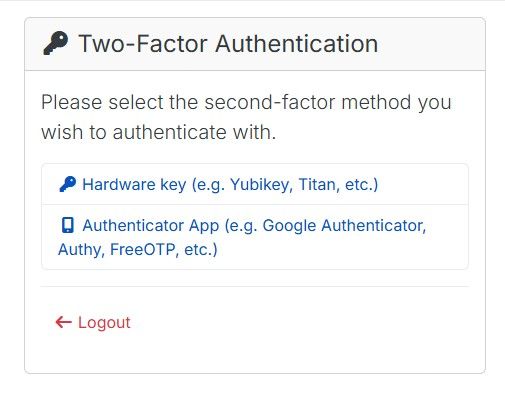
          image.jpeg

          1 Reply Last reply
          1

          Hello! It looks like you're interested in this conversation, but you don't have an account yet.

          Getting fed up of having to scroll through the same posts each visit? When you register for an account, you'll always come back to exactly where you were before, and choose to be notified of new replies (either via email, or push notification). You'll also be able to save bookmarks and upvote posts to show your appreciation to other community members.

          With your input, this post could be even better 💗

          Register Login
          Reply
          • Reply as topic
          Log in to reply
          • Oldest to Newest
          • Newest to Oldest
          • Most Votes


          • Login

          • Don't have an account? Register

          • Login or register to search.
          • First post
            Last post
          0
          • Categories
          • Recent
          • Tags
          • Popular
          • Bookmarks
          • Search