
Trilium - hierarchical note taking application with focus on building large personal knowledge bases
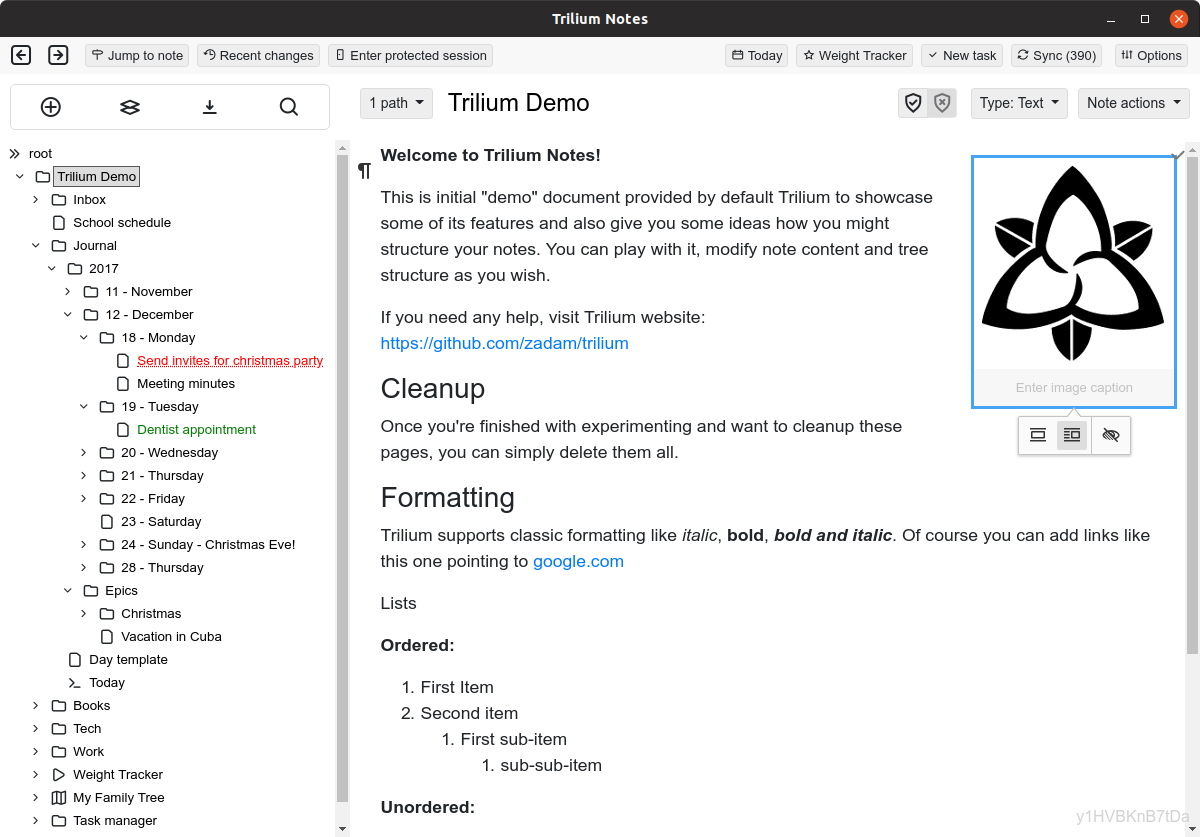
-
@seeker Joplin is the best of the FOSS option IMHO.
Personally, I'm all-in on Ulysses but that's Mac & iOS only, and closed-source and paid if that's an issue.
Otherwise, iA Writer is the best of the cross-platform, offline apps, bunch that I know of.
My main requirement is the .mk files retain their file names and folder structures in a way I can edit with multiple apps as needed, which Joplin doesn't do.
Atom / VS Code and a Git app like Working Copy is another way.
-
@seeker Joplin is the best of the FOSS option IMHO.
Personally, I'm all-in on Ulysses but that's Mac & iOS only, and closed-source and paid if that's an issue.
Otherwise, iA Writer is the best of the cross-platform, offline apps, bunch that I know of.
My main requirement is the .mk files retain their file names and folder structures in a way I can edit with multiple apps as needed, which Joplin doesn't do.
Atom / VS Code and a Git app like Working Copy is another way.
@marcusquinn I see. I can imagine how keeping the file names and folder structure intact would allow you to use any program to manipulate the files.
-
@seeker
When I started using notes, I wanted to have them as text files in order to have them in a simple format and find the editor that would feel the most natural for my workflow.I have used Joplin, Typora, Zettlr, FocusWriter. And I settled on Joplin for some time. I think I moved out because of sync issues and also because the interface was a bit too terse for my liking.
I then tried Obsidian.md (and its extension) which blew out all of these, but unfortunately is not free software.
This experience changed my priorities, and I moved to Trilium because as it's not text based, you can use advanced workflow (for example, create everyday a note with the current date, but the best is to check out the demo content from Trilium), have notes appearing in multiple place in a tree structure (which I discovered was important for me) and is super scriptable.
Check out this mad person turning Trilium notes into a CMS: https://wingysam.xyz/posts/tePIFQKUbTQ3
I also hoped there would be an android app, but it's not the case. The mobile version is really usable though, so eventually I'd like to help make it a PWA.
-
@seeker
When I started using notes, I wanted to have them as text files in order to have them in a simple format and find the editor that would feel the most natural for my workflow.I have used Joplin, Typora, Zettlr, FocusWriter. And I settled on Joplin for some time. I think I moved out because of sync issues and also because the interface was a bit too terse for my liking.
I then tried Obsidian.md (and its extension) which blew out all of these, but unfortunately is not free software.
This experience changed my priorities, and I moved to Trilium because as it's not text based, you can use advanced workflow (for example, create everyday a note with the current date, but the best is to check out the demo content from Trilium), have notes appearing in multiple place in a tree structure (which I discovered was important for me) and is super scriptable.
Check out this mad person turning Trilium notes into a CMS: https://wingysam.xyz/posts/tePIFQKUbTQ3
I also hoped there would be an android app, but it's not the case. The mobile version is really usable though, so eventually I'd like to help make it a PWA.
@ruihildt said in Trilium - hierarchical note taking application with focus on building large personal knowledge bases:
The mobile version is really usable though, so eventually I'd like to help make it a PWA
I guess you could "install" it as a browser app so it has its own button and auto logs in?
I do this with lots of forums I use regularly.
-
@seeker
When I started using notes, I wanted to have them as text files in order to have them in a simple format and find the editor that would feel the most natural for my workflow.I have used Joplin, Typora, Zettlr, FocusWriter. And I settled on Joplin for some time. I think I moved out because of sync issues and also because the interface was a bit too terse for my liking.
I then tried Obsidian.md (and its extension) which blew out all of these, but unfortunately is not free software.
This experience changed my priorities, and I moved to Trilium because as it's not text based, you can use advanced workflow (for example, create everyday a note with the current date, but the best is to check out the demo content from Trilium), have notes appearing in multiple place in a tree structure (which I discovered was important for me) and is super scriptable.
Check out this mad person turning Trilium notes into a CMS: https://wingysam.xyz/posts/tePIFQKUbTQ3
I also hoped there would be an android app, but it's not the case. The mobile version is really usable though, so eventually I'd like to help make it a PWA.
@ruihildt
Thank you. Scripting is one of the things I see Trilium praised about. My understanding of scripting is minimal. But I understand enough to see how that could be a game changer. It is a matter of weather I would use the scripting. A few of the existing scripts might be useful enough for me to make the leap. But what about using it when away from my pc. I really need a way to bridge the phone and the pc with as little friction as possible. Being able to take notes while reading a report or reviewing a video or an audio file on my mobile phone would be extremely helpful.Obsidian is pretty amazing. It is part of a broader evolution of knowledge management. I know a number of people who are using it and loving it. I have also heard good things about logseq and athens While plain text is future proof, it is difficult when working with video and audio files.
I discovered Codex I really like the freeform access it give to one's data- specifically multimedia. But I have not had a chance to look deeply into it. I suspect that there is a good chance it is not future proof.
@jdaviescoates A good idea. I think part of it is how easy it is to navigate while on a smartphone as well.
-
@ruihildt
Thank you. Scripting is one of the things I see Trilium praised about. My understanding of scripting is minimal. But I understand enough to see how that could be a game changer. It is a matter of weather I would use the scripting. A few of the existing scripts might be useful enough for me to make the leap. But what about using it when away from my pc. I really need a way to bridge the phone and the pc with as little friction as possible. Being able to take notes while reading a report or reviewing a video or an audio file on my mobile phone would be extremely helpful.Obsidian is pretty amazing. It is part of a broader evolution of knowledge management. I know a number of people who are using it and loving it. I have also heard good things about logseq and athens While plain text is future proof, it is difficult when working with video and audio files.
I discovered Codex I really like the freeform access it give to one's data- specifically multimedia. But I have not had a chance to look deeply into it. I suspect that there is a good chance it is not future proof.
@jdaviescoates A good idea. I think part of it is how easy it is to navigate while on a smartphone as well.
@seeker said in Trilium - hierarchical note taking application with focus on building large personal knowledge bases:
Being able to take notes while reading a report or reviewing a video or an audio file on my mobile phone would be extremely helpful.
I most just use Nextcloud Text docs!

-
@seeker said in Trilium - hierarchical note taking application with focus on building large personal knowledge bases:
Being able to take notes while reading a report or reviewing a video or an audio file on my mobile phone would be extremely helpful.
I most just use Nextcloud Text docs!
-
@jdaviescoates Do you highlight, share and then post to the Next cloud doc?
@seeker no I don't do any highlighting. I just take notes in the Nextcloud Text app (but it do it locally just using gedit)



Hello! It looks like you're interested in this conversation, but you don't have an account yet.
Getting fed up of having to scroll through the same posts each visit? When you register for an account, you'll always come back to exactly where you were before, and choose to be notified of new replies (either via email, or push notification). You'll also be able to save bookmarks and upvote posts to show your appreciation to other community members.
With your input, this post could be even better 💗
Register Login