
Increase upload max size in Nextcloud
-
I'm getting an error when I try to upload large files (it won't tell me which file is failing so I'm not exactly sure how large) to Nextcloud. I think it has something to do with a general php setting (php.ini) and not something set in Nextcloud itself but I have no experience with php so I'm not sure.

I think if I can get the associated attribute here "Upload max size" to increase it will solve my problem but I don't know how to set it. This is under settings -> administration -> system
-
You can edit the
htaccessfile using the file manager into the app or the/app/data/htaccessfile when using the webterminal and addphp_value upload_max_filesize 10Gto the
<IfModule mod_php7.c>section (adjust the 10G to whatever works for your case)Then just refresh the browser and you should see the value updated.
-
I think that worked, thanks. By the way, unrelated issue but it looks like the file browser is having trouble. When I go to file manager in Nextcloud config it says "Cloudron error file not found". This apps data was moved to a different disk on the system from the install disk so that might have something to do with it.
Anyway I added the setting you said using the console and it seems to be working.
-
You can edit the
htaccessfile using the file manager into the app or the/app/data/htaccessfile when using the webterminal and addphp_value upload_max_filesize 10Gto the
<IfModule mod_php7.c>section (adjust the 10G to whatever works for your case)Then just refresh the browser and you should see the value updated.
-
@nebulon I just tried this myself and when I refreshed the browser the the php value did not update. I don't have to restart any services for this to take effect?
-
You can edit the
htaccessfile using the file manager into the app or the/app/data/htaccessfile when using the webterminal and addphp_value upload_max_filesize 10Gto the
<IfModule mod_php7.c>section (adjust the 10G to whatever works for your case)Then just refresh the browser and you should see the value updated.
Hi there,
I followed this discription:@nebulon said in Increase upload max size in Nextcloud:
You can edit the htaccess file using the file manager into the app or the /app/data/htaccess file when using the webterminal and add
php_value upload_max_filesize 10G
to the <IfModule mod_php7.c> section (adjust the 10G to whatever works for your case)
Then just refresh the browser and you should see the value updated.
Is this still the correct and up-to-date method in the current Cloudron Nextcloud app?
Or has anything changed with newer PHP or app versions?I also tried the instructions from the official documentation:
https://docs.nextcloud.com/server/stable/admin_manual/configuration_files/big_file_upload_configuration.htmlNextcloud comes with its own nextcloud/.htaccess file. Because php-fpm can’t read PHP settings in .htaccess these settings must be set in the nextcloud/.user.ini file.
Does this also apply to Nextcloud on Cloudron?
If so, where is the .user.ini file located within the Cloudron setup?Thanks!
-
Hello @SolarSimon
Yes you can still use the described method with editing the
/app/data/htaccessfile.
Example excerpt from the/app/data/htaccessfile limiting the upload to 1 KB:<IfModule mod_php.c> php_value default_charset 'UTF-8' php_value output_buffering 0 php_value upload_max_filesize 1K <IfModule mod_env.c> SetEnv htaccessWorking true </IfModule> </IfModule>This can then also be checked in
https://$YOUR-DOMAIN/settings/admin/serverinfo: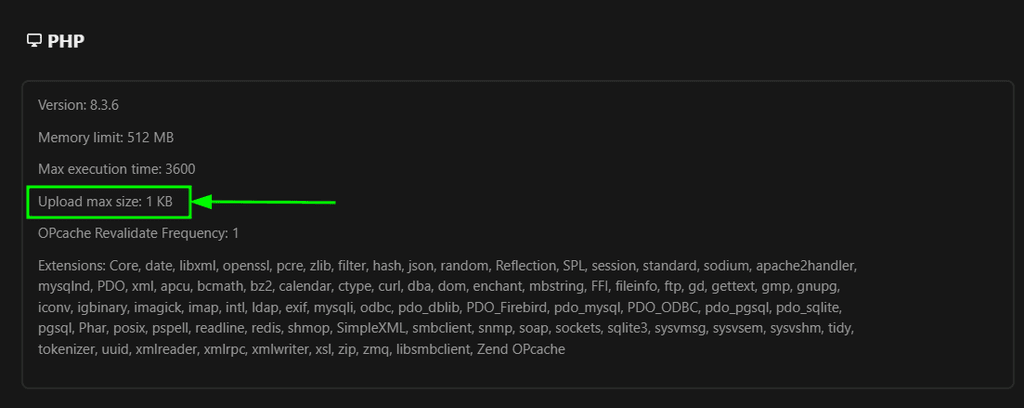
-
Hmm, that’s strange. I modified the .htaccess file as described, but the upload limit is still capped at 512 MB. I also restarted the app/server after making the changes. Any idea what else I might be missing?
My htaccess:<IfModule mod_headers.c> <IfModule mod_setenvif.c> <IfModule mod_fcgid.c> SetEnvIfNoCase ^Authorization$ "(.+)" XAUTHORIZATION=$1 RequestHeader set XAuthorization %{XAUTHORIZATION}e env=XAUTHORIZATION </IfModule> <IfModule mod_proxy_fcgi.c> SetEnvIfNoCase Authorization "(.+)" HTTP_AUTHORIZATION=$1 </IfModule> <IfModule mod_lsapi.c> SetEnvIfNoCase ^Authorization$ "(.+)" XAUTHORIZATION=$1 RequestHeader set XAuthorization %{XAUTHORIZATION}e env=XAUTHORIZATION </IfModule> </IfModule> <IfModule mod_env.c> # Add security and privacy related headers # Avoid doubled headers by unsetting headers in "onsuccess" table, # then add headers to "always" table: https://github.com/nextcloud/server/pull/19002 php_value upload_max_filesize 10G php_value post_max_size 10G php_value max_input_time 3600 php_value max_execution_time 3600 <If "%{REQUEST_URI} =~ m#/login$#"> # Only on the login page we need any Origin or Referer header set. Header onsuccess unset Referrer-Policy Header always set Referrer-Policy "same-origin" </If> <Else> Header onsuccess unset Referrer-Policy Header always set Referrer-Policy "no-referrer" </Else> Header onsuccess unset X-Content-Type-Options Header always set X-Content-Type-Options "nosniff" Header onsuccess unset X-Frame-Options Header always set X-Frame-Options "SAMEORIGIN" Header onsuccess unset X-Permitted-Cross-Domain-Policies Header always set X-Permitted-Cross-Domain-Policies "none" Header onsuccess unset X-Robots-Tag Header always set X-Robots-Tag "noindex, nofollow" Header onsuccess unset X-XSS-Protection Header always set X-XSS-Protection "1; mode=block" SetEnv modHeadersAvailable true </IfModule> -
Hello @SolarSimon
What.htaccessfile did you modify? It should be/app/data/htaccess.
And the default/app/data/htaccesslooks completely different to what you have posted. Did you only post a chunk of that file?
Here is the/app/data/htaccessfile from a fresh installed Nextcloud app:<IfModule mod_headers.c> <IfModule mod_setenvif.c> <IfModule mod_fcgid.c> SetEnvIfNoCase ^Authorization$ "(.+)" XAUTHORIZATION=$1 RequestHeader set XAuthorization %{XAUTHORIZATION}e env=XAUTHORIZATION </IfModule> <IfModule mod_proxy_fcgi.c> SetEnvIfNoCase Authorization "(.+)" HTTP_AUTHORIZATION=$1 </IfModule> <IfModule mod_lsapi.c> SetEnvIfNoCase ^Authorization$ "(.+)" XAUTHORIZATION=$1 RequestHeader set XAuthorization %{XAUTHORIZATION}e env=XAUTHORIZATION </IfModule> </IfModule> <IfModule mod_env.c> # Add security and privacy related headers # Avoid doubled headers by unsetting headers in "onsuccess" table, # then add headers to "always" table: https://github.com/nextcloud/server/pull/19002 <If "%{REQUEST_URI} =~ m#/login$#"> # Only on the login page we need any Origin or Referer header set. Header onsuccess unset Referrer-Policy Header always set Referrer-Policy "same-origin" </If> <Else> Header onsuccess unset Referrer-Policy Header always set Referrer-Policy "no-referrer" </Else> Header onsuccess unset X-Content-Type-Options Header always set X-Content-Type-Options "nosniff" Header onsuccess unset X-Frame-Options Header always set X-Frame-Options "SAMEORIGIN" Header onsuccess unset X-Permitted-Cross-Domain-Policies Header always set X-Permitted-Cross-Domain-Policies "none" Header onsuccess unset X-Robots-Tag Header always set X-Robots-Tag "noindex, nofollow" SetEnv modHeadersAvailable true </IfModule> # Add cache control for static resources <FilesMatch "\.(css|js|mjs|svg|gif|png|jpg|webp|ico|wasm|tflite)$"> <If "%{QUERY_STRING} =~ /(^|&)v=/"> Header set Cache-Control "max-age=15778463, immutable" </If> <Else> Header set Cache-Control "max-age=15778463" </Else> </FilesMatch> # Let browsers cache OTF and WOFF files for a week <FilesMatch "\.(otf|woff2?)$"> Header set Cache-Control "max-age=604800" </FilesMatch> </IfModule> <IfModule mod_php.c> php_value default_charset 'UTF-8' php_value output_buffering 0 <IfModule mod_env.c> SetEnv htaccessWorking true </IfModule> </IfModule> <IfModule mod_mime.c> AddType image/svg+xml svg svgz AddType application/wasm wasm AddEncoding gzip svgz # Serve ESM javascript files (.mjs) with correct mime type AddType text/javascript js mjs </IfModule> <IfModule mod_dir.c> DirectoryIndex index.php index.html </IfModule> <IfModule pagespeed_module> ModPagespeed Off </IfModule> <IfModule mod_rewrite.c> RewriteEngine on RewriteCond %{HTTP_USER_AGENT} DavClnt RewriteRule ^$ /remote.php/webdav/ [L,R=302] RewriteRule .* - [env=HTTP_AUTHORIZATION:%{HTTP:Authorization}] RewriteRule ^\.well-known/carddav https://%{HTTP_HOST}/remote.php/dav/ [R=301,L] RewriteRule ^\.well-known/caldav https://%{HTTP_HOST}/remote.php/dav/ [R=301,L] RewriteRule ^remote/(.*) remote.php [QSA,L] RewriteRule ^(?:build|tests|config|lib|3rdparty|templates)/.* - [R=404,L] RewriteRule ^\.well-known/(?!acme-challenge|pki-validation) /index.php [QSA,L] RewriteRule ^ocm-provider/?$ index.php [QSA,L] RewriteRule ^(?:\.(?!well-known)|autotest|occ|issue|indie|db_|console).* - [R=404,L] </IfModule> # Clients like xDavv5 on Android, or Cyberduck, use chunked requests. # When FastCGI or FPM is used with apache, requests arrive to Nextcloud without any content. # This leads to the creation of empty files. # The following directive will force the problematic requests to be buffered before being forwarded to Nextcloud. # This way, the "Transfer-Encoding" header is removed, the "Content-Length" header is set, and the request content is proxied to Nextcloud. # Here are more information about the issue: # - https://docs.cyberduck.io/mountainduck/issues/fastcgi/ # - https://docs.nextcloud.com/server/latest/admin_manual/issues/general_troubleshooting.html#troubleshooting-webdav <IfModule mod_setenvif.c> SetEnvIfNoCase Transfer-Encoding "chunked" proxy-sendcl=1 </IfModule> # Apache disabled the sending of the server-side content-length header # in their 2.4.59 patch updated which breaks some use-cases in Nextcloud. # Setting ap_trust_cgilike_cl allows to bring back the usual behaviour. # See https://bz.apache.org/bugzilla/show_bug.cgi?id=68973 <IfModule mod_env.c> SetEnv ap_trust_cgilike_cl </IfModule> AddDefaultCharset utf-8 Options -Indexes #### DO NOT CHANGE ANYTHING ABOVE THIS LINE #### ErrorDocument 403 /index.php/error/403 ErrorDocument 404 /index.php/error/404 <IfModule mod_rewrite.c> Options -MultiViews RewriteRule ^core/js/oc.js$ index.php [PT,E=PATH_INFO:$1] RewriteRule ^core/preview.png$ index.php [PT,E=PATH_INFO:$1] RewriteCond %{REQUEST_FILENAME} !\.(css|js|mjs|svg|gif|ico|jpg|jpeg|png|webp|html|otf|ttf|woff2?|map|webm|mp4|mp3|ogg|wav|flac|wasm|tflite)$ RewriteCond %{REQUEST_FILENAME} !/core/ajax/update\.php RewriteCond %{REQUEST_FILENAME} !/core/img/(favicon\.ico|manifest\.json)$ RewriteCond %{REQUEST_FILENAME} !/(cron|public|remote|status)\.php RewriteCond %{REQUEST_FILENAME} !/ocs/v(1|2)\.php RewriteCond %{REQUEST_FILENAME} !/robots\.txt RewriteCond %{REQUEST_FILENAME} !/(ocs-provider|updater)/ RewriteCond %{REQUEST_URI} !^/\.well-known/(acme-challenge|pki-validation)/.* RewriteCond %{REQUEST_FILENAME} !/richdocumentscode(_arm64)?/proxy.php$ RewriteRule . index.php [PT,E=PATH_INFO:$1] RewriteBase / <IfModule mod_env.c> SetEnv front_controller_active true <IfModule mod_dir.c> DirectorySlash off </IfModule> </IfModule> </IfModule>With assuming, you only posted a chunk, I can see that you have added:
    php_value upload_max_filesize 10G
    php_value post_max_size 10G
    php_value max_input_time 3600
    php_value max_execution_time 3600
in the wrong section in the
/app/data/htaccessfile.It should be like this:
<IfModule mod_headers.c>
  <IfModule mod_setenvif.c>
    <IfModule mod_fcgid.c>
       SetEnvIfNoCase ^Authorization$ "(.+)" XAUTHORIZATION=$1
       RequestHeader set XAuthorization %{XAUTHORIZATION}e env=XAUTHORIZATION
    </IfModule>
    <IfModule mod_proxy_fcgi.c>
       SetEnvIfNoCase Authorization "(.+)" HTTP_AUTHORIZATION=$1
    </IfModule>
    <IfModule mod_lsapi.c>
      SetEnvIfNoCase ^Authorization$ "(.+)" XAUTHORIZATION=$1
      RequestHeader set XAuthorization %{XAUTHORIZATION}e env=XAUTHORIZATION
    </IfModule>
  </IfModule>

  <IfModule mod_env.c>
    # Add security and privacy related headers
    # Avoid doubled headers by unsetting headers in "onsuccess" table,
    # then add headers to "always" table: https://github.com/nextcloud/server/pull/19002

    <If "%{REQUEST_URI} =~ m#/login$#">
      # Only on the login page we need any Origin or Referer header set.
      Header onsuccess unset Referrer-Policy
      Header always set Referrer-Policy "same-origin"
    </If>
    <Else>
      Header onsuccess unset Referrer-Policy
      Header always set Referrer-Policy "no-referrer"
    </Else>

    Header onsuccess unset X-Content-Type-Options
    Header always set X-Content-Type-Options "nosniff"

    Header onsuccess unset X-Frame-Options
    Header always set X-Frame-Options "SAMEORIGIN"

    Header onsuccess unset X-Permitted-Cross-Domain-Policies
    Header always set X-Permitted-Cross-Domain-Policies "none"

    Header onsuccess unset X-Robots-Tag
    Header always set X-Robots-Tag "noindex, nofollow"

    SetEnv modHeadersAvailable true
  </IfModule>

  # Add cache control for static resources
  <FilesMatch "\.(css|js|mjs|svg|gif|png|jpg|webp|ico|wasm|tflite)$">
    <If "%{QUERY_STRING} =~ /(^|&)v=/">
      Header set Cache-Control "max-age=15778463, immutable"
    </If>
    <Else>
      Header set Cache-Control "max-age=15778463"
    </Else>
  </FilesMatch>

  # Let browsers cache OTF and WOFF files for a week
  <FilesMatch "\.(otf|woff2?)$">
    Header set Cache-Control "max-age=604800"
  </FilesMatch>
</IfModule>

<IfModule mod_php.c>
  php_value default_charset 'UTF-8'
  php_value output_buffering 0
  php_value upload_max_filesize 10G
  php_value post_max_size 10G
  php_value max_input_time 3600
  php_value max_execution_time 3600
  <IfModule mod_env.c>
    SetEnv htaccessWorking true
  </IfModule>
</IfModule>

<IfModule mod_mime.c>
  AddType image/svg+xml svg svgz
  AddType application/wasm wasm
  AddEncoding gzip svgz
  # Serve ESM javascript files (.mjs) with correct mime type
  AddType text/javascript js mjs
</IfModule>

<IfModule mod_dir.c>
  DirectoryIndex index.php index.html
</IfModule>

<IfModule pagespeed_module>
  ModPagespeed Off
</IfModule>

<IfModule mod_rewrite.c>
  RewriteEngine on
  RewriteCond %{HTTP_USER_AGENT} DavClnt
  RewriteRule ^$ /remote.php/webdav/ [L,R=302]
  RewriteRule .* - [env=HTTP_AUTHORIZATION:%{HTTP:Authorization}]
  RewriteRule ^\.well-known/carddav https://%{HTTP_HOST}/remote.php/dav/ [R=301,L]
  RewriteRule ^\.well-known/caldav https://%{HTTP_HOST}/remote.php/dav/ [R=301,L]
  RewriteRule ^remote/(.*) remote.php [QSA,L]
  RewriteRule ^(?:build|tests|config|lib|3rdparty|templates)/.* - [R=404,L]
  RewriteRule ^\.well-known/(?!acme-challenge|pki-validation) /index.php [QSA,L]
  RewriteRule ^ocm-provider/?$ index.php [QSA,L]
  RewriteRule ^(?:\.(?!well-known)|autotest|occ|issue|indie|db_|console).* - [R=404,L]
</IfModule>

# Clients like xDavv5 on Android, or Cyberduck, use chunked requests.
# When FastCGI or FPM is used with apache, requests arrive to Nextcloud without any content.
# This leads to the creation of empty files.
# The following directive will force the problematic requests to be buffered before being forwarded to Nextcloud.
# This way, the "Transfer-Encoding" header is removed, the "Content-Length" header is set, and the request content is proxied to Nextcloud.
# Here are more information about the issue:
#  - https://docs.cyberduck.io/mountainduck/issues/fastcgi/
#  - https://docs.nextcloud.com/server/latest/admin_manual/issues/general_troubleshooting.html#troubleshooting-webdav
<IfModule mod_setenvif.c>
  SetEnvIfNoCase Transfer-Encoding "chunked" proxy-sendcl=1
</IfModule>

# Apache disabled the sending of the server-side content-length header
# in their 2.4.59 patch updated which breaks some use-cases in Nextcloud.
# Setting ap_trust_cgilike_cl allows to bring back the usual behaviour.
# See https://bz.apache.org/bugzilla/show_bug.cgi?id=68973
<IfModule mod_env.c>
  SetEnv ap_trust_cgilike_cl
</IfModule>

AddDefaultCharset utf-8
Options -Indexes
#### DO NOT CHANGE ANYTHING ABOVE THIS LINE ####

ErrorDocument 403 /index.php/error/403
ErrorDocument 404 /index.php/error/404
<IfModule mod_rewrite.c>
  Options -MultiViews
  RewriteRule ^core/js/oc.js$ index.php [PT,E=PATH_INFO:$1]
  RewriteRule ^core/preview.png$ index.php [PT,E=PATH_INFO:$1]
  RewriteCond %{REQUEST_FILENAME} !\.(css|js|mjs|svg|gif|ico|jpg|jpeg|png|webp|html|otf|ttf|woff2?|map|webm|mp4|mp3|ogg|wav|flac|wasm|tflite)$
  RewriteCond %{REQUEST_FILENAME} !/core/ajax/update\.php
  RewriteCond %{REQUEST_FILENAME} !/core/img/(favicon\.ico|manifest\.json)$
  RewriteCond %{REQUEST_FILENAME} !/(cron|public|remote|status)\.php
  RewriteCond %{REQUEST_FILENAME} !/ocs/v(1|2)\.php
  RewriteCond %{REQUEST_FILENAME} !/robots\.txt
  RewriteCond %{REQUEST_FILENAME} !/(ocs-provider|updater)/
  RewriteCond %{REQUEST_URI} !^/\.well-known/(acme-challenge|pki-validation)/.*
  RewriteCond %{REQUEST_FILENAME} !/richdocumentscode(_arm64)?/proxy.php$
  RewriteRule . index.php [PT,E=PATH_INFO:$1]
  RewriteBase /
  <IfModule mod_env.c>
    SetEnv front_controller_active true
    <IfModule mod_dir.c>
      DirectorySlash off
    </IfModule>
  </IfModule>
</IfModule>
To make it more visual please see: https://www.diffchecker.com/3aKUL3fu/
Editorial note:
@SolarSimon I have restored you last post to keep the context intact for future readers. -
Thanks for the hint! I noticed the mistake and deleted my previous post—sorry about that.
But it’s still a bit strange. I see two htaccess files: one under /mnt/volumes/ and one under /home/yellowtent/appsdata/.
If I modify the htaccess under /mnt/volumes/, it has no effect.
If I modify the htaccess under /home/yellowtent/appsdata/, the changes are gone after an app restart—the entries disappear. I’m editing the file via terminal with nano.
My data directory is located at /media/storagebox.
Any clue?
-
This post is deleted!
-
Thanks for the hint! I noticed the mistake and deleted my previous post—sorry about that.
But it’s still a bit strange. I see two htaccess files: one under /mnt/volumes/ and one under /home/yellowtent/appsdata/.
If I modify the htaccess under /mnt/volumes/, it has no effect.
If I modify the htaccess under /home/yellowtent/appsdata/, the changes are gone after an app restart—the entries disappear. I’m editing the file via terminal with nano.
My data directory is located at /media/storagebox.
Any clue?
@SolarSimon said in Increase upload max size in Nextcloud:
But it’s still a bit strange. I see two htaccess files: one under /mnt/volumes/ and one under /home/yellowtent/appsdata/.
Yes, confusing... There's two htaccess in nextcloud:
/app/data/htaccess- this one is for the nextcloud code (symlinked from /app/code/.htaccess) . nextcloud wants this writable since it patches this at runtime/app/data/data/.htaccess- this is for the data directory (i.e user files of nextcloud) which is/app/data/databy default. Here's the confusing part: in old nextcloud packages, the data directory was/app/data(by mistake) . This meant that/app/data/.htaccesswas present, and we ended up with 2 htaccess files one with a dot and one without it.@james maybe something for the docs?
-
Okay, so after some testing I still don’t know why the changes in htaccess disappear.
But on one server it works fine, and on the other it reports a 5 GB file size limit — no idea why.
At least normal uploads in the web interface now work.However, all my previous tests failed because I was always testing with a shared link that has edit rights.
With that, I still get a 413 error and the following message:BadRequest – Expected file size of 3099309687 bytes, but 0 bytes were read (from the Nextcloud client) and written (to the Nextcloud storage). This can be caused by a network issue on the sending side or a writing issue on the server side.
So it seems that the upload limit only works for regular logged-in uploads, but not for uploads via share links.
Any idea what might cause this difference? Guess this is a nextcloud issue.




Hello! It looks like you're interested in this conversation, but you don't have an account yet.
Getting fed up of having to scroll through the same posts each visit? When you register for an account, you'll always come back to exactly where you were before, and choose to be notified of new replies (either via email, or push notification). You'll also be able to save bookmarks and upvote posts to show your appreciation to other community members.
With your input, this post could be even better 💗
Register Login