
Cloudron makes it easy to run web apps like WordPress, Nextcloud, GitLab on your server. Find out more or install now.


Skip to content
  • Categories
  • Recent
  • Tags
  • Popular
  • Bookmarks
  • Search
Skins
  • Light
  • Brite
  • Cerulean
  • Cosmo
  • Flatly
  • Journal
  • Litera
  • Lumen
  • Lux
  • Materia
  • Minty
  • Morph
  • Pulse
  • Sandstone
  • Simplex
  • Sketchy
  • Spacelab
  • United
  • Yeti
  • Zephyr
  • Dark
  • Cyborg
  • Darkly
  • Quartz
  • Slate
  • Solar
  • Superhero
  • Vapor

  • Default (No Skin)
  • No Skin
Collapse
Brand Logo

Cloudron Forum

Apps - Status | Demo | Docs | Install
  1. Cloudron Forum
  2. Calibre Web
  3. Uploading multiple folders not possible

Uploading multiple folders not possible

Scheduled Pinned Locked Moved Solved Calibre Web
9 Posts 4 Posters 3.2k Views 4 Watching
  • Oldest to Newest
  • Newest to Oldest
  • Most Votes
Reply
  • Reply as topic
Log in to reply
This topic has been deleted. Only users with topic management privileges can see it.
  • imc67I Offline
    imc67I Offline
    imc67
    translator
    wrote on last edited by
    #1

    Hi,

    The current version of Calibre Web is very promising!

    Just a point of feedback:

    Uploading a local Calibre database as mentioned in the docs via File Manager has some inconveniences: the Calibre "database" consists of folders by author and a file metadata.db. In the File Manager > Folder Upload, you can't select multiple (author) folders, in my case it would mean to upload hundreds of seperate folders one by one (I used SCP to solve that).

    1 Reply Last reply
    1
    • girishG Offline
      girishG Offline
      girish
      Staff
      wrote on last edited by
      #2

      Good point. I guess we need to enhance the file manager to be able to take a tar.gz (which it can now) and add a extract action (not possible now). Can you make a feature request? I think it will be a good addition.

      1 Reply Last reply
      1
      • girishG Offline
        girishG Offline
        girish
        Staff
        wrote on last edited by girish
        #3

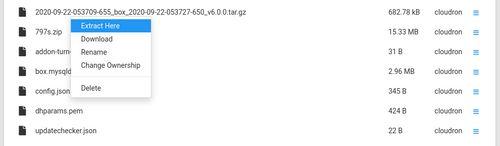
        I have added a way to extract things easily now in the File Manager. You can right click on a tgz or zip and say "Extract Here".
        b6d50d83-ed22-47b1-b02d-6b8b36c58961-image.png

        jdaviescoatesJ 2 Replies Last reply
        4
        • imc67I Offline
          imc67I Offline
          imc67
          translator
          wrote on last edited by
          #4

          @girish Great!!

          1 Reply Last reply
          0
          • girishG girish

            I have added a way to extract things easily now in the File Manager. You can right click on a tgz or zip and say "Extract Here".

            b6d50d83-ed22-47b1-b02d-6b8b36c58961-image.png

            jdaviescoatesJ Offline
            jdaviescoatesJ Offline
            jdaviescoates
            wrote on last edited by
            #5

            @girish said in Uploading multiple folders not possible:

            I have added a way to extract things easily now in the File Manager. You can right click on a tgz or zip and say "Extract Here".

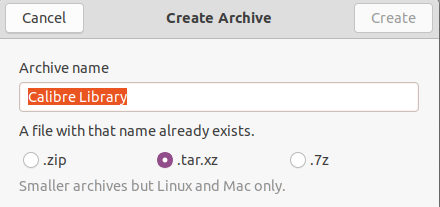
            Awesome. Can it also do tar.xz? Because that's what most easy to create using the GUI in Ubuntu.
            Screenshot from 2020-10-20 08-27-31.png

            I use Cloudron with Gandi & Hetzner

            1 Reply Last reply
            0
            • nebulonN Offline
              nebulonN Offline
              nebulon
              Staff
              wrote on last edited by
              #6

              It will support zip, tar, tar,gz, tgz, tar.xz, tar.bz2 and 7z for now

              1 Reply Last reply
              2
              • girishG girish

                I have added a way to extract things easily now in the File Manager. You can right click on a tgz or zip and say "Extract Here".

                b6d50d83-ed22-47b1-b02d-6b8b36c58961-image.png

                jdaviescoatesJ Offline
                jdaviescoatesJ Offline
                jdaviescoates
                wrote on last edited by
                #7

                @girish said in Uploading multiple folders not possible:

                I have added a way to extract things easily now in the File Manager. You can right click on a tgz or zip and say "Extract Here".

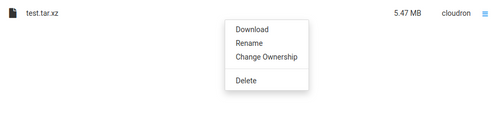
                I'm not seeing that option.
                no_extract_option.png

                I guess I'll have to wait for the next Cloudron release for that to be included?

                I use Cloudron with Gandi & Hetzner

                1 Reply Last reply
                0
                • nebulonN Offline
                  nebulonN Offline
                  nebulon
                  Staff
                  wrote on last edited by
                  #8

                  It was only added yesterday 😉

                  jdaviescoatesJ 1 Reply Last reply
                  3
                  • nebulonN nebulon

                    It was only added yesterday 😉

                    jdaviescoatesJ Offline
                    jdaviescoatesJ Offline
                    jdaviescoates
                    wrote on last edited by
                    #9

                    I guess now they'll be a 5.6.5 🙂

                    I use Cloudron with Gandi & Hetzner

                    1 Reply Last reply
                    0

                    Hello! It looks like you're interested in this conversation, but you don't have an account yet.

                    Getting fed up of having to scroll through the same posts each visit? When you register for an account, you'll always come back to exactly where you were before, and choose to be notified of new replies (either via email, or push notification). You'll also be able to save bookmarks and upvote posts to show your appreciation to other community members.

                    With your input, this post could be even better 💗

                    Register Login
                    Reply
                    • Reply as topic
                    Log in to reply
                    • Oldest to Newest
                    • Newest to Oldest
                    • Most Votes


                    • Login

                    • Don't have an account? Register

                    • Login or register to search.
                    • First post
                      Last post
                    0
                    • Categories
                    • Recent
                    • Tags
                    • Popular
                    • Bookmarks
                    • Search


