
Why I'm unable to login in my bitwarden ?
-
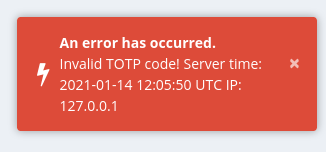
username and password are good, but
An error has occurred. Invalid TOTP code! Server time: 2021-01-14 11:58:34 UTC IP: 127.0.0.1- In the bitwarden apps date return (the same time than showed in the error message

Thu Jan 14 12:10:48 UTC 2021 - while when I access the logs via the webui the server itself date return:
19:10:17which Asia/Bangkok my local timezone
which sound normal based on what @nebulon said in Cloudron time vs App time mismatch:
time shown is from the logservice itself and is translated into the local time of your browser
- and the server, under https://my.cloudron.com/#/settings is Europe/Berlin which is where the server is physically located.
Bitwarden_rs
- Package v1.4.4-1
- App v1.17.0
How could I fix that ?
- In the bitwarden apps date return (the same time than showed in the error message
-
The timezone set via the dashboard does not trickle down to the apps, as you have found out already. I would assume apps should run all in UTC anyways. For Cloudron the timezone setting is to better match expectation around when updates and backups should be triggered.
So I am not sure if this TOTP issue is really related to timezone, otherwise I would expect to have hit this as well, since a TOTP time diverging even 1 hour would be invalid.
Can you try to restart the app?
-
The timezone set via the dashboard does not trickle down to the apps, as you have found out already. I would assume apps should run all in UTC anyways. For Cloudron the timezone setting is to better match expectation around when updates and backups should be triggered.
So I am not sure if this TOTP issue is really related to timezone, otherwise I would expect to have hit this as well, since a TOTP time diverging even 1 hour would be invalid.
Can you try to restart the app?
-
Do you have any other account available for testing on that instance to see if this is a server issue or if your TOTP client may produce wrong values?
@nebulon said in unable to login in my bitwarden:
your TOTP client may produce wrong values?
My TOTP Client is BitWarden on Android

it work fine with Nextcloud and others servicesSo I disabled the 2nd Auth in my bitwarden and tried to renable it
but during this process I have the exact same message and I can't renable it[update] Weird
if I open 2 TAB in my firefox- one for https://vault.mycloudron.com/#/settings/two-factor
- one for https://vault.mycloudron.com/#/vault
and do the step I'm able to renable it
so I think the issue is on my phone
-
@nebulon said in unable to login in my bitwarden:
your TOTP client may produce wrong values?
My TOTP Client is BitWarden on Android
it work fine with Nextcloud and others servicesSo I disabled the 2nd Auth in my bitwarden and tried to renable it
but during this process I have the exact same message and I can't renable it[update] Weird
if I open 2 TAB in my firefox- one for https://vault.mycloudron.com/#/settings/two-factor
- one for https://vault.mycloudron.com/#/vault
and do the step I'm able to renable it
so I think the issue is on my phone
@jodumont said in unable to login in my bitwarden:
so I think the issue is on my phone
I confirm; even if I forced a sync of the bitwarden database
which end with success because I published I changemy phone have almost 2 minutes of delay with my workstation (and what google say)
I think it is time to say goodbye to my Note4.




Hello! It looks like you're interested in this conversation, but you don't have an account yet.
Getting fed up of having to scroll through the same posts each visit? When you register for an account, you'll always come back to exactly where you were before, and choose to be notified of new replies (either via email, or push notification). You'll also be able to save bookmarks and upvote posts to show your appreciation to other community members.
With your input, this post could be even better 💗
Register Login