
Failed to mount (inactive): mount error(13) when mounting CIFS from Synology
-
@nebulon found it!
It doesn't like my super strong password, which contains special characters

When I wrap the password in "..." it accepts it!
@3246 ok, https://www.freedesktop.org/software/systemd/man/systemd.syntax.html has some more.
Can you please try
systemd-escape <your-password>and use that instead of quoting in the mount file? If that works, I can fix up our code accordingly. -
@3246 ok, https://www.freedesktop.org/software/systemd/man/systemd.syntax.html has some more.
Can you please try
systemd-escape <your-password>and use that instead of quoting in the mount file? If that works, I can fix up our code accordingly.@girish @nebulon thanks both. The previous password contained: @ & ^
It works OK on the command line, where I can escape it using double quotes or just pasting it in the prompt when running interactively.
I will have a go with a test user and suitably complex password and report back, after trying the 'system-escape' option.
-
@3246 ok, https://www.freedesktop.org/software/systemd/man/systemd.syntax.html has some more.
Can you please try
systemd-escape <your-password>and use that instead of quoting in the mount file? If that works, I can fix up our code accordingly.@girish said in Failed to mount (inactive): mount error(13) when mounting CIFS from Synology:
@3246 ok, https://www.freedesktop.org/software/systemd/man/systemd.syntax.html has some more.
Can you please try
systemd-escape <your-password>and use that instead of quoting in the mount file? If that works, I can fix up our code accordingly.Sadly, this did not work. I also tried MD5 hashing but the only reliable way is to use a password without special characters so far

👉 Find our more www.bebraver.online
-
@girish said in Failed to mount (inactive): mount error(13) when mounting CIFS from Synology:
@3246 ok, https://www.freedesktop.org/software/systemd/man/systemd.syntax.html has some more.
Can you please try
systemd-escape <your-password>and use that instead of quoting in the mount file? If that works, I can fix up our code accordingly.Sadly, this did not work. I also tried MD5 hashing but the only reliable way is to use a password without special characters so far
@3246
 thanks for trying! If you don't mind trying one more approach:
- Create a credentials file like:
username=username password=password- Then in the systemd mount file, do
Options=credentials=/path/to/credentialsfile,..other options...
See articles like https://askubuntu.com/questions/1119819/how-do-i-use-a-credential-file-for-cifs-in-etc-fstab
I think we should do one of these:
-
When complex passwords are entered in UI, we can inform the user about this limitation, so they don't end up with your situation.
-
If credential file works, we will fix the code to use that approach.
-
@3246
thanks for trying! If you don't mind trying one more approach:- Create a credentials file like:
username=username password=password- Then in the systemd mount file, do
Options=credentials=/path/to/credentialsfile,..other options...
See articles like https://askubuntu.com/questions/1119819/how-do-i-use-a-credential-file-for-cifs-in-etc-fstab
I think we should do one of these:
-
When complex passwords are entered in UI, we can inform the user about this limitation, so they don't end up with your situation.
-
If credential file works, we will fix the code to use that approach.
@girish OK, slowly for those of us who don't read too well ;D
Do you mean /etc/fstab or some other way to put the options line in? I am familiar with the former but even after DuckDuckGoing for 2min not that much more clued in about the latter.
What do I do in the GUI?
👉 Find our more www.bebraver.online
-
@girish OK, slowly for those of us who don't read too well ;D
Do you mean /etc/fstab or some other way to put the options line in? I am familiar with the former but even after DuckDuckGoing for 2min not that much more clued in about the latter.
What do I do in the GUI?
-
@3246 ha ha, sorry about that. Let me see if I can make a patch instead and test locally with special characters, might be easier.
-
 G girish has marked this topic as solved on
-
I have a similar issue when connecting to a Hetzner StorageBox system:
Failed to mount (inactive): mount error(128): Key has been revoked Refer to the mount.cifs(8) manual page (e.g. man mount.cifs) and kernel log messages (dmesg)My settings are the following:
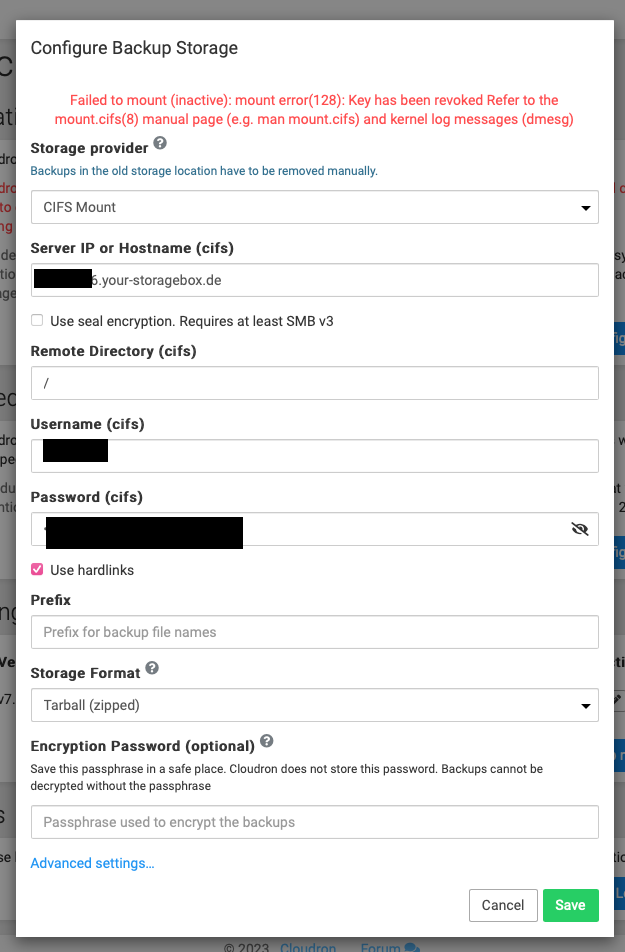
Any tips on how to get this fixed? The git commit is some months old so I thought this might be already included in the latest Cloudron release?
Best
Jay -
I have a similar issue when connecting to a Hetzner StorageBox system:
Failed to mount (inactive): mount error(128): Key has been revoked Refer to the mount.cifs(8) manual page (e.g. man mount.cifs) and kernel log messages (dmesg)My settings are the following:
Any tips on how to get this fixed? The git commit is some months old so I thought this might be already included in the latest Cloudron release?
Best
Jay@jayonrails said in Failed to mount (inactive): mount error(13) when mounting CIFS from Synology:
Key has been revoked
I think the error is coming from Hetzner . Did you possible revoke your existing key? Maybe you can generate new keys and try?
-
@jayonrails said in Failed to mount (inactive): mount error(13) when mounting CIFS from Synology:
Key has been revoked
I think the error is coming from Hetzner . Did you possible revoke your existing key? Maybe you can generate new keys and try?
@girish does key mean the password I received for the login? Or does it mean the authentication with an SSH Private / public key pair?
This would also be possible on Hetzner Storage Box, but is not what I have configured. I am curious because in my understanding a password cannot be revoked, while a private key could be revoked, but is nothing I am using right now.
I will check the credentials again and will let you know the results.
Best
Jay -
@girish does key mean the password I received for the login? Or does it mean the authentication with an SSH Private / public key pair?
This would also be possible on Hetzner Storage Box, but is not what I have configured. I am curious because in my understanding a password cannot be revoked, while a private key could be revoked, but is nothing I am using right now.
I will check the credentials again and will let you know the results.
Best
Jay@jayonrails SSH and SAMBA access haven’t been enabled yet, therefore it didn’t worked. After enabling it, everything works perfectly.

Hello! It looks like you're interested in this conversation, but you don't have an account yet.
Getting fed up of having to scroll through the same posts each visit? When you register for an account, you'll always come back to exactly where you were before, and choose to be notified of new replies (either via email, or push notification). You'll also be able to save bookmarks and upvote posts to show your appreciation to other community members.
With your input, this post could be even better 💗
Register Login