
Set acknowledge status of a Cloudron Notification via API doesn't work
-
Hi,
I try to set a notification to read after I consumed it via API and forwarded it to Telegram. Unfortunatly I am recieving the following failure:
https://my.xxx.de/api/v1/notifications/"49"{"status":"rejected","reason":{"message":"404 - {\"status\":\"Not Found\",\"message\":\"Notification not found\"}", "name":"Error","stack":"Error: Request failed with status code 404\n at createError (/app/code/node_modules/axios/lib/core/createError.js:16:15)\n at settle (/app/code/node_modules/axios/lib/core/settle.js:17:12)\n at IncomingMessage.handleStreamEnd (/app/code/node_modules/axios/lib/adapters/http.js:269:11)\n at IncomingMessage.emit (node:events:539:35)\n at endReadableNT (node:internal/streams/readable:1345:12)\n at processTicksAndRejections (node:internal/process/task_queues:83:21)"}}Any ideas what to change?
Best,
Sven -
Hi,
I try to set a notification to read after I consumed it via API and forwarded it to Telegram. Unfortunatly I am recieving the following failure:
https://my.xxx.de/api/v1/notifications/"49"{"status":"rejected","reason":{"message":"404 - {\"status\":\"Not Found\",\"message\":\"Notification not found\"}", "name":"Error","stack":"Error: Request failed with status code 404\n at createError (/app/code/node_modules/axios/lib/core/createError.js:16:15)\n at settle (/app/code/node_modules/axios/lib/core/settle.js:17:12)\n at IncomingMessage.handleStreamEnd (/app/code/node_modules/axios/lib/adapters/http.js:269:11)\n at IncomingMessage.emit (node:events:539:35)\n at endReadableNT (node:internal/streams/readable:1345:12)\n at processTicksAndRejections (node:internal/process/task_queues:83:21)"}}Any ideas what to change?
Best,
Sven@manngobaum said in Set acknowledge status of a Cloudron Notification via API doesn't work:
is the quote around 49 intentional? there should be no quote
-
@manngobaum said in Set acknowledge status of a Cloudron Notification via API doesn't work:
is the quote around 49 intentional? there should be no quote
@girish I tried it without quotes in first place:
https://my.xxx.de/api/v1/notifications/49But using it I am receiving the following failure:
{"status":"rejected","reason":{"message":"400 - {\"status\":\"Bad Request\",\"message\":\"acknowledged must be a booliean\"}","name":"Error","stack":"Error: Request failed with status code 400\n at createError (/app/code/node_modules/axios/lib/core/createError.js:16:15)\n at settle (/app/code/node_modules/axios/lib/core/settle.js:17:12)\n at IncomingMessage.handleStreamEnd (/app/code/node_modules/axios/lib/adapters/http.js:269:11)\n at IncomingMessage.emit (node:events:539:35)\n at endReadableNT (node:internal/streams/readable:1345:12)\n at processTicksAndRejections (node:internal/process/task_queues:83:21)"}} -
@girish I tried it without quotes in first place:
https://my.xxx.de/api/v1/notifications/49But using it I am receiving the following failure:
{"status":"rejected","reason":{"message":"400 - {\"status\":\"Bad Request\",\"message\":\"acknowledged must be a booliean\"}","name":"Error","stack":"Error: Request failed with status code 400\n at createError (/app/code/node_modules/axios/lib/core/createError.js:16:15)\n at settle (/app/code/node_modules/axios/lib/core/settle.js:17:12)\n at IncomingMessage.handleStreamEnd (/app/code/node_modules/axios/lib/adapters/http.js:269:11)\n at IncomingMessage.emit (node:events:539:35)\n at endReadableNT (node:internal/streams/readable:1345:12)\n at processTicksAndRejections (node:internal/process/task_queues:83:21)"}}@manngobaum said in Set acknowledge status of a Cloudron Notification via API doesn't work:
acknowledged must be a booliean
You must send
acknowledgedto be true in the body of the POST request. -
@manngobaum said in Set acknowledge status of a Cloudron Notification via API doesn't work:
acknowledged must be a booliean
You must send
acknowledgedto be true in the body of the POST request.@girish Thanks for your answer! I also tried this in first place. But I think something is wrong:
{
  "nodes": [
    {
      "parameters": {
        "requestMethod": "POST",
        "url": "=https://my.xxx.de/api/v1/notifications/{{$node[\"Item Lists\"].json[\"id\"]}}",
        "options": {},
        "bodyParametersUi": {
          "parameter": [
            {
              "name": "acknowledged",
              "value": "true"
            }
          ]
        },
        "headerParametersUi": {
          "parameter": [
            {
              "name": "authorization",
              "value": "Bearer xxx"
            }
          ]
        }
      },
      "name": "HTTP Request1",
      "type": "n8n-nodes-base.httpRequest",
      "typeVersion": 2,
      "position": [
        1100,
        300
      ]
    }
  ],
  "connections": {}
}
With this failure:
{"status":"rejected","reason":{"message":"400 - {\"status\":\"Bad Request\",\"message\":\"acknowledged must be a booliean\"}","name":"Error","stack":"Error: Request failed with status code 400\n at createError (/app/code/node_modules/axios/lib/core/createError.js:16:15)\n at settle (/app/code/node_modules/axios/lib/core/settle.js:17:12)\n at IncomingMessage.handleStreamEnd (/app/code/node_modules/axios/lib/adapters/http.js:269:11)\n at IncomingMessage.emit (node:events:539:35)\n at endReadableNT (node:internal/streams/readable:1345:12)\n at processTicksAndRejections (node:internal/process/task_queues:83:21)"}} -
@girish Thanks for your answer! I also tried this in first place. But I think something is wrong:
{
  "nodes": [
    {
      "parameters": {
        "requestMethod": "POST",
        "url": "=https://my.xxx.de/api/v1/notifications/{{$node[\"Item Lists\"].json[\"id\"]}}",
        "options": {},
        "bodyParametersUi": {
          "parameter": [
            {
              "name": "acknowledged",
              "value": "true"
            }
          ]
        },
        "headerParametersUi": {
          "parameter": [
            {
              "name": "authorization",
              "value": "Bearer xxx"
            }
          ]
        }
      },
      "name": "HTTP Request1",
      "type": "n8n-nodes-base.httpRequest",
      "typeVersion": 2,
      "position": [
        1100,
        300
      ]
    }
  ],
  "connections": {}
}
With this failure:
{"status":"rejected","reason":{"message":"400 - {\"status\":\"Bad Request\",\"message\":\"acknowledged must be a booliean\"}","name":"Error","stack":"Error: Request failed with status code 400\n at createError (/app/code/node_modules/axios/lib/core/createError.js:16:15)\n at settle (/app/code/node_modules/axios/lib/core/settle.js:17:12)\n at IncomingMessage.handleStreamEnd (/app/code/node_modules/axios/lib/adapters/http.js:269:11)\n at IncomingMessage.emit (node:events:539:35)\n at endReadableNT (node:internal/streams/readable:1345:12)\n at processTicksAndRejections (node:internal/process/task_queues:83:21)"}}@manngobaum said in Set acknowledge status of a Cloudron Notification via API doesn't work:
"value": "true"This should probably be
true(without quotes around it, which would make it boolean true instead of string true). -
@manngobaum said in Set acknowledge status of a Cloudron Notification via API doesn't work:
"value": "true"This should probably be
true(without quotes around it, which would make it boolean true instead of string true).@girish Yes, this was it. I did not manage to see the actual json. But seems like n8n always adds quotes using the name / value combination. I changed it to this:
{
  "nodes": [
    {
      "parameters": {
        "requestMethod": "POST",
        "url": "=https://my.xxx.de/api/v1/notifications/{{$node[\"Item Lists\"].json[\"id\"]}}",
        "jsonParameters": true,
        "options": {},
        "bodyParametersJson": "={\n\"acknowledged\": true\n}",
        "headerParametersJson": "={\"authorization\": \"Bearer xxx\"}"
      },
      "name": "HTTP Request1",
      "type": "n8n-nodes-base.httpRequest",
      "typeVersion": 2,
      "position": [
        1100,
        300
      ]
    }
  ],
  "connections": {}
}
Now it's working. I used this:
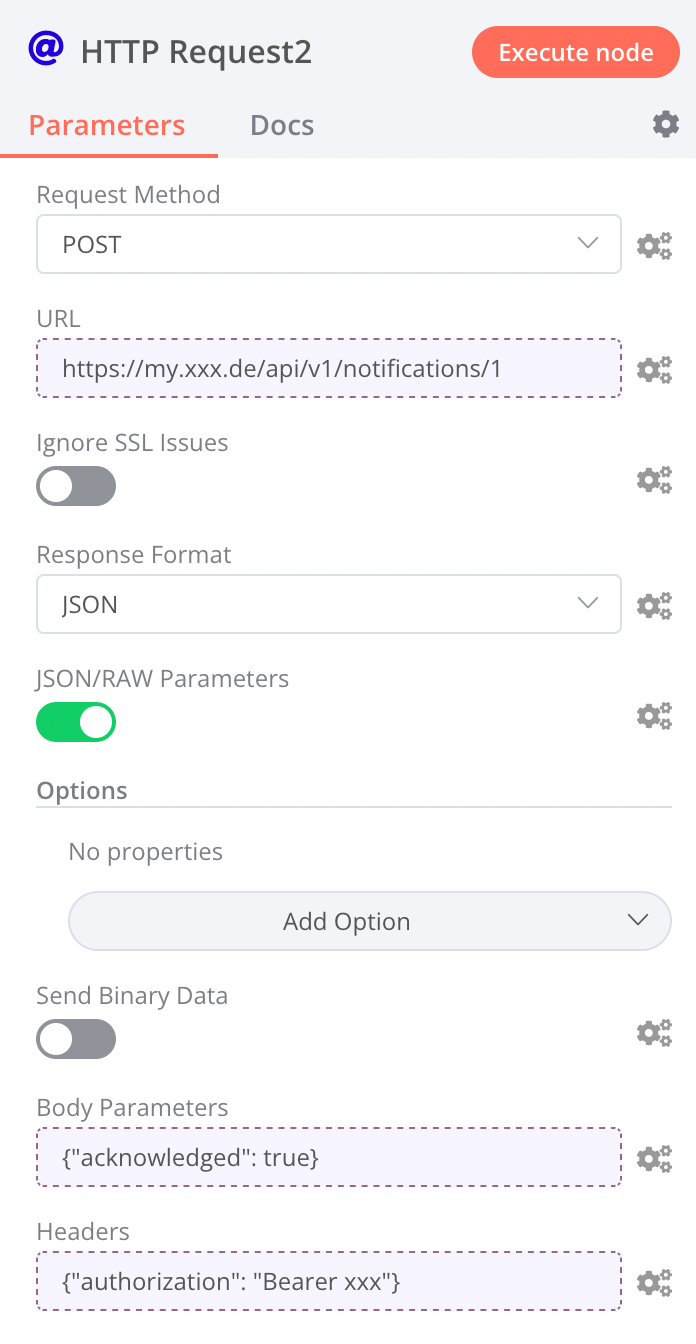
instead of this: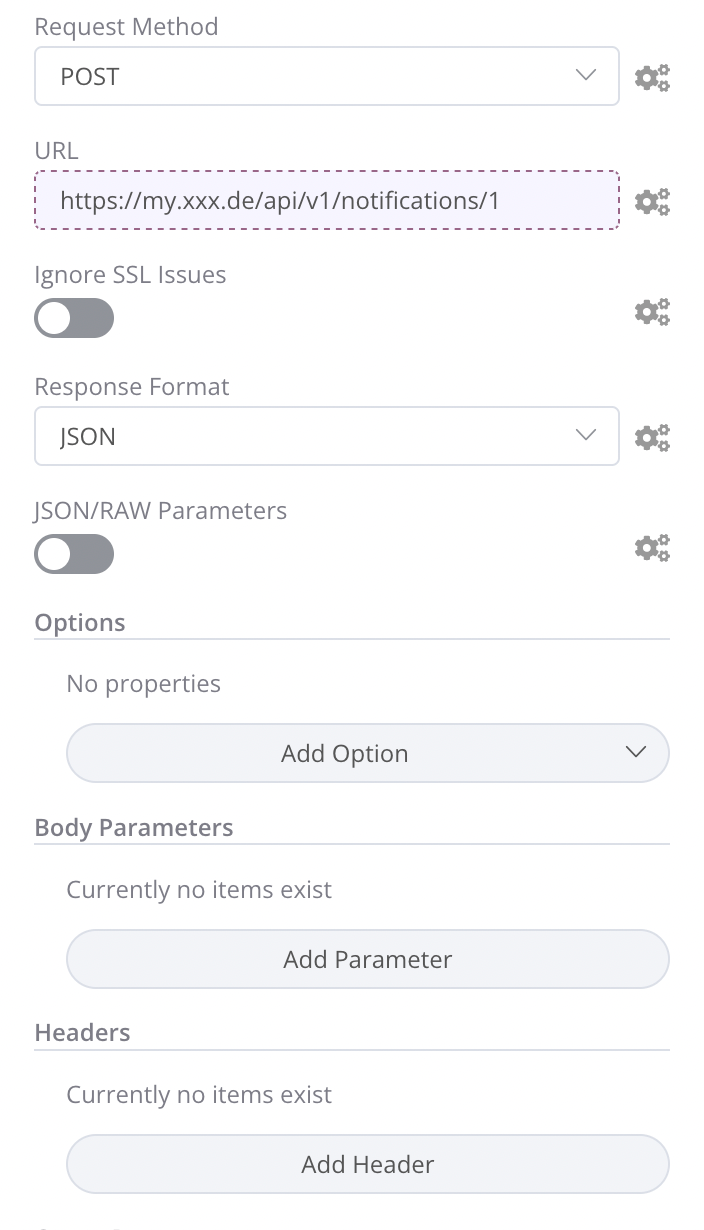

Hello! It looks like you're interested in this conversation, but you don't have an account yet.
Getting fed up of having to scroll through the same posts each visit? When you register for an account, you'll always come back to exactly where you were before, and choose to be notified of new replies (either via email, or push notification). You'll also be able to save bookmarks and upvote posts to show your appreciation to other community members.
With your input, this post could be even better 💗
Register Login