
Uploads not going to mounted storage location
-
I have a volume, "vultr" mounted and, for example, with custom emojies I have "/media/vultr/rocketchat_assets/emojies".
The path to that is /mnt/blockstorage/rocketchat_assets/emojies and exists. It's mounted as a "mountpoint" in Cloudron and is Vultr's Block Storage which is mounted to the VM.
Now, if I go to custom emjoies and upload an emoji, I'd expect it in that directory... however, nothing appears in the directory but does show up online.
This is across the board for all upload options... I have it pointed to /media/vultr/rocketchat_assets/*.
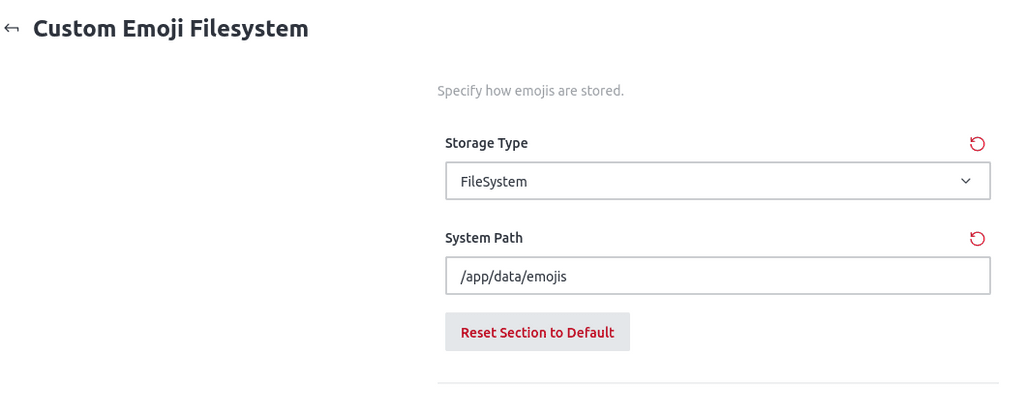
I'm also tried entering "/mnt/blockstorage/rocketchat_assets" in RocketChat and that didn't do anything. And for all the options, the Storage Type "File System" is selected.
I'm not sure what I'm doing wrong as I don't have this issue with other apps, so was curious if anyone here has any ideas or input...
Thanks,
AJ -
I have a volume, "vultr" mounted and, for example, with custom emojies I have "/media/vultr/rocketchat_assets/emojies".
The path to that is /mnt/blockstorage/rocketchat_assets/emojies and exists. It's mounted as a "mountpoint" in Cloudron and is Vultr's Block Storage which is mounted to the VM.
Now, if I go to custom emjoies and upload an emoji, I'd expect it in that directory... however, nothing appears in the directory but does show up online.
This is across the board for all upload options... I have it pointed to /media/vultr/rocketchat_assets/*.
I'm also tried entering "/mnt/blockstorage/rocketchat_assets" in RocketChat and that didn't do anything. And for all the options, the Storage Type "File System" is selected.
I'm not sure what I'm doing wrong as I don't have this issue with other apps, so was curious if anyone here has any ideas or input...
Thanks,
AJ -
Oh, I restarted the app and the emojis disappear in the chat (gets replaced by a '?').
So, then I reupload another custom emoji and it appears in the filesystem!
It seems that after you set Emoji to filesystem storage, you have to restart rocket.chat and things work after that.
-
Oh, I restarted the app and the emojis disappear in the chat (gets replaced by a '?').
So, then I reupload another custom emoji and it appears in the filesystem!
It seems that after you set Emoji to filesystem storage, you have to restart rocket.chat and things work after that.


Hello! It looks like you're interested in this conversation, but you don't have an account yet.
Getting fed up of having to scroll through the same posts each visit? When you register for an account, you'll always come back to exactly where you were before, and choose to be notified of new replies (either via email, or push notification). You'll also be able to save bookmarks and upvote posts to show your appreciation to other community members.
With your input, this post could be even better 💗
Register Login