Cloudron makes it easy to run web apps like WordPress, Nextcloud, GitLab on your server. Find out more or install now.


Skip to content
  • Categories
  • Recent
  • Tags
  • Popular
  • Bookmarks
  • Search
Skins
  • Light
  • Brite
  • Cerulean
  • Cosmo
  • Flatly
  • Journal
  • Litera
  • Lumen
  • Lux
  • Materia
  • Minty
  • Morph
  • Pulse
  • Sandstone
  • Simplex
  • Sketchy
  • Spacelab
  • United
  • Yeti
  • Zephyr
  • Dark
  • Cyborg
  • Darkly
  • Quartz
  • Slate
  • Solar
  • Superhero
  • Vapor

  • Default (No Skin)
  • No Skin
Collapse
Brand Logo

Cloudron Forum

Apps - Status | Demo | Docs | Install
  1. Cloudron Forum
  2. Ghost
  3. Question: root directory location? Need to add a ads.txt

Question: root directory location? Need to add a ads.txt

Scheduled Pinned Locked Moved Ghost
5 Posts 4 Posters 2.1k Views 4 Watching
  • Oldest to Newest
  • Newest to Oldest
  • Most Votes
Reply
  • Reply as topic
Log in to reply
This topic has been deleted. Only users with topic management privileges can see it.
  • 823Labs8 Offline
    823Labs8 Offline
    823Labs
    wrote on last edited by
    #1

    I'm trying to add a ads.txt file to my install but am a little confused as to the actual home directory to place the file.

    would I be placing the file in /home/yellowtent/appsdata/[unique-string]
    or one of its subdirectories

    Thanks.

    jdaviescoatesJ 1 Reply Last reply
    1
    • 823Labs8 823Labs

      I'm trying to add a ads.txt file to my install but am a little confused as to the actual home directory to place the file.

      would I be placing the file in /home/yellowtent/appsdata/[unique-string]
      or one of its subdirectories

      Thanks.

      jdaviescoatesJ Offline
      jdaviescoatesJ Offline
      jdaviescoates
      wrote on last edited by
      #2

      @823Labs the docs on this https://ghost.org/integrations/google-ad-manager/ say

      simply move your ads.txt file to your theme’s root directory,

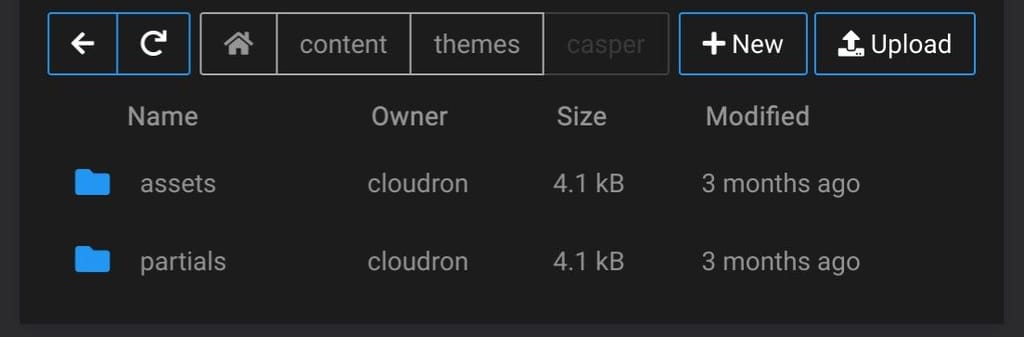
      So, just use the app File Manager to browse to Content -> Themes -> Casper (or whatever theme you are using) and upload it there
      IMG_20230225_081714.jpg

      I use Cloudron with Gandi & Hetzner

      823Labs8 1 Reply Last reply
      2
      • jdaviescoatesJ jdaviescoates

        @823Labs the docs on this https://ghost.org/integrations/google-ad-manager/ say

        simply move your ads.txt file to your theme’s root directory,

        So, just use the app File Manager to browse to Content -> Themes -> Casper (or whatever theme you are using) and upload it there

        IMG_20230225_081714.jpg

        823Labs8 Offline
        823Labs8 Offline
        823Labs
        wrote on last edited by
        #3

        @jdaviescoates Thank you!

        1 Reply Last reply
        2
        • G Offline
          G Offline
          ghstandard
          wrote on last edited by
          #4

          I've done this, yet Adsense still says the file can't be found

          girishG 1 Reply Last reply
          0
          • G ghstandard

            I've done this, yet Adsense still says the file can't be found

            girishG Offline
            girishG Offline
            girish
            Staff
            wrote on last edited by
            #5

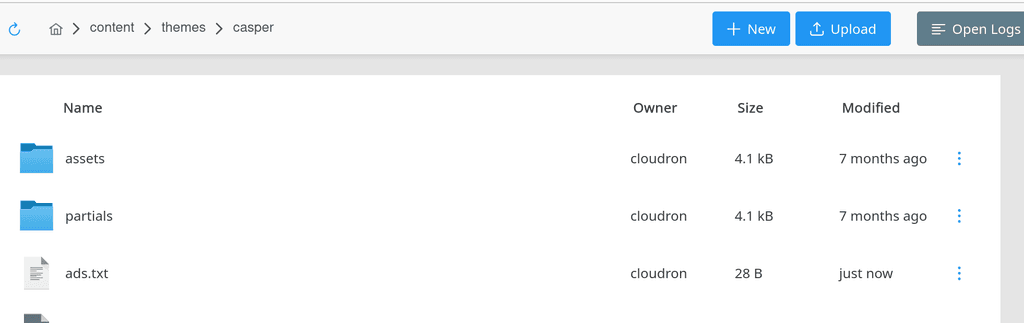
            @ghstandard putting an ads.txt at top level works for me.

            f7dfcf9b-6ec3-4b53-8180-e52e12172ffc-image.png

            Then, if I go to https://blog.domain.com/ads.txt , I can see the file. Are you able to navigate to the URL and see the file ? If so , maybe this is some caching issue on Google side.

            1 Reply Last reply
            1

            Hello! It looks like you're interested in this conversation, but you don't have an account yet.

            Getting fed up of having to scroll through the same posts each visit? When you register for an account, you'll always come back to exactly where you were before, and choose to be notified of new replies (either via email, or push notification). You'll also be able to save bookmarks and upvote posts to show your appreciation to other community members.

            With your input, this post could be even better 💗

            Register Login
            Reply
            • Reply as topic
            Log in to reply
            • Oldest to Newest
            • Newest to Oldest
            • Most Votes


            • Login

            • Don't have an account? Register

            • Login or register to search.
            • First post
              Last post
            0
            • Categories
            • Recent
            • Tags
            • Popular
            • Bookmarks
            • Search