
Cloudron makes it easy to run web apps like WordPress, Nextcloud, GitLab on your server. Find out more or install now.


Skip to content
  • Categories
  • Recent
  • Tags
  • Popular
  • Bookmarks
  • Search
Skins
  • Light
  • Brite
  • Cerulean
  • Cosmo
  • Flatly
  • Journal
  • Litera
  • Lumen
  • Lux
  • Materia
  • Minty
  • Morph
  • Pulse
  • Sandstone
  • Simplex
  • Sketchy
  • Spacelab
  • United
  • Yeti
  • Zephyr
  • Dark
  • Cyborg
  • Darkly
  • Quartz
  • Slate
  • Solar
  • Superhero
  • Vapor

  • Default (No Skin)
  • No Skin
Collapse
Brand Logo

Cloudron Forum

Apps - Status | Demo | Docs | Install
  1. Cloudron Forum
  2. Superset
  3. Database drivers

Database drivers

Scheduled Pinned Locked Moved Solved Superset
supersetconfigurationsetup
21 Posts 7 Posters 7.7k Views 8 Watching
  • Oldest to Newest
  • Newest to Oldest
  • Most Votes
Reply
  • Reply as topic
Log in to reply
This topic has been deleted. Only users with topic management privileges can see it.
  • A as1111111

    Thanks for offering Superset in Cloudron!

    Is there a simple way to install additional database drivers? In our case we would like to connect a Microsoft SQL server.
    According to the superset documentation at https://superset.apache.org/docs/databases/docker-add-drivers I should create a textfile as follows:

    touch ./docker/requirements-local.txt
    

    followed by

    echo "mysqlclient" >> ./docker/requirements-local.txt
    

    Or is this possible via the env.sh file?
    Thanks for your help!

    girishG Offline
    girishG Offline
    girish
    Staff
    wrote on last edited by
    #2

    @as1111111 I guess you mean https://superset.apache.org/docs/databases/sql-server . I can add this to the base package itself.

    1 Reply Last reply
    1
    • A as1111111

      Thanks for offering Superset in Cloudron!

      Is there a simple way to install additional database drivers? In our case we would like to connect a Microsoft SQL server.
      According to the superset documentation at https://superset.apache.org/docs/databases/docker-add-drivers I should create a textfile as follows:

      touch ./docker/requirements-local.txt
      

      followed by

      echo "mysqlclient" >> ./docker/requirements-local.txt
      

      Or is this possible via the env.sh file?
      Thanks for your help!

      girishG Offline
      girishG Offline
      girish
      Staff
      wrote on last edited by
      #3

      @as1111111 I pushed an update. Can you please try with that?

      1 Reply Last reply
      0
      • A Offline
        A Offline
        as1111111
        wrote on last edited by
        #4

        Thanks for the fast update! Will test it.

        1 Reply Last reply
        0
        • A Offline
          A Offline
          as1111111
          wrote on last edited by
          #5

          It's working. Thanks @girish !

          1 Reply Last reply
          2
          • nebulonN nebulon marked this topic as a question on
          • nebulonN nebulon has marked this topic as solved on
          • A Offline
            A Offline
            Antonis
            wrote on last edited by
            #6

            Hi Community! Hi girish! Is it possible for you to add clickhouse support to the base package?
            Or, is it possible for me to add it after the istallation?
            I tried pip install clickhouse-connect on terminal
            but I got an
            ERROR: Could not install packages due to an OSError: [Errno 30] Read-only file system: '/app/code/venv/lib/python3.8/site-packages/zstandard'

            I am new cloudron user and this is my first post here. I want to thank you all for this precious piece of software and your valuable support.

            girishG 1 Reply Last reply
            2
            • A Antonis

              Hi Community! Hi girish! Is it possible for you to add clickhouse support to the base package?
              Or, is it possible for me to add it after the istallation?
              I tried pip install clickhouse-connect on terminal
              but I got an
              ERROR: Could not install packages due to an OSError: [Errno 30] Read-only file system: '/app/code/venv/lib/python3.8/site-packages/zstandard'

              I am new cloudron user and this is my first post here. I want to thank you all for this precious piece of software and your valuable support.

              girishG Offline
              girishG Offline
              girish
              Staff
              wrote on last edited by
              #7

              @Antonis added it now to the package.

              A A 2 Replies Last reply
              3
              • girishG girish

                @Antonis added it now to the package.

                A Offline
                A Offline
                Antonis
                wrote on last edited by
                #8

                @girish it took 2 minutes to upgrade and start querying my clickhouse! Pure magic! Thank you very much 🙂

                1 Reply Last reply
                2
                • girishG girish

                  @Antonis added it now to the package.

                  A Offline
                  A Offline
                  aurelie
                  wrote on last edited by
                  #9

                  @girish would it be possible to also add the BigQuery driver ? 🙏

                  command:

                  echo "sqlalchemy-bigquery" >> ./docker/requirements-local.txt
                  

                  link: Superset BigQuery

                  girishG 1 Reply Last reply
                  0
                  • A aurelie

                    @girish would it be possible to also add the BigQuery driver ? 🙏

                    command:

                    echo "sqlalchemy-bigquery" >> ./docker/requirements-local.txt
                    

                    link: Superset BigQuery

                    girishG Offline
                    girishG Offline
                    girish
                    Staff
                    wrote on last edited by
                    #10

                    @aurelie added this now, please check in the latest package.

                    A Z 2 Replies Last reply
                    0
                    • girishG girish

                      @aurelie added this now, please check in the latest package.

                      A Offline
                      A Offline
                      aurelie
                      wrote on last edited by
                      #11

                      @girish thank you very much, confirming it work great

                      1 Reply Last reply
                      0
                      • rapmac13160R Offline
                        rapmac13160R Offline
                        rapmac13160
                        wrote on last edited by
                        #12

                        Hi @girish would it be possible to add the Snowflake driver ?

                        Command:

                        echo "snowflake-sqlalchemy" >> ./docker/requirements-local.txt

                        link: https://superset.apache.org/docs/databases/snowflake

                        girishG 1 Reply Last reply
                        1
                        • rapmac13160R rapmac13160

                          Hi @girish would it be possible to add the Snowflake driver ?

                          Command:

                          echo "snowflake-sqlalchemy" >> ./docker/requirements-local.txt

                          link: https://superset.apache.org/docs/databases/snowflake

                          girishG Offline
                          girishG Offline
                          girish
                          Staff
                          wrote on last edited by
                          #13

                          @rapmac13160 added, please check in the latest package.

                          rapmac13160R 1 Reply Last reply
                          0
                          • girishG girish

                            @rapmac13160 added, please check in the latest package.

                            rapmac13160R Offline
                            rapmac13160R Offline
                            rapmac13160
                            wrote on last edited by
                            #14

                            @girish It works very well, thanks!

                            1 Reply Last reply
                            0
                            • girishG girish

                              @aurelie added this now, please check in the latest package.

                              Z Offline
                              Z Offline
                              zeitrechnen
                              wrote on last edited by
                              #15

                              @girish Has the driver for BigQuery been removed? I cannot find BigQuery as a selection in the list of available databases (package version 1.6.0).

                              1 Reply Last reply
                              1
                              • girishG Offline
                                girishG Offline
                                girish
                                Staff
                                wrote on last edited by
                                #16

                                @zeitrechnen sqlalchemy-bigquery is still there.

                                1 Reply Last reply
                                0
                                • girishG Offline
                                  girishG Offline
                                  girish
                                  Staff
                                  wrote on last edited by
                                  #17

                                  @zeitrechnen I managed to reproduce this. Can you please update to the latest package and check?
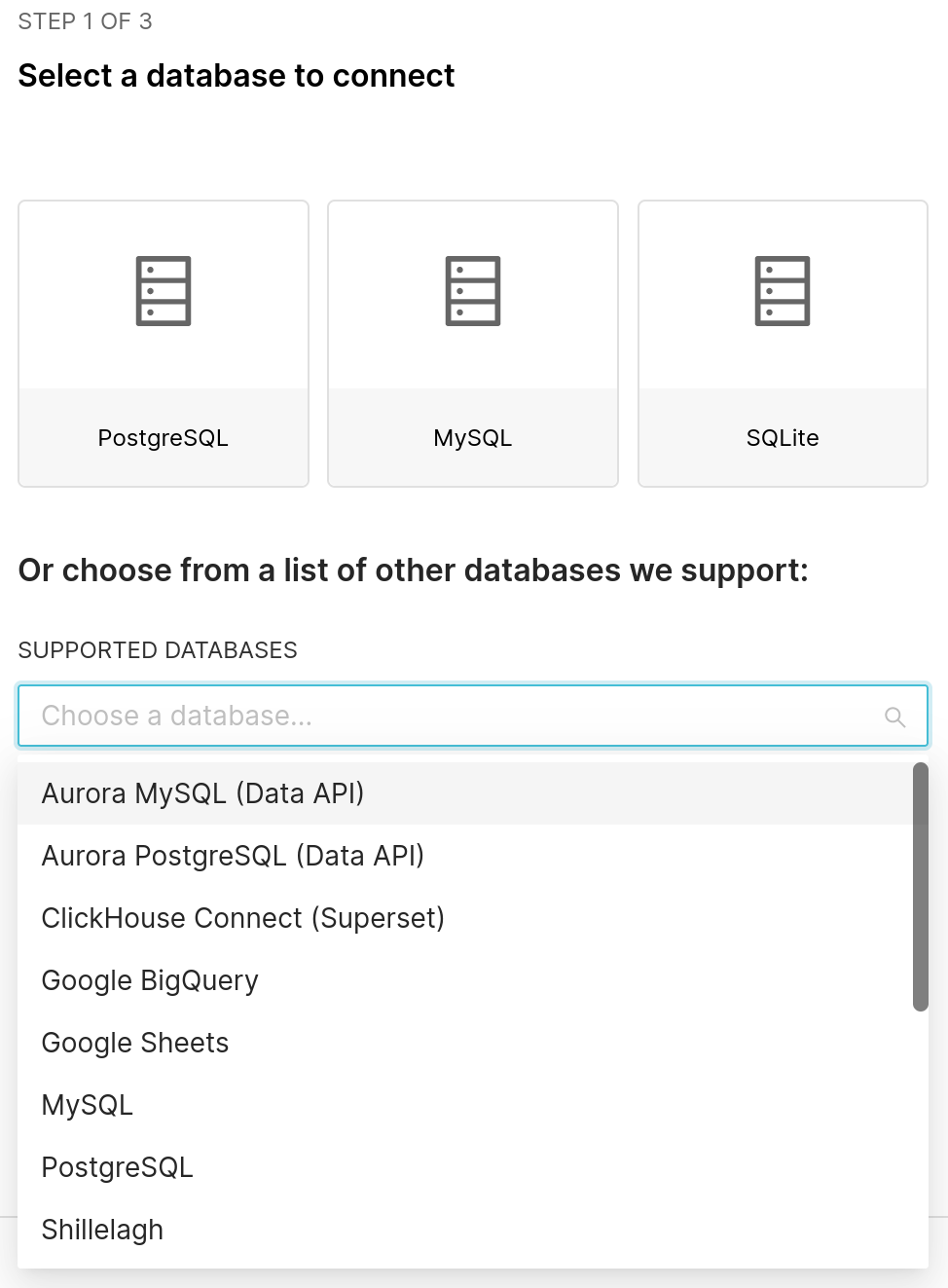
                                  image.png

                                  Z 1 Reply Last reply
                                  0
                                  • girishG girish

                                    @zeitrechnen I managed to reproduce this. Can you please update to the latest package and check?

                                    image.png

                                    Z Offline
                                    Z Offline
                                    zeitrechnen
                                    wrote on last edited by
                                    #18

                                    @girish Many thanks! I updated to the latest version, and now I can select BigQuery. Great!

                                    1 Reply Last reply
                                    1
                                    • C Offline
                                      C Offline
                                      creative567145
                                      wrote on last edited by
                                      #19

                                      @girish we are trying to connect a MySQL DB but it requires the following:
                                      driver "mysql-connector-python"
                                      Is it possilble for it to be installed by us or by your team (by pushing it in the new update)?
                                      Thank you

                                      1 Reply Last reply
                                      0
                                      • girishG Offline
                                        girishG Offline
                                        girish
                                        Staff
                                        wrote on last edited by
                                        #20

                                        @creative567145 I was going to say that it works fine with ours but it seems newer MySQL needs that module per https://github.com/apache/superset/blob/3dadefcfb0f0f2da159bec549ca1ed87263a31b6/docs/docs/configuration/databases.mdx#mysql .

                                        1 Reply Last reply
                                        0
                                        • girishG Offline
                                          girishG Offline
                                          girish
                                          Staff
                                          wrote on last edited by
                                          #21

                                          @creative567145 I have added it now. You have to use connection string like mysql+mysqlconnector://{username}:{password}@{host}/{database}

                                          1 Reply Last reply
                                          0
                                          • J joseph forked this topic on

                                          Hello! It looks like you're interested in this conversation, but you don't have an account yet.

                                          Getting fed up of having to scroll through the same posts each visit? When you register for an account, you'll always come back to exactly where you were before, and choose to be notified of new replies (either via email, or push notification). You'll also be able to save bookmarks and upvote posts to show your appreciation to other community members.

                                          With your input, this post could be even better 💗

                                          Register Login
                                          Reply
                                          • Reply as topic
                                          Log in to reply
                                          • Oldest to Newest
                                          • Newest to Oldest
                                          • Most Votes


                                          • Login

                                          • Don't have an account? Register

                                          • Login or register to search.
                                          • First post
                                            Last post
                                          0
                                          • Categories
                                          • Recent
                                          • Tags
                                          • Popular
                                          • Bookmarks
                                          • Search

