
Cloudron makes it easy to run web apps like WordPress, Nextcloud, GitLab on your server. Find out more or install now.


Skip to content
  • Categories
  • Recent
  • Tags
  • Popular
  • Bookmarks
  • Search
Skins
  • Light
  • Brite
  • Cerulean
  • Cosmo
  • Flatly
  • Journal
  • Litera
  • Lumen
  • Lux
  • Materia
  • Minty
  • Morph
  • Pulse
  • Sandstone
  • Simplex
  • Sketchy
  • Spacelab
  • United
  • Yeti
  • Zephyr
  • Dark
  • Cyborg
  • Darkly
  • Quartz
  • Slate
  • Solar
  • Superhero
  • Vapor

  • Default (No Skin)
  • No Skin
Collapse
Brand Logo

Cloudron Forum

Apps - Status | Demo | Docs | Install
  1. Cloudron Forum
  2. Support
  3. Cloudron Install Issues

Cloudron Install Issues

Scheduled Pinned Locked Moved Solved Support
installation
9 Posts 3 Posters 2.8k Views 3 Watching
  • Oldest to Newest
  • Newest to Oldest
  • Most Votes
Reply
  • Reply as topic
Log in to reply
This topic has been deleted. Only users with topic management privileges can see it.
  • S Offline
    S Offline
    SignalScout
    wrote on last edited by girish
    #1

    Im attempting to install Cloudron on Ubuntu 22.04.
    Initially Init script would fail because it couldnt reach files at us.archive.ubuntu.
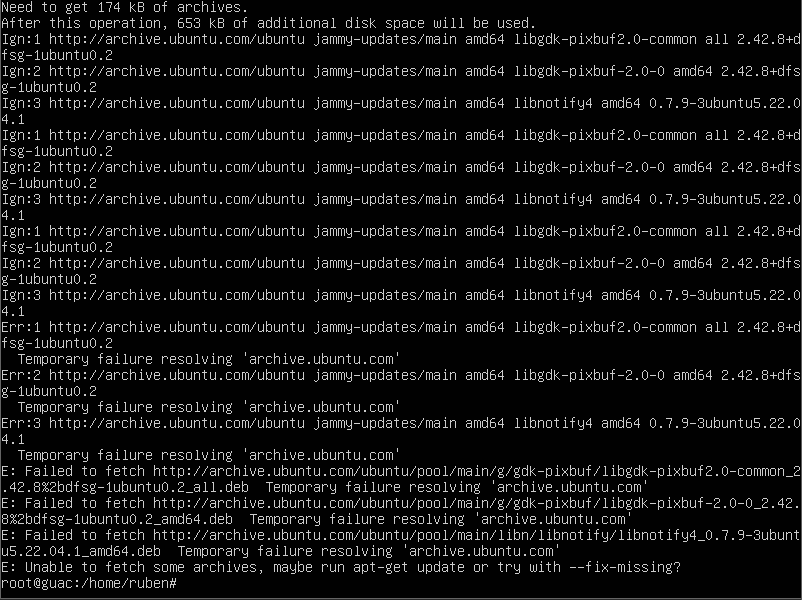
    3e832842-9ffb-4442-a784-8b933c600e3f-image.png

    After manual install of those files I receive this error for collectd.
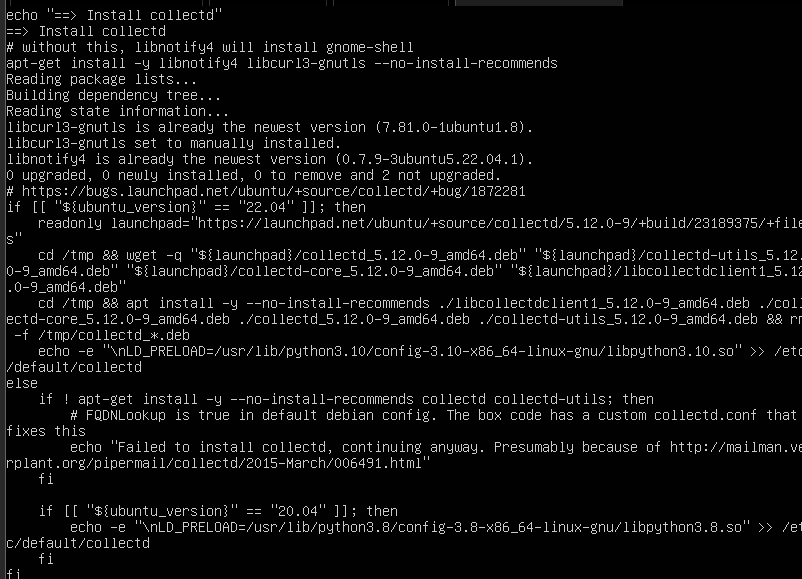
    90776a0d-fd8d-4117-9a3b-50ec7a8dbb7d-image.png

    girishG 1 Reply Last reply
    0
    • S SignalScout

      Im attempting to install Cloudron on Ubuntu 22.04.
      Initially Init script would fail because it couldnt reach files at us.archive.ubuntu.

      3e832842-9ffb-4442-a784-8b933c600e3f-image.png

      After manual install of those files I receive this error for collectd.

      90776a0d-fd8d-4117-9a3b-50ec7a8dbb7d-image.png

      girishG Offline
      girishG Offline
      girish
      Staff
      wrote on last edited by girish
      #2

      @SignalScout Where are you installing this?

      Maybe you start afresh and try this:

      • Start with vanilla 22.04
      • apt update and then apt upgrade. This is done by the Cloudron installation script but maybe we can identify if there is some temporary error here by running it manually.
      • Now install cloudron
      S 1 Reply Last reply
      0
      • girishG girish marked this topic as a question on
      • girishG girish

        @SignalScout Where are you installing this?

        Maybe you start afresh and try this:

        • Start with vanilla 22.04
        • apt update and then apt upgrade. This is done by the Cloudron installation script but maybe we can identify if there is some temporary error here by running it manually.
        • Now install cloudron
        S Offline
        S Offline
        SignalScout
        wrote on last edited by
        #3

        @girish It completes the apt update and upgrade successfully, but continues to fail at the same pkgs. I ran an apt update--fix-missing a couple times after script failure. This is the output.
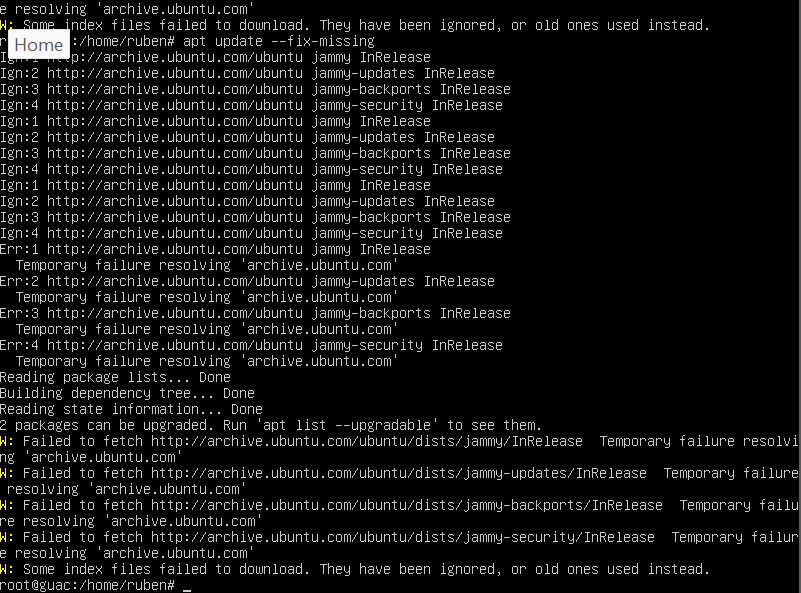
        7b1afbfd-af7a-447d-9ae0-8c569c9e1ff5-image.png

        1 Reply Last reply
        0
        • nebulonN Offline
          nebulonN Offline
          nebulon
          Staff
          wrote on last edited by
          #4

          So if you start with a fresh vanilla ubuntu installation, you can run apt-get update && apt-get upgrade fine and then running cloudron-setup results in such failure?

          If you need to run --fix-missing there is already some underlying issue which we need to get down to first.

          S 1 Reply Last reply
          0
          • nebulonN nebulon

            So if you start with a fresh vanilla ubuntu installation, you can run apt-get update && apt-get upgrade fine and then running cloudron-setup results in such failure?

            If you need to run --fix-missing there is already some underlying issue which we need to get down to first.

            S Offline
            S Offline
            SignalScout
            wrote on last edited by
            #5

            @nebulon that is correct. I only ran --fix after the cloudron-setup failed. Just ran --fix prior to setup and nothing unusual happens.
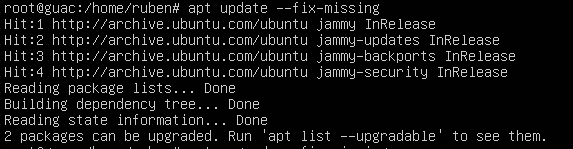
            bba44dc8-729f-4bbd-807f-af6258b75d22-image.png

            1 Reply Last reply
            0
            • nebulonN Offline
              nebulonN Offline
              nebulon
              Staff
              wrote on last edited by
              #6

              Is this on a specific server provider or a bare-metal installation?

              S 1 Reply Last reply
              0
              • nebulonN nebulon

                Is this on a specific server provider or a bare-metal installation?

                S Offline
                S Offline
                SignalScout
                wrote on last edited by
                #7

                @nebulon its on a local server using esxi.

                girishG 1 Reply Last reply
                0
                • S SignalScout

                  @nebulon its on a local server using esxi.

                  girishG Offline
                  girishG Offline
                  girish
                  Staff
                  wrote on last edited by
                  #8

                  @SignalScout can you check these:

                  • systemctl status unbound
                  • cat /etc/resolv.conf . Where is the resolv pointing to?
                  • host www.cloudron.io - Does this resolve ?
                  S 1 Reply Last reply
                  0
                  • girishG girish

                    @SignalScout can you check these:

                    • systemctl status unbound
                    • cat /etc/resolv.conf . Where is the resolv pointing to?
                    • host www.cloudron.io - Does this resolve ?
                    S Offline
                    S Offline
                    SignalScout
                    wrote on last edited by
                    #9

                    @girish
                    The resolv.conf has nameserver set to 8.8.8.8 and 8.8.4.4.

                    I did notice that when I ran the script it would overwrite dns and set to 127.0.0.1.

                    I edited the /etc/resolvconf/resolv.conf.d/head file and permanently added nameserver 8.8.8.8 and 8.8.4.4

                    Ran the install and successfully installed.

                    Thank you for your assistance!

                    1 Reply Last reply
                    0
                    • girishG girish has marked this topic as solved on

                    Hello! It looks like you're interested in this conversation, but you don't have an account yet.

                    Getting fed up of having to scroll through the same posts each visit? When you register for an account, you'll always come back to exactly where you were before, and choose to be notified of new replies (either via email, or push notification). You'll also be able to save bookmarks and upvote posts to show your appreciation to other community members.

                    With your input, this post could be even better 💗

                    Register Login
                    Reply
                    • Reply as topic
                    Log in to reply
                    • Oldest to Newest
                    • Newest to Oldest
                    • Most Votes


                    • Login

                    • Don't have an account? Register

                    • Login or register to search.
                    • First post
                      Last post
                    0
                    • Categories
                    • Recent
                    • Tags
                    • Popular
                    • Bookmarks
                    • Search
