
Cloudron makes it easy to run web apps like WordPress, Nextcloud, GitLab on your server. Find out more or install now.


Skip to content
  • Categories
  • Recent
  • Tags
  • Popular
  • Bookmarks
  • Search
Skins
  • Light
  • Brite
  • Cerulean
  • Cosmo
  • Flatly
  • Journal
  • Litera
  • Lumen
  • Lux
  • Materia
  • Minty
  • Morph
  • Pulse
  • Sandstone
  • Simplex
  • Sketchy
  • Spacelab
  • United
  • Yeti
  • Zephyr
  • Dark
  • Cyborg
  • Darkly
  • Quartz
  • Slate
  • Solar
  • Superhero
  • Vapor

  • Default (No Skin)
  • No Skin
Collapse
Brand Logo

Cloudron Forum

Offical apps | Community apps | Demo | Docs | Install
O

OskarArdolo

@OskarArdolo
Unfollow Follow
About
Posts
5
Topics
2
Shares
0
Groups
0
Followers
0
Following
0

Posts

Recent Best Controversial

  • Plugins auto update fail
    O OskarArdolo
    Grafana

    Hi, I have experienced an issue today with my Grafana instance.

    I have a datasource configured on InfluxDB, and today it was entirely bugged in the Grafana app (somehow missing, and somehow still there, Schrodinger's datasource)

    After looking at logs, I found the root cause: an update on the influx's grafana plugin.
    The application tries to update its plugins on start-up which seems to be located in /app/code/data/plugins-bundled/, which is read-only. Therefore it could not finish the update and never loads the plugin.

    Updating plugin  pluginId=influxdb from=13.1.3 to=13.1.6
    Failed to install plugin  pluginId=influxdb error="unlinkat /app/code/data/plugins-bundled/influxdb: read-only file system"
    plugin process exited  logger=plugin.influxdb
    

    This only happened now because there was an update published yesterday on the Cloudron package, which made the container restart.

    Adding this to /app/data/custom.ini "solves" the problem:

    [plugins]
    preinstall_auto_update = false
    

    But correct fixing would be putting plugins somewhere in /app/data or make their directory writable by the update process.
  • Dolibarr SMTP configuration is not filled with Cloudron settings starting from package version 1.13.0
    O OskarArdolo
    Dolibarr

    Dolibarr version: 23.X.X
    Cloudron package version: 1.13.X, 1.14.X

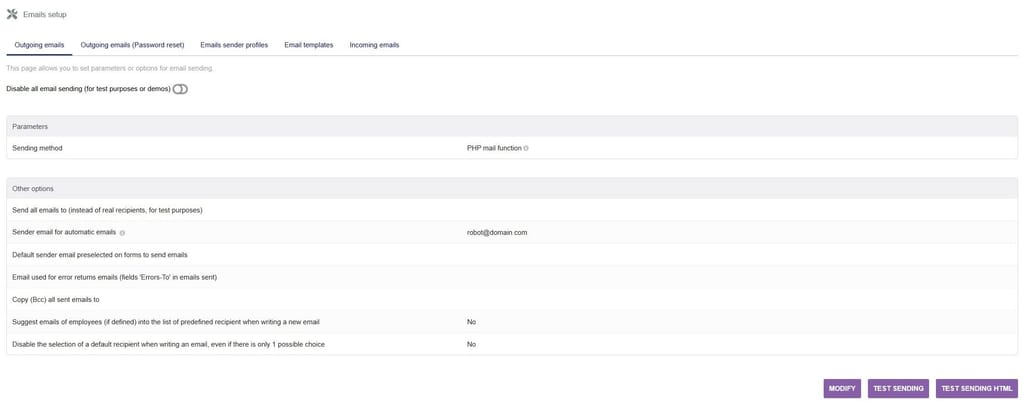
    Hi, I just discovered today that any install made from package version 1.13.X or higher will result in SMTP configuration in Dolibarr to be default configuration:
    0041984b-0e0f-40fa-a3a9-e8ba372c6bc7-image.jpeg

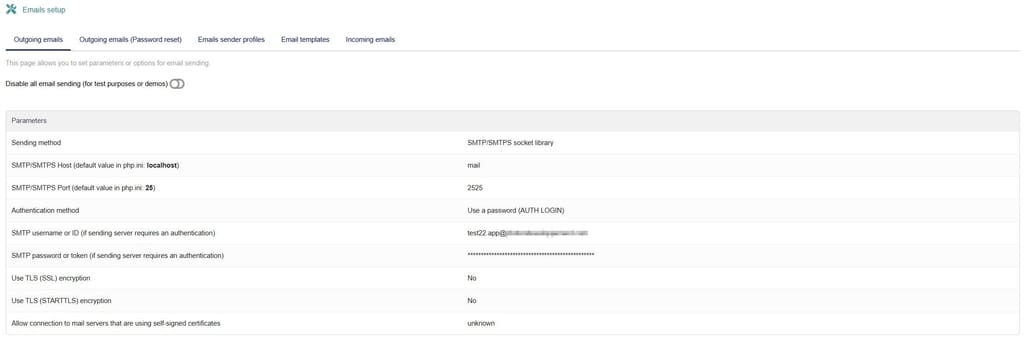
    In previous package versions, installing Dolibarr would automatically fill SMTP configuration with Cloudron settings values ; but this behaviour does not work starting from package version 1.13.0 (Dolibarr 23.0.0)

    Here is a screenshot from fresh 1.12.0 install:
    5e6f3eca-67ef-4b6c-b8c0-53bf7230391d-image.jpeg

    Without being Dolibarr-specific, how are we supposed to configure SMTP settings when Cloudron does not?
    SMTP host and login is pretty straightforward (my.domain.com with appname.app@domain.com), but I have no clue where we can get the password for each app. Is there a way to get it?

    Thank you very much.


  • tcpdf error permission denied cuz invoice job create folder with root permission instead of www-data
    O OskarArdolo
    Dolibarr

    @james said:

    Hello @matth33
    Sorry it took so long.
    It was actualy a simple fix and the latest app update fixes this issue.

    Hi, I cannot update my dolibarr app because of external modules that are not compatible with latests versions.
    Is that possible to share the fix so I can reproduce it manually in my instance please?

    Thank you very much.


  • External links: now mangles http URLs by prepending https
    O OskarArdolo
    Support app link dashboard

    When will next version with this patch be published please?
    Thank you very much.


  • Dolibarr OIDC
    O OskarArdolo
    Dolibarr

    Hi, I had same problem today. I was unable to connect to admin account using password.
    A workaround I did was to edit Dolibarr "admin" account username to an already existing Cloudron username (using a Dolibarr account that had administrator rights). I could then connect with OIDC on the edited admin account.

    But I'm pretty sure I was able to connect to that admin account with username/password months ago. I'm not a big fan of the workaround I used today.

  • Login

  • Don't have an account? Register

  • Login or register to search.
  • First post
    Last post
0
  • Categories
  • Recent
  • Tags
  • Popular
  • Bookmarks
  • Search