
Thanks for this - not sure what happened to the original links and how I ended up on what seem like a dev server
I edited my original post to fix the links.
T
Teiluj
@Teiluj
Posts
-
Immich v3 breaking changes -
App update failing with "Downgrades are not permitted"Thanks @nebulon - Much appreciated.
-
IT-Tools and OIDC - Looping issue@joseph Thanks - This is only a problem with the IT-tools app and this user.
Essentially this is reproducible in the sense that the user is pulled/synced from a master Cloudron directory (on server A) and the behavior is the same whether the application is running on server A B or C.
To which extend it can be reproduce on a different server with a different user directory/directory setup, I am not sure.
I will contact support as suggested.
-
App update failing with "Downgrades are not permitted" -
App update failing with "Downgrades are not permitted" -
App update failing with "Downgrades are not permitted"I am facing an issue with an app marked as needed an update even if the the app shows as already being on the latest package version.
- App: Vaultwarden
- Current version on the server it is running on: Vaulwarden 1.36.0
- Package version: com.github.bitwardenrs@1.25.0
I believe that this is already the latest version of the Cloudron package / Vaulwarden app.
The app however shows as having an update available:
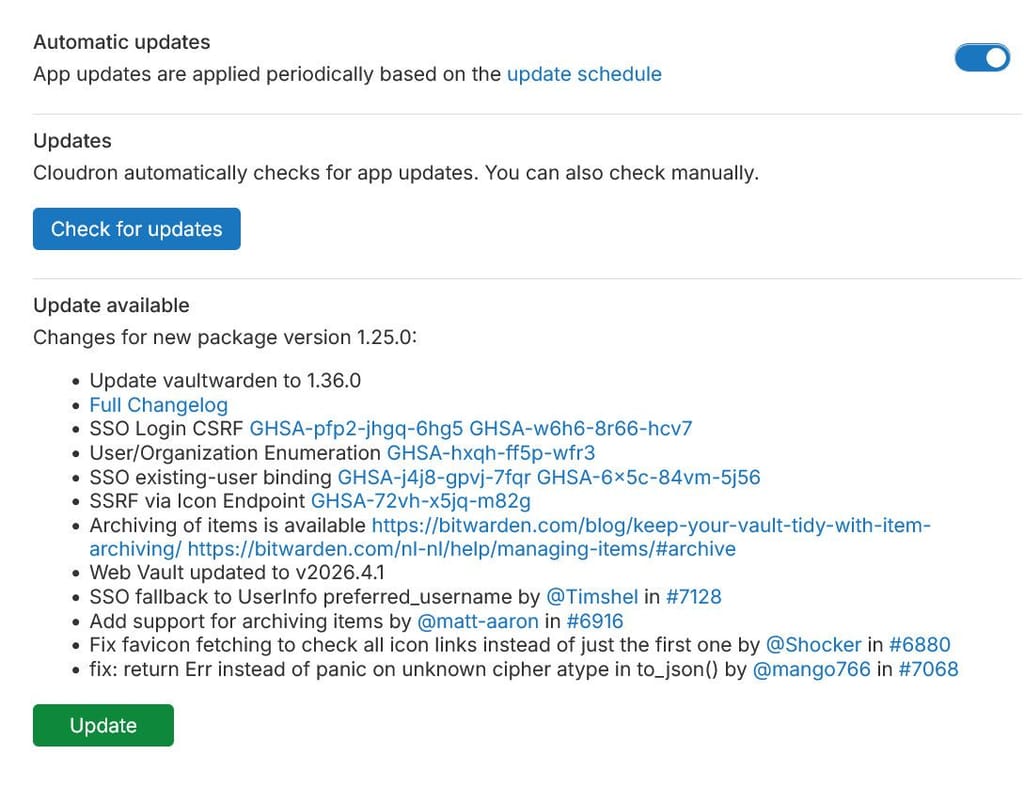
Upon attempting to update, the process fails with the following error:
Downgrades are not permitted for apps installed from AppStore or Community. force to overrideThis sounds similar to this. However, contrarily to this post, I am not at the liberty to restore backup of the app since I cannot be sure when the issue started and there has been some update to the data within the app since then.
A couple of sidenote:
- cloning the app works and the cloned app does not suffer from the same issue.
cloudron-support --troubleshootis clean.
Any suggestion on how to solve the underlying issue?
-
Ability to change calendar color for calendard shared with you.At the moment, when user A shares calendar "Personal" with user B, user B see the following:
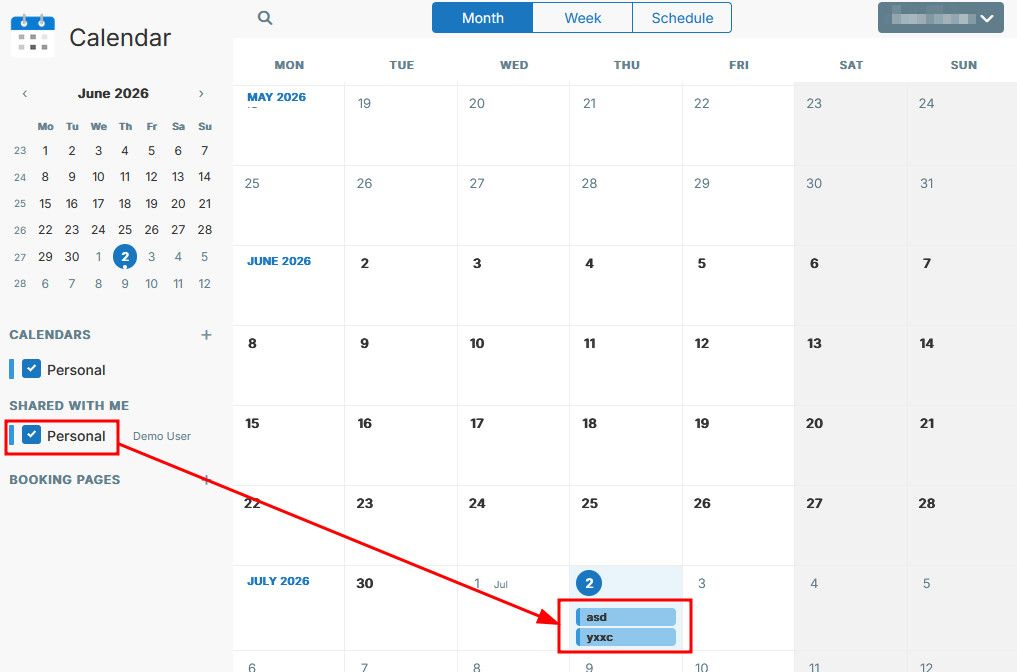
As far as I was able to test, User B does not have the possibility to change either the name or the color of the calendar shared with him within the his app context.
As you can see, User B now has two "Personal" blue calendar. This makes it challenging to differentiate on the calendar views.
Possibly, calendar colors should be limited to each user context making customizing colors personal whether for your own calendar or for calendar shared with you.
Ideally, and since I think that in some occasion having a unified calendar color for all having access to given shared calendar might be relevant too, this could also be a "flag"/tick box to select when sharing a calendar. something like "enforce coloring"
Hopefully this makes sense also.
-
Public view of calendar(s)@nebulon This is great.
Couple of quick notes / suggestions from my side:
-
At the moment, this enables the exposition of a single calendar at a time / per link. It would be great if it was possible to expose multiple calendars via the same link - aka a calendars "view".
E.g. I have a calendar 1 for Room A and a calendar 2 for Room B -> the ablility to have a view exposing calendar 1&2 at the same address to have a quick overview of both calendars at the same time. -
Possibly, it is my permanent brain fog, but I had to search a bit to find the "public sharing" of the calendar (currently under the "edit calendar" menu option).
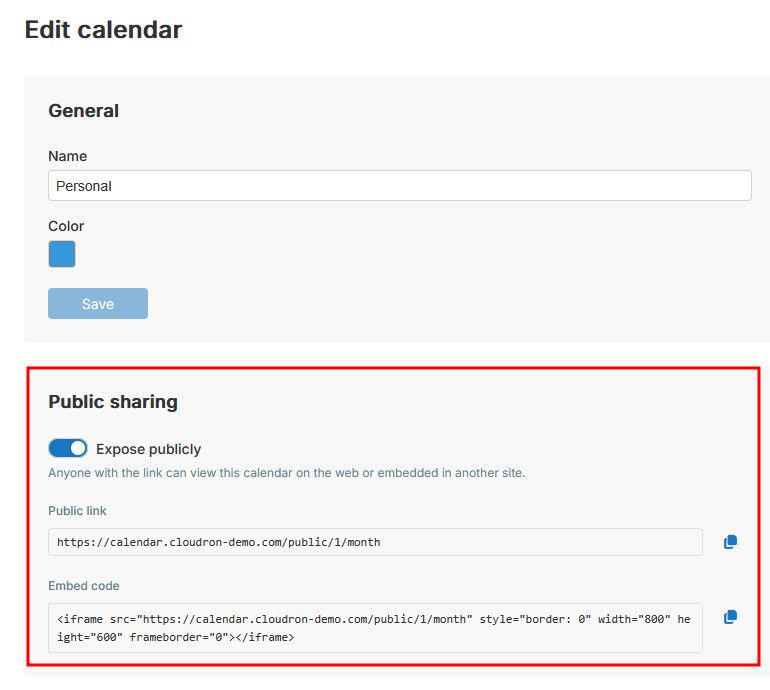
Possibly it would make sense to have a direct way to enable public sharing under the "Sharing" menu option too, or alternatively, in that "Sharing" menu option, a "public sharing" hyperlink redirecting to that "edit calendar" option.
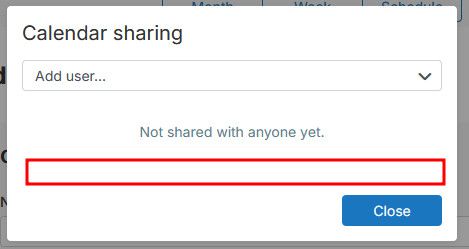
Another alternative would be to leave it as it is, but change the wording from public sharing to "publishing" or "publish"
Thanks again for the implementation
-
-
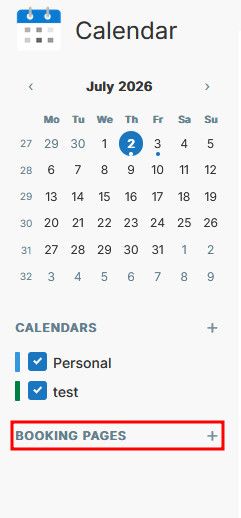
Ability to turn on/off booking page system / creation centrallyHaving the ability to create booking page is great / interesting and I am looking forward how this develops.
However, sometime, this might run against booking system already in place (cal.com / Tymeslot etc..), possibly getting user confused and diverting the booking process from a
Possibly there should be a way to centrally managed whether a user can create booking page or not.
Ideally, this would be governed by permissions (giving user x or usergroup y permissions fro create booking pages) requiring a users / permissions dashboard.
But an easier/faster way might be to simply have this governed by either a switch at the app level, or a env variable.The switch would then simply disable the booking page functions from the calendar app and make this disappear.
Hopefully this makes sense.
-
Docmost to v0.95 but no such release available from Github@joseph so I though - I guess just a timing question until this is published in github with accompanying release notes.
I 'll be patient... I promise I can... -
Docmost to v0.95 but no such release available from GithubIt looks like Cloudron release for Docmost v0.95 was published. But interestingly, there is no such release on Docmost's public github.
Any ideas? or is this likely just a timing issue in between Cloudron's source and the publication/release of v0.95 on github?
-
IT-Tools and OIDC - Looping issueSo, I did not update the thread for a while, but I can confirm that for this same synced-in user, this is happening what ever the server the application is installed on.
Only this user.
No idea why, and how to debug this further - This is pretty annoying, since the user is me

Any idea how to go on about this?
-
New Question Editor require config.php change@girish I can confirm that your fix solved the issue, at least on our side.
Many thanks - Much appreciated!After a brief look, the new editor looks much better than previous one.
-
Contacts & CalendarThese are great additions.
I made a suggestion here already with regards to the calendar - This would be fantastic and would allow to use a "publicly published set of calendars" in case of event and/or in various other places - More info here
-
Public view of calendar(s)Thanks for roadmap inclusion.
We are using something similar with a different product and it is incredibly useful. Having this on Cloudron would greatly improve product overlap.
in our current case, the publication is for read-only purpose mostly so this is what I would suggest initially.
Although there might be some benefit to having the possibility to publish a given set of calendar publicly, with editing capabilities (e.g. collaboration with external non cloudron-based third party etc..)
-
Immich v3 breaking changesHi - I am sure Cloudron's team is all over it already, but since I have done something similar for Paperless-ngx yesterday and I came across this today, here it goes:
Heads up for incoming Immich v3 breaking changes!
More info here
Blog announcement hereHope this helps and the migration of Cloudron's app goes smoothly when the times come.
Cheers!
[Edit] Fix links.
-
Paperless v3 breaking changesA quick heads up - Paperless-ngx is nearing v3 release and it seems to be a big one introducing breaking changes.
More info here:
https://github.com/paperless-ngx/paperless-ngx/blob/beta/docs/migration-v3.mdHopefully this can carry on being supported by Cloudron.
-
New Question Editor require config.php changeHi @james
The console shows errors/warning of the following type:Object { name: "FCP", value: 2166.71, rating: "needs-improvement", delta: 2166.71, entries: (1) […], id: "v5-1781697002910-5326925753083", navigationType: "navigate" } 57.038de187.js:1:917 Object { name: "TTFB", value: 516.677, rating: "good", delta: 516.677, entries: (1) […], id: "v5-1781697002910-9995917222311", navigationType: "navigate" } 57.038de187.js:1:917 API Error: Object { code: "NOT_FOUND", message: "An unknown error occurred", httpStatus: 404, originalError: AxiosError } index.afa03a1e.js:1:2314 API Error: Object { code: "NOT_FOUND", message: "An unknown error occurred", httpStatus: 404, originalError: AxiosError } index.afa03a1e.js:1:2314 API Error: Object { code: "NOT_FOUND", message: "An unknown error occurred", httpStatus: 404, originalError: AxiosError } index.afa03a1e.js:1:2314 XHRGET https://<my.limesurvey.url>/rest/v1/version-info [HTTP/2 404 20ms] Source map error: Error: request failed with status 404 Stack in the worker:networkRequest@resource://devtools/client/shared/source-map-loader/utils/network-request.js:43:9 Resource URL: https://<my.limesurvey.url>/editor/build/static/js/async/57.038de187.js Source Map URL: 57.038de187.js.map Source map error: Error: request failed with status 404 Stack in the worker:networkRequest@resource://devtools/client/shared/source-map-loader/utils/network-request.js:43:9 Resource URL: https://<my.limesurvey.url>/editor/build/static/css/index.5d734da9.css Source Map URL: index.5d734da9.css.map Source map error: Error: request failed with status 404 Stack in the worker:networkRequest@resource://devtools/client/shared/source-map-loader/utils/network-request.js:43:9 Resource URL: https://<my.limesurvey.url>/editor/build/static/css/594.74d89bab.css Source Map URL: 594.74d89bab.css.map XHRGET https://<my.limesurvey.url>/rest/v1/version-info [HTTP/2 404 17ms] XHRGET https://<my.limesurvey.url>/rest/v1/version-info [HTTP/2 404 18ms] XHRGET https://<my.limesurvey.url>/rest/v1/version-info [HTTP/2 404 31ms] XHRGET https://<my.limesurvey.url>/rest/v1/version-info [HTTP/2 404 23ms] Source map error: request failed with status 404 Resource URL: https://<my.limesurvey.url>/editor/build/static/js/async/57.038de187.js Source Map URL: 57.038de187.js.map Source map error: request failed with status 404 Resource URL: https://<my.limesurvey.url>/editor/build/static/js/index.afa03a1e.js Source Map URL: index.afa03a1e.js.map Source map error: request failed with status 404 Resource URL: https://<my.limesurvey.url>/editor/build/static/js/lib-polyfill.57770fb6.js Source Map URL: lib-polyfill.57770fb6.js.map Source map error: request failed with status 404 Resource URL: https://<my.limesurvey.url>/editor/build/static/js/594.9d0509ec.js Source Map URL: 594.9d0509ec.js.map Source map error: request failed with status 404 Resource URL: https://<my.limesurvey.url>/editor/build/static/js/lib-react.921b21ad.js Source Map URL: lib-react.921b21ad.js.map Source map error: request failed with status 404 Resource URL: https://<my.limesurvey.url>/editor/build/static/js/lib-axios.d29b975f.js Source Map URL: lib-axios.d29b975f.js.map Source map error: request failed with status 404 Resource URL: https://<my.limesurvey.url>/editor/build/static/js/lib-router.ff97bacb.js Source Map URL: lib-router.ff97bacb.js.map XHRGET https://<my.limesurvey.url>/rest/v1/version-info [HTTP/2 404 21ms] Source map error: Error: request failed with status 404 Stack in the worker:networkRequest@resource://devtools/client/shared/source-map-loader/utils/network-request.js:43:9 Resource URL: https://<my.limesurvey.url>/editor/build/static/js/index.afa03a1e.js Source Map URL: index.afa03a1e.js.map XHRGET https://<my.limesurvey.url>/rest/v1/version-info [HTTP/2 404 17ms] XHRGET https://<my.limesurvey.url>/rest/v1/version-info [HTTP/2 404 16ms] XHRGET https://<my.limesurvey.url>/rest/v1/version-info [HTTP/2 404 16ms] XHRGET https://<my.limesurvey.url>/rest/v1/version-info [HTTP/2 404 19ms] XHRGET https://<my.limesurvey.url>/rest/v1/version-info [HTTP/2 404 16ms] XHRGET https://<my.limesurvey.url>/rest/v1/version-info [HTTP/2 404 90ms] XHRGET https://<my.limesurvey.url>/rest/v1/version-info [HTTP/2 404 18ms] XHRGET https://<my.limesurvey.url>/rest/v1/version-info [HTTP/2 404 16ms] XHRGET https://<my.limesurvey.url>/rest/v1/version-info [HTTP/2 404 22ms] XHRGET https://<my.limesurvey.url>/rest/v1/version-info [HTTP/2 404 42ms] XHRGET https://<my.limesurvey.url>/rest/v1/version-info [HTTP/2 404 15ms] XHRGET https://<my.limesurvey.url>/rest/v1/version-info [HTTP/2 404 30ms] XHRGET https://<my.limesurvey.url>/rest/v1/version-info [HTTP/2 404 36ms] XHRGET https://<my.limesurvey.url>/rest/v1/version-info [HTTP/2 404 30ms] XHRGET https://<my.limesurvey.url>/rest/v1/version-info [HTTP/2 404 23ms] XHRGET https://<my.limesurvey.url>/rest/v1/version-info [HTTP/2 404 40ms] XHRGET https://<my.limesurvey.url>/rest/v1/version-info [HTTP/2 404 16ms] XHRGET https://<my.limesurvey.url>/rest/v1/version-info [HTTP/2 404 34ms] XHRGET https://<my.limesurvey.url>/rest/v1/version-info [HTTP/2 404 17ms] XHRGET https://<my.limesurvey.url>/rest/v1/version-info [HTTP/2 404 24ms] XHRGET https://<my.limesurvey.url>/rest/v1/version-info [HTTP/2 404 41ms] XHRGET https://<my.limesurvey.url>/rest/v1/version-info [HTTP/2 404 36ms] Object { name: "INP", value: 16.667, rating: "good", delta: 16.667, entries: (1) […], id: "v5-1781697002910-7874295037768", navigationType: "navigate" } 57.038de187.js:1:917 Object { name: "LCP", value: 2200.044, rating: "good", delta: 2200.044, entries: (1) […], id: "v5-1781697002910-4018760916501", navigationType: "navigate" } 57.038de187.js:1:917 XHRGET https://<my.limesurvey.url>/rest/v1/version-info [HTTP/2 404 19ms] XHRGET https://<my.limesurvey.url>/rest/v1/version-info [HTTP/2 404 24ms] XHRGET https://<my.limesurvey.url>/rest/v1/version-info [HTTP/2 404 18ms]Here is the details of the XHRGET Error:
XHRGET
https://<my.limesurvey.url>/rest/v1/version-info
[HTTP/2 404  17ms]


GET
	https://<my.limesurvey.url>/rest/v1/version-info
Status
404
VersionHTTP/2
Transferred430 B (277 B size)
Referrer Policysame-origin
DNS ResolutionDNS over HTTPS


    content-length
    	277
    content-type
    	text/html; charset=iso-8859-1
    date
    	Wed, 17 Jun 2026 11:50:24 GMT
    server
    	nginx
    X-Firefox-Spdy
    	h2

    Accept
    	application/json, text/plain, */*
    Accept-Encoding
    	gzip, deflate, br, zstd
    Accept-Language
    	en-US,en;q=0.9
    Connection
    	keep-alive
    Cookie
    	PHPSESSID=<myPHPSessionID>; YII_CSRF_TOKEN=<myYIITokken>
    Host
    	<my.limesurvey.url>
    Referer
    	https://<my.limesurvey.url>/editor/
    Sec-Fetch-Dest
    	empty
    Sec-Fetch-Mode
    	cors
    Sec-Fetch-Site
    	same-origin
    Sec-GPC
    	1
    User-Agent
    	Mozilla/5.0 (Windows NT 10.0; Win64; x64; rv:152.0) Gecko/20100101 Firefox/152.0
Hope this helps - Thanks,
-
New Question Editor require config.php changeAdditionally after a further check, switching to the new question editor prevent access to surveys (creating / modifying), with a "checking permissions" purple wheel of.... waiting.
Reverting the changes in config.php fix the issue of access to the surveys, but does prevent access to the new question editor too.
-
New Question Editor require config.php changeJust an FYI:
With the arrival of LimeSurvey 7, there seems to be a new Question Editor available.
However, this require a change in the config.php which trigger a rewrite of URLs.
More info here:
https://www.limesurvey.org/manual/LimeSurvey_7_Question_EditorManually changing the config.php is trivial, but I wonder if this is something that should be considered as updating the Cloudron app package with, as default, considering the direction the app is taking
Due to the impact/consequences of the change however (details in the article linked above), triggering the update to the package should be a manual one and not pushed as automatic.