Cloudron makes it easy to run web apps like WordPress, Nextcloud, GitLab on your server. Find out more or install now.


Skip to content
  • Categories
  • Recent
  • Tags
  • Popular
  • Bookmarks
  • Search
Skins
  • Light
  • Brite
  • Cerulean
  • Cosmo
  • Flatly
  • Journal
  • Litera
  • Lumen
  • Lux
  • Materia
  • Minty
  • Morph
  • Pulse
  • Sandstone
  • Simplex
  • Sketchy
  • Spacelab
  • United
  • Yeti
  • Zephyr
  • Dark
  • Cyborg
  • Darkly
  • Quartz
  • Slate
  • Solar
  • Superhero
  • Vapor

  • Default (No Skin)
  • No Skin
Collapse
Brand Logo

Cloudron Forum

Apps - Status | Demo | Docs | Install
  1. Cloudron Forum
  2. Baserow
  3. Postgre DB is big (20+GB) - How can I understand what's stored there?

Postgre DB is big (20+GB) - How can I understand what's stored there?

Scheduled Pinned Locked Moved Solved Baserow
postgresql
12 Posts 4 Posters 2.9k Views 4 Watching
  • Oldest to Newest
  • Newest to Oldest
  • Most Votes
Reply
  • Reply as topic
Log in to reply
This topic has been deleted. Only users with topic management privileges can see it.
  • J Offline
    J Offline
    joseph
    Staff
    wrote on last edited by
    #2

    I guess some app is storing a lot in postgres. With some help from ChatGPT:

    docker exec -it postgresql /bin/bash
    psql -Uroot  --dbname=postgres
    

    Then, run this query in postgresql prompt:

    SELECT pg_database.datname AS database_name,
           pg_size_pretty(pg_database_size(pg_database.datname)) AS size
    FROM pg_database
    ORDER BY pg_database_size(pg_database.datname) DESC;
    

    This gives a bunch of daabase names like dbf88f51a1c41249a6947427dedb491dfd. Take the first 6 characters like f88f51a1 and put in the search field in the dashboard. This will reveal the app.

    humptydumptyH 1 Reply Last reply
    1
    • J joseph marked this topic as a question on
    • J joseph

      I guess some app is storing a lot in postgres. With some help from ChatGPT:

      docker exec -it postgresql /bin/bash
      psql -Uroot  --dbname=postgres
      

      Then, run this query in postgresql prompt:

      SELECT pg_database.datname AS database_name,
             pg_size_pretty(pg_database_size(pg_database.datname)) AS size
      FROM pg_database
      ORDER BY pg_database_size(pg_database.datname) DESC;
      

      This gives a bunch of daabase names like dbf88f51a1c41249a6947427dedb491dfd. Take the first 6 characters like f88f51a1 and put in the search field in the dashboard. This will reveal the app.

      humptydumptyH Offline
      humptydumptyH Offline
      humptydumpty
      wrote on last edited by
      #3

      @joseph I think he knows which app it’s related to (baserow) but doesn’t understand why it’s so big given he has 100 rows of data only.

      1 Reply Last reply
      1
      • A AmbroiseUnly

        Postgresql contain 21 GB of data on my Cloudron server that only has a single app: Baserow

        The baserow database itself only contains around a hundred records, nothing huge.
        So, I wonder why the postgresql on that server is so huge. Can I login to it and navigate the PG DB directly? Or is there another simpler/smarter way to understand what's being stored there?

        $ du -h --max-depth=1
        21G	./postgresql
        84K	./addons
        197M	./mysql
        20K	./oidc
        518M	./mongodb
        136K	./nginx
        4.0K	./tls
        16K	./logrotate.d
        4.0K	./cifs
        12K	./backup
        4.0K	./acme
        4.0K	./sshfs
        236K	./update
        8.0K	./diskusage
        24K	./sftp
        524K	./redis
        207M	./logs
        4.0K	./firewall
        12K	./collectd
        48M	./graphite
        22G	.
        
        humptydumptyH Offline
        humptydumptyH Offline
        humptydumpty
        wrote on last edited by humptydumpty
        #4

        @AmbroiseUnly I don’t use baserow but I’ve ran into something similar with other apps and it was the log files. Check the upstream docs and in-app to locate them. Report this upstream too.

        1 Reply Last reply
        1
        • J Offline
          J Offline
          joseph
          Staff
          wrote on last edited by
          #5

          Reading fail on my part, sorry. @AmbroiseUnly so the next step is to determine which table in baserow is taking much space. Could be logs as @humptydumpty mentioned. You can access the db from Web Terminal and click the postgres button on nav bar

          1 Reply Last reply
          1
          • A Offline
            A Offline
            AmbroiseUnly
            wrote on last edited by
            #6

            Okay! I thought about the logs but the folder ./logs mislead me, as I thought it couldn't be that because it was so small. Didn't think there would be both logs in the filesystem and in the db. I'll try to have a look into the db then.

            1 Reply Last reply
            0
            • A Offline
              A Offline
              AmbroiseUnly
              wrote on last edited by
              #7

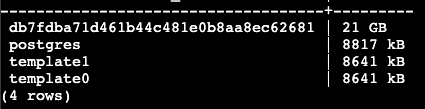
              image.png

              So, db7fdba71d461b44c481e0b8aa8ec62681 is taking 21GB

              So it'd be db7fdb, where is the "Dashboard" you mentioned? I didn't understand that part

              1 Reply Last reply
              0
              • J Offline
                J Offline
                joseph
                Staff
                wrote on last edited by
                #8

                @AmbroiseUnly look into which table of db7fdba71d461b44c481e0b8aa8ec62681 is taking space .

                1 Reply Last reply
                0
                • A Offline
                  A Offline
                  AmbroiseUnly
                  wrote on last edited by
                  #9

                  I ran

                  SELECT relname AS table_name,
                         pg_size_pretty(pg_total_relation_size(relid)) AS total_size,
                         pg_size_pretty(pg_relation_size(relid)) AS table_size,
                         pg_size_pretty(pg_total_relation_size(relid) - pg_relation_size(relid)) AS index_size
                  FROM pg_catalog.pg_statio_user_tables
                  ORDER BY pg_total_relation_size(relid) DESC;


                  And got
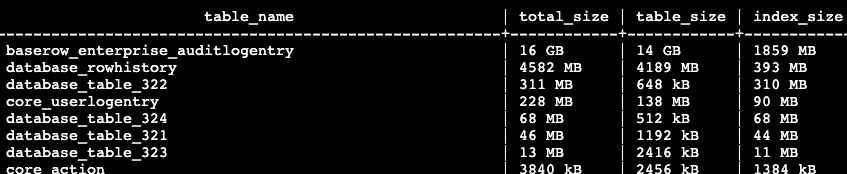
                  image.png

                  So it seems what's taking space are 2 items:

                  • History of audit, which is useless to me because I'm not "enterprise" (and don't plan on switching plan)
                  • History of rows, which is definitely useful but I need to be careful because I'm storing data related to crypto and value of each crypto, so changes happen every couple minute on each row
                  1 Reply Last reply
                  0
                  • A Offline
                    A Offline
                    AmbroiseUnly
                    wrote on last edited by
                    #10

                    My env.sh

                    # Add Baserow customizations here (https://baserow.io/docs/installation/configuration)
                    
                    export BASEROW_BACKEND_LOG_LEVEL=INFO
                    
                    # Changed default because I don't have Enterprise plan and don't have a need for audit log
                    # But I'm interested in retention history for a bit longer
                    # See https://forum.cloudron.io/topic/13193/postgre-db-is-big-20-gb-how-can-i-understand-what-s-stored-there/9?_=1738227461250
                    export BASEROW_ROW_HISTORY_RETENTION_DAYS=365
                    export BASEROW_ENTERPRISE_AUDIT_LOG_RETENTION_DAYS=30
                    
                    
                    1 Reply Last reply
                    0
                    • A Offline
                      A Offline
                      AmbroiseUnly
                      wrote on last edited by
                      #11

                      Yes, you can set BASEROW_ENTERPRISE_AUDIT_LOG_RETENTION_DAYS to control how long audit logs are kept. Setting this to 30 days would automatically prune logs older than a month.
                      Actions (which power the undo/redo functionality) can also take up significant space. Consider setting BASEROW_JOB_CLEANUP_INTERVAL_MINUTES to run cleanup more frequently.
                      You can also adjust BASEROW_ROW_HISTORY_RETENTION_DAYS to limit how long row history is kept.

                      I am not familiar with Cloudron but make sure you are also removing old docker images as they also often take up space

                      and if you are on a Debian based OS and you do updates often the occasional sudo apt auto-remove won’t hurt…
                      I suspect you have the bulk of the data in the table you found but these are a couple more things you can check that I often see people forget as well

                      From my discussion with the Cloudron team

                      1 Reply Last reply
                      0
                      • girishG Offline
                        girishG Offline
                        girish
                        Staff
                        wrote on last edited by
                        #12

                        Thanks, I have put this info in https://docs.cloudron.io/apps/baserow/#log-retention

                        1 Reply Last reply
                        0
                        • girishG girish has marked this topic as solved on
                        • girishG girish moved this topic from Support on

                        Hello! It looks like you're interested in this conversation, but you don't have an account yet.

                        Getting fed up of having to scroll through the same posts each visit? When you register for an account, you'll always come back to exactly where you were before, and choose to be notified of new replies (either via email, or push notification). You'll also be able to save bookmarks and upvote posts to show your appreciation to other community members.

                        With your input, this post could be even better 💗

                        Register Login
                        Reply
                        • Reply as topic
                        Log in to reply
                        • Oldest to Newest
                        • Newest to Oldest
                        • Most Votes


                        • Login

                        • Don't have an account? Register

                        • Login or register to search.
                        • First post
                          Last post
                        0
                        • Categories
                        • Recent
                        • Tags
                        • Popular
                        • Bookmarks
                        • Search