Cloudron makes it easy to run web apps like WordPress, Nextcloud, GitLab on your server. Find out more or install now.


Skip to content
  • Categories
  • Recent
  • Tags
  • Popular
  • Bookmarks
  • Search
Skins
  • Light
  • Brite
  • Cerulean
  • Cosmo
  • Flatly
  • Journal
  • Litera
  • Lumen
  • Lux
  • Materia
  • Minty
  • Morph
  • Pulse
  • Sandstone
  • Simplex
  • Sketchy
  • Spacelab
  • United
  • Yeti
  • Zephyr
  • Dark
  • Cyborg
  • Darkly
  • Quartz
  • Slate
  • Solar
  • Superhero
  • Vapor

  • Default (No Skin)
  • No Skin
Collapse
Brand Logo

Cloudron Forum

Offical apps | Community apps | Demo | Docs | Install
  1. Cloudron Forum
  2. Listmonk
  3. Listmonk: I can't reset my own password???

Listmonk: I can't reset my own password???

Scheduled Pinned Locked Moved Listmonk
22 Posts 3 Posters 5.8k Views 3 Watching
  • Oldest to Newest
  • Newest to Oldest
  • Most Votes
Reply
  • Reply as topic
Log in to reply
This topic has been deleted. Only users with topic management privileges can see it.
  • svtxS
    svtxS
    svtx
    wrote on last edited by svtx
    #1

    Hi there,

    I need to reset the password on this app. It's using it's own user management.

    The provided environment variables from the docs aren't doing anything for me:

    export LISTMONK_app__admin_username=admin
    export LISTMONK_app__admin_password=changeme

    1 Reply Last reply
    0
    • svtxS
      svtxS
      svtx
      wrote on last edited by svtx
      #2
      This post is deleted!
      1 Reply Last reply
      0
      • svtxS
        svtxS
        svtx
        wrote on last edited by svtx
        #3

        Is it possible to run an SQL query on the listmonk database? Can't seem to find that option anywhere but maybe there's a hack?

        1 Reply Last reply
        0
        • robiR
          robiR
          robi
          wrote on last edited by
          #4

          Search the forum

          Conscious tech

          1 Reply Last reply
          0
          • svtxS
            svtxS
            svtx
            wrote on last edited by svtx
            #5

            There is no working solution to this problem on this forum, which is why I've asked.

            1 Reply Last reply
            0
            • svtxS
              svtxS
              svtx
              wrote on last edited by
              #6

              I've used n8n to access the listmonk API using the API user. At least this way I could actually get a hold of my subscribers list. I'll leave it at that as I won't be using listmonk (or Cloudron for that matter) again anytime soon.

              1 Reply Last reply
              0
              • robiR
                robiR
                robi
                wrote on last edited by
                #7

                It's also in the app documentation. There's a post here from June that goes over all the details too.

                Not hard to find.

                Conscious tech

                1 Reply Last reply
                0
                • svtxS
                  svtxS
                  svtx
                  wrote on last edited by svtx
                  #8

                  "The provided environment variables from the docs aren't doing anything for me."

                  Why do you bother replying if you're neither motivated enough to read my post properly nor willing to actually help?

                  1 Reply Last reply
                  0
                  • robiR
                    robiR
                    robi
                    wrote on last edited by
                    #9

                    And you restarted the app after any changes?

                    Conscious tech

                    1 Reply Last reply
                    0
                    • svtxS
                      svtxS
                      svtx
                      wrote on last edited by svtx
                      #10

                      But of course I did, always restarted the app and every time absolutely nothing happens.

                      I tried every possible combination of no quotes, single and double quotes too.
                      Admin username, my username, completely new user name. None of it works.

                      1 Reply Last reply
                      0
                      • robiR
                        robiR
                        robi
                        wrote on last edited by robi
                        #11

                        It's single quotes from the example and other threads on this topic.

                        Conscious tech

                        1 Reply Last reply
                        0
                        • svtxS
                          svtxS
                          svtx
                          wrote on last edited by
                          #12

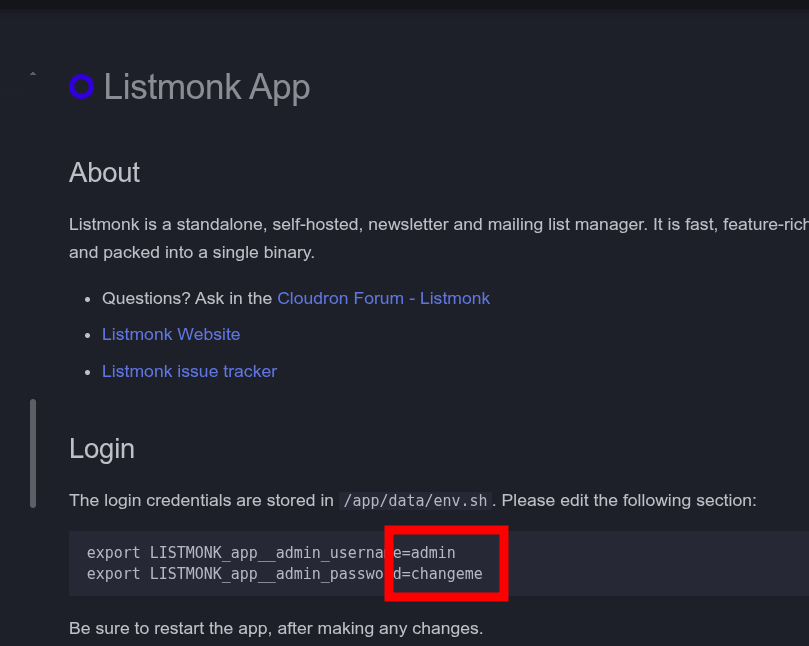
                          Actually, on the docs page there are no quotes.
                          The forum mentions single quotes to be the proper way and...
                          The file itself already uses double quotes.

                          But as I've said already, NONE of them work at all.

                          1 Reply Last reply
                          0
                          • svtxS
                            svtxS
                            svtx
                            wrote on last edited by svtx
                            #13

                            The app's docs page:
                            image.png

                            1 Reply Last reply
                            0
                            • svtxS
                              svtxS
                              svtx
                              wrote on last edited by
                              #14

                              The actual file:
                              image.png

                              1 Reply Last reply
                              0
                              • robiR
                                robiR
                                robi
                                wrote on last edited by
                                #15

                                the export lines run in bash, so if there are special chars in the pw it will fail without quotes.

                                is the app up to date?
                                is the username all lower case?
                                areyou using bitwarden?

                                Conscious tech

                                1 Reply Last reply
                                0
                                • svtxS
                                  svtxS
                                  svtx
                                  wrote on last edited by
                                  #16

                                  Yes, I know that but I'm sure you can see how the documentation is wrong, the forum mentions another thing and when presented with the actual file, yet another case emerges.

                                  At any rate, I really tried ALL combinations here just to be sure. I even tried simple passwords without special characters to see if they break the line but that doesn't seem to be the case either.

                                  Cloudron up to date: YES
                                  App up to date: YES
                                  Username lowercase: YES
                                  Bitwarden: NO

                                  1 Reply Last reply
                                  0
                                  • robiR
                                    robiR
                                    robi
                                    wrote on last edited by
                                    #17

                                    I don't see it as wrong, but it could be improved.

                                    The only other thing I can suggest is to try it on the my.demo.cloudron.io server and see if it has the same behavior.

                                    Conscious tech

                                    1 Reply Last reply
                                    0
                                    • svtxS
                                      svtxS
                                      svtx
                                      wrote on last edited by svtx
                                      #18

                                      Yes, the behaviour is exactly the same on there.

                                      Steps to recreate:

                                      Install app, leave user management to the app
                                      Login to default admin account
                                      Change admin username and pass (login works, tested)
                                      Add credentials on the env.sh file
                                      Restart the app
                                      No users are being changed or added at all.

                                      However here I'm noticing the following notice in the listmonk settings page now (because here I can actually login, as opposed to my actual site:

                                      "Remove the admin_username and admin_password fields from the TOML configuration file or environment variables. If you are using APIs, create and use new API credentials before removing them. Visit Admin -> Settings -> Users dashboard. Learn more."

                                      Removing the credentials from the env.sh file does not remove this notice btw. (seems to refer to a different config)

                                      1 Reply Last reply
                                      0
                                      • robiR
                                        robiR
                                        robi
                                        wrote on last edited by
                                        #19

                                        Maybe the new package needs an adjustment to not step on the external env.sh

                                        @nebulon ?

                                        Conscious tech

                                        1 Reply Last reply
                                        0
                                        • nebulonN
                                          nebulonN
                                          nebulon
                                          Staff
                                          wrote on last edited by
                                          #20

                                          @svtx was trying to reproduce this and indeed it seems the environment variables are not picked up anymore for actual login, however if they are set a warning is shown for the admin login.

                                          It seems listmonk does not support password reset as such via the login form!

                                          Looks like one has to fallback to running database queries directly: https://github.com/knadh/listmonk/discussions/2155

                                          I will remove those env variables from the docs, but I am not sure we should add raw SQL queries there in our docs, as they might get stale as well and cause maybe more harm.


                                          1 Reply Last reply
                                          1

                                          Hello! It looks like you're interested in this conversation, but you don't have an account yet.

                                          Getting fed up of having to scroll through the same posts each visit? When you register for an account, you'll always come back to exactly where you were before, and choose to be notified of new replies (either via email, or push notification). You'll also be able to save bookmarks and upvote posts to show your appreciation to other community members.

                                          With your input, this post could be even better 💗

                                          Register Login
                                          Reply
                                          • Reply as topic
                                          Log in to reply
                                          • Oldest to Newest
                                          • Newest to Oldest
                                          • Most Votes


                                          • Login

                                          • Don't have an account? Register

                                          • Login or register to search.
                                          • First post
                                            Last post
                                          0
                                          • Categories
                                          • Recent
                                          • Tags
                                          • Popular
                                          • Bookmarks
                                          • Search