
-
MiroTalk SFU has a landing page that meeting participants are taken to if the meeting organizer has not yet started the meeting. Really great feature.
I wanted to edit some of the text on this page, but it wouldn't let me save when using Cloudron console. The message said it was read-only.
Is it not permitted to make minor HTML text changes?
-
J joseph marked this topic as a regular topic on
-
J joseph moved this topic from Support on
-
@slfhstng such customizations need to come from the app . Changing text/html/source code, however minor is not possible because the next app update will overwrite your changes. Maybe you can request this customization feature upstream?
(Alternately, you can build https://git.cloudron.io/packages/mirotalksfu-app on your own and host a custom app with changes. But mirotalk is actively developed and it will be quite a hassle to keep your changes up to date).
-
MiroTalk SFU has a landing page that meeting participants are taken to if the meeting organizer has not yet started the meeting. Really great feature.
I wanted to edit some of the text on this page, but it wouldn't let me save when using Cloudron console. The message said it was read-only.
Is it not permitted to make minor HTML text changes?
@slfhstng said in "read-only" - can't edit static page in MiroTalk:
I wanted to edit some of the text on this page, but it wouldn't let me save when using Cloudron console. The message said it was read-only.
With MiroTalk SFU, everything is possible!

By editing the
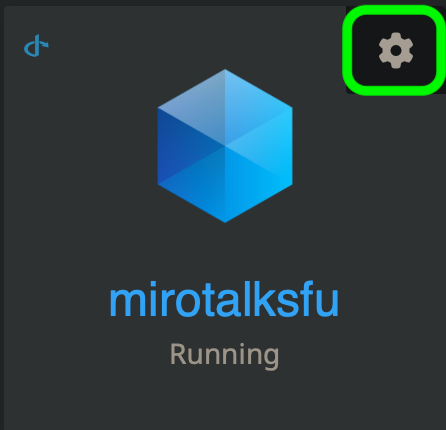
envfile via the Cloudron App file manager:- Open the MiroTalk SFU settings.
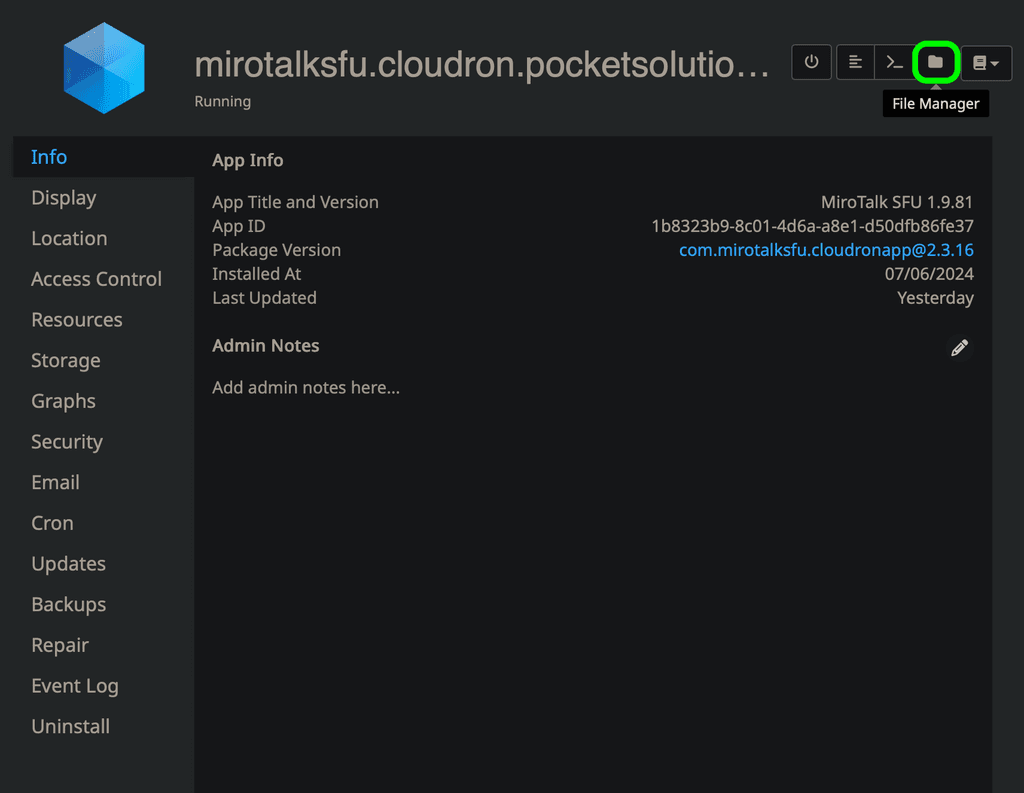
- Navigate to the File Manager.
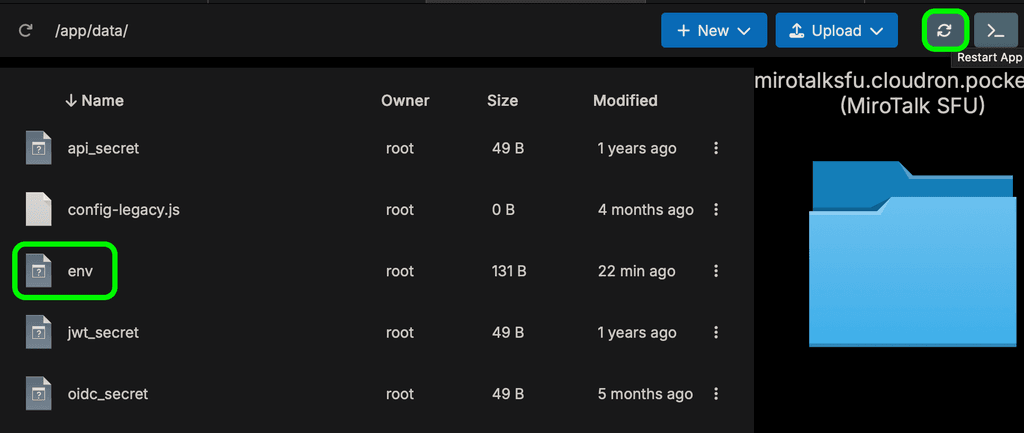
- Open the
envfile (double-click to edit), make your changes, save, and then restart the instance for the changes to take effect.
you can fully rebrand MiroTalk, including changing the app name, logo, description, language, and even customizing which buttons appear in the meeting interface, among many other options:
Here’s an example of a simple landing page rebranding, without touching the source code. Everything is centralized in a single
envfile, which is injected into config.js for documentation purposes: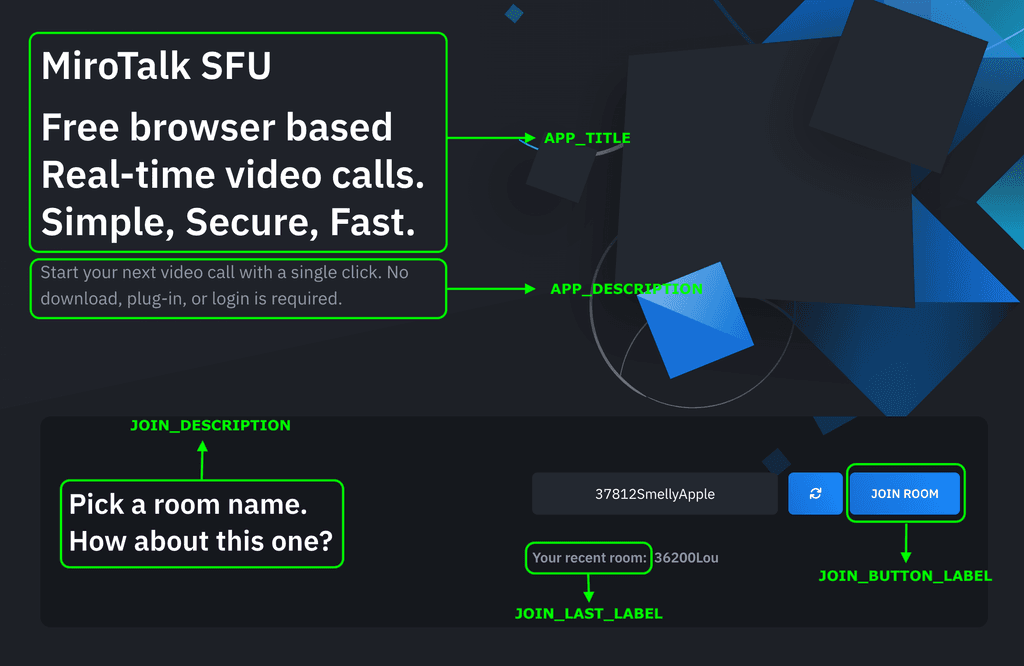
# App
UI_LANGUAGE=en                                    # Interface language (en, es, fr, etc.)
APP_NAME=YOUR-APP-NAME                            # Application name
APP_TITLE=YOUR-APP-TITLE                          # Custom HTML title (leave empty for default)
APP_DESCRIPTION=YOUR-APP-DESC                     # Application description
JOIN_DESCRIPTION=JOIN-DESC                        # Join screen description
JOIN_BUTTON_LABEL=JOIN ROOM                       # Join button text
JOIN_LAST_LABEL=Your recent room:                 # Recent room label text

# OG
OG_TYPE=app-webrtc                                # OpenGraph type
OG_SITE_NAME=YOUR-APP-NAME                        # OG site name
OG_TITLE=                                         # OG title
OG_DESCRIPTION=                                   # OG description
OG_IMAGE_URL=https://MIROTALK-CLOUDRON-URL/images/mirotalksfu.png # OG image
OG_URL=https://MIROTALK-CLOUDRON-URL              # OG URL

# HTML
SHOW_TOP_SPONSORS=false                            # Show top sponsors section (true|false)
SHOW_FEATURES=false                                # Show features section (true|false)
SHOW_TEAMS=false                                   # Show teams section (true|false)
SHOW_TRY_EASIER=false                              # Show "try easier" section (true|false)
SHOW_POWERED_BY=false                              # Show powered by (true|false)
SHOW_SPONSORS=false                                # Show sponsors (true|false)
SHOW_ADVERTISERS=false                             # Show advertisers (true|false)
SHOW_FOOTER=false                                  # Show footer (true|false)
For the Who Are You page (which I believe you’re referring to), you can customize the following environment variables in the
envfile as well to adapt the page to your preferences:# Who Are You WHO_ARE_YOU_TITLE="Who are you?" WHO_ARE_YOU_DESCRIPTION="If you're the presenter, please log in now.<br />Otherwise, please wait for the presenter to join." WHO_ARE_YOU_BUTTON_LOGIN_LABEL="LOGIN" WHO_ARE_YOU_JOIN_LABEL="JOIN ROOM"
 ️ Important: To use these rebranding and customization features, a Regular License is required. This ensures legal compliance and supports the ongoing development and deployment of MiroTalk.
You can purchase the license directly from CodeCanyon here:
 MiroTalk SFU – WebRTC Real-time Video Conferences
One-time payment for a lifetime license, including all updates.
Thank you for your support!

-
@slfhstng said in "read-only" - can't edit static page in MiroTalk:
I wanted to edit some of the text on this page, but it wouldn't let me save when using Cloudron console. The message said it was read-only.
With MiroTalk SFU, everything is possible!
By editing the
envfile via the Cloudron App file manager:- Open the MiroTalk SFU settings.
- Navigate to the File Manager.
- Open the
envfile (double-click to edit), make your changes, save, and then restart the instance for the changes to take effect.
you can fully rebrand MiroTalk, including changing the app name, logo, description, language, and even customizing which buttons appear in the meeting interface, among many other options:
Here’s an example of a simple landing page rebranding, without touching the source code. Everything is centralized in a single
envfile, which is injected into config.js for documentation purposes:# App UI_LANGUAGE=en # Interface language (en, es, fr, etc.) APP_NAME=YOUR-APP-NAME # Application name APP_TITLE=YOUR-APP-TITLE # Custom HTML title (leave empty for default) APP_DESCRIPTION=YOUR-APP-DESC # Application description JOIN_DESCRIPTION=JOIN-DESC # Join screen description JOIN_BUTTON_LABEL=JOIN ROOM # Join button text JOIN_LAST_LABEL=Your recent room: # Recent room label text # OG OG_TYPE=app-webrtc # OpenGraph type OG_SITE_NAME=YOUR-APP-NAME # OG site name OG_TITLE= # OG title OG_DESCRIPTION= # OG description OG_IMAGE_URL=https://MIROTALK-CLOUDRON-URL/images/mirotalksfu.png # OG image OG_URL=https://MIROTALK-CLOUDRON-URL # OG URL # HTML SHOW_TOP_SPONSORS=false # Show top sponsors section (true|false) SHOW_FEATURES=false # Show features section (true|false) SHOW_TEAMS=false # Show teams section (true|false) SHOW_TRY_EASIER=false # Show "try easier" section (true|false) SHOW_POWERED_BY=false # Show powered by (true|false) SHOW_SPONSORS=false # Show sponsors (true|false) SHOW_ADVERTISERS=false # Show advertisers (true|false) SHOW_FOOTER=false # Show footer (true|false)
For the Who Are You page (which I believe you’re referring to), you can customize the following environment variables in the
envfile as well to adapt the page to your preferences:# Who Are You WHO_ARE_YOU_TITLE="Who are you?" WHO_ARE_YOU_DESCRIPTION="If you're the presenter, please log in now.<br />Otherwise, please wait for the presenter to join." WHO_ARE_YOU_BUTTON_LOGIN_LABEL="LOGIN" WHO_ARE_YOU_JOIN_LABEL="JOIN ROOM"
️ Important: To use these rebranding and customization features, a Regular License is required. This ensures legal compliance and supports the ongoing development and deployment of MiroTalk.You can purchase the license directly from CodeCanyon here:
MiroTalk SFU – WebRTC Real-time Video ConferencesOne-time payment for a lifetime license, including all updates.
Thank you for your support!
-
@slfhstng such customizations need to come from the app . Changing text/html/source code, however minor is not possible because the next app update will overwrite your changes. Maybe you can request this customization feature upstream?
(Alternately, you can build https://git.cloudron.io/packages/mirotalksfu-app on your own and host a custom app with changes. But mirotalk is actively developed and it will be quite a hassle to keep your changes up to date).
-
@MiroTalk Thank you for such a detailed overview! I'm really enjoying MiroTalk (I'm telling everyone about it).
Thanks again!
EDIT:
Of course, if I ever rebrand, I'll purchase a license. I just wanted to reword one of the headlines.@slfhstng said in "read-only" - can't edit static page in MiroTalk:
@MiroTalk Thank you for such a detailed overview! I'm really enjoying MiroTalk (I'm telling everyone about it).
Thanks again!
You're welcome! and Thank you!
Hello! It looks like you're interested in this conversation, but you don't have an account yet.
Getting fed up of having to scroll through the same posts each visit? When you register for an account, you'll always come back to exactly where you were before, and choose to be notified of new replies (either via email, or push notification). You'll also be able to save bookmarks and upvote posts to show your appreciation to other community members.
With your input, this post could be even better 💗
Register Login