
Is it possible/safe to install Client Push App ?
-
-
-
Hello @mononym
You can always create a clone from your latest backup and tinker with the clone.
With that approach you risk nothing and can report findings. -
-
Hello. Short question: I wonder if I can install the Client Push App, as described in https://github.com/nextcloud/notify_push ? Basically, does the setup work when running
sudo -u www-data php -f /app/code/occ notify_push:setup. Thx@mononym said in Is it possible/safe to install Client Push App ?:
does the setup work when running sudo -u www-data php -f /app/code/occ notify_push:setup
I don’t think this is possible within Cloudron. For
pushto work, you need to create a daemon at/etc/systemd/system/notify_push.serviceand make some changes to Apache or Nginx.
Theocc notify_push:setupcommand assumes that all of this is done on the same server where Nextcloud itself is installed.
However, based on the information from https://github.com/nextcloud/notify_push, it seems that it might be possible to set it up on a separate server — though exactly how to do that is another question. -
-
I've been following the instructions in threads cited below, and it looks like notify_push is up and running
- configure nginx https://forum.cloudron.io/post/48343
- run notify_push via script https://forum.cloudron.io/post/48298
-
I've been following the instructions in threads cited below, and it looks like notify_push is up and running
- configure nginx https://forum.cloudron.io/post/48343
- run notify_push via script https://forum.cloudron.io/post/48298
it looks like notify_push is up and running
I honestly don’t understand how you managed to get this working. I spent about 5 hours today trying to set it up and still didn’t get the result I expected.
@rebootcron job simply doesn’t work. It’s mentioned in the docs but I’ve never seen it run in the logs.@servicedoes run but only once. Аfter subsequent Nextcloud restarts the job never triggers again.- My version of the script works fine if I run it manually from the terminal like this
/app/data/notify_push.sh. The service starts and all checks pass.
root@71780ea5-011c-4c09-886e-5f7e17e0b670:/app/code# /app/data/notify_push.sh ; sleep 1 ; ps aux | grep notify_push ; ss -tlnp | grep 7867 ✓ redis is configured ✓ push server is receiving redis messages ✓ push server can load mount info from database ✓ push server can connect to the Nextcloud server ✓ push server is a trusted proxy ✓ push server is running the same version as the app configuration saved => notify_push started on port 7867 root 265 0.3 0.0 25676 8796 ? Ssl 15:57 0:00 /app/code/apps/notify_push/bin/x86_64/notify_push --allow-self-signed --nextcloud-url http://172.18.20.152 --port 7867 /app/code/config/config.php root 286 0.0 0.0 4104 2100 pts/1 S+ 15:57 0:00 grep --color=auto notify_push LISTEN 0 128 0.0.0.0:7867 0.0.0.0:* users:(("notify_push",pid=265,fd=10))- If I set up a cron job to run every 5 minutes.
*/5 * * * * echo "=> Enabling notify_push" && /app/data/notify_push.sh
I can see in the logs that everything looks fine:
Apr 16 18:30:41 ✓ redis is configured
Apr 16 18:30:41 ✓ push server is receiving redis messages
Apr 16 18:30:41 ✓ push server can load mount info from database
Apr 16 18:30:41 ✓ push server can connect to the Nextcloud server
Apr 16 18:30:41 ✓ push server is a trusted proxy
Apr 16 18:30:41 ✓ push server is running the same version as the app
Apr 16 18:30:41 configuration saved
Apr 16 18:30:41 => notify_push started on port 7867
But in reality the process doesn’t survive after the script finishes. If I check manually with
ps aux | grep notify_push ; ss -tlnp | grep 7867there’s nothing in the terminal.Claude suggested this might be a cgroup-related issue in containers. The process started from cron gets attached to its cgroup and when the cron job exits, the process is killed along with it. I’m not sure how accurate that is.
Maybe most people who claimed to have
notify_pushworking probably didn’t verify it properly, since the warning disappears from the Nextcloud admin panel. It looks like it’s working, even when it actually isn’t. -
sorry for replying late:
there's no cron job involved, maybe that's the issue?
Everything needs to be done manually:- nginx-config whenever Cloudron box is updated, in an SSH session
- running the script to start notify_push whenever NC app is restarted, using a terminal from Cloudron UI to access the docker container
after running the start script, and using your ps-check command, I see a corresponding process. Additionally, running <occ notify_push:metrics> in a Cloudron terminal shows it works, all indicated stats are up-to-date and change over time.
-
I think I got Nextcloud Client Push (
notify_push) working persistently with the current Cloudron Nextcloud package.Tested with:
- Cloudron Nextcloud package
5.8.5 - Nextcloud
34.0.2 notify_push1.3.5
This uses only
/app/data; it does not modify read-only/app/codeor/etc. I verified it across a full Cloudron app restart.1. Install Client Push
Install Client Push from the Nextcloud Apps page, or run this in the Nextcloud app terminal:
sudo -u www-data php /app/code/occ app:install notify_push || true
sudo -u www-data php /app/code/occ app:enable notify_push
2. Create the persistent daemon runner
Run in the Nextcloud app terminal:
mkdir -p /app/data/notify_push

cat > /app/data/notify_push/runner.sh <<'EOF'
#!/bin/bash

set -u

binary="/app/data/apps/notify_push/bin/x86_64/notify_push"
config="/app/data/config/config.php"

if [[ ! -x "${binary}" ]]; then
    echo "notify_push binary is missing: ${binary}" >&2
    exit 1
fi

# Apache supplies a pipe on stdin. Preserve and drain it so requests cannot block.
exec 3<&0
cat <&3 >/dev/null &
reader_pid=$!

"${binary}" \
    --bind 127.0.0.1 \
    --port 7867 \
    --nextcloud-url http://127.0.0.1 \
    "${config}" &
push_pid=$!

cleanup() {
    kill -TERM "${push_pid}" "${reader_pid}" 2>/dev/null || true
    wait "${push_pid}" "${reader_pid}" 2>/dev/null || true
}

trap cleanup EXIT
trap 'exit 0' HUP INT TERM

wait "${push_pid}"
EOF

chown www-data:www-data /app/data/notify_push/runner.sh
chmod 0755 /app/data/notify_push/runner.sh
The daemon binds only to loopback. Port
7867is not exposed publicly.3. Add the internal callback configuration
The daemon must contact Nextcloud directly instead of looping back through Cloudron’s public proxy:
cat > /app/data/config/notify_push.config.php <<'EOF'
<?php

$CONFIG = [
    'trusted_domains' => [
        getenv('CLOUDRON_APP_DOMAIN'),
        '127.0.0.1',
    ],
    'trusted_proxies' => [
        getenv('CLOUDRON_PROXY_IP'),
        '127.0.0.1',
    ],
];
EOF

chown www-data:www-data /app/data/config/notify_push.config.php
chmod 0640 /app/data/config/notify_push.config.php
Do not add
--glob-configto the daemon command. The Rust configuration parser cannot evaluate thegetenv()calls in this extra PHP config file.4. Add the persistent Apache proxy
First save the original configuration:
cp -n /app/data/apache/mpm_prefork.conf \
    /app/data/apache/mpm_prefork.conf.before-notify-push
Then append the integration once:
if ! grep -Fq "BEGIN CLOUDRON NOTIFY_PUSH" /app/data/apache/mpm_prefork.conf; then cat >> /app/data/apache/mpm_prefork.conf <<'EOF' # BEGIN CLOUDRON NOTIFY_PUSH <IfModule !proxy_module> LoadModule proxy_module /usr/lib/apache2/modules/mod_proxy.so </IfModule> <IfModule !proxy_http_module> LoadModule proxy_http_module /usr/lib/apache2/modules/mod_proxy_http.so </IfModule> <IfModule !proxy_wstunnel_module> LoadModule proxy_wstunnel_module /usr/lib/apache2/modules/mod_proxy_wstunnel.so </IfModule> ProxyPass "/push/ws" "ws://127.0.0.1:7867/ws" ProxyPass "/push/" "http://127.0.0.1:7867/" ProxyPassReverse "/push/" "http://127.0.0.1:7867/" GlobalLog "|/usr/local/bin/gosu www-data:www-data /app/data/notify_push/runner.sh" combined # END CLOUDRON NOTIFY_PUSH EOF fi chown www-data:www-data /app/data/apache/mpm_prefork.conf chmod 0644 /app/data/apache/mpm_prefork.confGlobalLoggives Apache ownership of the daemon lifecycle. Apache starts the runner whenever the app starts and respawns it if it exits.5. Validate and activate Apache
apache2ctl configtestOnly continue if it reports
Syntax OK:supervisorctl restart apache2Check that the daemon is running:
ps -ef | grep '[n]otify_push'
curl -i "https://${CLOUDRON_APP_DOMAIN}/push/test/cookie"
The unauthenticated
curlrequest should return HTTP400withMissing request header "token". That is expected and confirms the public proxy reaches the daemon.6. Configure Nextcloud
sudo -u www-data php /app/code/occ \
    notify_push:setup "https://${CLOUDRON_APP_DOMAIN}/push"
All checks should pass:
✓ redis is configured
✓ push server is receiving redis messages
✓ push server can load mount info from database
✓ push server can connect to the Nextcloud server
✓ push server is a trusted proxy
✓ push server is running the same version as the app
  configuration saved
Run the self-test:
sudo -u www-data php /app/code/occ notify_push:self-test7. Verify persistence
Restart Nextcloud from the Cloudron dashboard. Once it is healthy again, reopen the terminal and run:
sudo -u www-data php /app/code/occ notify_push:self-test
ps -ef | grep '[n]otify_push'
The saved endpoints should be:
https://your-nextcloud-domain.example/push
wss://your-nextcloud-domain.example/push/ws
I also confirmed that both, my Hermes and the official Nextcloud sync client connected and authenticated to the WebSocket after the restart.
Notes
This is an instance-level workaround because the current Cloudron package has no custom supervisor hook. It follows the official
notify_pusharchitecture: a background daemon plus an Apache reverse proxy.Everything persistent is stored in:
/app/data/apache/mpm_prefork.conf
/app/data/notify_push/runner.sh
/app/data/config/notify_push.config.php
The original Apache configuration is retained at:
/app/data/apache/mpm_prefork.conf.before-notify-pushI would rerun
notify_push:self-testafter future Nextcloud or Cloudron package updates. - Cloudron Nextcloud package
-
-
@andreasdueren Wow. thanks a lot! can you still recommend it?
Yes, still recommend it with one caveat: the setup survives Cloudron package updates fine, but a Nextcloud major upgrade can silently take it out. Mine broke going from
34to35.After the upgrade
notify_pushwas gone fromocc app:list, no process, nothing on port7867, butoc_appconfigstill heldbase_endpointwithenabled: "no". Config intact in the database, app code gone from disk. For the record, it was not the package overwriting anything:start.shonly copiesmpm_prefork.confwhen it is absent, andnotify_pushis not inapps_template, so both persistent hooks from my guide are genuinely durable. A second instance on the same Nextcloud version kept running throughout.GlobalLogalready respawns the runner, so process death was never the issue. A disabled app or missing binary was. I moved that check intorunner.shbefore the daemon launches: if the binary is not executable orocc app:listshows no version, it runs app:install (falling back toapp:update) thenapp:enable. If the binary is still missing it sleeps 300s and exits, which matters becauseApacherestarts the pipe target immediately and a fast-failing runner turns into a hot loop. I tested it by deleting the app directory outright, andApachehad it reinstalled and serving again three seconds later, confirmed across a full app restart.One pitfall: right after a self-heal reinstall,
notify_push:self-testmay report push server can't connect to the Nextcloud server /Client error: 404 Not Found. That is a stale route cache, not a broken setup.supervisorctl restart apache2clears it. Still worth runningocc notify_push:self-testafter every Nextcloud upgrade, since the runner deliberately cannot paper over a release with no compatiblenotify_pushat all. -
Here's the updated guide. Changes: hardened self-healing runner in step 2, new step 8 for failure injection, corrected facts about what actually survives updates, and refreshed versions.
1. Install Client Push
Install Client Push from the Nextcloud Apps page, or run this in the Nextcloud app terminal:
sudo -u www-data php /app/code/occ app:install notify_push || true
sudo -u www-data php /app/code/occ app:enable notify_push
2. Create the persistent daemon runner
Run in the Nextcloud app terminal:
mkdir -p /app/data/notify_push

cat > /app/data/notify_push/runner.sh <<'EOF'
#!/bin/bash
# Self-healing notify_push runner, started and respawned by Apache GlobalLog.
# Survives Nextcloud major upgrades that disable or remove the app.

set -u

binary="/app/data/apps/notify_push/bin/x86_64/notify_push"
config="/app/data/config/config.php"
occ="php /app/code/occ"
log="/app/data/notify_push/runner.log"

say() { echo "$(date -u +%FT%TZ) $*" >> "${log}"; }

# Apache supplies a pipe on stdin. Preserve and drain it so requests cannot block.
exec 3<&0
cat <&3 >/dev/null &
reader_pid=$!

cleanup() {
    kill -TERM ${push_pid:-} "${reader_pid}" 2>/dev/null || true
    wait ${push_pid:-} "${reader_pid}" 2>/dev/null || true
}

trap cleanup EXIT
trap 'exit 0' HUP INT TERM

# A major Nextcloud upgrade can mark the app incompatible, disable it, and
# leave the code directory gone while the DB config survives. Repair that here.
app_ver="$(${occ} app:list --output=json 2>/dev/null \
    | grep -o '"notify_push":"[^"]*"' | cut -d'"' -f4 || true)"

if [[ ! -x "${binary}" || -z "${app_ver}" ]]; then
    say "binary or app missing (app_ver='${app_ver}'); attempting repair"
    ${occ} app:install notify_push >>"${log}" 2>&1 \
        || ${occ} app:update notify_push >>"${log}" 2>&1 || true
    ${occ} app:enable notify_push >>"${log}" 2>&1 || true
fi

if [[ ! -x "${binary}" ]]; then
    say "repair failed, binary still missing; backing off 300s"
    sleep 300
    exit 1
fi

say "starting notify_push"
"${binary}" \
    --bind 127.0.0.1 \
    --port 7867 \
    --nextcloud-url http://127.0.0.1 \
    "${config}" &
push_pid=$!

wait "${push_pid}"
rc=$?
say "notify_push exited rc=${rc}; backing off 10s"
sleep 10
exit "${rc}"
EOF

chown www-data:www-data /app/data/notify_push/runner.sh
chmod 0755 /app/data/notify_push/runner.sh
touch /app/data/notify_push/runner.log
chown www-data:www-data /app/data/notify_push/runner.log
bash -n /app/data/notify_push/runner.sh && echo "syntax OK"
The daemon binds only to loopback. Port
7867is not exposed publicly.Both
sleepcalls are deliberate. Apache respawns the pipe target immediately, so a runner that fails fast becomes a hot respawn loop. The runner executes undergosu www-data, sooccneeds nosudohere.3. Add the internal callback configuration
The daemon must contact Nextcloud directly instead of looping back through Cloudron's public proxy:
cat > /app/data/config/notify_push.config.php <<'EOF'
<?php

$CONFIG = [
    'trusted_domains' => [
        getenv('CLOUDRON_APP_DOMAIN'),
        '127.0.0.1',
    ],
    'trusted_proxies' => [
        getenv('CLOUDRON_PROXY_IP'),
        '127.0.0.1',
    ],
];
EOF

chown www-data:www-data /app/data/config/notify_push.config.php
chmod 0640 /app/data/config/notify_push.config.php
Do not add
--glob-configto the daemon command. The Rust configuration parser cannot evaluate thegetenv()calls in this extra PHP config file.4. Add the persistent Apache proxy
First save the original configuration:
cp -n /app/data/apache/mpm_prefork.conf \
    /app/data/apache/mpm_prefork.conf.before-notify-push
Then append the integration once:
if ! grep -Fq "BEGIN CLOUDRON NOTIFY_PUSH" /app/data/apache/mpm_prefork.conf; then cat >> /app/data/apache/mpm_prefork.conf <<'EOF' # BEGIN CLOUDRON NOTIFY_PUSH <IfModule !proxy_module> LoadModule proxy_module /usr/lib/apache2/modules/mod_proxy.so </IfModule> <IfModule !proxy_http_module> LoadModule proxy_http_module /usr/lib/apache2/modules/mod_proxy_http.so </IfModule> <IfModule !proxy_wstunnel_module> LoadModule proxy_wstunnel_module /usr/lib/apache2/modules/mod_proxy_wstunnel.so </IfModule> ProxyPass "/push/ws" "ws://127.0.0.1:7867/ws" ProxyPass "/push/" "http://127.0.0.1:7867/" ProxyPassReverse "/push/" "http://127.0.0.1:7867/" GlobalLog "|/usr/local/bin/gosu www-data:www-data /app/data/notify_push/runner.sh" combined # END CLOUDRON NOTIFY_PUSH EOF fi chown www-data:www-data /app/data/apache/mpm_prefork.conf chmod 0644 /app/data/apache/mpm_prefork.confGlobalLoggives Apache ownership of the daemon lifecycle. Apache starts the runner whenever the app starts and respawns it if it exits.This file is safe to edit.
start.shonly copies the package default when the file is absent:[[ ! -f /app/data/apache/mpm_prefork.conf ]] && cp /app/pkg/mpm_prefork.conf /app/data/apache/mpm_prefork.confIf you later tune MPM settings here, keep the
NOTIFY_PUSHblock.5. Validate and activate Apache
apache2ctl configtestOnly continue if it reports
Syntax OK:supervisorctl restart apache2Check that the daemon is running:
ps -ef | grep '[n]otify_push'
curl -i "https://${CLOUDRON_APP_DOMAIN}/push/test/cookie"
The unauthenticated
curlrequest should return HTTP400withMissing request header "token". That is expected and confirms the public proxy reaches the daemon.6. Configure Nextcloud
sudo -u www-data php /app/code/occ \
    notify_push:setup "https://${CLOUDRON_APP_DOMAIN}/push"
All checks should pass:
✓ redis is configured
✓ push server is receiving redis messages
✓ push server can load mount info from database
✓ push server can connect to the Nextcloud server
✓ push server is a trusted proxy
✓ push server is running the same version as the app
  configuration saved
Run the self-test:
sudo -u www-data php /app/code/occ notify_push:self-test7. Verify persistence
Restart Nextcloud from the Cloudron dashboard. Once it is healthy again, reopen the terminal and run:
sudo -u www-data php /app/code/occ notify_push:self-test
ps -ef | grep '[n]otify_push'
The saved endpoints should be:
https://your-nextcloud-domain.example/push
wss://your-nextcloud-domain.example/push/ws
Note that a passing self-test alone does not prove persistence. The process must still be present after the restart, with new PIDs.
8. Verify self-healing
Simulate what a bad upgrade does, then confirm recovery:
mv /app/data/apps/notify_push /app/data/apps/.notify_push.bak
supervisorctl restart apache2
sleep 45

ls -la /app/data/apps/notify_push/bin/x86_64/notify_push
ps -ef | grep '[n]otify_push'
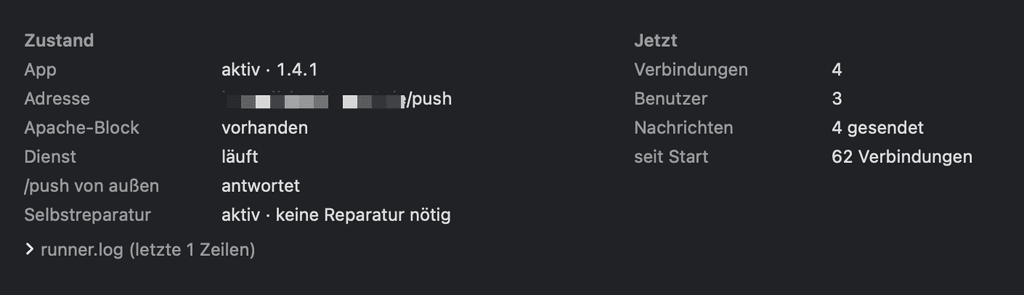
cat /app/data/notify_push/runner.log
Expected log output:
binary or app missing (app_ver=''); attempting repair
notify_push 1.4.1 installed
notify_push enabled
starting notify_push
Then clean up the injected directory:
rm -rf /app/data/apps/.notify_push.bakRight after a self-heal reinstall,
notify_push:self-testmay reportpush server can't connect to the Nextcloud serverwithClient error: 404 Not Found. That is a stale Nextcloud route cache, not a broken setup; loopbackstatus.phpstill returns200. Runsupervisorctl restart apache2and re-test.Notes
This is an instance-level workaround because the current Cloudron package has no custom supervisor hook. It follows the official
notify_pusharchitecture: a background daemon plus an Apache reverse proxy.Everything persistent is stored in:
/app/data/apache/mpm_prefork.conf
/app/data/notify_push/runner.sh
/app/data/config/notify_push.config.php
The original Apache configuration is retained at:
/app/data/apache/mpm_prefork.conf.before-notify-pushFor what it is worth, the Cloudron package itself does not remove any of this.
notify_pushis not in/app/pkg/apps_template, and the update loop only replaces template apps. The failure mode worth guarding against is the Nextcloud app being disabled or removed during a major Nextcloud upgrade, which is what step 2 now handles. I would still rerunnotify_push:self-testafter future Nextcloud or Cloudron package updates, and checkrunner.logif push goes quiet. -
Hi @andreasdueren this is great and works perfect right now. Thanks a lot for your work!!
Do you see any chance this being integrated in the official package?





Hello! It looks like you're interested in this conversation, but you don't have an account yet.
Getting fed up of having to scroll through the same posts each visit? When you register for an account, you'll always come back to exactly where you were before, and choose to be notified of new replies (either via email, or push notification). You'll also be able to save bookmarks and upvote posts to show your appreciation to other community members.
With your input, this post could be even better 💗
Register Login