Cloudron makes it easy to run web apps like WordPress, Nextcloud, GitLab on your server. Find out more or install now.


Skip to content
  • Categories
  • Recent
  • Tags
  • Popular
  • Bookmarks
  • Search
Skins
  • Light
  • Brite
  • Cerulean
  • Cosmo
  • Flatly
  • Journal
  • Litera
  • Lumen
  • Lux
  • Materia
  • Minty
  • Morph
  • Pulse
  • Sandstone
  • Simplex
  • Sketchy
  • Spacelab
  • United
  • Yeti
  • Zephyr
  • Dark
  • Cyborg
  • Darkly
  • Quartz
  • Slate
  • Solar
  • Superhero
  • Vapor

  • Default (No Skin)
  • No Skin
Collapse
Brand Logo

Cloudron Forum

Apps - Status | Demo | Docs | Install
  1. Cloudron Forum
  2. Dawarich
  3. GPX file upload error

GPX file upload error

Scheduled Pinned Locked Moved Dawarich
bugreadonly
21 Posts 3 Posters 1.3k Views 3 Watching
  • Oldest to Newest
  • Newest to Oldest
  • Most Votes
Reply
  • Reply as topic
Log in to reply
This topic has been deleted. Only users with topic management privileges can see it.
  • nebulonN Offline
    nebulonN Offline
    nebulon
    Staff
    wrote on last edited by
    #6

    Did not even think of such a use-case, but I have never really worked with .gpx files as such. I will add the watcher directory also then

    1 Reply Last reply
    2
    • nebulonN Offline
      nebulonN Offline
      nebulon
      Staff
      wrote on last edited by
      #7

      So the app already has /app/code/tmp linked to /tmp/dawarich. So the imports/watched can already be used, though this is all in the /tmp mount. Not sure what upstream intends here, is one supposed to upload to a /tmp folder manually and how are things cleaned up there?

      imc67I 1 Reply Last reply
      0
      • imc67I Offline
        imc67I Offline
        imc67
        translator
        wrote on last edited by
        #8

        Mmm, when I go to Filemanager (of the app) I do see a folder “storage” but not “temp”, should I create it including “imports/watched”?

        1 Reply Last reply
        0
        • nebulonN nebulon

          So the app already has /app/code/tmp linked to /tmp/dawarich. So the imports/watched can already be used, though this is all in the /tmp mount. Not sure what upstream intends here, is one supposed to upload to a /tmp folder manually and how are things cleaned up there?

          imc67I Offline
          imc67I Offline
          imc67
          translator
          wrote on last edited by imc67
          #9

          @nebulon said in GPX file upload error:

          is one supposed to upload to a /tmp folder manually and how are things cleaned up there?

          I’m not a programmer but my assumption is that the developer means by “temp” a folder that a user or the system can use for files that temporarily exist, either by ingress or whatever. I guess it can be mounted to /app/data/ so a user can get there?

          Like in the docs, only the watched folder mapping to app/data?

          volumes:
                - dawarich_public:/var/app/public
                - dawarich_watched:/var/app/tmp/imports/watched
                - dawarich_storage:/var/app/storage
          
          1 Reply Last reply
          0
          • imc67I Offline
            imc67I Offline
            imc67
            translator
            wrote on last edited by
            #10

            I just noticed that “public” also needs to be symlinked, there are editable files but also the “export” folder needs to be writable. I guess as mentioned before all 3 needs to be symlinked to /app/data/?

            1 Reply Last reply
            0
            • nebulonN Offline
              nebulonN Offline
              nebulon
              Staff
              wrote on last edited by
              #11

              do you know what the public folder does?

              imc67I 1 Reply Last reply
              0
              • nebulonN nebulon

                do you know what the public folder does?

                imc67I Offline
                imc67I Offline
                imc67
                translator
                wrote on last edited by
                #12

                @nebulon said in GPX file upload error:

                do you know what the public folder does?

                When I use Terminal of the app and go there I see some html files, images and export folder. I guess it’s all configurable to what you want to show in your browser.

                1 Reply Last reply
                0
                • nebulonN Offline
                  nebulonN Offline
                  nebulon
                  Staff
                  wrote on last edited by
                  #13

                  So we need to first understand what is supposed to be there, since content in /tmp will get regularily (though only after 10 days) purged from disk. Have to play more with the app to see what it expects

                  1 Reply Last reply
                  1
                  • nebulonN Offline
                    nebulonN Offline
                    nebulon
                    Staff
                    wrote on last edited by
                    #14

                    So after reading through the code, it seems public/ is mounted as a volume probably to customize the page, however given that it also contains the code from the release, we should not make that writable, otherwise we have a hard time to update.

                    1 Reply Last reply
                    1
                    • nebulonN Offline
                      nebulonN Offline
                      nebulon
                      Staff
                      wrote on last edited by
                      #15

                      The export also works fine for both .json and .gpx. Looks like the export/ folder is not actually used there.

                      I also found that the app stores the pid file in /tmp which will not go well when regularly purged, so I think we will move all that to /run instead.

                      1 Reply Last reply
                      1
                      • nebulonN Offline
                        nebulonN Offline
                        nebulon
                        Staff
                        wrote on last edited by
                        #16

                        New package release links the watched folder from /app/data however I was not able to get the app actually consume anything from that folder, not even without the linking. So this may need more debugging in the app itself it seems.

                        imc67I 1 Reply Last reply
                        1
                        • nebulonN nebulon

                          New package release links the watched folder from /app/data however I was not able to get the app actually consume anything from that folder, not even without the linking. So this may need more debugging in the app itself it seems.

                          imc67I Offline
                          imc67I Offline
                          imc67
                          translator
                          wrote on last edited by
                          #17

                          @nebulon said in GPX file upload error:

                          I was not able to get the app actually consume anything from that folder, not even without the linking

                          I deleted the previous app completely and started fresh. The "consuming" from the folder is only once an hour if I remember correctly. Now testing ...

                          imc67I 1 Reply Last reply
                          1
                          • imc67I imc67

                            @nebulon said in GPX file upload error:

                            I was not able to get the app actually consume anything from that folder, not even without the linking

                            I deleted the previous app completely and started fresh. The "consuming" from the folder is only once an hour if I remember correctly. Now testing ...

                            imc67I Offline
                            imc67I Offline
                            imc67
                            translator
                            wrote on last edited by
                            #18

                            said in GPX file upload error:

                            @nebulon said in GPX file upload error:
                            Now testing ...

                            Test succeeded after 2 tries: in the watched folder you have to create a folder with the email address of the user, in that folder you can put ie. the gpx files. Exact on every whole hour they get fetched and processed. Now after 5 minutes they are still not removed, can’t find info on that.

                            1 Reply Last reply
                            0
                            • imc67I Offline
                              imc67I Offline
                              imc67
                              translator
                              wrote on last edited by imc67
                              #19

                              update: the amount of gpx files I tried to load was either too much or simply didn't worked out. Together with ChatGPT I was able to consolidate (multiple-)day files to monthly files, kml files to gpx and when you max to 100.000 datapoint per gpx file (about 11MB) I was able to upload and process them via GUI.

                              The result is AMAZING, this Dawarich app is absolutely great for people, like me, who always has a tracker on his smartphone. It's bizarre to see all your travels, vacations, flights etc etc.

                              Next step: integrate Immich.

                              @nebulon thanks for your time and effort to publish this app, very happy with it! 😀

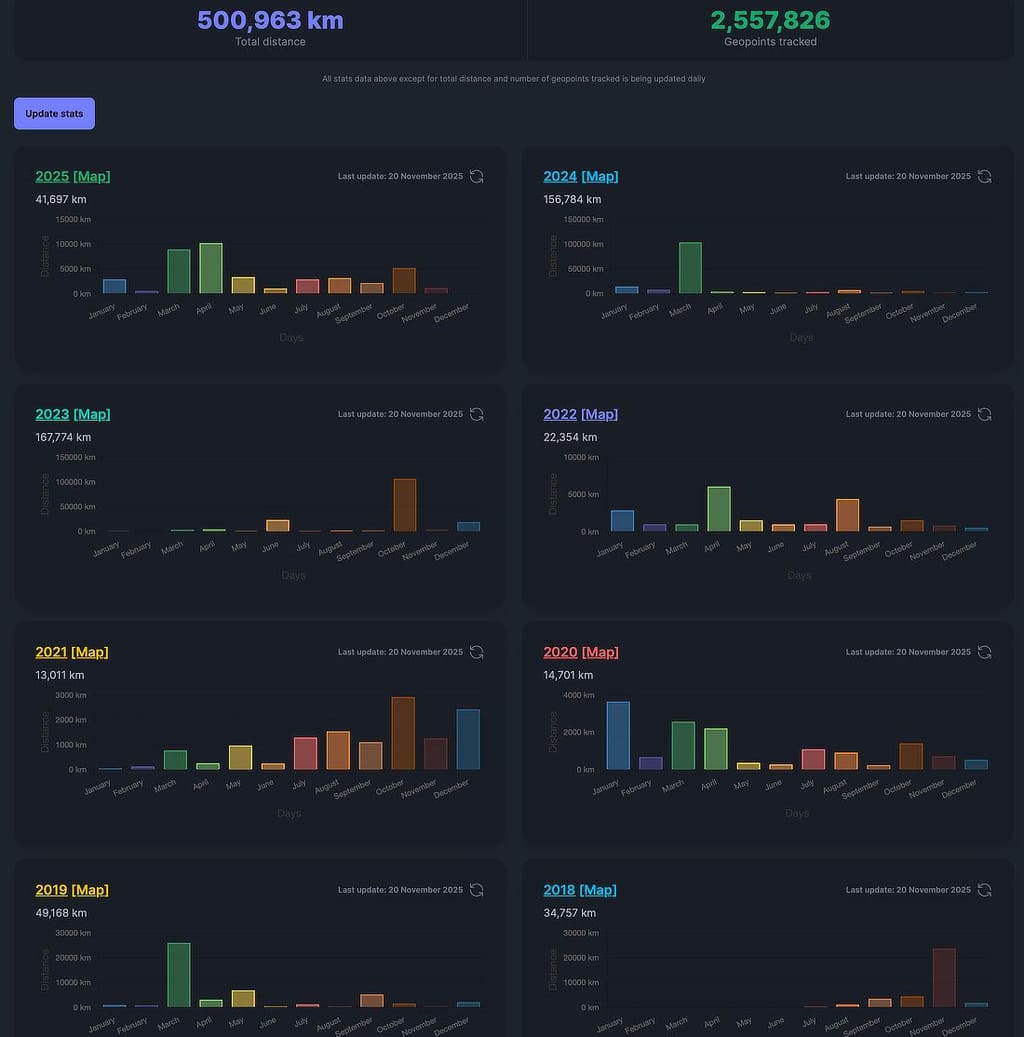
                              The stats are also nice:
                              aa4f096f-c0c1-44b5-a998-394d9a59308a-Scherm­afbeelding 2025-11-20 om 15.42.33.jpg

                              luckowL 1 Reply Last reply
                              1
                              • imc67I imc67

                                update: the amount of gpx files I tried to load was either too much or simply didn't worked out. Together with ChatGPT I was able to consolidate (multiple-)day files to monthly files, kml files to gpx and when you max to 100.000 datapoint per gpx file (about 11MB) I was able to upload and process them via GUI.

                                The result is AMAZING, this Dawarich app is absolutely great for people, like me, who always has a tracker on his smartphone. It's bizarre to see all your travels, vacations, flights etc etc.

                                Next step: integrate Immich.

                                @nebulon thanks for your time and effort to publish this app, very happy with it! 😀

                                The stats are also nice:
                                aa4f096f-c0c1-44b5-a998-394d9a59308a-Scherm­afbeelding 2025-11-20 om 15.42.33.jpg

                                luckowL Online
                                luckowL Online
                                luckow
                                translator
                                wrote on last edited by
                                #20

                                @imc67 What? Almost half the distance to the moon in 2023?

                                Pronouns: he/him | Primary language: German

                                imc67I 1 Reply Last reply
                                1
                                • luckowL luckow

                                  @imc67 What? Almost half the distance to the moon in 2023?

                                  imc67I Offline
                                  imc67I Offline
                                  imc67
                                  translator
                                  wrote on last edited by
                                  #21

                                  @luckow said in GPX file upload error:

                                  @imc67 What? Almost half the distance to the moon in 2023?

                                  Haha that’s impossible, I did a double check. I was in October on a car trip to Bavaria and somehow GPS was swapping many times between my home (NL) and location there, maybe because of bad GPS reception and VPN? I’ll have to manually correct them because this is nonsense of course.


                                  1 Reply Last reply
                                  2
                                  Reply
                                  • Reply as topic
                                  Log in to reply
                                  • Oldest to Newest
                                  • Newest to Oldest
                                  • Most Votes


                                  • Login

                                  • Don't have an account? Register

                                  • Login or register to search.
                                  • First post
                                    Last post
                                  0
                                  • Categories
                                  • Recent
                                  • Tags
                                  • Popular
                                  • Bookmarks
                                  • Search