
Backup is failing for UpTime Kuma on 9.0.15
-
After update to v9 of Cloudron from latest v8, UpTime Kuma can't be backed up - failing the whole backup process - so I had to exclude it.
I don't mind not backing up, but I afraid it might be a sign of something bigger.
Here are the logs:
Jan 07 12:22:43 box:tasks updating task 13869 with: {"percent":46.45454545454546,"message":"Backing up check.domain.com (5/8). Waiting for lock"} Jan 07 12:22:43 box:locks write: current locks: {"full_backup_task_33af5ff8-0a0d-4250-9c1d-15bf8e6529fe":null,"app_backup_be0be218-57bf-427b-abb6-b7660943eaf6":"13869"} Jan 07 12:22:43 box:locks acquire: app_backup_be0be218-57bf-427b-abb6-b7660943eaf6 Jan 07 12:22:43 box:tasks updating task 13869 with: {"percent":46.45454545454546,"message":"Snapshotting app check.domain.com"} Jan 07 12:22:43 box:services backupAddons Jan 07 12:22:43 box:services backupAddons: backing up ["localstorage"] Jan 07 12:22:43 box:services Backing up sqlite Jan 07 12:22:43 box:shell services: /bin/bash -c docker run --rm --name=sqlite-be0be218-57bf-427b-abb6-b7660943eaf6 --net cloudron --log-driver=none -v /home/yellowtent/appsdata/be0be218-57bf-427b-abb6-b7660943eaf6/data:/app/data --label isCloudronManaged=true --read-only -v /tmp -v /run cloudron/louislam.uptimekuma.app:202511081423470000 sqlite3 /app/data/data/kuma.db ".dump" > /home/yellowtent/appsdata/be0be218-57bf-427b-abb6-b7660943eaf6/kuma.sqlite Jan 07 12:22:43 box:shell services: /bin/bash -c docker run --rm --name=sqlite-be0be218-57bf-427b-abb6-b7660943eaf6 --net cloudron --log-driver=none -v /home/yellowtent/appsdata/be0be218-57bf-427b-abb6-b7660943eaf6/data:/app/data --label isCloudronManaged=true --read-only -v /tmp -v /run cloudron/louislam.uptimekuma.app:202511081423470000 sqlite3 /app/data/data/kuma.db ".dump" > /home/yellowtent/appsdata/be0be218-57bf-427b-abb6-b7660943eaf6/kuma.sqlite errored BoxError: /bin/bash exited with code 125 signal null Jan 07 12:22:43 at ChildProcess.<anonymous> (/home/yellowtent/box/src/shell.js:82:23) Jan 07 12:22:43 at ChildProcess.emit (node:events:519:28) Jan 07 12:22:43 at maybeClose (node:internal/child_process:1101:16) Jan 07 12:22:43 at ChildProcess._handle.onexit (node:internal/child_process:304:5) { Jan 07 12:22:43 reason: 'Shell Error', Jan 07 12:22:43 details: {}, Jan 07 12:22:43 stdout: '', Jan 07 12:22:43 stdoutLineCount: 0, Jan 07 12:22:43 stderr: 'docker: Error response from daemon: Conflict. The container name "/sqlite-be0be218-57bf-427b-abb6-b7660943eaf6" is already in use by container "bbb52ef9e6869b43778e5bd796d52dcece50162fd45658877200006219c3f259". You have to remove (or rename) that container to be able to reuse that name.\n' + Jan 07 12:22:43 '\n' + Jan 07 12:22:43 "Run 'docker run --help' for more information\n", Jan 07 12:22:43 stderrLineCount: 3, Jan 07 12:22:43 code: 125, Jan 07 12:22:43 signal: null, Jan 07 12:22:43 timedOut: false, Jan 07 12:22:43 terminated: false Jan 07 12:22:43 } Jan 07 12:22:43 box:backuptask fullBackup: app check.domain.com backup finished. Took 0.021 seconds Jan 07 12:22:43 box:locks write: current locks: {"full_backup_task_33af5ff8-0a0d-4250-9c1d-15bf8e6529fe":null} Jan 07 12:22:43 box:locks release: app_backup_be0be218-57bf-427b-abb6-b7660943eaf6 Jan 07 12:22:43 box:tasks setCompleted - 13869: {"result":null,"error":{"message":"/bin/bash exited with code 125 signal null","reason":"Shell Error"},"percent":100} Jan 07 12:22:43 box:tasks updating task 13869 with: {"completed":true,"result":null,"error":{"message":"/bin/bash exited with code 125 signal null","reason":"Shell Error"},"percent":100} Jan 07 12:22:43 box:taskworker Task took 9.642 seconds Jan 07 12:22:43 BoxError: /bin/bash exited with code 125 signal null Jan 07 12:22:43 at ChildProcess.<anonymous> (/home/yellowtent/box/src/shell.js:82:23) Jan 07 12:22:43 at ChildProcess.emit (node:events:519:28) Jan 07 12:22:43 at maybeClose (node:internal/child_process:1101:16) Jan 07 12:22:43 at ChildProcess._handle.onexit (node:internal/child_process:304:5) Jan 07 12:22:43 Exiting with code 0 -
-
Hello @james , I believe I did

After update to v9 of Cloudron from latest v8, UpTime Kuma can't be backed up
It's UpTime Kuma
-
Just in case - the forum software keeps changing my e-mail notification settings. I'm returning to e-mail notifications for the topic I've created for a second or third time now and it keeps reseting to notifications only.
-
Hello @potemkin_ai
@potemkin_ai said in Backup is failing for UpTime Kuma on 9.0.15:
It's UpTime Kuma
Okay.
I think this might be an issue with SQLITE that is used by Uptime Kuma.
How many hosts do you monitor with Uptime Kuma?
I have the suspicion that while creating the SQLITE backup the file changes and causes this error.@potemkin_ai said in Backup is failing for UpTime Kuma on 9.0.15:
Just in case - the forum software keeps changing my e-mail notification settings. I'm returning to e-mail notifications for the topic I've created for a second or third time now and it keeps reseting to notifications only.
Could this be related to your profile notification setting overwriting the individual topic notification setting?
You have configured:
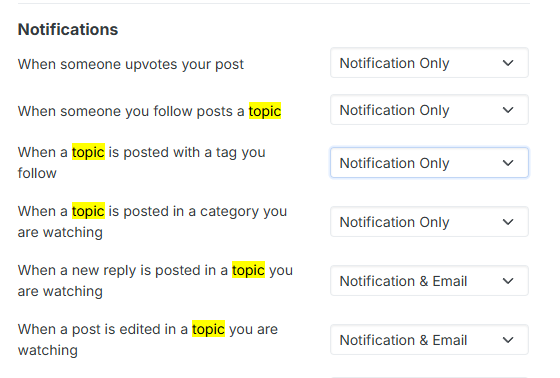
Or do you mean this setting is getting overwritten again and again? -
Hello @potemkin_ai
@potemkin_ai said in Backup is failing for UpTime Kuma on 9.0.15:
It's UpTime Kuma
Okay.
I think this might be an issue with SQLITE that is used by Uptime Kuma.
How many hosts do you monitor with Uptime Kuma?
I have the suspicion that while creating the SQLITE backup the file changes and causes this error.@potemkin_ai said in Backup is failing for UpTime Kuma on 9.0.15:
Just in case - the forum software keeps changing my e-mail notification settings. I'm returning to e-mail notifications for the topic I've created for a second or third time now and it keeps reseting to notifications only.
Could this be related to your profile notification setting overwriting the individual topic notification setting?
You have configured:
Or do you mean this setting is getting overwritten again and again?@james said in Backup is failing for UpTime Kuma on 9.0.15:
Or do you mean this setting is getting overwritten again and again?
yeah - I always have my settings setup in a way, that I would be getting an e-mail for the threads I'm participating and from time to time I'm finding myself not getting those updates - going to check the settings and they are again in 'Notification only'.
It's sporadic, but I'm quite sure I didn't change them manually (too lazy / busy for that - I don't even remember where they are in the profile).
-
Hello @potemkin_ai
@potemkin_ai said in Backup is failing for UpTime Kuma on 9.0.15:
It's UpTime Kuma
Okay.
I think this might be an issue with SQLITE that is used by Uptime Kuma.
How many hosts do you monitor with Uptime Kuma?
I have the suspicion that while creating the SQLITE backup the file changes and causes this error.@potemkin_ai said in Backup is failing for UpTime Kuma on 9.0.15:
Just in case - the forum software keeps changing my e-mail notification settings. I'm returning to e-mail notifications for the topic I've created for a second or third time now and it keeps reseting to notifications only.
Could this be related to your profile notification setting overwriting the individual topic notification setting?
You have configured:
Or do you mean this setting is getting overwritten again and again?@james said in Backup is failing for UpTime Kuma on 9.0.15:
How many hosts do you monitor with Uptime Kuma?
not much - like 20 max; UpTime Kuma on itself works just fine.
-
Hello @potemkin_ai
Is this issue still persistent? If so, can you please try to stop the Uptime Kuma app once and start it again and attempt a backup?
Want to make sure this is not a file handling issue with the SQLITE.
In the sense of, while trying to back the SQLITE file, it gets changed and thus messes up the process in some way. -
Yep - it does.
Stop & start didn't help, unfortunately. -
-
If you still get the same docker error about an already existing container with the name
sqlite-<appid>, can you check with the docker cli if some dead container exists and if so, if you just remove that, it starts working?@nebulon there seems to be none of the dead ones:
ubuntu@cloudron:~$ sudo docker ps -a | grep sqlite | wc -l
1
ubuntu@cloudron:~$ sudo docker ps -a | grep sqlite
bbb52ef9e686   cloudron/louislam.uptimekuma.app:202511081423470000       "sqlite3 /app/data/d…"   2 weeks ago   Created                                                                                                                                                                sqlite-be0be218-57bf-427b-abb6-b7660943eaf6
There are not that much non-running containers - only 2 nextcloud workers with
exit(0)and another service, that I have stopped explicitely. -
So yeah looks like there is a dangling container with the conflicting name
sqlite-be0be218-57bf-427b-abb6-b7660943eaf6, not sure why that wasn't cleanly exiting, but it exists but stopped, hence no new one for another backup can be created.The fix here would probably be to purge that with
docker rm bbb52ef9e686and then the backup should work again. Before you do this, maybe check withdocker logs bbb52ef9e686if there is anything useful, why it possibly failed. -
Thank you, that fixed the issue.
There been no logs in the container.Any ideas what is the nature of the sqlite container for uptime kuma? I've been under impression that sqlite requires no server side...
-
That is true, no server is required for sqlite, however to make a correct and consistent backup, one cannot just copy the sqlite file on disk, as data might not have been flushed fully to disk. This is why the
localstorageaddon in Cloudron has a way to signal the system, which file is an sqlite database and the backup will spin up a container to make a proper database dump. See https://docs.cloudron.io/packaging/addons#localstorage -
That is true, no server is required for sqlite, however to make a correct and consistent backup, one cannot just copy the sqlite file on disk, as data might not have been flushed fully to disk. This is why the
localstorageaddon in Cloudron has a way to signal the system, which file is an sqlite database and the backup will spin up a container to make a proper database dump. See https://docs.cloudron.io/packaging/addons#localstorage@nebulon thank you. And yes - I understand why the work-around required. If you don't mind sharing the source code to read the logic exactly?
I've been wondering on the best way to achieve that, but never seen any good practical approach - would love to see how you are approaching that, without a container shutdown, if you don't mind sharing of course.
If that's too complicated - never mind and please, feel free to close the issue - the question now is purely to satisfy my curiosity.
-
J joseph has marked this topic as solved on
-
-
-
Thanks!!




Hello! It looks like you're interested in this conversation, but you don't have an account yet.
Getting fed up of having to scroll through the same posts each visit? When you register for an account, you'll always come back to exactly where you were before, and choose to be notified of new replies (either via email, or push notification). You'll also be able to save bookmarks and upvote posts to show your appreciation to other community members.
With your input, this post could be even better 💗
Register Login