
Can't import backup: Error loading fsmetadata.json
-
Hello @difficult222
Thanks for reporting.
Can you please check the file size and report that here?@james Of which file?
-
Hello @difficult222
@difficult222 said in Can't import backup: Error loading fsmetadata.json:
I can find this file in two locations in my Object Storage:
backup/2026-01-24-060000-602/app_name_v1.4.0/fsmetadata.json
backup/snapshot/app_0245750c-82b5-4b4c-b6ea-15c53d6046b6/fsmetadata.json
These two files. Can you check the size of these two files and also the content?
Also, since the error is with this file
/home/yellowtent/appsdata/f6e82f5e-ae79-403b-b824-f96d8989b4f4/fsmetadata.json
Can you check if this file really does not exist? -
Sure! Thanks for the instructions!
The two
fsmetadata.jsons files in Object Storage look like this:{ "emptyDirs": [ "./data/modules/BulkEdit/test/BulkEditTest", "./data/files/preload", "./data/files/import", "./data/files/backup/log" ], "execFiles": [ "./data/omeka-s-cli.phar" ], "symlinks": [ { "path": "./data/modules/Ldap", "site": "/app/code/modules_vanilla/Ldap" }, { "path": "./data/themes/default", "site": "/app/code/themes_vanilla/default" } ] }size: 428 byte
How can I check if
/home/yellowtent/appsdata/f6e82f5e-ae79-403b-b824-f96d8989b4f4/fsmetadata.jsonexists?When I start the terminal I only have
home/cloudron/..., but nohome/yellow-tent/... -
I
sshed into the server, and the file really does not exist:cloudron# ls /home/yellowtent/appsdata/f6e82f5e-ae79-403b-b824-f96d8989b4f4/fsmetadata.json ls: cannot access '/home/yellowtent/appsdata/f6e82f5e-ae79-403b-b824-f96d8989b4f4/fsmetadata.json': No such file or directoryThe content of the directory:
cloudron# cd /home/yellowtent/appsdata/f6e82f5e-ae79-403b-b824-f96d8989b4f4/ cloudron# ls -la total 2552 drwxr-xr-x 5 yellowtent yellowtent 4096 Jan 30 23:06 . drwxr-xr-x 4 yellowtent yellowtent 4096 Jan 28 19:35 .. drwxr-xr-x 3 yellowtent yellowtent 4096 Jan 28 20:07 2026-01-24-060000-602 -rw-r--r-- 1 yellowtent yellowtent 6343 Jan 31 23:06 config.json drwxr-xr-x 6 www-data www-data 4096 Jan 30 15:02 data -rw-r--r-- 1 yellowtent yellowtent 2582680 Jan 31 23:06 mysqldump drwxr-xr-x 3 yellowtent yellowtent 4096 Jan 28 20:15 snapshot -
@difficult222 there is something wrong with that output . It has 2026-01-24-060000-602 and snapshot . These directories should not be there (in fact, they are part of backups).
Can you check if those directories exist in the Hezner S3 also? If it did, something has gone wrong with how the backups are getting created . Could it be that you changed the prefix of a site? Or used a prefix that already had some contents from previous backup setup?
-
right now, it looks like that in Hetzner Object Storage:
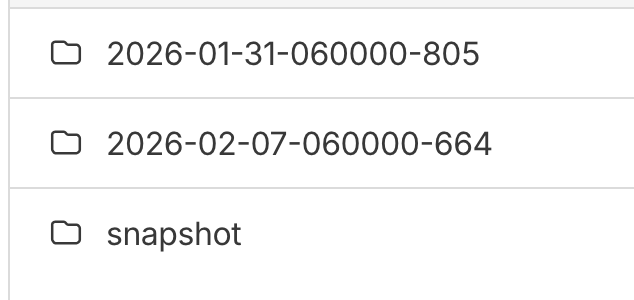
No, I didn't change the prefix of a site.
Should I just delete everything on Hetzner and start again?
-
I deleted everything on S3 and then made a fresh backup and tried to import again: Same error.
This is the structure on hetzner:
[2026-02-07 14:12:46 CET] 3.1MiB STANDARD 2026-02-07-131010-053/app_example.com_v1.4.0.backupinfo
[2026-02-07 14:11:58 CET] 8.3KiB STANDARD 2026-02-07-131010-053/app_example.com_v1.4.0/config.json
[2026-02-07 14:11:58 CET]   428B STANDARD 2026-02-07-131010-053/app_example.com_v1.4.0/fsmetadata.json
[2026-02-07 14:12:46 CET] 4.0GiB STANDARD 2026-02-07-131010-053/app_example.com_v1.4.0/mysqldump
[2026-02-07 14:11:58 CET] 3.1MiB STANDARD snapshot/app_0245750c-82b5-4b4c-b6ea-15c53d6046b6.backupinfo
[2026-02-07 14:11:07 CET] 8.3KiB STANDARD snapshot/app_0245750c-82b5-4b4c-b6ea-15c53d6046b6/config.json
[2026-02-07 14:11:07 CET]   428B STANDARD snapshot/app_0245750c-82b5-4b4c-b6ea-15c53d6046b6/fsmetadata.json
[2026-02-07 14:11:57 CET] 4.0GiB STANDARD snapshot/app_0245750c-82b5-4b4c-b6ea-15c53d6046b6/mysqldump
Still same error:
box:backupformat/rsync Recreating empty directories in {"localRoot":"/home/yellowtent/appsdata/f6e82f5e-ae79-403b-b824-f96d8989b4f4","layout":[]}
Feb 07 14:19:49 box:apptask run: app error for state pending_import: BoxError: Error loading fsmetadata.json:ENOENT: no such file or directory, open '/home/yellowtent/appsdata/f6e82f5e-ae79-403b-b824-f96d8989b4f4/fsmetadata.json' at restoreFsMetadata (/home/yellowtent/box/src/backupformat/rsync.js:188:38) at Object.download (/home/yellowtent/box/src/backupformat/rsync.js:290:11) at process.processTicksAndRejections (node:internal/process/task_queues:105:5) at async download (/home/yellowtent/box/src/backuptask.js:129:5) at async Object.downloadApp (/home/yellowtent/box/src/backuptask.js:169:5) at async installCommand (/home/yellowtent/box/src/apptask.js:341:9) { reason: 'External Error', details: {} }
Feb 07 14:19:49 box:tasks setCompleted - 3594: {"result":null,"error":{"message":"Error loading fsmetadata.json:ENOENT: no such file or directory, open '/home/yellowtent/appsdata/f6e82f5e-ae79-403b-b824-f96d8989b4f4/fsmetadata.json'","reason":"External Error"},"percent":100}
Feb 07 14:19:49 box:tasks updating task 3594 with: {"completed":true,"result":null,"error":{"message":"Error loading fsmetadata.json:ENOENT: no such file or directory, open '/home/yellowtent/appsdata/f6e82f5e-ae79-403b-b824-f96d8989b4f4/fsmetadata.json'","reason":"External Error"},"percent":100}
Feb 07 14:19:49 Exiting with code 0
Feb 07 14:19:49 box:taskworker Task took 171.978 seconds
Feb 07 14:19:49 BoxError: Error loading fsmetadata.json:ENOENT: no such file or directory, open '/home/yellowtent/appsdata/f6e82f5e-ae79-403b-b824-f96d8989b4f4/fsmetadata.json'
Might be something wrong with the way I create the backup?
-
Hello @difficult222
Please contact us at support@cloudron.io and reference this issue so we can have a look at your system to figure out what is going on.
-
I did, thanks
-
J joseph has marked this topic as solved on

Hello! It looks like you're interested in this conversation, but you don't have an account yet.
Getting fed up of having to scroll through the same posts each visit? When you register for an account, you'll always come back to exactly where you were before, and choose to be notified of new replies (either via email, or push notification). You'll also be able to save bookmarks and upvote posts to show your appreciation to other community members.
With your input, this post could be even better 💗
Register Login