
Cubby & Collabora integration
-
Hm the error indicates, that the file could not be found in cubby. Did the file have some special unicode characters maybe?
@nebulon Nope. Maybe later when I have some spare time, I will re-install cubby and do some more testing on this. But for now I am back to using nextcloud.
-
I experience the same. Though *.doc files do work, *.docx don't.
-
I still cannot reproduce this with my .docx files @wesleynuijens do you get any error somewhere? Or if possible can you share the non working document with us? If you do not want to share it publicly, you may also send it to support@cloudron.io so we can try to reproduce and fix this.
-
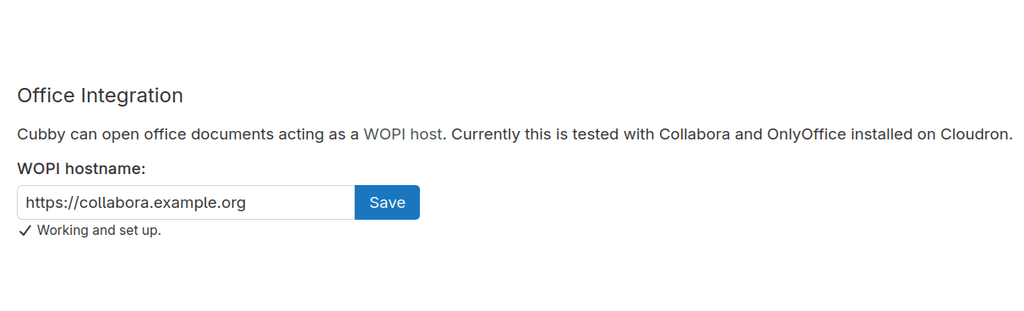
Cubby <-> Collabora on different instances.
Any idea what this console error means?
Firefox kann keine Verbindung zu dem Server unter wss://collabora.example.org/cool/https%3A%2F%2Fcubby.example.com%2Fapi%2Fv1%2Foffice%2Fwopi%2Ffiles%2Fhid-5b95502b9786ed3ba72f8e882b08cf4133db7c7c2cfb7c321e5cf0391a111e1b%3Faccess_token%3D9960178323b43261501c591b7f1ff6ed0fae9611add6d64935e087c1ceb49013%26access_token_ttl%3D0%26permission%3Dedit/ws?WOPISrc=https%3A%2F%2Fcubby.example.com%%2Fapi%2Fv1%2Foffice%2Fwopi%2Ffiles%2Fhid-5b95502b9786ed3ba72f8e882b08cf4133db7c7c2cfb7c321e5cf0391a111e1b&compat=/ws aufbauen. global.js:1:38362
Die Verbindung zu wss://collabora.example.org/cool/https%3A%2F%2Fcubby.example.com%%2Fapi%2Fv1%2Foffice%2Fwopi%2Ffiles%2Fhid-5b95502b9786ed3ba72f8e882b08cf4133db7c7c2cfb7c321e5cf0391a111e1b%3Faccess_token%3D9960178323b43261501c591b7f1ff6ed0fae9611add6d64935e087c1ceb49013%26access_token_ttl%3D0%26permission%3Dedit/ws?WOPISrc=https%3A%2F%2Fcubby.example.com%%2Fapi%2Fv1%2Foffice%2Fwopi%2Ffiles%2Fhid-5b95502b9786ed3ba72f8e882b08cf4133db7c7c2cfb7c321e5cf0391a111e1b&compat=/ws wurde unterbrochen, während die Seite geladen wurde.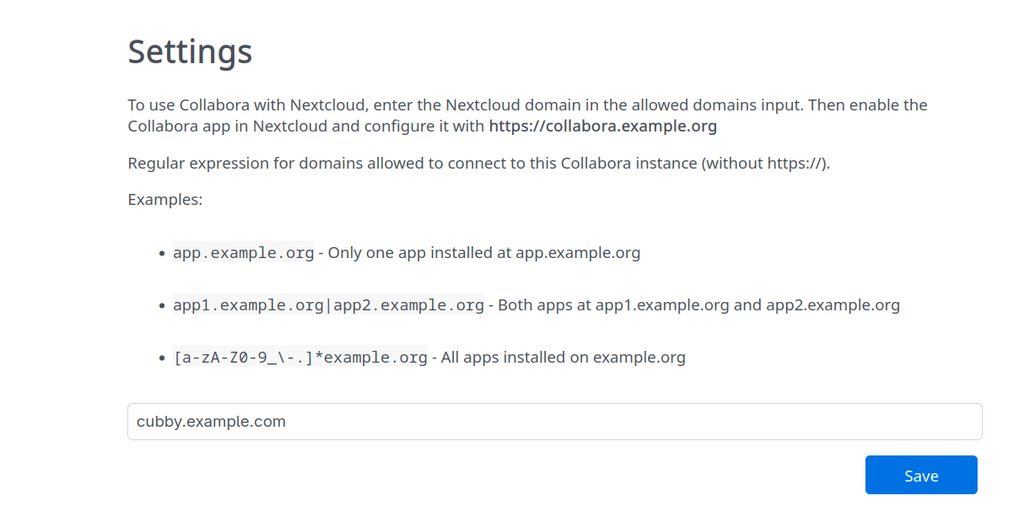
-
Do you see any blocked requests or other errors in the browser network tab while trying to open a document? Assuming you see this error while opening a document.
Also anything in either app logs?
@nebulon User error confirmed after 15 minutes of testing. Note: adding another domain to Collabora requires the format
[a-zA-Z0-9_\-.]*domain1.org|[a-zA-Z0-9_\-.]*domain2.orgplus a restart. We should probably update the settings page with this info. -
I think I may have stumbled upon the issue on my end. I have Collabora running behind Cloudflare's proxy.
When attempting to open files with spaces in their filenames via Collabora, Cubby fails to load the document and returns a 404 Not Found in the browser console. This appears to be caused by double-encoding of the file path in the WOPI handshake.
Steps to Reproduce:
-
Upload a file with a space in the name (e.g., Audit Record 2026.xlsx) to Cubby.
-
Attempt to open the file with the Collabora integration.
-
The editor opens but remains blank.
Observed Behavior:
The browser console shows a 404 error for the file path:
api/v1/files?path=%2Fhome%2F2025-11-19%2520Work%2520Orders.xlsx
The space character (%20) has been double-encoded into %2520.Expected Behavior:
The path should be decoded correctly by the server/proxy to locate the file on disk.Workaround Found:
Renaming the file to remove spaces (e.g., Audit_Record_2026.xlsx) resolves the issue and the file opens successfully.Possible Solution:
Cloudron team can fix this by changing how the app handles the WOPI access_token or by ensuring the path is decoded once more before the final request. -
-
Encoding is per-character, so it doesn't multiply the number of spaces; it just makes the string significantly longer.
1 Space: → %20 (Single) → %2520 (Double)
2 Spaces: → %20%20 (Single) → %2520%2520 (Double)
It doesn't become 4 spaces, but it becomes a very "noisy" URL.
You can find the official explanation of how Cloudflare handles this here: https://developers.cloudflare.com/rules/normalization/
In theory, if I turn this behaviour off in Cloudflare's settings, then Cubby should be able to talk with Collabora without any issues. I will test this out later when I have some time.
But I think there is probably a way to get this fixed within Cubby itself because on NextCloud it works fine.
One difference I have noticed between Cubby's implementation vs Nextcloud's is that when Nextcloud talks to Collabora, it doesn't usually send the filename in the URL. It uses an Internal File ID (e.g.,/files/12345). Because the URL only contains numbers, there are no spaces to encode, so Cloudflare has nothing to double-encode. Cubby on the other hand passes the Literal Path as a query parameter (?path=/home/File Name.xlsx). Because the filename itself is in the URL, the spaces are exposed to Cloudflare’s "normalization" logic. So that might be an area to explore.
-
 N nebulon locked this topic on

Hello! It looks like you're interested in this conversation, but you don't have an account yet.
Getting fed up of having to scroll through the same posts each visit? When you register for an account, you'll always come back to exactly where you were before, and choose to be notified of new replies (either via email, or push notification). You'll also be able to save bookmarks and upvote posts to show your appreciation to other community members.
With your input, this post could be even better 💗
Register Login