
Cloudron makes it easy to run web apps like WordPress, Nextcloud, GitLab on your server. Find out more or install now.


Skip to content
  • Categories
  • Recent
  • Tags
  • Popular
  • Bookmarks
  • Search
Skins
  • Light
  • Brite
  • Cerulean
  • Cosmo
  • Flatly
  • Journal
  • Litera
  • Lumen
  • Lux
  • Materia
  • Minty
  • Morph
  • Pulse
  • Sandstone
  • Simplex
  • Sketchy
  • Spacelab
  • United
  • Yeti
  • Zephyr
  • Dark
  • Cyborg
  • Darkly
  • Quartz
  • Slate
  • Solar
  • Superhero
  • Vapor

  • Default (No Skin)
  • No Skin
Collapse
Brand Logo

Cloudron Forum

Apps - Status | Demo | Docs | Install
  1. Cloudron Forum
  2. Support
  3. Unable to Edit External App Links (400 Bad Request)

Unable to Edit External App Links (400 Bad Request)

Scheduled Pinned Locked Moved Solved Support
app link
7 Posts 2 Posters 34 Views 2 Watching
  • Oldest to Newest
  • Newest to Oldest
  • Most Votes
Reply
  • Reply as topic
Log in to reply
This topic has been deleted. Only users with topic management privileges can see it.
  • H Offline
    H Offline
    hakunamatata
    wrote last edited by joseph
    #1

    Summary

    In Cloudron Dashboard v9.0.17, attempting to edit an existing External App Link (changing the label, icon, or URL) fails. Clicking the "Save" button results in no UI feedback, and the browser console reveals a 400 Bad Request error.

    Environment

    • Cloudron Version: 9.0.17
    • Component: Dashboard -> External Links
    • Browser: Safari / Brave Browser

    Steps to Reproduce

    1. Navigate to the Cloudron Dashboard.
    2. Click the "Configure" icon on an existing External App Link.
    3. Modify any field (e.g., change the Label, URL, or Logo).
    4. Click Save.

    Actual Result

    The modal does not close, and changes are not saved.

    Console Error Trace:

    POST https://[MY-CLOUDRON-DOMAIN]/api/v1/applinks/[LINK-ID] 400 (Bad Request)
    {status: 400, body: {…}}
    

    Expected Result

    The system should accept the updated metadata, the modal should close, and the dashboard should successfully update the link details.

    1 Reply Last reply
    1
    • H Offline
      H Offline
      hakunamatata
      wrote last edited by
      #2

      There also appears to be another bug where if you create a new external link and upload a custom logo, and then after saving, subsequently create another new external link, the previously uploaded logo appears as the default logo instead of the Cloudron logo.

      1 Reply Last reply
      0
      • H Offline
        H Offline
        hakunamatata
        wrote last edited by
        #3

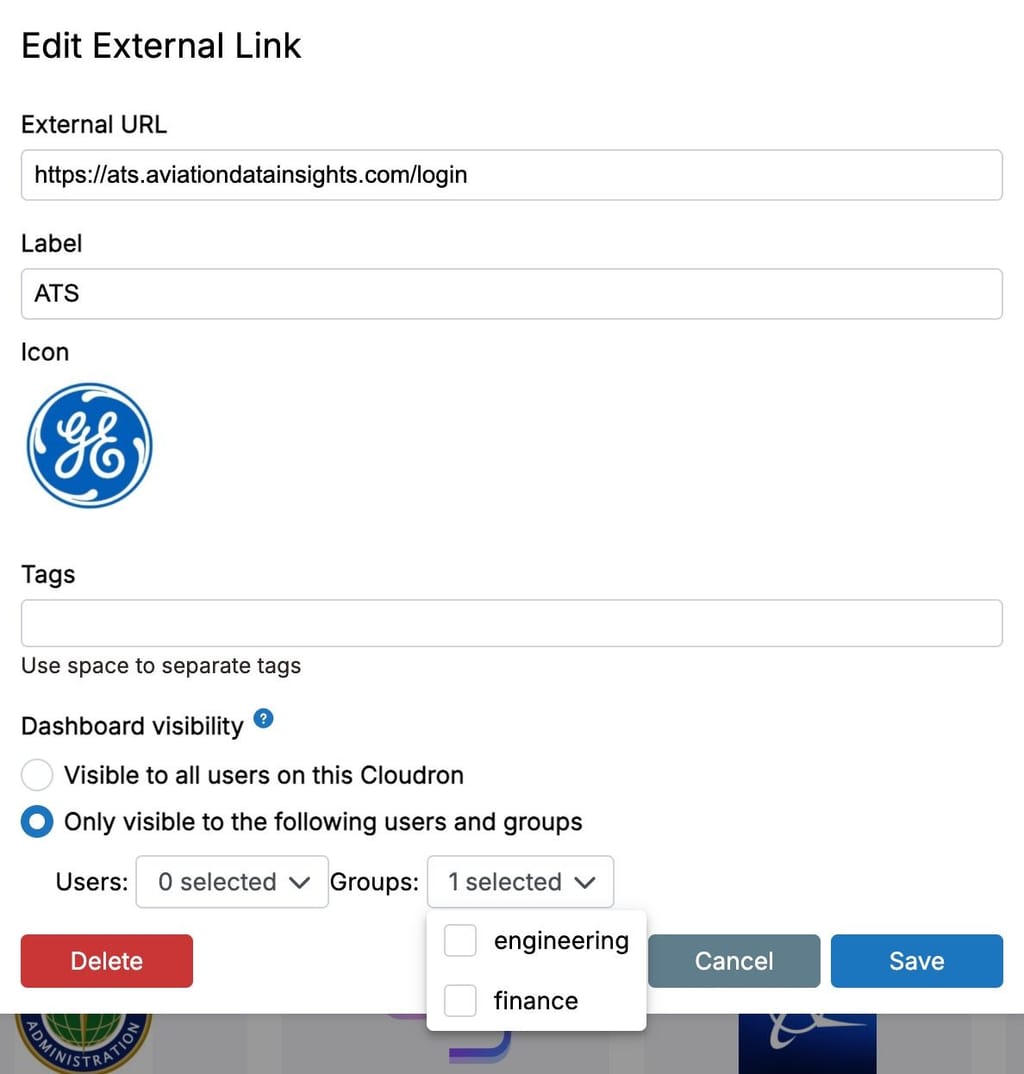
        There is also some other issue where previously selected users/groups don't appear as already selected in the UI
        ed2a6960-ae0e-442b-b31a-78118246569f-image.jpeg

        1 Reply Last reply
        1
        • nebulonN Offline
          nebulonN Offline
          nebulon
          Staff
          wrote last edited by
          #4

          for the first issue, I am not able to reproduce this. what is the error body you are seeing from the 400 request?

          The dashboard visibility should be fixed with cloudron 9.1

          1 Reply Last reply
          0
          • H Offline
            H Offline
            hakunamatata
            wrote last edited by
            #5

            @nebulon see below. I think the issue is related to the bug in post #3 because it seems to be limited to making changes to the label/tags field when users and/or groups were previously selected but show unselected in the UI. If I edit the fields for an external link that is visible to all users, that seems to be working fine.

            body
            : 
            message
            : 
            "All groups have to be strings"
            status
            : 
            "Bad Request"
            
            1 Reply Last reply
            0
            • nebulonN Offline
              nebulonN Offline
              nebulon
              Staff
              wrote last edited by
              #6

              ah I see, this should be fixed in 9.1 then

              1 Reply Last reply
              0
              • H Offline
                H Offline
                hakunamatata
                wrote last edited by
                #7

                Noted, will wait for the 9.1 release then and revert if there are still issues.

                1 Reply Last reply
                0
                • jamesJ james has marked this topic as solved

                Hello! It looks like you're interested in this conversation, but you don't have an account yet.

                Getting fed up of having to scroll through the same posts each visit? When you register for an account, you'll always come back to exactly where you were before, and choose to be notified of new replies (either via email, or push notification). You'll also be able to save bookmarks and upvote posts to show your appreciation to other community members.

                With your input, this post could be even better 💗

                Register Login
                Reply
                • Reply as topic
                Log in to reply
                • Oldest to Newest
                • Newest to Oldest
                • Most Votes


                • Login

                • Don't have an account? Register

                • Login or register to search.
                • First post
                  Last post
                0
                • Categories
                • Recent
                • Tags
                • Popular
                • Bookmarks
                • Search

