
Unable to Edit External App Links (400 Bad Request)
-
Summary
In Cloudron Dashboard v9.0.17, attempting to edit an existing External App Link (changing the label, icon, or URL) fails. Clicking the "Save" button results in no UI feedback, and the browser console reveals a 400 Bad Request error.
Environment
- Cloudron Version: 9.0.17
- Component: Dashboard -> External Links
- Browser: Safari / Brave Browser
Steps to Reproduce
- Navigate to the Cloudron Dashboard.
- Click the "Configure" icon on an existing External App Link.
- Modify any field (e.g., change the Label, URL, or Logo).
- Click Save.
Actual Result
The modal does not close, and changes are not saved.
Console Error Trace:
POST https://[MY-CLOUDRON-DOMAIN]/api/v1/applinks/[LINK-ID] 400 (Bad Request)
{status: 400, body: {…}}
Expected Result
The system should accept the updated metadata, the modal should close, and the dashboard should successfully update the link details.
-
There also appears to be another bug where if you create a new external link and upload a custom logo, and then after saving, subsequently create another new external link, the previously uploaded logo appears as the default logo instead of the Cloudron logo.
-
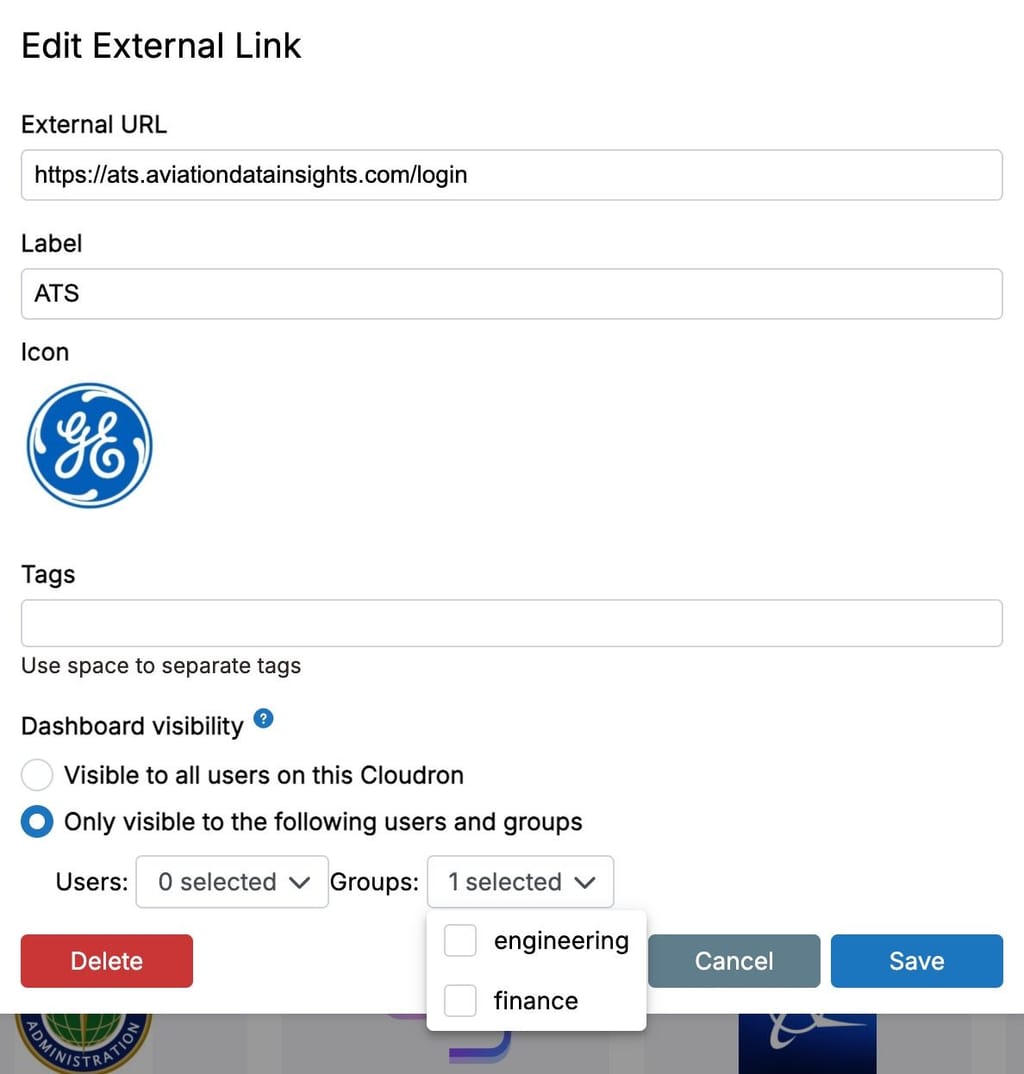
There is also some other issue where previously selected users/groups don't appear as already selected in the UI
-
@nebulon see below. I think the issue is related to the bug in post #3 because it seems to be limited to making changes to the label/tags field when users and/or groups were previously selected but show unselected in the UI. If I edit the fields for an external link that is visible to all users, that seems to be working fine.
body : message : "All groups have to be strings" status : "Bad Request" -
Noted, will wait for the 9.1 release then and revert if there are still issues.
-
 J james has marked this topic as solved on

Hello! It looks like you're interested in this conversation, but you don't have an account yet.
Getting fed up of having to scroll through the same posts each visit? When you register for an account, you'll always come back to exactly where you were before, and choose to be notified of new replies (either via email, or push notification). You'll also be able to save bookmarks and upvote posts to show your appreciation to other community members.
With your input, this post could be even better 💗
Register Login