Cloudron makes it easy to run web apps like WordPress, Nextcloud, GitLab on your server. Find out more or install now.


Skip to content
  • Categories
  • Recent
  • Tags
  • Popular
  • Bookmarks
  • Search
Skins
  • Light
  • Brite
  • Cerulean
  • Cosmo
  • Flatly
  • Journal
  • Litera
  • Lumen
  • Lux
  • Materia
  • Minty
  • Morph
  • Pulse
  • Sandstone
  • Simplex
  • Sketchy
  • Spacelab
  • United
  • Yeti
  • Zephyr
  • Dark
  • Cyborg
  • Darkly
  • Quartz
  • Slate
  • Solar
  • Superhero
  • Vapor

  • Default (No Skin)
  • No Skin
Collapse
Brand Logo

Cloudron Forum

Apps - Status | Demo | Docs | Install
  1. Cloudron Forum
  2. VPN
  3. Wireguard: "Patching" AllowedIps and interface PostUp

Wireguard: "Patching" AllowedIps and interface PostUp

Scheduled Pinned Locked Moved VPN
10 Posts 3 Posters 88 Views 3 Watching
  • Oldest to Newest
  • Newest to Oldest
  • Most Votes
Reply
  • Reply as topic
Log in to reply
This topic has been deleted. Only users with topic management privileges can see it.
  • S Offline
    S Offline
    sirthias
    wrote last edited by sirthias
    #1

    Dear all,

    I've just set up a wireguard VPN server on my Cloudron instance and love the simplicity and instant success! Great stuff!

    However, I have one little question:

    One of my VPN peers is a MikroTik LTE router with a private subnet 192.168.99.0/24 behind it.
    After the VPN app is started I currently run the following two commands in the app's web terminal to make the nodes in the subnet behind the router reachable to all VPN peers:

    wg set wg0 peer <key> allowed-ips 172.26.99.3/32,192.168.99.0/24
    ip route add 192.168.99.0/24 via 172.26.99.3
    

    These two commands add the subnet 192.168.99.0/24 to the AllowedIps of the routers wireguard peer entry and add a respective route.
    This works great and everything functions exactly as it should.

    However, these changes get lost when the VPN app is restarted.
    In order to make them persist across app restarted I tried patching the /app/data/wg/wg0.conf file, but apparently this file gets regenerated on every app restart.

    Does anyone have an idea of how to best make these two tweaks permanent?

    Cheers
    Mathias

    1 Reply Last reply
    1
    • robiR Offline
      robiR Offline
      robi
      wrote last edited by
      #2

      Look for a start.sh or run.sh file which gets called on start.

      Conscious tech

      1 Reply Last reply
      1
      • S Offline
        S Offline
        sirthias
        wrote last edited by sirthias
        #3

        Thank you, robi, I've seen /app/code/start.sh and it'd be a great place to put the needed changes, but this file is not in the /app/data/ folder and -- as such -- isn't writeable.
        It seems to me I have to somehow sneak something into /app/data/ as that's the only place I have influence over.

        One thought: Could I simply patch /app/data/wg/wg0.conf and chmod -r it to prevent it being rewritten on app restart?

        robiR 1 Reply Last reply
        1
        • S sirthias

          Thank you, robi, I've seen /app/code/start.sh and it'd be a great place to put the needed changes, but this file is not in the /app/data/ folder and -- as such -- isn't writeable.
          It seems to me I have to somehow sneak something into /app/data/ as that's the only place I have influence over.

          One thought: Could I simply patch /app/data/wg/wg0.conf and chmod -r it to prevent it being rewritten on app restart?

          robiR Offline
          robiR Offline
          robi
          wrote last edited by
          #4

          @sirthias probably not -r, how would the app read it?

          Needs some TLC from staff and a package fix

          Conscious tech

          1 Reply Last reply
          1
          • S Offline
            S Offline
            sirthias
            wrote last edited by
            #5

            Ah, of course I meant -w to prevent the rewrite.

            I don't think there is a lot of TCL required.
            One additional line in start.sh would suffice, which simply checks for the existence of a custom script like /app/data/poststart.sh and calls it if it exists.
            So, a hook for custom logic to run after the app has started and the tunnel is up.
            Where can I best propose/submit this little feature request?

            1 Reply Last reply
            1
            • robiR Offline
              robiR Offline
              robi
              wrote last edited by
              #6

              This is it, however it is the weekend and staff need a break 🙂

              Conscious tech

              1 Reply Last reply
              1
              • girishG Offline
                girishG Offline
                girish
                Staff
                wrote last edited by
                #7

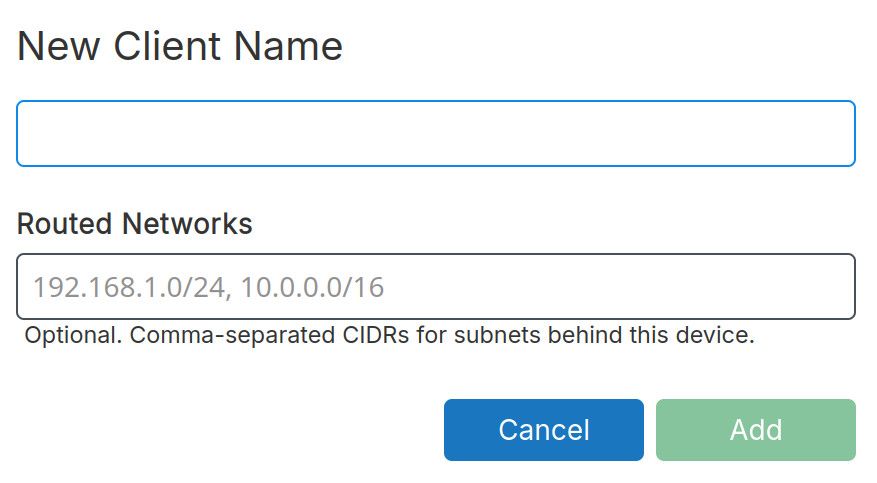
                @sirthias if I understand correctly, you are adding a device that has a network behind it. What do you think of taking this network IP (or a list of IPs) when adding a new device? This way we don't need the special scripts.

                1 Reply Last reply
                0
                • girishG Offline
                  girishG Offline
                  girish
                  Staff
                  wrote last edited by
                  #8

                  Something like this:

                  a6c0c910-c05c-4741-a25f-f0ef2a0430d4-image.jpeg

                  robiR S 2 Replies Last reply
                  1
                  • girishG girish

                    Something like this:

                    a6c0c910-c05c-4741-a25f-f0ef2a0430d4-image.jpeg

                    robiR Offline
                    robiR Offline
                    robi
                    wrote last edited by
                    #9

                    @girish It would still be useful to expose an editable configuration file for future remote control or even API management.

                    Automation

                    Conscious tech

                    1 Reply Last reply
                    0
                    • girishG girish

                      Something like this:

                      a6c0c910-c05c-4741-a25f-f0ef2a0430d4-image.jpeg

                      S Offline
                      S Offline
                      sirthias
                      wrote last edited by
                      #10

                      @girish Yes, of course, it'd be great it the VPN App had native support for routed networks behind a device.
                      This would make it easier for users who are less experienced with networking setups to quickly set this up.

                      I'd be happy to test-drive an update if you'd like to make one available.

                      Nevertheless I agree with @robi in that providing a simple hook for a custom script in the /app/data/ directory would also work and be even more flexible.
                      It wouldn't even have to become part of the UI and thus be somewhat less intrusive to the clean nature of the app.

                      Cheers
                      Mathias

                      1 Reply Last reply
                      1

                      Hello! It looks like you're interested in this conversation, but you don't have an account yet.

                      Getting fed up of having to scroll through the same posts each visit? When you register for an account, you'll always come back to exactly where you were before, and choose to be notified of new replies (either via email, or push notification). You'll also be able to save bookmarks and upvote posts to show your appreciation to other community members.

                      With your input, this post could be even better 💗

                      Register Login
                      Reply
                      • Reply as topic
                      Log in to reply
                      • Oldest to Newest
                      • Newest to Oldest
                      • Most Votes


                      • Login

                      • Don't have an account? Register

                      • Login or register to search.
                      • First post
                        Last post
                      0
                      • Categories
                      • Recent
                      • Tags
                      • Popular
                      • Bookmarks
                      • Search