
Application unexpectedly missing in Backup
-
Hi All,
I love the newly introduced integrity check for Backups! I did it for the backup in question and it turned green. Happy.
Later, unexpected error, I need to restore Cloudron from Backup. Unfortunately, one important backup is missing in the backups. It is missing since the upgrade of Cloudron from 9.1.7 to 9.2.0 but this might be just coincidence.
Because I have another app of the same type which was perfectly fine backed up.Is the integrity check also checking, if all Apps are backed which are supposed to be backed up?
Thinking about it, that may be a difficult check, but somehow I was expecting it.
I missing 4 Backups for that application. I checked the Backup location storage and I don't see that app there (so UI seems to be correct).
-
Hello @nottheend
I can not tell without any details if the missing backup even should be present.
It depends on the retention policy set and also if a backup was marked to keep it.
For my current knowledge, it could just be that the missing backups got cleaned up due to the retention policy. -
Thanks. Let me add some context:
It is about firefly-iii app. There are 2 of them: firefly-iii-green app and firefly-iii-red app.
But for red the Backup looks like this:
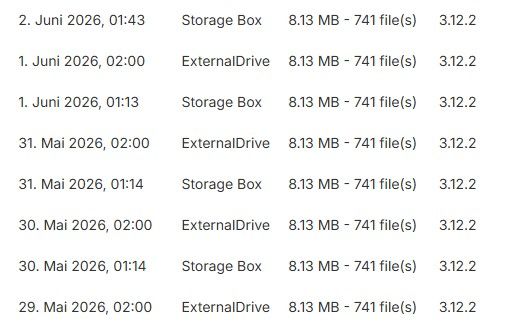
While for green it looks like this (locations are fine, just not on the Screenshot):
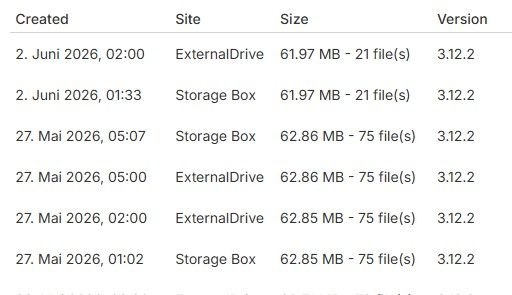
Both follow the same retention policy.
Is the integrity checking if all expected backups are available?There are 2 Backup locations available and supposed to be used, and they are missing similarly in both locations.
When I open the logs via the GUI I only get the last day and the failure event happend before -
I guess I have more questions around the integrity check: What is the exact criteria for "green" or "red"?
Here's why I'm asking: After recovering my Cloudron, I noticed that one backup location, an external drive, is still present in the configuration. BUT: that external drive is no longer mounted (or even connected, for that matter). I haven't disabled the location in Cloudron yet.
Now here's the surprising part for me: Cloudron still claims it performed a backup to that location. And when I run the integrity check on that backup, it shows up as green. For a backup that, as far as I can tell, doesn't actually exist on accessible hardware.
I realise I might not fully understand how ext4 mounts work behind the scenes, but I do know that the physical hardware isn't connected. So this makes me wonder: how does the integrity check actually work under the hood? Does it only check metadata or local records, rather than verifying the actual remote files?
Would love to understand this better, because right now a "green" integrity result feels less reliable than I initially thought.
Thanks for bearing with me.
-
Update: Day 5 of the mystery backup issue
After 4 days of backups appearing to succeed (no errors in the notification centre), the backup finally failed on day 5 with this error:
Jun 07 01:24:44 BoxError: Not enough disk space for backup. Needed: 47.1GB Available: 45.71GB
    at runBackupUpload (file:///home/yellowtent/box/src/backuptask.js:192:15)
    at process.processTicksAndRejections (node:internal/process/task_queues:103:5)
    at async uploadAppSnapshot (file:///home/yellowtent/box/src/backuptask.js:359:34)
    at async backupAppWithTag (file:///home/yellowtent/box/src/backuptask.js:382:26)
Jun 07 01:24:44 Exiting with code 0
This is confusing because:
The server's local disk has about 60 GB free
I don't see any backup files actually being written to the server itself
So I'm not sure what disk or location this error is even referring to. I need to investigate further, but I'm posting this in case it helps explain what's been going wrong.Thread summary so far: There seem to be a few possibly related issues:
- Missing backups: For one app no backups were created from one day onwards. Though a second identical app was unaffected. Only discovered through a Cloudron restauration
- Backup to phantom location: After migrating to a new server, backups to a disconnected external drive kept succeding for 4 days. On day 5, that same location finally failed with a "not enough space" error referencing a disk that doesn't match anything visible on the server.
- Unreliable integrity check: Integrity check succeeded for backups which didn't contain the backup of the app in question (prior to restauration). Even on the backups to the phantom location, the integrity check kept succeeding
-
Update: All apps in error state after Cloudron restore
After restoring Cloudron, all my apps ended up in an error state. I've been digging into the logs and wanted to share what I found in case it's relevant to my setup or helps others.
The key error from the app task log:
Error: ENOENT: no such file or directory, scandir '/mnt/managedbackups/<uuid>/2026-06-10-000001-121/app_<myapp>.<mydomain>_v3.12.2'So during the restore, Cloudron tries to download the app backup from
/mnt/managedbackups/..., but that path doesn't exist. This then causes the task to crash with anAssertionErrorrather than a cleanBoxError, which is probably also worth flagging as a minor bug.I suspect this is related to my specific setup: I have an external backup location that is no longer mounted (as described earlier in this thread). Cloudron appears to be pointing the restore at that unmounted path.
Resolution that worked for me: Explicitly restoring each app from its most recent backup (rather than letting the automatic restore run) resolved the error state. Ideally, this should be the default behaviour during a Cloudron restore anyway, restoring from the most recent available backup, so this might be worth looking into.
Happy to provide more details if useful.


Hello! It looks like you're interested in this conversation, but you don't have an account yet.
Getting fed up of having to scroll through the same posts each visit? When you register for an account, you'll always come back to exactly where you were before, and choose to be notified of new replies (either via email, or push notification). You'll also be able to save bookmarks and upvote posts to show your appreciation to other community members.
With your input, this post could be even better 💗
Register Login