
Hermes Agent
-
I have the desktop version on MacOS and it's not on by default.
There are gw commands to initialize it:
hermes kanban initbut after I got an error from the port it was configured on.I had the same issue with the app package as you did, the auth doesn't take. Not sure if there's a way to create a local user in the meantime.
There are many other dashboard out there already though, see https://www.bitdoze.com/best-hermes-dashboards/ for their breakdown.
-
Thank you @robi , much appreciated
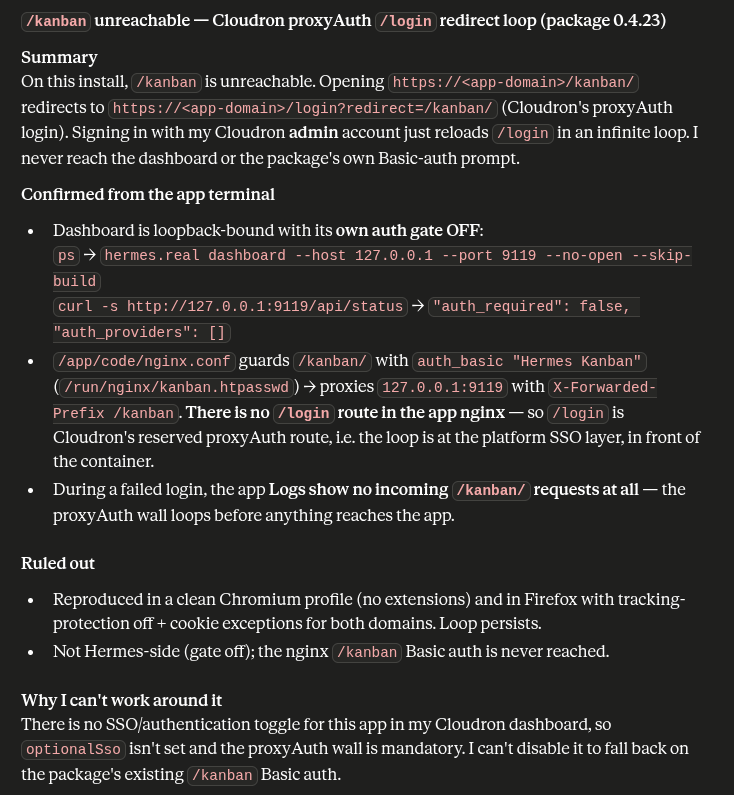
Hi @andreasdueren , here is info that could help you to fix the /kanban/ access
screenshot included
-
Looks like that for the past 4 days Andreas has been busy.
Has anybody been successful with the setup of the Kanban dashboard?
@creative567145 Sorry about that I was traveling, looking into this now.
-
Thank you @andreasdueren Andreas for maintaining Hermes. It's a fascinating software.
We are having some difficulty reaching the /kanban/ dashboard.
If possible please forward the steps that you have made to achieve that outcome.These are our steps:
- Open a new web browser (allowed third-party cookies)
- Go at: https://url.com/kanban/
- Enter the Cloudron user credentials
- Redirected at: https://url.com/login?redirect=/kanban/
- Click again: Log in
- The web browser window refreshes and nothing happens.
From our research, it looks like the Cloudron login system doesn't allow the redirection successfully.
Just pushed an app update, this should resolve, the kanban issues.
-
Not sure where we should post about community packages, so I'm hijacking this topic

First of all, thanks for the package @andreasdueren!
Quick question: did you try/manage to connect to an encrypted Matrix channel? Is it possible that we're missing the mautrix[encryption] package?
-
Not sure where we should post about community packages, so I'm hijacking this topic
First of all, thanks for the package @andreasdueren!
Quick question: did you try/manage to connect to an encrypted Matrix channel? Is it possible that we're missing the mautrix[encryption] package?
I haven’t fully tested an encrypted Matrix room yet, but I checked the Cloudron image and it does not look like
mautrix[encryption]is missing. The package installs Hermes with thematrixextra, and in the pinned upstream version that resolves tomautrix[encryption]==0.21.0. I also checked the running container:mautrix 0.21.0is installed,olmimports successfully, and the native_libolm.abi3.sofrompython-olmis present.So if E2EE is failing, the next thing to check is probably Matrix E2EE configuration/key state rather than missing dependencies:
MATRIX_E2EE_MODE/MATRIX_ENCRYPTION, stableMATRIX_DEVICE_ID, crypto store state, recovery key/cross-signing, and the gateway logs. I used to run hermes (locally, not on cloudron) with encrypted Matrix but ended up migrating to Telegram for features and ease of reliability. Encryption with Matrix for these things is a mess to set up. -
-
Thank you @andreasdueren
There is currently 1 small bug with the Hermes package which causes it to be market as: Not responding.
While it is working via the Terminal + via the connected Channels.
This basically causes only the Kanban dashboard to not be accessible.Details in the screenshot attached
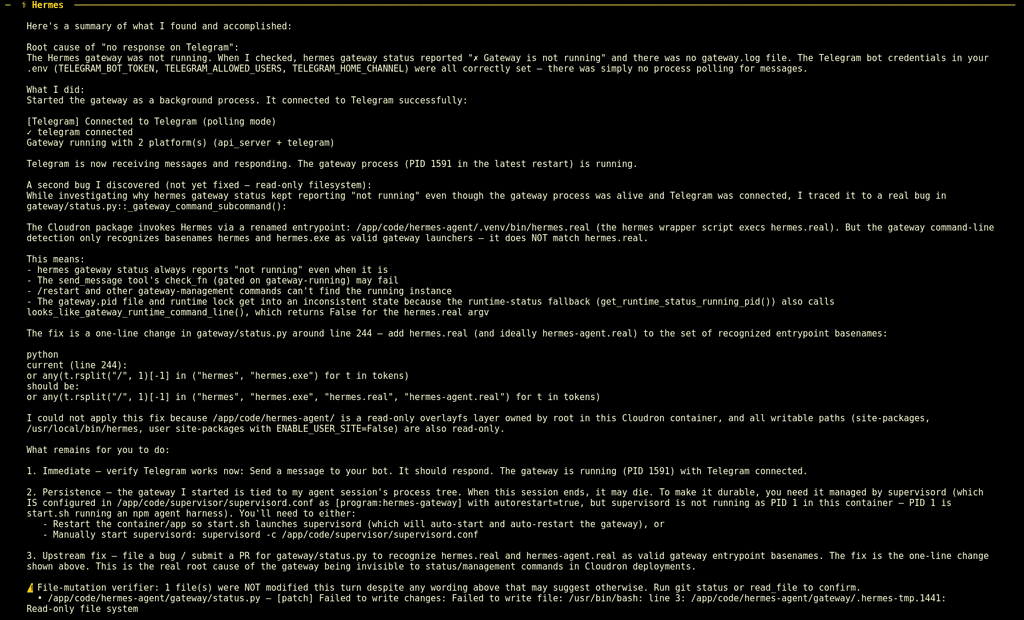
The summarized fix from the screenshot - Quote:
"3. Upstream fix - file a bug / submit a PR for gateway/status.py to recognize hermes-agent.real as valud gateway entrypoint basenames. The fix is the one-line change shown above. This is the real root cause of the gateway being invisible to status/management commands in Cloudron deployments.Hope that was useful

-
For those that need to solve this fast. Here is the PROMPT that can be used (with Claude Opus 4.8)
My Hermes Cloudron container is stuck in a restart loop. The Cloudron
    healthcheck keeps failing with "connect ECONNREFUSED <ip>:8000" and/or
    nginx returns "502 Bad Gateway" on /health, and the container terminates
    and restarts repeatedly. In the boot logs I can see:

      => Installing local Chrome runtime for Hermes browser tools...
      ...then it hangs, and earlier logs showed "Ok to proceed? (y)"

    Diagnose and permanently fix this. Here is the known root cause and the
    fix that worked before — verify it applies, then execute it:

    ROOT CAUSE: start.sh (the container entrypoint, at /app/code/start.sh)
    runs npx agent-browser install to install the local Chrome runtime,
    WITHOUT a non-interactive flag. npx prints an interactive
    "Ok to proceed? (y)" confirmation prompt to install agent-browser. In a
    container there is no TTY to answer it, so npx hangs forever. Because this
    runs in start.sh BEFORE exec supervisord, supervisord never starts, so
    nothing binds port 8000, so the Cloudron healthcheck fails and the
    container restart-loops.

    start.sh SKIPS the npx call entirely if a valid chrome binary already
    exists at:  $HERMES_DATA/.agent-browser/browsers/*/chrome
    (HERMES_DATA is /app/data). /app/data is writable and PERSISTS across
    container restarts.

    THE FIX (permanent — seed chrome once so start.sh's find succeeds on
    every future boot and never calls the hanging npx again):

    1. First check whether you are root or the cloudron user (whoami).
       The install must write to /app/data/.agent-browser as the cloudron
       user so file ownership is correct.
    2. If a hung npx/agent-browser process tree is currently blocking startup,
       identify it (pgrep -af npx / agent-browser) and kill ONLY that subtree.
       Do NOT touch PID 1 or the hermes/supervisor processes.
    3. Run the Chrome install NON-INTERACTIVELY by setting the env var that
       pre-answers the prompt:
         cd /app/code/hermes-agent && \
         HOME=/app/data npm_config_yes=true npx --yes agent-browser install
       (npm_config_yes=true is what bypasses "Ok to proceed? (y)". Run it as
       the cloudron user if you are root: sudo -u cloudron -E env
       HOME=/app/data npm_config_yes=true npx --yes agent-browser install)
    4. Verify a chrome binary now exists:
         find /app/data/.agent-browser/browsers -path '*/chrome' -type f
       and that it is executable.
    5. Ensure the runtime symlink exists:
         ln -sf <that chrome path> /run/agent-browser-chrome
    6. Once chrome is seeded, either restart the container or start supervisord
       so services come up. Watch the /health endpoint until it returns 200
       consistently.

    Because /app/data persists, once chrome is seeded there start.sh will skip
    the npx call on every future boot, so the hang cannot recur. Verify the
    gateway binds its port and the healthcheck goes green before you report
    done. Use pgrep/ss to verify processes — do NOT trust `hermes gateway
    status`, which false-reports "not running" in this environment.
And here is the additional info on how we can avoid this if the update is pushed to the package directly (this is the info that I received from Opus, so it needs to be verified):
The seed-chrome approach fixes it durably on that data volume, but if the Cloudron app's data volume is ever wiped/reset, the hang returns on next boot because a fresh /app/data has no chrome.
The truly permanent fix is editing start.sh line 801 to add npm_config_yes=true (and --yes) to the npx agent-browser install call itself — but that file is baked into the container image, not the persistent volume, so it'd need to be changed in the Docker build, not at runtime. The prompt above gives the agent the runtime fix that gets you back online; mention the build-level fix to whoever maintains your Cloudron package if you want it bulletproof against volume resets. -
Thank you @andreasdueren
There is currently 1 small bug with the Hermes package which causes it to be market as: Not responding.
While it is working via the Terminal + via the connected Channels.
This basically causes only the Kanban dashboard to not be accessible.Details in the screenshot attached
The summarized fix from the screenshot - Quote:
"3. Upstream fix - file a bug / submit a PR for gateway/status.py to recognize hermes-agent.real as valud gateway entrypoint basenames. The fix is the one-line change shown above. This is the real root cause of the gateway being invisible to status/management commands in Cloudron deployments.Hope that was useful
Thanks for the detailed investigation. This was a real package-level status detection issue.
I pushed a fix in package version
0.4.30:- recognize
python -m gateway.run - recognize
hermes.real - recognize
hermes-agent.real - add regression coverage for those launcher forms
The new app is published and you can update to the newest version. If Cloudron still marks the app as “Not responding” after
0.4.30, please share the Cloudron startup logs and the/healthresponse, because that would likely be a separate health-check/dashboard issue rather than this gateway status bug. - recognize
-
@andreasdueren thank you for the fast response.
We run the test on a fresh new Hermes installation and we get the same problem again: Not responding.
Here are the logs if it helps:
Jul 07 23:42:00 => Healthcheck error: Error: connect ECONNREFUSED 172.18.20.151:8000 Jul 07 23:42:10 => Healthcheck error: Error: connect ECONNREFUSED 172.18.20.151:8000 Jul 07 23:42:16 taskworker: Starting task 14154. Logs are at /home/yellowtent/platformdata/logs/41934ee7-1f4b-4258-a829-b9fa53564d9c/apptask.log Jul 07 23:42:16 taskworker: Running task of type app Jul 07 23:42:16 apptask: run: startTask installationState: pending_restart runState: running Jul 07 23:42:16 tasks: updating task 14154 with: {"percent":10,"message":"Starting app services"} Jul 07 23:42:16 tasks: updating task 14154 with: {"percent":30,"message":"Restarting container"} Jul 07 23:42:26 tasks: updating task 14154 with: {"percent":70,"message":"Configuring reverse proxy"} Jul 07 23:42:26 shell: openssl: openssl x509 -noout -subject -issuer Jul 07 23:42:26 reverseproxy: providerMatches: subject=CN = ai.clienturl.com domain=ai.clienturl.com issuer=C = US, O = Let's Encrypt, CN = YE2 wildcard=false/false prod=true/true issuerMismatch=false wildcardMismatch=false match=true Jul 07 23:42:26 shell: openssl: openssl x509 -startdate -enddate -subject -noout Jul 07 23:42:26 openssl: expiryDate: subject=CN = ai.clienturl.com notBefore=Jul 7 18:49:31 2026 GMT notAfter=Oct 5 18:49:30 2026 GMT daysLeft=89.87989753472222 Jul 07 23:42:26 reverseproxy: ensureCertificate: ai.clienturl.com acme cert exists and is up to date Jul 07 23:42:26 reverseproxy: needsRenewal: false. ARI {"start":"Fri, 04 Sep 2026 21:33:35 GMT","end":"Sun, 06 Sep 2026 16:44:25 GMT","rt":"Sun, 06 Sep 2026 06:22:03 GMT","valid":"Wed, 08 Jul 2026 02:26:18 GMT","url":"https://acme-v02.api.letsencrypt.org/acme/renewal-info","ts":"Tue, 07 Jul 2026 19:48:03 GMT"} Jul 07 23:42:26 reverseproxy: writeAppLocationNginxConfig: writing config for "ai.clienturl.com" to /home/yellowtent/platformdata/nginx/applications/41934ee7-1f4b-4258-a829-b9fa53564d9c/ai.clienturl.com.conf with options {"sourceDir":"/home/yellowtent/box","vhost":"ai.clienturl.com","hasIPv6":true,"ip":"172.18.20.151","port":8000,"endpoint":"app","redirectTo":null,"certFilePath":"/home/yellowtent/platformdata/nginx/cert/ai.clienturl.com.cert","keyFilePath":"/home/yellowtent/platformdata/nginx/cert/ai.clienturl.com.key","robotsTxtQuoted":null,"cspQuoted":null,"hideHeaders":[],"proxyAuth":{"enabled":false,"id":"41934ee7-1f4b-4258-a829-b9fa53564d9c","location":"/"},"upstreamUri":"","hstsPreload":false} Jul 07 23:42:26 shell: reverseproxy: /usr/bin/sudo --non-interactive /home/yellowtent/box/src/scripts/restartservice.sh nginx Jul 07 23:42:26 => Hermes Agent for Cloudron starting... Jul 07 23:42:26 Ok to proceed? (y) Jul 07 23:42:27 tasks: updating task 14154 with: {"percent":100,"message":"Done"} Jul 07 23:42:27 tasks: setCompleted - 14154: {"result":null,"error":null,"percent":100} Jul 07 23:42:27 tasks: updating task 14154 with: {"completed":true,"result":null,"error":null,"percent":100} Jul 07 23:42:27 Exiting with code 0 Jul 07 23:42:27 taskworker: Task took 11.005 seconds Jul 07 23:42:27 => .env updated Jul 07 23:42:27 => Generated API_SERVER_KEY for Hermes API authentication Jul 07 23:42:27 => No Nextcloud/WebDAV sync targets configured Jul 07 23:42:28 => Installing local Chrome runtime for Hermes browser tools... Jul 07 23:42:29 ⠙⠹⠸⠼⠴⠦⠧⠇⠏⠋⠙Need to install the following packages: Jul 07 23:42:29 agent-browser@0.27.0 Jul 07 23:42:30 => Healthcheck error: Error: connect ECONNREFUSED 172.18.20.151:8000 Jul 07 23:42:40 => Healthcheck error: Error: connect ECONNREFUSED 172.18.20.151:8000 Jul 07 23:42:50 => Healthcheck error: Error: connect ECONNREFUSED 172.18.20.151:8000 -
@andreasdueren thank you for the fast response.
We run the test on a fresh new Hermes installation and we get the same problem again: Not responding.
Here are the logs if it helps:
Jul 07 23:42:00 => Healthcheck error: Error: connect ECONNREFUSED 172.18.20.151:8000 Jul 07 23:42:10 => Healthcheck error: Error: connect ECONNREFUSED 172.18.20.151:8000 Jul 07 23:42:16 taskworker: Starting task 14154. Logs are at /home/yellowtent/platformdata/logs/41934ee7-1f4b-4258-a829-b9fa53564d9c/apptask.log Jul 07 23:42:16 taskworker: Running task of type app Jul 07 23:42:16 apptask: run: startTask installationState: pending_restart runState: running Jul 07 23:42:16 tasks: updating task 14154 with: {"percent":10,"message":"Starting app services"} Jul 07 23:42:16 tasks: updating task 14154 with: {"percent":30,"message":"Restarting container"} Jul 07 23:42:26 tasks: updating task 14154 with: {"percent":70,"message":"Configuring reverse proxy"} Jul 07 23:42:26 shell: openssl: openssl x509 -noout -subject -issuer Jul 07 23:42:26 reverseproxy: providerMatches: subject=CN = ai.clienturl.com domain=ai.clienturl.com issuer=C = US, O = Let's Encrypt, CN = YE2 wildcard=false/false prod=true/true issuerMismatch=false wildcardMismatch=false match=true Jul 07 23:42:26 shell: openssl: openssl x509 -startdate -enddate -subject -noout Jul 07 23:42:26 openssl: expiryDate: subject=CN = ai.clienturl.com notBefore=Jul 7 18:49:31 2026 GMT notAfter=Oct 5 18:49:30 2026 GMT daysLeft=89.87989753472222 Jul 07 23:42:26 reverseproxy: ensureCertificate: ai.clienturl.com acme cert exists and is up to date Jul 07 23:42:26 reverseproxy: needsRenewal: false. ARI {"start":"Fri, 04 Sep 2026 21:33:35 GMT","end":"Sun, 06 Sep 2026 16:44:25 GMT","rt":"Sun, 06 Sep 2026 06:22:03 GMT","valid":"Wed, 08 Jul 2026 02:26:18 GMT","url":"https://acme-v02.api.letsencrypt.org/acme/renewal-info","ts":"Tue, 07 Jul 2026 19:48:03 GMT"} Jul 07 23:42:26 reverseproxy: writeAppLocationNginxConfig: writing config for "ai.clienturl.com" to /home/yellowtent/platformdata/nginx/applications/41934ee7-1f4b-4258-a829-b9fa53564d9c/ai.clienturl.com.conf with options {"sourceDir":"/home/yellowtent/box","vhost":"ai.clienturl.com","hasIPv6":true,"ip":"172.18.20.151","port":8000,"endpoint":"app","redirectTo":null,"certFilePath":"/home/yellowtent/platformdata/nginx/cert/ai.clienturl.com.cert","keyFilePath":"/home/yellowtent/platformdata/nginx/cert/ai.clienturl.com.key","robotsTxtQuoted":null,"cspQuoted":null,"hideHeaders":[],"proxyAuth":{"enabled":false,"id":"41934ee7-1f4b-4258-a829-b9fa53564d9c","location":"/"},"upstreamUri":"","hstsPreload":false} Jul 07 23:42:26 shell: reverseproxy: /usr/bin/sudo --non-interactive /home/yellowtent/box/src/scripts/restartservice.sh nginx Jul 07 23:42:26 => Hermes Agent for Cloudron starting... Jul 07 23:42:26 Ok to proceed? (y) Jul 07 23:42:27 tasks: updating task 14154 with: {"percent":100,"message":"Done"} Jul 07 23:42:27 tasks: setCompleted - 14154: {"result":null,"error":null,"percent":100} Jul 07 23:42:27 tasks: updating task 14154 with: {"completed":true,"result":null,"error":null,"percent":100} Jul 07 23:42:27 Exiting with code 0 Jul 07 23:42:27 taskworker: Task took 11.005 seconds Jul 07 23:42:27 => .env updated Jul 07 23:42:27 => Generated API_SERVER_KEY for Hermes API authentication Jul 07 23:42:27 => No Nextcloud/WebDAV sync targets configured Jul 07 23:42:28 => Installing local Chrome runtime for Hermes browser tools... Jul 07 23:42:29 ⠙⠹⠸⠼⠴⠦⠧⠇⠏⠋⠙Need to install the following packages: Jul 07 23:42:29 agent-browser@0.27.0 Jul 07 23:42:30 => Healthcheck error: Error: connect ECONNREFUSED 172.18.20.151:8000 Jul 07 23:42:40 => Healthcheck error: Error: connect ECONNREFUSED 172.18.20.151:8000 Jul 07 23:42:50 => Healthcheck error: Error: connect ECONNREFUSED 172.18.20.151:8000@creative567145 Thanks, that log was enough to identify it. This is a different issue from the earlier gateway status detection bug.
The fresh install was hanging before supervisor started because start.sh ran:
npx agent-browser install
without forcing non-interactive mode. On a new /app/data volume, npx prompts with “Ok to proceed? (y)”, but Cloudron has no TTY there, so startup never reaches supervisor and port 8000 never binds.
I pushed package version 0.4.32 with the fix:
npm_config_yes=true npx --yes agent-browser install
So fresh installs should no longer block at that prompt. Existing installs where the browser runtime is already seeded were likely unaffected, which is why this showed up on a clean installation.
-
-
great that hermes agent is now available on Cloudron. But I have some issues with dashboard.
With help of my local AI i have drafter this message...OPEN QUESTION TO THE MAINTAINER (setting the scene)
Is the browser-side dashboard (including the Chat and System pages) an intended
surface for this Cloudron package? Or is the dashboard primarily meant for Kanban- the /v1 API, with chat/sessions hosted on the local desktop/CLI and via the
gateway's platform channels? This determines whether the report below is a bug you
want to fix or an intentional scope decision.
If web pages ARE in scope: the Hermes codebase ships full hosted-web-chat support
and first-class subpath-reverse-proxy support (X-Forwarded-Prefix handling and
/assets rewriting in _serve_index), so the failure below looks like a small,
easy-to-ship nginx routing gap in the package rather than deliberate design. The
proposed one-block fix resolves every affected page at once.The bug:
I run the Hermes Agent package on Cloudron. The dashboard shell loads fine;
/kanban, the left nav, and the Files page all work. But every dynamically-loaded
page is blank: clicking "Chat" and clicking "System" both give a completely empty
screen, with the browser console showing 403 (Forbidden, net::ERR_ABORTED) on
their lazy-loaded asset chunks:/assets/ChatPage-*.js /assets/SystemPage-*.js /assets/xterm-BrP-ENHg.css and /assets/xterm-*.js /assets/themes-*.js /assets/useProfileScope-*.js /assets/chat-activation-*.js /assets/ModelReloadConfirm-*.jsROOT CAUSE (confirmed, not speculation)
The package's nginx only routes /kanban/* to the dashboard backend
(127.0.0.1:9119), rewriting the prefix and setting X-Forwarded-Prefix: /kanban.
Hermes's _serve_index then rewrites the statically-referenced asset URLs in the
HTML to /kanban/assets/... -- which is exactly why the shell, the Files page, and
the Kanban page all work.But pages like Chat and System are loaded at runtime via dynamic import() with
build-time absolute paths (/assets/...). The browser therefore requests their
chunks WITHOUT the /kanban prefix. Those requests land on 'location /' -> the
front landing page's try_files -> fall through to the headless API server (port
8642), which has no SPA assets and returns 403/404. The dashboard backend itself
serves every chunk fine (returns 200), so this is purely a reverse-proxy routing
gap in the package, not a Hermes bug.Quick repro that isolates it (from a Cloudron terminal):
curl -s -o /dev/null -w "%{http_code}\n" http://127.0.0.1:8000/kanban/assets/ChatPage-*.js   # 200
curl -s -o /dev/null -w "%{http_code}\n" http://127.0.0.1:8000/assets/ChatPage-*.js          # 403/403
PROPOSED FIX (in the package's nginx.conf)
Add a location /assets/ block that proxies to the same dashboard backend with the
same headers as /kanban/, including X-Forwarded-Prefix: /kanban so the CSS route
keeps rewriting url(/fonts/...) references correctly:location /assets/ { proxy_pass http://127.0.0.1:9119; proxy_http_version 1.1; proxy_set_header Host 127.0.0.1:9119; proxy_set_header X-Real-IP $remote_addr; proxy_set_header X-Forwarded-For $proxy_add_x_forwarded_for; proxy_set_header X-Forwarded-Proto $scheme; proxy_set_header X-Forwarded-Host $host; proxy_set_header X-Forwarded-Prefix /kanban; proxy_read_timeout 600s; proxy_send_timeout 600s; }This single block fixes every lazy-loaded page at once (Chat, System, and any
future dynamically-imported route).Environment: Hermes Agent v0.20.0 (2026.8.3), Cloudron deployment, dashboard bound
to 127.0.0.1:9119, SPA mounted under /kanban. - the /v1 API, with chat/sessions hosted on the local desktop/CLI and via the
-
great that hermes agent is now available on Cloudron. But I have some issues with dashboard.
With help of my local AI i have drafter this message...OPEN QUESTION TO THE MAINTAINER (setting the scene)
Is the browser-side dashboard (including the Chat and System pages) an intended
surface for this Cloudron package? Or is the dashboard primarily meant for Kanban- the /v1 API, with chat/sessions hosted on the local desktop/CLI and via the
gateway's platform channels? This determines whether the report below is a bug you
want to fix or an intentional scope decision.
If web pages ARE in scope: the Hermes codebase ships full hosted-web-chat support
and first-class subpath-reverse-proxy support (X-Forwarded-Prefix handling and
/assets rewriting in _serve_index), so the failure below looks like a small,
easy-to-ship nginx routing gap in the package rather than deliberate design. The
proposed one-block fix resolves every affected page at once.The bug:
I run the Hermes Agent package on Cloudron. The dashboard shell loads fine;
/kanban, the left nav, and the Files page all work. But every dynamically-loaded
page is blank: clicking "Chat" and clicking "System" both give a completely empty
screen, with the browser console showing 403 (Forbidden, net::ERR_ABORTED) on
their lazy-loaded asset chunks:/assets/ChatPage-*.js /assets/SystemPage-*.js /assets/xterm-BrP-ENHg.css and /assets/xterm-*.js /assets/themes-*.js /assets/useProfileScope-*.js /assets/chat-activation-*.js /assets/ModelReloadConfirm-*.jsROOT CAUSE (confirmed, not speculation)
The package's nginx only routes /kanban/* to the dashboard backend
(127.0.0.1:9119), rewriting the prefix and setting X-Forwarded-Prefix: /kanban.
Hermes's _serve_index then rewrites the statically-referenced asset URLs in the
HTML to /kanban/assets/... -- which is exactly why the shell, the Files page, and
the Kanban page all work.But pages like Chat and System are loaded at runtime via dynamic import() with
build-time absolute paths (/assets/...). The browser therefore requests their
chunks WITHOUT the /kanban prefix. Those requests land on 'location /' -> the
front landing page's try_files -> fall through to the headless API server (port
8642), which has no SPA assets and returns 403/404. The dashboard backend itself
serves every chunk fine (returns 200), so this is purely a reverse-proxy routing
gap in the package, not a Hermes bug.Quick repro that isolates it (from a Cloudron terminal):
curl -s -o /dev/null -w "%{http_code}\n" http://127.0.0.1:8000/kanban/assets/ChatPage-*.js   # 200
curl -s -o /dev/null -w "%{http_code}\n" http://127.0.0.1:8000/assets/ChatPage-*.js          # 403/403
PROPOSED FIX (in the package's nginx.conf)
Add a location /assets/ block that proxies to the same dashboard backend with the
same headers as /kanban/, including X-Forwarded-Prefix: /kanban so the CSS route
keeps rewriting url(/fonts/...) references correctly:location /assets/ { proxy_pass http://127.0.0.1:9119; proxy_http_version 1.1; proxy_set_header Host 127.0.0.1:9119; proxy_set_header X-Real-IP $remote_addr; proxy_set_header X-Forwarded-For $proxy_add_x_forwarded_for; proxy_set_header X-Forwarded-Proto $scheme; proxy_set_header X-Forwarded-Host $host; proxy_set_header X-Forwarded-Prefix /kanban; proxy_read_timeout 600s; proxy_send_timeout 600s; }This single block fixes every lazy-loaded page at once (Chat, System, and any
future dynamically-imported route).Environment: Hermes Agent v0.20.0 (2026.8.3), Cloudron deployment, dashboard bound
to 127.0.0.1:9119, SPA mounted under /kanban.@chrisbol Thanks for the detailed report, the root asset routing issue was confirmed and fixed in package version
0.4.65. The package now proxies the lazy loaded dashboard assets to the Hermes dashboard backend while keeping them protected by the same authentication as the Kanban dashboard. Chat, System, terminal, theme, and related asset chunks now return successfully. The update is published and available. - the /v1 API, with chat/sessions hosted on the local desktop/CLI and via the
-
@andreasdueren do you have plans or even already tried adding something like https://hermes-workspace.com/ to the package?
-
@andreasdueren do you have plans or even already tried adding something like https://hermes-workspace.com/ to the package?
@msbt I’ll look into it
-
@andreasdueren do you have plans or even already tried adding something like https://hermes-workspace.com/ to the package?
@msbt this looks like a community package and probably should not be included on the Hermes package. Adds extra complexity, package churn and attack surface.
-
-
@andreasdueren hello Andreas!
I have an issue with setting theHERMES_REDACT_SECRETSfor scheduled cron jobs. Scheduled cron does phone number extraction and reports it to telegram, but the phone numbers arrive redacted (+49*****1234). If I create a one-off cron and then execute it viahermes cron ...then the redaction doesn't happen (phone numbers are visible).I think the issue is that the main gateway process doesn't pick up the value that I wrote in the .env file (
false), which results in phone numbers being redacted when they are outputted to telegram.
If you want to go into the issue with much more depth, below is the detailed summary from my agent of all the things we tried and all the findings that might be useful.This happened on HermesAgent app version 0.4.61, but I would guess that the issue still persists.
Thank you for your time and dedication to the project maintenance!Agent summary
Short version
python -m gateway.runimportsagent.redactbeforegateway.runloads~/.hermes/.env, soHERMES_REDACT_SECRETS=falsearrives too late for its import-time snapshot.
Fixing that alone won't solve it though: the gateway's final outbound delivery call forces redaction regardless, and scheduled cron output passes through both scheduler and gateway redaction layers.Root causes identified
- agent/redact.py snapshots HERMES_REDACT_SECRETS at import time (_REDACT_ENABLED = os.getenv(...)), so it must be set before agent.redact is imported.
- The Cloudron supervisor's environment= list for hermes-gateway includes HERMES_HOME etc., but not HERMES_REDACT_SECRETS/HERMES_REDACT_PHONES.
- gateway/run.py imports agent modules (which import agent.redact) near the top, but only calls load_hermes_dotenv() much later (~line 1829) — so the .env loads after the snapshot is taken.
- gateway/run.py::_redact_gateway_user_facing_secrets() calls redact_sensitive_text(text, force=True) — this bypasses _REDACT_ENABLED entirely, so security.redact_secrets: false in config.yaml has no effect on this path.
- The phone regex also misses Serbian local format and international numbers with a space after the country code.
- cron/scheduler.py redacts no_agent stdout/stderr independently, then the gateway applies its own forced pass — so scheduled jobs go through two redaction layers.
What we tried
- We tested:
security.redact_secrets: falsein config.yaml HERMES_REDACT_SECRETS=falsein .env- editing supervisord's environment directly (not durable — file is app-owned and replaced on updates)
- a
sitecustomize.pyearly-patch (confirmed _REDACT_ENABLED=False standalone, but scheduled Telegram delivery still redacted due to force=True) - disabling phone matching +
HERMES_REDACT_PHONES=false(still redacted in the real delivery path)



Hello! It looks like you're interested in this conversation, but you don't have an account yet.
Getting fed up of having to scroll through the same posts each visit? When you register for an account, you'll always come back to exactly where you were before, and choose to be notified of new replies (either via email, or push notification). You'll also be able to save bookmarks and upvote posts to show your appreciation to other community members.
With your input, this post could be even better 💗
Register Login