
Grav 2.0 - copying a page is slow
-
Hello @superhua
Without more details about your set-up it is close to impossible to make an assumption what the issue could be.
It might be the systems IO, network speed or something else.
Maybe you can check your browser console with these request if they really take this long.
If the browser console reports back faster the web log viewer it might be system related.Maybe also provide the output of
cloudron-support --troubleshootso we can get a better understand of what you are working with.@james Thank you. I totally understand that this is nearly impossible to diagnose. Feels like such an odd issue.
Anyhow, not sure which aspect of the browser console would be helpful, but the long wait times are confirmed:
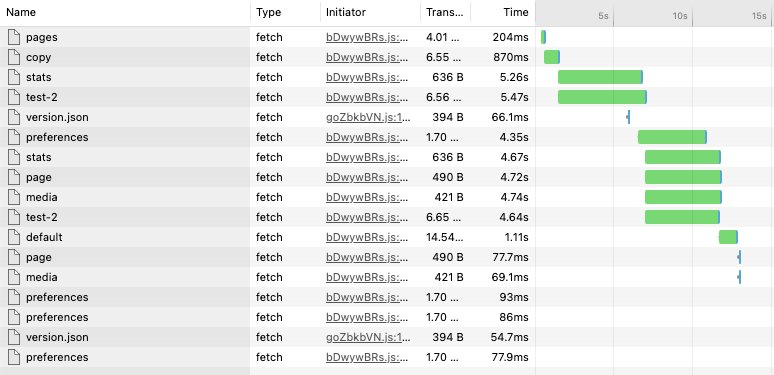
Further, here is the output of
cloudron-support --troubleshoot:Vendor: Red Hat Product: KVM Linux: 5.15.0-185-generic Ubuntu: jammy 22.04 Cloudron: 9.2.0 Execution environment: kvm Processor: Intel(R) Xeon(R) CPU E5-2680 v2 @ 2.80GHz x 4 RAM: 8127812KB Disk: /dev/vda4 16G [OK] Root disk usage is OK (82%) [OK] Memory usage is OK (53%) [OK] Clock is NTP-synchronized [OK] node version is correct [OK] IPv6 is enabled in kernel. No public IPv6 address [OK] docker is running [OK] docker version is correct [OK] MySQL is running [OK] netplan is good [OK] DNS is resolving via systemd-resolved [OK] unbound is running [OK] IPv4 HTTPS to api.cloudron.io/api/v1/helper/public_ip [SKIP] IPv6 HTTPS to api.cloudron.io/api/v1/helper/public_ip — no public IPv6 address [OK] IPv4 HTTPS to auth.docker.io/token [SKIP] IPv6 HTTPS to auth.docker.io/token — no public IPv6 address [OK] IPv4 HTTPS to acme-v02.api.letsencrypt.org [SKIP] IPv6 HTTPS to acme-v02.api.letsencrypt.org — no public IPv6 address [OK] nginx is running [OK] dashboard cert is valid [OK] dashboard is reachable via loopback [OK] No pending database migrations [OK] Service 'mysql' is running and healthy [OK] Service 'postgresql' is running and healthy [OK] Service 'mongodb' is running and healthy [OK] Service 'mail' is running and healthy [OK] Service 'graphite' is running and healthy [OK] Service 'sftp' is running and healthy [OK] box v9.2.0 is running [OK] Dashboard is reachable via IPv4 (https://my.indychinesechurch.org) [SKIP] Dashboard IPv6 reachability — no public IPv6 address [SKIP] Domain expiry check — whois not installed; run 'apt install whois' to check ======== Summary ======== PASS: 26 WARN: 0 FAIL: 0 SKIP: 5 -
Hello @superhua
/dev/vda4hints that this is a virtual disk.
You should check the disk speeds it could be it is very slow for some reason.
Also, IOWAIT might be worth looking at.Not that your hoster is having file storage issues and your system is just slow because of that.
-
hdparm -Tt /dev/vda4yields:/dev/vda4: Timing cached reads: 9658 MB in 1.99 seconds = 4846.98 MB/sec Timing buffered disk reads: 896 MB in 3.00 seconds = 298.61 MB/secWait time (
wa) usingvmstat 1is 0 or 1.These numbers look good.
I'll continue to research and report back if I discover anything.
Thanks again for your help!
-
@robi – Good idea!
Yes, after installing Grav and LAMP (and then Grav on top of that), LAMP/Grav is still faster on the demo server. -
-
If both those apps are installed and using the same disk, I can't quite see how filesystem operations would in any case impact how Grav is serving up files. On top of this, the Grav package is also using apache to serve up the files.
-
Would the following making any difference?
grav-system-info.yaml from the Dockerized install has
opcache.revalidate_freq: "2s"while
grav-system-info.yaml from LAMP install has
opcache.revalidate_freq: "60s"?
-
@robi Thanks for the reply! No, I haven't changed the
opcache.revalidate_freqas I don't know how. If there is a way to do that in Cloudron, please let me know.
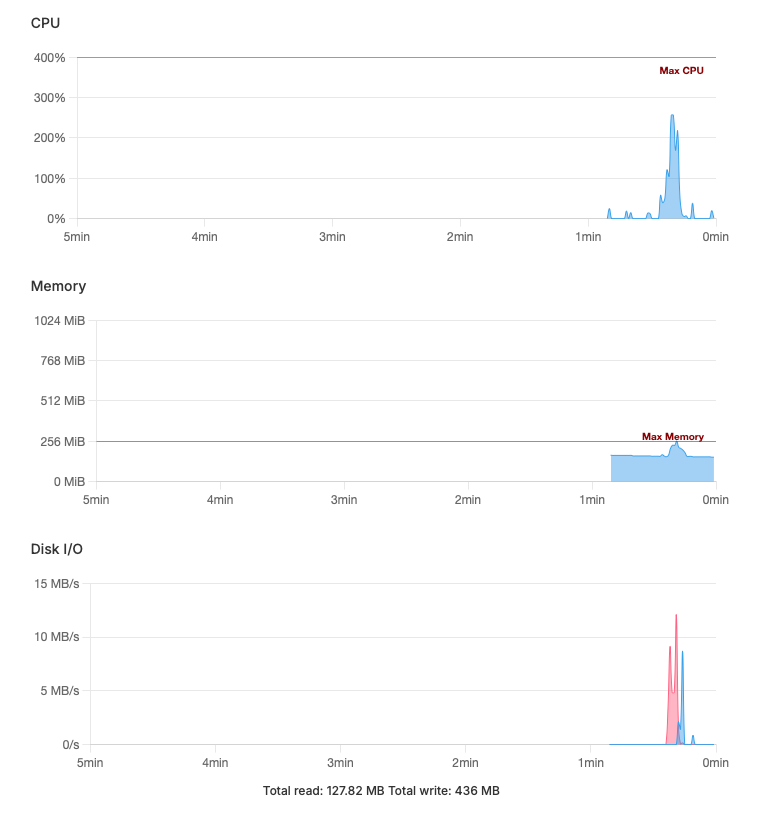
CPU usage for both is okay -- but the Disk I/O is quite different: 4.6 GB / 9.6 GB for Docker and 128 MB / 436 MB for LAMP:
Docker:
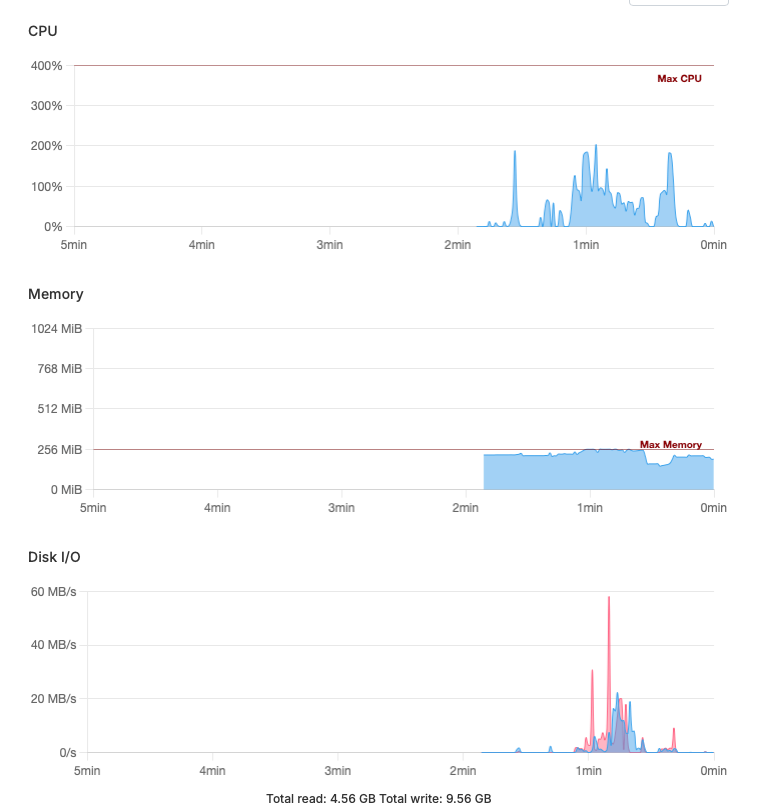
LAMP:
-
@robi Thanks for the reply! No, I haven't changed the
opcache.revalidate_freqas I don't know how. If there is a way to do that in Cloudron, please let me know.CPU usage for both is okay -- but the Disk I/O is quite different: 4.6 GB / 9.6 GB for Docker and 128 MB / 436 MB for LAMP:
Docker:
LAMP:
-
Update: just re-tested on the Docker install, and the I/O amounts are now similar to the LAMP install.
However, copying a page in the GUI is still slow.
@superhua have you tried another browser, incognito tabs, no plugins, cleared cache etc yet?
-
@robi Thanks for the reply! No, I haven't changed the
opcache.revalidate_freqas I don't know how. If there is a way to do that in Cloudron, please let me know.CPU usage for both is okay -- but the Disk I/O is quite different: 4.6 GB / 9.6 GB for Docker and 128 MB / 436 MB for LAMP:
Docker:
LAMP:
-
@superhua have you tried another browser, incognito tabs, no plugins, cleared cache etc yet?
@jdaviescoates Yes, I tried …
- Chrome
- Private browsing
- Minimal plugins (e.g., Admin2, API, Login)
- Clearing cache
… but no difference.
Copying a page in Admin2 is still slow.
Thanks for your reply!
-
@superhua You edit the .yaml file from the File Manager or CLI console.. then test your page copy.
It might help to fully describe exactly what you're doing to copy a page and how slow it is, so it can be tested on the demo server as well.
@robi Forgive the basic question, but which .yaml file?
I'm using the copy page button in Admin2 to copy:

It takes 12-16 seconds before I can edit the new copy on the Dockerized version.
In contrast, on the same server, the LAMP version takes ~7 seconds.
The demo server was faster, but yielded similar results (i.e., faster on on the LAMP install).
Thank you!
-
@robi Forgive the basic question, but which .yaml file?
I'm using the copy page button in Admin2 to copy:
It takes 12-16 seconds before I can edit the new copy on the Dockerized version.
In contrast, on the same server, the LAMP version takes ~7 seconds.
The demo server was faster, but yielded similar results (i.e., faster on on the LAMP install).
Thank you!





Hello! It looks like you're interested in this conversation, but you don't have an account yet.
Getting fed up of having to scroll through the same posts each visit? When you register for an account, you'll always come back to exactly where you were before, and choose to be notified of new replies (either via email, or push notification). You'll also be able to save bookmarks and upvote posts to show your appreciation to other community members.
With your input, this post could be even better 💗
Register Login