
UI feedback: Settings > Mailbox > Spam tab
-
Hello,
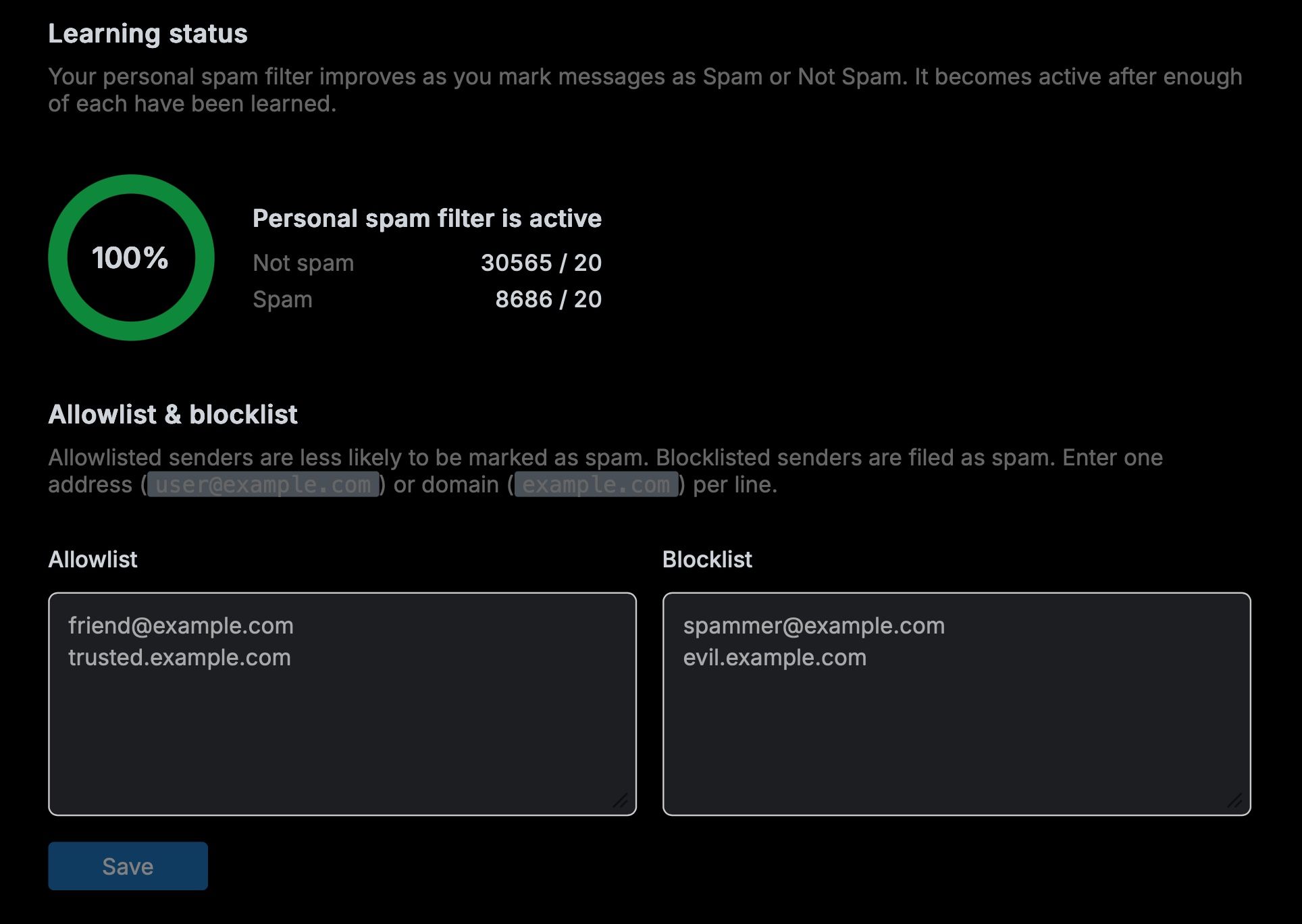
I was just deploying the Mail app to test with (I love the modern UX by the way, thank you for building this app!), and I see that the Spam tab in mailbox settings has a few things which I wanted to provide feedback on (and a question to ask too). Screenshot below for reference as well.
- At least while in dark mode, I find the placeholder text in the Allowlist and Blocklist divs to be bright enough that they almost look at first glance like real text rather than placeholders. And I think the reason I think that way is because it's brighter than the text under the "Allowlist & blocklist" heading. It may just be a my own perspective, but I would maybe suggest darkening the placeholder text a little bit to make it less obvious, either that or perhaps increase the contrast between that and the descriptive text under the various headings on the same tab.
- For the spam filter is active part with the statistics on how much is spam vs not spam... it took me a while to understand what the
/ 20part represented? At first I thought it was a bug or that text was cut-off. From re-reading the text above though, I guess the "100%" part is representative of at least 20 messages in each classification, is that correct? I don't necessarily have a solution here, but I just feel like this part could use a little work in terms of how to display that information. But I might just be sour because I was embarrassed on how long it took me to understand it.
- For the blocklist and allowlists... this might be obvious to most users perhaps, but for an admin side of things, it might be helpful if there was descriptions there (or at least maybe in the documentation for the app?) to confirm that this is a per mailbox setting but more importantly explain how this affects the spam filters server-wide in Cloudron if there is ever a conflict between what's set server-side and what's set in the Mail app (client-side).
That's all my feedback for now on that tab. Thank you again for considering it and for building such a replacement webmail app for everyone using Cloudron.


-
The abstract 20 is supposed to mean the minimum learning required before the Bayes filtering kicks in
 I know very geeky. Have to fix the UI to say something more meaningful. But the idea was to first expose this fact to the user that they need to train their email!
 -
About the blocklists/allowlists: the ones on Cloudron side are server global and managed by admins. The ones here are mailbox local and controlled by user. They are merged essentially but the mailbox one "wins" and has more priority in case of conflicts.
IMO, the admin one is only there in case the admin finds there is some major phishing or something going on and wants to block things for sure. Usually these lists are best controlled by end users themselves.
I can fix the wording in the Cloudron dashboard since the Mail app is targeting the end user who doesn't care about the admin role settings.


Hello! It looks like you're interested in this conversation, but you don't have an account yet.
Getting fed up of having to scroll through the same posts each visit? When you register for an account, you'll always come back to exactly where you were before, and choose to be notified of new replies (either via email, or push notification). You'll also be able to save bookmarks and upvote posts to show your appreciation to other community members.
With your input, this post could be even better 💗
Register Login