
Cloudron 10.0.4: Cannot add a second backup site – "Add" button missing

-
Hi Cloudron team,
I'm running Cloudron 10.0.4 and I'm trying to configure an external backup location in addition to my existing local backup location.
My current backup configuration looks like this:
Backup site: Default
Storage: filesystem (tgz)
Path: /var/backups
Content: Everything
Schedule: Daily at 23:00
Retention: 2 daysThe problem is that I cannot add another backup site.
Under:
Backup → Backup Sites
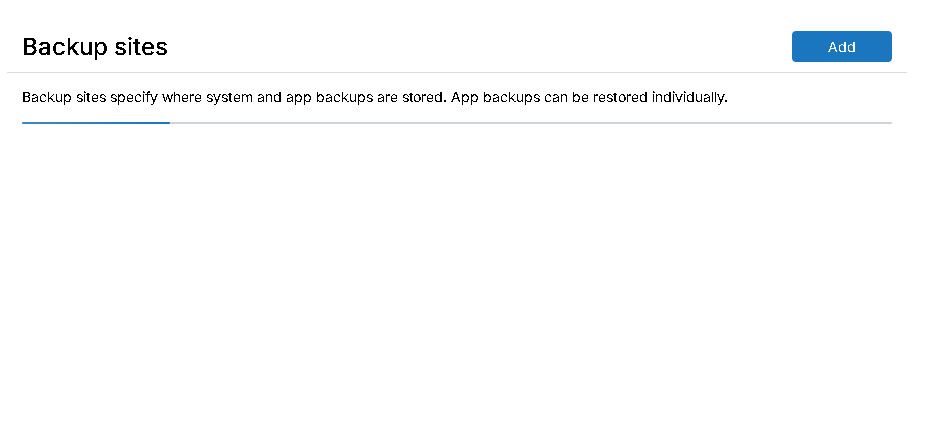
I only see the existing Default backup site. There is no "Add" button or any other option to create another backup site.
I have already checked the following:
Cloudron version: 10.0.4
Logged-in user: lukas
User role: Superadmin
cloudron-support --troubleshoot: 32 PASS / 0 WARN / 0 FAIL / 1 SKIP
cloudron-support --owner-login confirms that lukas is the owner
The existing Default backup site is working normallyThe skipped check is:
Domain expiry check – RDAP lookup for hallecloud.de failed (TLD may not support RDAP, or network unreachable)I've attached a screenshot of the Backup Sites page. As you can see, the page only contains the Default site and there is no option to add another one.

Is this expected behavior in Cloudron 10.0.4, or could there be an issue with my installation/UI?
I'd like to add an external backup target, preferably Cloudflare R2, while keeping the existing local backup as a second backup target.
Thanks!
-
Hi Cloudron team,
I'm running Cloudron 10.0.4 and I'm trying to configure an external backup location in addition to my existing local backup location.
My current backup configuration looks like this:
Backup site: Default
Storage: filesystem (tgz)
Path: /var/backups
Content: Everything
Schedule: Daily at 23:00
Retention: 2 daysThe problem is that I cannot add another backup site.
Under:
Backup → Backup Sites
I only see the existing Default backup site. There is no "Add" button or any other option to create another backup site.
I have already checked the following:
Cloudron version: 10.0.4
Logged-in user: lukas
User role: Superadmin
cloudron-support --troubleshoot: 32 PASS / 0 WARN / 0 FAIL / 1 SKIP
cloudron-support --owner-login confirms that lukas is the owner
The existing Default backup site is working normallyThe skipped check is:
Domain expiry check – RDAP lookup for hallecloud.de failed (TLD may not support RDAP, or network unreachable)I've attached a screenshot of the Backup Sites page. As you can see, the page only contains the Default site and there is no option to add another one.
Is this expected behavior in Cloudron 10.0.4, or could there be an issue with my installation/UI?
I'd like to add an external backup target, preferably Cloudflare R2, while keeping the existing local backup as a second backup target.
Thanks!
@lukasp
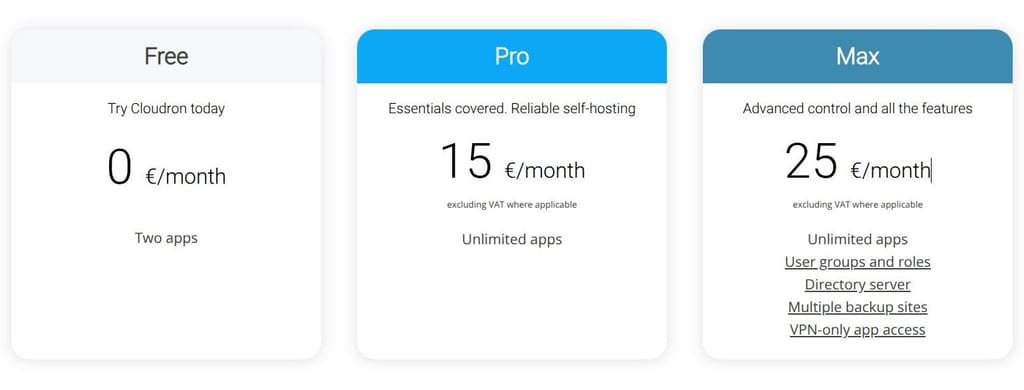
Multiple backup sitesis only in the Max plan. If this is your subscription, you found a bug.https://www.cloudron.io/pricing.html
-
J joseph has marked this topic as solved
-
@lukasp existing users (both paid and free) are grandfathered to previous plans. new plans only apply to new users.
@lukasp existing users (both paid and free) are grandfathered to previous plans. new plans only apply to new users.
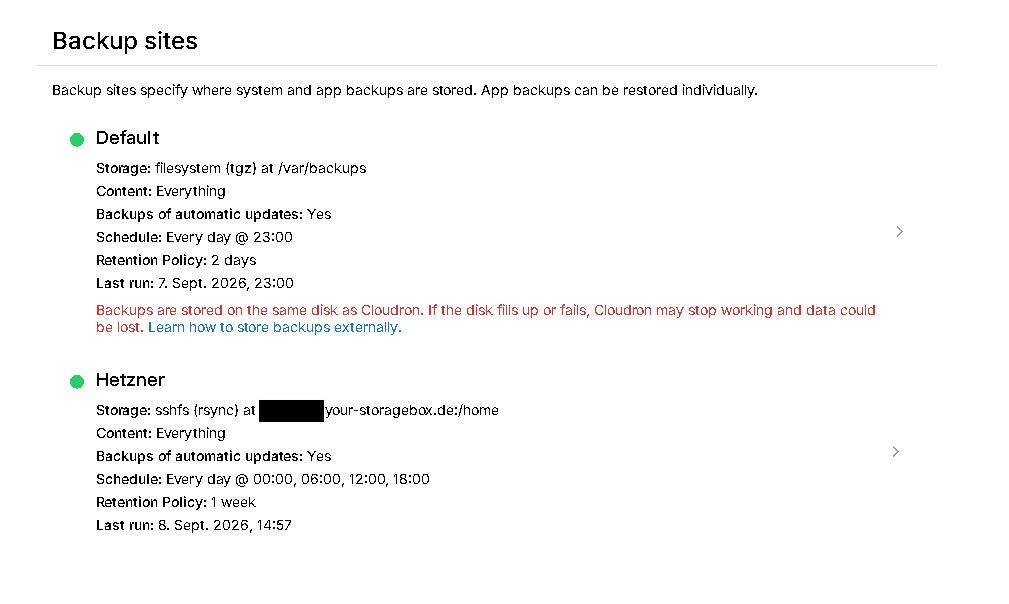
Do you mean this is per user rather than per license? I'm an existing user for years, if I want to set-up a new Cloudron instance and say I buy a Pro plan, do I benefit from the Max features?
-
@avatar1024 yes, it is based on the time when your cloudron.io user account was registered. It is not based on when you installed cloudron or existing licenses. Even if you just install a new cloudron today, you still get the old Pro plan with the old pricing (and that plan includes all existing and future features) since you are an existing user. If you have an existing free cloudron and only decide to subscribe say next month, you will still get the old Pro plan.



Hello! It looks like you're interested in this conversation, but you don't have an account yet.
Getting fed up of having to scroll through the same posts each visit? When you register for an account, you'll always come back to exactly where you were before, and choose to be notified of new replies (either via email, or push notification). You'll also be able to save bookmarks and upvote posts to show your appreciation to other community members.
With your input, this post could be even better 💗
Register Login