
UPDATE - We now have a much stronger package - How to install Docassemble on Cloudron as a custom application
-
Great news! Jonathan Pyle likes this effort and he is going to take a look. He suggested this:
"If your platform supports Docker Compose, you might want to look at https://github.com/jhpyle/docassemble-compose, which shows how you can cut out the jhpyle/docassemble image, supervisord, and any service you are hosting externally."
-
Great news! Jonathan Pyle likes this effort and he is going to take a look. He suggested this:
"If your platform supports Docker Compose, you might want to look at https://github.com/jhpyle/docassemble-compose, which shows how you can cut out the jhpyle/docassemble image, supervisord, and any service you are hosting externally."
@LoudLemur .... but Cloudron does NOT support Docker Compose, so ...
-
for a community custom app ...
You raise an interesting point. Just because it is a community app does not mean it can be any base image. Community apps should be compliant to Cloudron standards. IMHO. If not, you might as well set up a separate VPS and deploy via docker compose, why have the hassle of cloudron compliance.
I do see the other view point, I just don't agree with it.Rebuilding all of that on top of cloudron/base would have been a multi-week project
I started from scratch using a cloudron base image, none of your code, different direction, at 17:16, took 2 hours out for supper & TV, then returned to the app. 1st working version at 21:08. So roughly 2 hours.
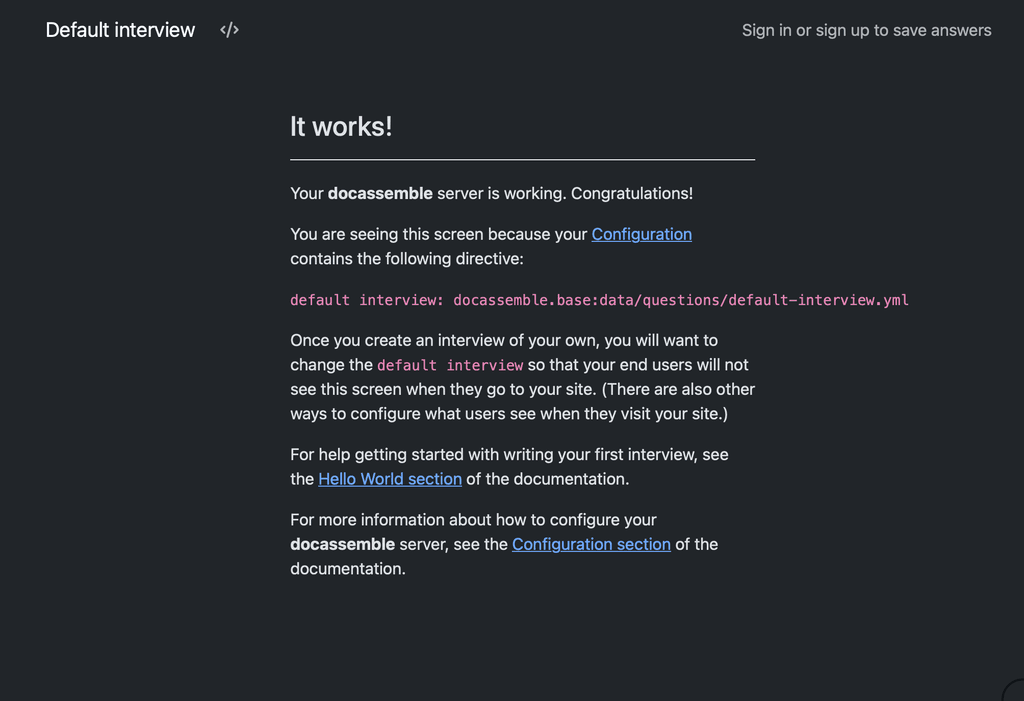
I'm not saying that the app is fully built. But to get a Home Screen loaded is significant. I don't know the app, so not sure what to do next. That might take another couple hours.
Not seeking an argument, I just don't agree that your approach to build from upstream image is correct.
-
for a community custom app ...
You raise an interesting point. Just because it is a community app does not mean it can be any base image. Community apps should be compliant to Cloudron standards. IMHO. If not, you might as well set up a separate VPS and deploy via docker compose, why have the hassle of cloudron compliance.
I do see the other view point, I just don't agree with it.Rebuilding all of that on top of cloudron/base would have been a multi-week project
I started from scratch using a cloudron base image, none of your code, different direction, at 17:16, took 2 hours out for supper & TV, then returned to the app. 1st working version at 21:08. So roughly 2 hours.
I'm not saying that the app is fully built. But to get a Home Screen loaded is significant. I don't know the app, so not sure what to do next. That might take another couple hours.
Not seeking an argument, I just don't agree that your approach to build from upstream image is correct.
@timconsidine That is fantastic, Tim!
I was just trying a version 2 using the Docker Compose approach, but if you have managed to do it on the Cloudron base, that would be much better. -
-
Follow-up: one more
config.ymldirective needed to avoid Cloudron healthcheck failuresA week or so after getting our production instance working, it silently went unhealthy on us. Worth documenting for anyone else who follows this guide, because the symptom is confusing and the fix is trivial.
Symptom
The Cloudron dashboard shows the app as "not responding", or the browser shows a Cloudron error page instead of docassemble. Inside the container, everything looks healthy:
# supervisorctl status
celery           RUNNING
celerysingle     RUNNING
cron             RUNNING
main:initialize  RUNNING
nginx            RUNNING
uwsgi            RUNNING
websockets       RUNNING
Meanwhile, the Cloudron app log fills up with this, every ten seconds, indefinitely:
=> Healthcheck error got response status 501
=> Healthcheck error got response status 501
=> Healthcheck error got response status 501
And
docassemble.logshows repeated entries like:docassemble: ip=172.18.0.1 i=docassemble.base:data/questions/default-interview.yml uid=None user=anonymous 2026-04-16 20:47:50 Not authorizedWhat is actually happening
Docassemble is fine. uWSGI is answering requests. The problem is that it is answering Cloudron's healthcheck probe of
/with HTTP 501 NOT IMPLEMENTED.Testing from inside the container confirms this:
# curl -sI http://localhost:8080/
HTTP/1.1 501 NOT IMPLEMENTED
Server: nginx
Content-Type: text/html; charset=utf-8
This is docassemble's deliberate behaviour when an anonymous user hits the root URL and there is no default interview set and no root redirect configured. It falls through to the factory default interview (
docassemble.base:data/questions/default-interview.yml), which refuses anonymous access and returns 501 with a "Not authorized" body. There is even a dedicated/static/app/501.min.jsin the response HTML, so this is a well-worn code path upstream.Cloudron's healthcheck expects a 2xx or 3xx at the probe path. 501 trips the unhealthy marker, and after a few failed probes Cloudron stops proxying user traffic to the app. The app is then effectively offline to users even though it is running normally internally.
The fix
Add a single directive to
/app/data/config/config.yml:root redirect url: /user/sign-inThen restart uWSGI from inside the container (via the Cloudron terminal):
supervisorctl restart uwsgiAfter this,
/returns a 302 redirect to/user/sign-in, which returns 200, and Cloudron's healthcheck is satisfied. The sign-in page is a sensible default landing for a private docassemble instance anyway.Verification from inside the container:
# curl -sI http://localhost:8080/
HTTP/1.1 302 FOUND
Location: /user/sign-in
Give Cloudron 30-60 seconds to pick up the healthy state. The app will come back online in the dashboard.
Why this probably didn't bite us during the initial packaging
Best guess is an upstream behaviour change in docassemble itself. Earlier versions may have redirected anonymous root requests to the sign-in page automatically; current versions return 501 unless
root redirect urlordefault interview(with anonymous access enabled) is explicitly set. It works on first install because the default interview loads once and caches, then fails later when cache conditions change or the app is redeployed.Suggested addition to the packaging guide
Two options for handling this in the package itself, either of which would remove the manual step:
- Have
start.shensureroot redirect url: /user/sign-inis present in the generatedconfig.ymlif neitherroot redirect urlnordefault interviewis set by the user. - Add it as a default to the config template, so any new install gets it on first boot.
Option 1 is safer because it will not override a user who has deliberately set one of those directives.
Happy to PR this into the repo if there is interest.
- Have
-
Follow-up: one more
config.ymldirective needed to avoid Cloudron healthcheck failuresA week or so after getting our production instance working, it silently went unhealthy on us. Worth documenting for anyone else who follows this guide, because the symptom is confusing and the fix is trivial.
Symptom
The Cloudron dashboard shows the app as "not responding", or the browser shows a Cloudron error page instead of docassemble. Inside the container, everything looks healthy:
# supervisorctl status
celery           RUNNING
celerysingle     RUNNING
cron             RUNNING
main:initialize  RUNNING
nginx            RUNNING
uwsgi            RUNNING
websockets       RUNNING
Meanwhile, the Cloudron app log fills up with this, every ten seconds, indefinitely:
=> Healthcheck error got response status 501
=> Healthcheck error got response status 501
=> Healthcheck error got response status 501
And
docassemble.logshows repeated entries like:docassemble: ip=172.18.0.1 i=docassemble.base:data/questions/default-interview.yml uid=None user=anonymous 2026-04-16 20:47:50 Not authorizedWhat is actually happening
Docassemble is fine. uWSGI is answering requests. The problem is that it is answering Cloudron's healthcheck probe of
/with HTTP 501 NOT IMPLEMENTED.Testing from inside the container confirms this:
# curl -sI http://localhost:8080/
HTTP/1.1 501 NOT IMPLEMENTED
Server: nginx
Content-Type: text/html; charset=utf-8
This is docassemble's deliberate behaviour when an anonymous user hits the root URL and there is no default interview set and no root redirect configured. It falls through to the factory default interview (
docassemble.base:data/questions/default-interview.yml), which refuses anonymous access and returns 501 with a "Not authorized" body. There is even a dedicated/static/app/501.min.jsin the response HTML, so this is a well-worn code path upstream.Cloudron's healthcheck expects a 2xx or 3xx at the probe path. 501 trips the unhealthy marker, and after a few failed probes Cloudron stops proxying user traffic to the app. The app is then effectively offline to users even though it is running normally internally.
The fix
Add a single directive to
/app/data/config/config.yml:root redirect url: /user/sign-inThen restart uWSGI from inside the container (via the Cloudron terminal):
supervisorctl restart uwsgiAfter this,
/returns a 302 redirect to/user/sign-in, which returns 200, and Cloudron's healthcheck is satisfied. The sign-in page is a sensible default landing for a private docassemble instance anyway.Verification from inside the container:
# curl -sI http://localhost:8080/
HTTP/1.1 302 FOUND
Location: /user/sign-in
Give Cloudron 30-60 seconds to pick up the healthy state. The app will come back online in the dashboard.
Why this probably didn't bite us during the initial packaging
Best guess is an upstream behaviour change in docassemble itself. Earlier versions may have redirected anonymous root requests to the sign-in page automatically; current versions return 501 unless
root redirect urlordefault interview(with anonymous access enabled) is explicitly set. It works on first install because the default interview loads once and caches, then fails later when cache conditions change or the app is redeployed.Suggested addition to the packaging guide
Two options for handling this in the package itself, either of which would remove the manual step:
- Have
start.shensureroot redirect url: /user/sign-inis present in the generatedconfig.ymlif neitherroot redirect urlnordefault interviewis set by the user. - Add it as a default to the config template, so any new install gets it on first boot.
Option 1 is safer because it will not override a user who has deliberately set one of those directives.
Happy to PR this into the repo if there is interest.
@LoudLemur well done, sounds like you have had fun (!).
I'm not clear. You mentioned your production system - is that your own build or using my ALPHA community app ? Or you already cloned/fixed mine ?
If the latter, I can try to make changes as you describe. But I am in the middle of a couple of big projects, so it won't be immediate.
If timing is an issue, you might want to clone/fix and publish your own repo/community app.
- Have
-
@LoudLemur well done, sounds like you have had fun (!).
I'm not clear. You mentioned your production system - is that your own build or using my ALPHA community app ? Or you already cloned/fixed mine ?
If the latter, I can try to make changes as you describe. But I am in the middle of a couple of big projects, so it won't be immediate.
If timing is an issue, you might want to clone/fix and publish your own repo/community app.
@timconsidine thanks. This was on my own version. I haven't got round to trying yours yet Tim, but yours is the one people should try.
-
@timconsidine thanks. This was on my own version. I haven't got round to trying yours yet Tim, but yours is the one people should try.
@LoudLemur no no no
Don’t try my version - is ALPHA PRROF OF CONCEPT.
Not for deployment just in case it helped another package. -
@LoudLemur no no no
Don’t try my version - is ALPHA PRROF OF CONCEPT.
Not for deployment just in case it helped another package.Don’t try my version
Yours gave us some inspiration, Tim. The new package we released is pretty good. We don't mind people trying it at all. It should work well.

Hello! It looks like you're interested in this conversation, but you don't have an account yet.
Getting fed up of having to scroll through the same posts each visit? When you register for an account, you'll always come back to exactly where you were before, and choose to be notified of new replies (either via email, or push notification). You'll also be able to save bookmarks and upvote posts to show your appreciation to other community members.
With your input, this post could be even better 💗
Register Login