Cloudron makes it easy to run web apps like WordPress, Nextcloud, GitLab on your server. Find out more or install now.


Skip to content
  • Categories
  • Recent
  • Tags
  • Popular
  • Bookmarks
  • Search
Skins
  • Light
  • Brite
  • Cerulean
  • Cosmo
  • Flatly
  • Journal
  • Litera
  • Lumen
  • Lux
  • Materia
  • Minty
  • Morph
  • Pulse
  • Sandstone
  • Simplex
  • Sketchy
  • Spacelab
  • United
  • Yeti
  • Zephyr
  • Dark
  • Cyborg
  • Darkly
  • Quartz
  • Slate
  • Solar
  • Superhero
  • Vapor

  • Default (No Skin)
  • No Skin
Collapse
Brand Logo

Cloudron Forum

Apps - Status | Demo | Docs | Install
  1. Cloudron Forum
  2. WordPress (Managed)
  3. WebP Conversion plugin for WP errors

WebP Conversion plugin for WP errors

Scheduled Pinned Locked Moved WordPress (Managed)
9 Posts 2 Posters 2.9k Views 2 Watching
  • Oldest to Newest
  • Newest to Oldest
  • Most Votes
Reply
  • Reply as topic
Log in to reply
This topic has been deleted. Only users with topic management privileges can see it.
  • ianhyzyI Offline
    ianhyzyI Offline
    ianhyzy
    wrote on last edited by ianhyzy
    #1

    Hi there, I'm trying to install some automatic WebP conversion plugins and they're having issues. I tried with the free Webp converter for media plugin and get an error where it can't change .htaccess rules:

    5d9aa3de-66bd-45e3-a569-6b79cab48b7e-image.png

    Another plugin, Imagify, has the following error:

    The backup folder /app/data/wp-content/uploads/backup/ cannot be created or is not writable by the server, original images cannot be saved!
    

    Is this something I can create manually, or is this not a good idea given that I'm on the "managed" wordpress app and not the dev one?

    girishG 1 Reply Last reply
    0
    • ianhyzyI ianhyzy

      Hi there, I'm trying to install some automatic WebP conversion plugins and they're having issues. I tried with the free Webp converter for media plugin and get an error where it can't change .htaccess rules:
      5d9aa3de-66bd-45e3-a569-6b79cab48b7e-image.png

      Another plugin, Imagify, has the following error:

      The backup folder /app/data/wp-content/uploads/backup/ cannot be created or is not writable by the server, original images cannot be saved!
      

      Is this something I can create manually, or is this not a good idea given that I'm on the "managed" wordpress app and not the dev one?

      girishG Do not disturb
      girishG Do not disturb
      girish
      Staff
      wrote on last edited by girish
      #2

      @ianhyzy yes, you can create that directory using the file manager if that's what the plugin requires. This is safe to do since it's inside /app/data .

      ianhyzyI 3 Replies Last reply
      1
      • girishG girish

        @ianhyzy yes, you can create that directory using the file manager if that's what the plugin requires. This is safe to do since it's inside /app/data .

        ianhyzyI Offline
        ianhyzyI Offline
        ianhyzy
        wrote on last edited by
        #3
        This post is deleted!
        1 Reply Last reply
        0
        • girishG girish

          @ianhyzy yes, you can create that directory using the file manager if that's what the plugin requires. This is safe to do since it's inside /app/data .

          ianhyzyI Offline
          ianhyzyI Offline
          ianhyzy
          wrote on last edited by
          #4
          This post is deleted!
          1 Reply Last reply
          0
          • girishG girish

            @ianhyzy yes, you can create that directory using the file manager if that's what the plugin requires. This is safe to do since it's inside /app/data .

            ianhyzyI Offline
            ianhyzyI Offline
            ianhyzy
            wrote on last edited by
            #5

            @girish I made the folder but the plugin is still saying it doesn't have permission - is there anything special I need to do to give the wordpress user permission?

            girishG 1 Reply Last reply
            0
            • ianhyzyI ianhyzy

              @girish I made the folder but the plugin is still saying it doesn't have permission - is there anything special I need to do to give the wordpress user permission?

              girishG Do not disturb
              girishG Do not disturb
              girish
              Staff
              wrote on last edited by
              #6

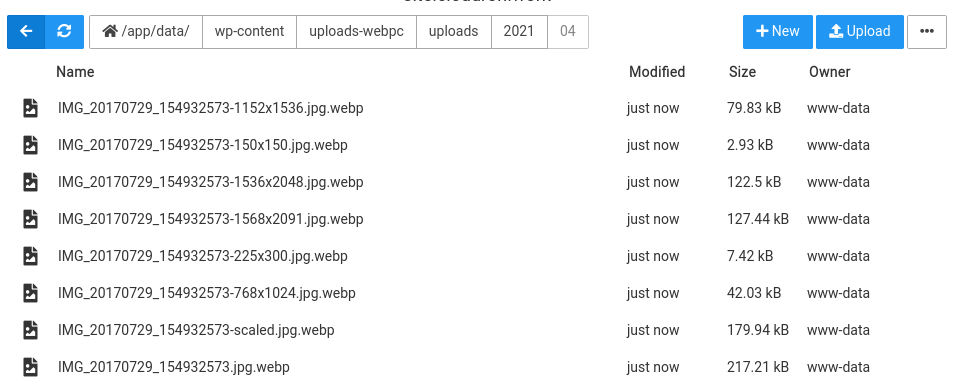
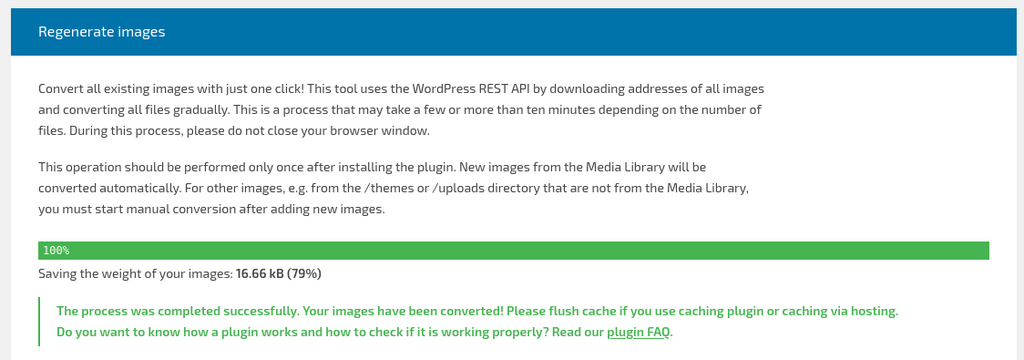
              @ianhyzy how do I reproduce this? I can regenerate images just fine with that plugin.

              6f273cde-fdb5-4c1d-8bb6-ffa511675e60-image.png

              1 Reply Last reply
              0
              • girishG Do not disturb
                girishG Do not disturb
                girish
                Staff
                wrote on last edited by
                #7

                I can also see webp files generated. But I just realized that you commented about htaccess issue with this plugin. Do you see that error on a fresh install?

                cfca2ca9-4585-455a-a589-a9111b40c0af-image.png

                1 Reply Last reply
                0
                • girishG Do not disturb
                  girishG Do not disturb
                  girish
                  Staff
                  wrote on last edited by girish
                  #8

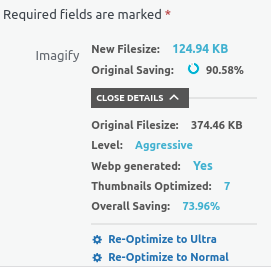
                  The imagify also seems to work. That plugin uploads to some service it seems (not 100% sure but looks like it).
                  f9bfd55d-b932-4ea1-a1c1-6d2d33734ea8-image.png

                  It also replaced inserted images at webp links using htaccess. I did not have to create any directory by hand, it created it automatically for me.

                  Can you try restarting the app and try again? I wonder if the permissions of the data directory somehow got messed up.


                  ianhyzyI 1 Reply Last reply
                  0
                  • girishG girish

                    The imagify also seems to work. That plugin uploads to some service it seems (not 100% sure but looks like it).

                    f9bfd55d-b932-4ea1-a1c1-6d2d33734ea8-image.png

                    It also replaced inserted images at webp links using htaccess. I did not have to create any directory by hand, it created it automatically for me.

                    Can you try restarting the app and try again? I wonder if the permissions of the data directory somehow got messed up.
                    ianhyzyI Offline
                    ianhyzyI Offline
                    ianhyzy
                    wrote on last edited by
                    #9

                    @girish I got it working (I think?) but I didn't change anything, I just rebooted again. I also used WebP express which is free and has more features than the paid options. thanks for checking though!

                    1 Reply Last reply
                    0
                    Reply
                    • Reply as topic
                    Log in to reply
                    • Oldest to Newest
                    • Newest to Oldest
                    • Most Votes


                    • Login

                    • Don't have an account? Register

                    • Login or register to search.
                    • First post
                      Last post
                    0
                    • Categories
                    • Recent
                    • Tags
                    • Popular
                    • Bookmarks
                    • Search