
Delete server rules button does not delete rule.
-
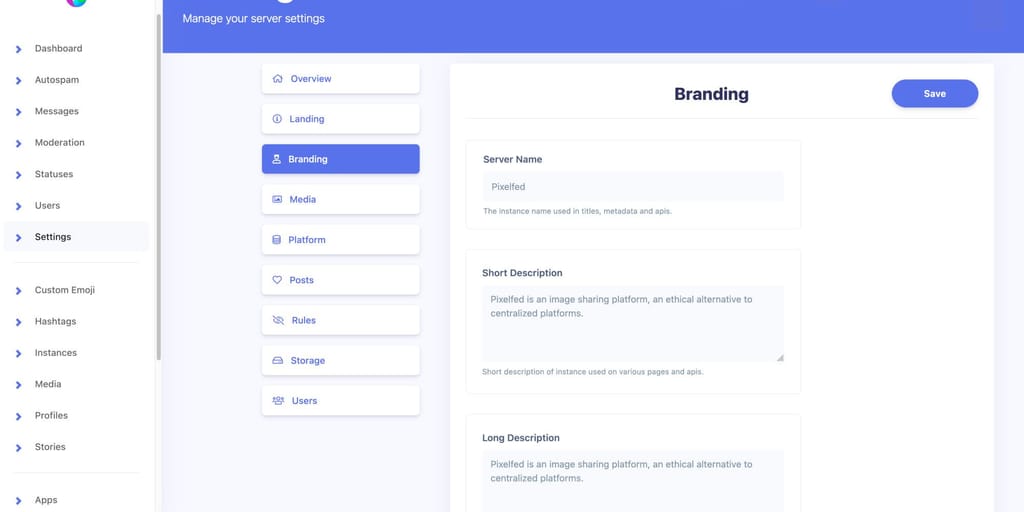
-
@girish It's all missing, and saving new won't take.
-
My settings are also not saved and /horizon gives an error.
-
I also have a problem with the version, rules cannot be added and I had a larger user storage limit and it is 5 Gb after the update and cannot be increased in the settings
-
@girish It also breaks Curated Onboarding, there is just wide open registrations
-
@girish Dan says "I will look into this after work, seems like something maybe corrupted in the config_cache table, however it will be easy to fix"
-
@girish his fix didn't work, and of course this is much more extensive than just the rules.
-
I went back, to an older version
-
I had to roll back to the previous Pixelfed version, I couldn't leave everything unconfigured and registrations wide open.
-
@girish I told Dan this is not a one-off issue, that more people than just me are experiencing the issue. I'm going to setup a Cloudron server with one Pixelfed instance to see if I can replicate the issue with 0.12.0 that he can diagnose. If I can't replicate it with a fresh 0.12.0, it is likely related to the upgrade from 0.11.13 I'm imagining. Is there a way to start a fresh install with a specific version?
-
@girish I told Dan this is not a one-off issue, that more people than just me are experiencing the issue. I'm going to setup a Cloudron server with one Pixelfed instance to see if I can replicate the issue with 0.12.0 that he can diagnose. If I can't replicate it with a fresh 0.12.0, it is likely related to the upgrade from 0.11.13 I'm imagining. Is there a way to start a fresh install with a specific version?
@yehuda1491 yes, https://git.cloudron.io/cloudron/pixelfed-app/-/blob/master/CHANGELOG?ref_type=heads gives a mapping between package version and pixelfed version. Click on pixelfed in appstore and change the URL bar to have the right package version and then click install.
-
@yehuda1491 yes, https://git.cloudron.io/cloudron/pixelfed-app/-/blob/master/CHANGELOG?ref_type=heads gives a mapping between package version and pixelfed version. Click on pixelfed in appstore and change the URL bar to have the right package version and then click install.
@girish It does replicate on a fresh 0.12.0 install, fyi. I'll let you know what happens.
-
@girish still haven't heard from Dan.
FYI I have no idea if this is relevant, but on both v0.11.13 & v0.12.0 in env.production ENABLE_CONFIG_CACHE=true, and in v0.11.13 diagnostics ENABLE_CONFIG_CACHE is true, but in v0.12.0 diagnostics ENABLE_CONFIG_CACHE is false. -
@girish @nebulon A person I know says they fixed the issue, but I don't know how this relates to cloudron/docker:
"Btw, I was able to get pixelfed working I had to do the setting permissions step again
cd pixelfed
sudo chown -R http:http . # change user/group to http user and http group
sudo find . -type d -exec chmod 755 {} ; # set all directories to rwx by user/group
sudo find . -type f -exec chmod 644 {} ; # set all files to rw by user/group(replace http in http:http with the user you run pixelfed as with the systemd service) then after this, i did
php artisan cache:clear
and then these
php artisan config:cache
php artisan route: cache
php artisan migrate --forcefrom the upgrade steps now it all works"





Hello! It looks like you're interested in this conversation, but you don't have an account yet.
Getting fed up of having to scroll through the same posts each visit? When you register for an account, you'll always come back to exactly where you were before, and choose to be notified of new replies (either via email, or push notification). You'll also be able to save bookmarks and upvote posts to show your appreciation to other community members.
With your input, this post could be even better 💗
Register Login