
How to use OnlyOffice on Cloudron?
-
@Package-Updates said in Cubby - Package Updates:
[2.3.9]
- OnlyOffice can now also be used as office WOPI host
Does that mean I just enter the address of my OO instance on Cloudron (that didn't work for me)?
-
yes the full URI (eg. https://office.example.com) should work, however onlyoffice needs to be also updated to latest and the wopi option being enabled https://git.cloudron.io/cloudron/onlyoffice-app/-/blob/master/production-linux.json?ref_type=heads#L105
I will publish a new onlyoffice package which enables that by default also for updated apps.
-
 N nebulon marked this topic as a question on
-
A close button would be nice and easy to access, I guess.
-
Btw I am open for any ideas how to deal with document closing, either some overlay with a close button, extra navbar (although that occupies space) or like gdrive and onedrive, just open a new tab.
@nebulon said in How to use OnlyOffice on Cloudron?:
Btw I am open for any ideas how to deal with document closing, either some overlay with a close button, extra navbar (although that occupies space) or like gdrive and onedrive, just open a new tab.
I already have set docs open in a new tab, then I close that tab to close the document. It's kind of odd but works, but a close button should be more intuitive indeed.
-
@Package-Updates said in Cubby - Package Updates:
[2.3.9]
- OnlyOffice can now also be used as office WOPI host
Does that mean I just enter the address of my OO instance on Cloudron (that didn't work for me)?
@necrevistonnezr said in How to use OnlyOffice on Cloudron?:
@Package-Updates said in Cubby - Package Updates:
[2.3.9]
- OnlyOffice can now also be used as office WOPI host
Does that mean I just enter the address of my OO instance on Cloudron (that didn't work for me)?
BTW this works now!
-
Btw I am open for any ideas how to deal with document closing, either some overlay with a close button, extra navbar (although that occupies space) or like gdrive and onedrive, just open a new tab.
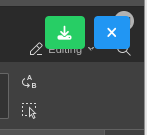
@nebulon I think opening documents in a new tab by default would be a good design decision and make having a close button unnecessary. The download button as well is a bit redundant as downloads can be handled via the file menu in OnlyOffice. Currently I find the Cubby close and download buttons get in the way of the editor mode, search and user buttons.
-
N nebulon has marked this topic as solved on


Hello! It looks like you're interested in this conversation, but you don't have an account yet.
Getting fed up of having to scroll through the same posts each visit? When you register for an account, you'll always come back to exactly where you were before, and choose to be notified of new replies (either via email, or push notification). You'll also be able to save bookmarks and upvote posts to show your appreciation to other community members.
With your input, this post could be even better 💗
Register Login