Cloudron makes it easy to run web apps like WordPress, Nextcloud, GitLab on your server. Find out more or install now.


Skip to content
  • Categories
  • Recent
  • Tags
  • Popular
  • Bookmarks
  • Search
Skins
  • Light
  • Brite
  • Cerulean
  • Cosmo
  • Flatly
  • Journal
  • Litera
  • Lumen
  • Lux
  • Materia
  • Minty
  • Morph
  • Pulse
  • Sandstone
  • Simplex
  • Sketchy
  • Spacelab
  • United
  • Yeti
  • Zephyr
  • Dark
  • Cyborg
  • Darkly
  • Quartz
  • Slate
  • Solar
  • Superhero
  • Vapor

  • Default (No Skin)
  • No Skin
Collapse
Brand Logo

Cloudron Forum

Apps - Status | Demo | Docs | Install
  1. Cloudron Forum
  2. Baserow
  3. 403 error for images/videos bigger than 3MB

403 error for images/videos bigger than 3MB

Scheduled Pinned Locked Moved Solved Baserow
10 Posts 3 Posters 3.0k Views 3 Watching
  • Oldest to Newest
  • Newest to Oldest
  • Most Votes
Reply
  • Reply as topic
Log in to reply
This topic has been deleted. Only users with topic management privileges can see it.
  • P Offline
    P Offline
    parhelium
    wrote on last edited by parhelium
    #1

    Hi,

    I have 2 separate instances of baserow on 2 different cloudron.
    Both instances are:
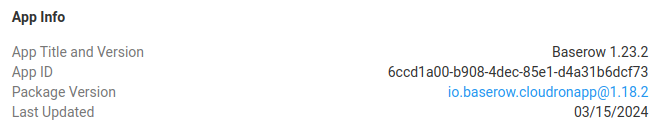
    db453b92-1da9-4df5-96dc-f3b3f6c7944b-image.png

    On both I have issue with showing bigger files than 3MB.

    It looks like baserow have nginx config which serves files.
    https://community.baserow.io/t/image-viewing-permission-denied/4780/4

    In reality it doesn't allow to view images bigger than 3MB and it throws error 403:

    Mar 19 14:43:552024/03/19 13:43:55 [error] 35#35: *18634 open() “/app/data/media/user_files/2kKBfyXwsByu02n0eWzu7NDJ0Xe7uyR8_364e9c032bf8016f6a13ef48f7ee8f7726b94d573631a9d7ae45b88839500906.jpg” failed (13: Permission denied), client: 172.18.0.1, server: , request: “GET /media/user_files/2kKBfyXwsByu02n0eWzu7NDJ0Xe7uyR8_364e9c032bf8016f6a13ef48f7ee8f7726b94d573631a9d7ae45b88839500906.jpg HTTP/1.1”, host: “data.staff.10s.pl”, referrer: “Login // Baserow”
    Mar 19 14:43:55172.18.0.1 - - [19/Mar/2024:13:43:55 +0000] “GET /media/user_files/2kKBfyXwsByu02n0eWzu7NDJ0Xe7uyR8_364e9c032bf8016f6a13ef48f7ee8f7726b94d573631a9d7ae45b88839500906.jpg HTTP/1.1” 403 196 “Login // Baserow” “Mozilla/5.0 (X11; Linux x86_64) AppleWebKit/537.36 (KHTML, like Gecko) Chrome/122.0.0.0 Safari/537.36”

    Any idea how to configure that to show bigger images ?

    1 Reply Last reply
    0
    • P Offline
      P Offline
      parhelium
      wrote on last edited by
      #2

      Seems like people have similar problem with nginx.
      https://stackoverflow.com/questions/56059893/nginx-php-fpm-download-size-is-limited-to-3mb

      1 Reply Last reply
      0
      • P Offline
        P Offline
        parhelium
        wrote on last edited by parhelium
        #3

        I made another test on one big file.
        Convertered original file ( 5.6 MB ) to the same size jpgs but with different quality.
        In result I had files having from 800 kB to 5.6 MB with same resolution.

        Everything was working fine, until image size is above 3 MB.
        It looks like it is issue with nginx configuration of baserow package on cloudron.

        @girish @cloudron ?

        1 Reply Last reply
        0
        • P Offline
          P Offline
          parhelium
          wrote on last edited by
          #4

          I found some info about similar issue here:

          image.png

          source

          1 Reply Last reply
          0
          • P Offline
            P Offline
            parhelium
            wrote on last edited by parhelium
            #5

            Finally I found the issue.

            Problem is solved once I changed big file (bigger than 3MB) ownership from cloudron to www-data.

            92c8e55d-1cb3-4807-9d27-6796e1ebf4a5-image.png
            It is permissions for tmp folder of nginx.

            All dir used by nginx has ownership www-data.cloudron.

            image.png

            When I change them to cloudron.cloudron and restart app, it goes back to www-data.cloudron.

            @girish can you fix that ?

            1 Reply Last reply
            0
            • nebulonN Offline
              nebulonN Offline
              nebulon
              Staff
              wrote on last edited by
              #6

              So the issue is file permissions then and not the file size it seems. The app's start script does change the ownership of all files to cloudron.cloudron at https://git.cloudron.io/cloudron/baserow-app/-/blob/master/start.sh?ref_type=heads#L36

              In fact no process in this app should use the www-data owner. Are you showing the ownership info from the host system or from the webterminal into the app?

              1 Reply Last reply
              0
              • P Offline
                P Offline
                parhelium
                wrote on last edited by parhelium
                #7

                @nebulon I'm showing ownership info from webterminal in the app. The path is /run
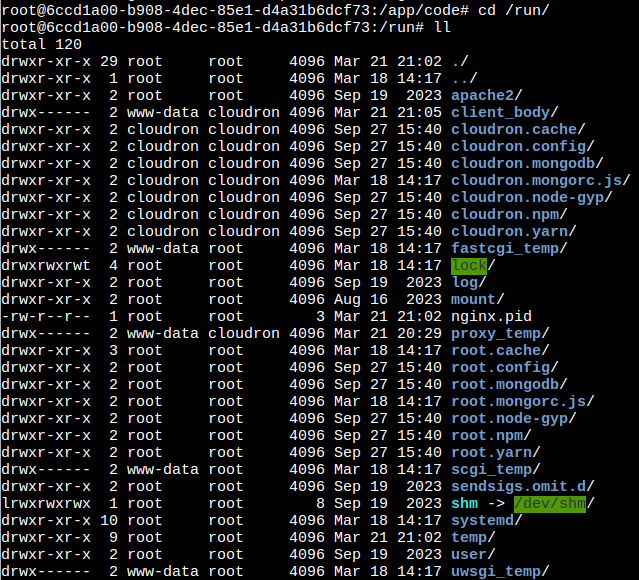
                873836ba-d8e6-414a-aff8-d2c6838330a3-image.png

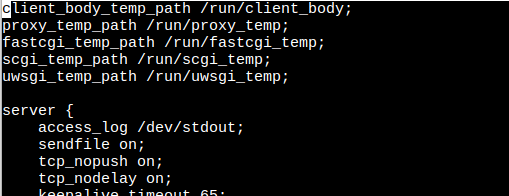
                I was checking /run path, because nginx is using this path:
                https://git.cloudron.io/cloudron/baserow-app/-/blob/master/Dockerfile?ref_type=heads

                /etc/nginx/sites-enabled/nginx.conf

                0796a4df-e43b-46b1-9acc-0c2a9438262a-image.png

                1 Reply Last reply
                1
                • girishG Offline
                  girishG Offline
                  girish
                  Staff
                  wrote on last edited by
                  #8

                  @parhelium I was able to reproduce the issue, testing the fix. nginx is running as www-data user instead of cloudron

                  1 Reply Last reply
                  1
                  • girishG Offline
                    girishG Offline
                    girish
                    Staff
                    wrote on last edited by
                    #9

                    @parhelium the latest package should fix the problem. thanks for reporting.

                    1 Reply Last reply
                    0
                    • P Offline
                      P Offline
                      parhelium
                      wrote on last edited by
                      #10

                      @girish Updated baserow to latest version.Confirm it works for files bigger than 3 MB. Thank you ! Amazing work.

                      1 Reply Last reply
                      1
                      • nebulonN nebulon marked this topic as a question on
                      • nebulonN nebulon has marked this topic as solved on

                      Hello! It looks like you're interested in this conversation, but you don't have an account yet.

                      Getting fed up of having to scroll through the same posts each visit? When you register for an account, you'll always come back to exactly where you were before, and choose to be notified of new replies (either via email, or push notification). You'll also be able to save bookmarks and upvote posts to show your appreciation to other community members.

                      With your input, this post could be even better 💗

                      Register Login
                      Reply
                      • Reply as topic
                      Log in to reply
                      • Oldest to Newest
                      • Newest to Oldest
                      • Most Votes


                      • Login

                      • Don't have an account? Register

                      • Login or register to search.
                      • First post
                        Last post
                      0
                      • Categories
                      • Recent
                      • Tags
                      • Popular
                      • Bookmarks
                      • Search