Cloudron makes it easy to run web apps like WordPress, Nextcloud, GitLab on your server. Find out more or install now.


Skip to content
  • Categories
  • Recent
  • Tags
  • Popular
  • Bookmarks
  • Search
Skins
  • Light
  • Brite
  • Cerulean
  • Cosmo
  • Flatly
  • Journal
  • Litera
  • Lumen
  • Lux
  • Materia
  • Minty
  • Morph
  • Pulse
  • Sandstone
  • Simplex
  • Sketchy
  • Spacelab
  • United
  • Yeti
  • Zephyr
  • Dark
  • Cyborg
  • Darkly
  • Quartz
  • Slate
  • Solar
  • Superhero
  • Vapor

  • Default (No Skin)
  • No Skin
Collapse
Brand Logo

Cloudron Forum

Apps - Status | Demo | Docs | Install
  1. Cloudron Forum
  2. Matrix (Synapse/Element)
  3. OIDC not working after app migration to another Cloudron & IPv6 error

OIDC not working after app migration to another Cloudron & IPv6 error

Scheduled Pinned Locked Moved Solved Matrix (Synapse/Element)
17 Posts 4 Posters 4.9k Views 5 Watching
  • Oldest to Newest
  • Newest to Oldest
  • Most Votes
Reply
  • Reply as topic
Log in to reply
This topic has been deleted. Only users with topic management privileges can see it.
  • humptyH Offline
    humptyH Offline
    humpty
    wrote on last edited by
    #4

    No, it wasn't redirecting properly. It was set to the old domain. All the links after that section too also pointed to the old domain (authorization_endpoint, token_endpoint, userinfo_endpoint). After updating the links, it started to redirect to my new domain. I just tried to login into Element CR app (web) and the invalid token error persists.

    Matrix is working fine though. My previous users, set up, iOS clients, desktop clients, are still functioning without any change required after migration.

    1 Reply Last reply
    0
    • humptyH Offline
      humptyH Offline
      humpty
      wrote on last edited by
      #5

      Copy of the oidc_providers section:

      oidc_providers:
        - idp_id: cloudron
          idp_name: Cloudron
          issuer: https://my.sub.domain.com/openid
          client_id: xxxxxxxxx-xxxx-xxxx-xxxx-xxxxxxxxxxxxxx
          client_secret: xxxxxxxxxxxxxxxxxxxxxxxxxxxxxxxxxxxxxxxxxxxxxxxxxxxxxxxxxxxxxxxxxxxxxxxxxxxxxxxxxxxxxxxxxxxxxxxxxxxxxxxxxxxxxxxxxxxxxxxxxxx
          scopes:
            - openid
            - email
            - profile
          authorization_endpoint: https://my.sub.domain.com/openid/auth
          token_endpoint: https://my.sub.domain.com/openid/token
          userinfo_endpoint: https://my.sub.domain.com/openid/me
          allow_existing_users: true
          skip_verification: true
          user_mapping_provider:
            config:
              localpart_template: '{{ user.sub }}'
              display_name_template: '{{ user.name }}'
      
      1 Reply Last reply
      0
      • nebulonN Away
        nebulonN Away
        nebulon
        Staff
        wrote on last edited by
        #6

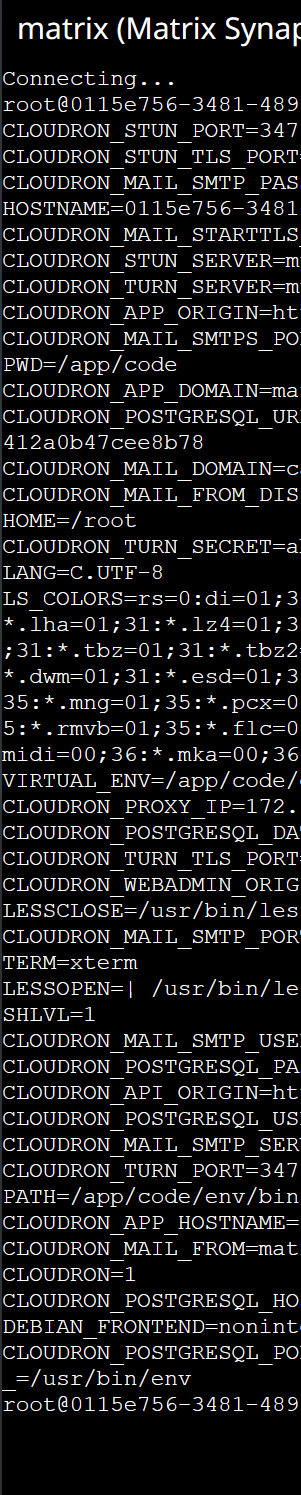
        Maybe there is a package bug in updating the client id/secret in the config file. Can you verify that those match the values from the env variables in the webterminal in the app? You can run env command to see all variables. The ones in question are https://docs.cloudron.io/packaging/addons/#oidc

        1 Reply Last reply
        1
        • humptyH Offline
          humptyH Offline
          humpty
          wrote on last edited by
          #7

          I don't see any OIDC references when running env in the webterminal in the Matrix app. Here's a screenshot without exposing any private stuff so you can see what lines are in there. Please let me know if you need me to email this instead.

          image.png

          1 Reply Last reply
          0
          • humptyH Offline
            humptyH Offline
            humpty
            wrote on last edited by humpty
            #8

            CR turn secret = matches
            SMTP pass = matches
            CR Postgre DB = matches
            CR Postgre Pass= matches

            The entire OIDC Providers info in homeserver.yaml aren't referenced in the result of env so there's nothing to check against.

            homesever.yaml is 100 lines total if that helps.

            1 Reply Last reply
            0
            • humptyH Offline
              humptyH Offline
              humpty
              wrote on last edited by humpty
              #9

              I installed matrix/element on another domain on my other Cloudron and compared the homeserver.yaml files. There's some differences with the code formatting like one has " the other doesn't, some lines have [ ... I fixed up my existing install to match the formatting of the test app but that didn't help. The only difference now is the following:

              #This is on the broken matrix homeserver.yaml
              localdb_enabled: true 
              
              #This is on the new test matrix homeserver.yaml
              localdb_enabled: false
              pepper: xxxxxx (random characters)
              

              Could this be caused by the IPv6 error I get when checking via the Matrix Federation checker website?

              Connection Errors
              Get "https://[2500:7600:FJ00:22:1000:e5ff:gh33:2355]:443/_matrix/key/v2/server": context deadline exceeded (Client.Timeout exceeded while awaiting headers)
              
              
              1 Reply Last reply
              0
              • nebulonN Away
                nebulonN Away
                nebulon
                Staff
                wrote on last edited by
                #10

                If you don't see those env variables, are you sure you installed the app with Cloudron usermanagement even?

                1 Reply Last reply
                0
                • humptyH Offline
                  humptyH Offline
                  humpty
                  wrote on last edited by humpty
                  #11

                  This is an old install that I migrated. The users are my Cloudron users from the previous CR, so the answer is yes?

                  I kept the same usernames on the new CR and migrated the app only - not the entire Cloudron if that makes a difference.

                  The mobile and desktop clients continue to work as usual. I didn't have to do anything like logout and back in. Now, I'm thinking that if I do log out, I might run into issues getting back in. I'll try logging in on a new desktop app when I get home to see if it works.

                  BTW, I set up the admin synapse from github (done it before) and I couldn't log in into that either. "e is not defined" or something like that.

                  1 Reply Last reply
                  0
                  • nebulonN Away
                    nebulonN Away
                    nebulon
                    Staff
                    wrote on last edited by
                    #12

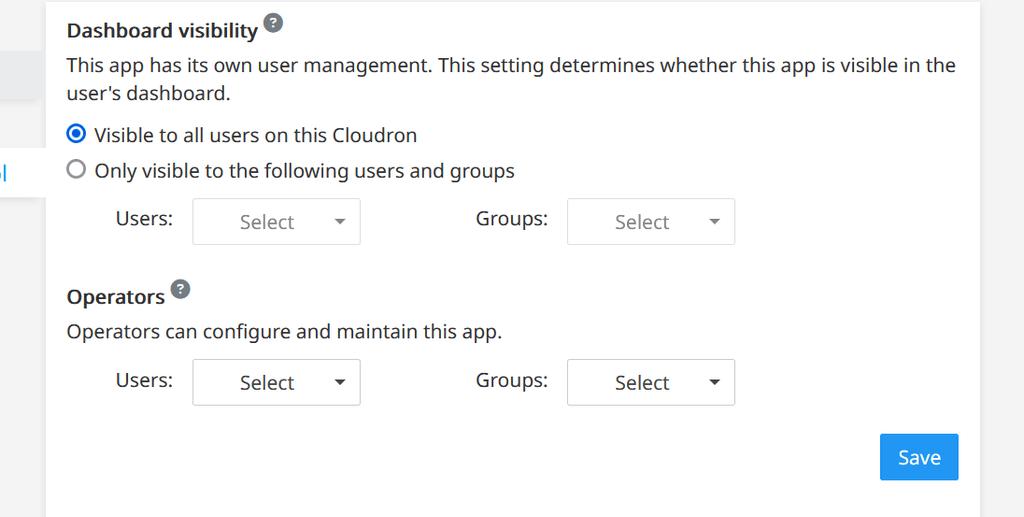
                    if you miss the OIDC related env variables, then most likely Cloudron user management is not enabled. You can check this in the app configuration view in the access control tab.

                    Is it possible that you have enabled openid manually using a custom open id client setting instead of the Cloudron user integration? If so that would at least explain the wrong client id

                    humptyH 1 Reply Last reply
                    0
                    • nebulonN nebulon

                      if you miss the OIDC related env variables, then most likely Cloudron user management is not enabled. You can check this in the app configuration view in the access control tab.

                      Is it possible that you have enabled openid manually using a custom open id client setting instead of the Cloudron user integration? If so that would at least explain the wrong client id

                      humptyH Offline
                      humptyH Offline
                      humpty
                      wrote on last edited by
                      #13

                      @nebulon if I did, it's definitely not intentional - I'm not a fan of OIDC tbh.

                      fb0db907-8cf4-496d-849c-2520aee33f7c-image.png

                      1 Reply Last reply
                      0
                      • nebulonN Away
                        nebulonN Away
                        nebulon
                        Staff
                        wrote on last edited by
                        #14

                        So that is the root cause then. Since you migrated the app, the new Cloudron does not have the OIDC client credentials which the other Cloudron has. You have to recreate this and configure the app accordingly.

                        1 Reply Last reply
                        1
                        • humptyH Offline
                          humptyH Offline
                          humpty
                          wrote on last edited by
                          #15

                          I'm not sure how to do any of that but I'll worry about this later as I received a reply from Hetzner support about my VPS (SMTP issue) and you won't believe what they said.

                          1 Reply Last reply
                          0
                          • jamesJ Offline
                            jamesJ Offline
                            james
                            Staff
                            wrote on last edited by
                            #16

                            @humptydumpty said in OIDC not working after app migration to another Cloudron & IPv6 error:

                            you won't believe what they said

                            On that cliffhanger, can this topic be marked as solved or is this still technically open?

                            humptyH 1 Reply Last reply
                            0
                            • jamesJ james

                              @humptydumpty said in OIDC not working after app migration to another Cloudron & IPv6 error:

                              you won't believe what they said

                              On that cliffhanger, can this topic be marked as solved or is this still technically open?

                              humptyH Offline
                              humptyH Offline
                              humpty
                              wrote on last edited by
                              #17

                              @james I never got OIDC "fixed". I was able to log in again simply by resetting the password. I haven't tried adding new users since the migration because only my immediate family and myself use the app. Feel free to mark it as solved. Thank you.

                              1 Reply Last reply
                              1
                              • J joseph has marked this topic as solved on

                              Hello! It looks like you're interested in this conversation, but you don't have an account yet.

                              Getting fed up of having to scroll through the same posts each visit? When you register for an account, you'll always come back to exactly where you were before, and choose to be notified of new replies (either via email, or push notification). You'll also be able to save bookmarks and upvote posts to show your appreciation to other community members.

                              With your input, this post could be even better 💗

                              Register Login
                              Reply
                              • Reply as topic
                              Log in to reply
                              • Oldest to Newest
                              • Newest to Oldest
                              • Most Votes


                              • Login

                              • Don't have an account? Register

                              • Login or register to search.
                              • First post
                                Last post
                              0
                              • Categories
                              • Recent
                              • Tags
                              • Popular
                              • Bookmarks
                              • Search