
S3 Compatible Storage
-
correct it is in /app/data/env - unfortunately not working.
-
Two examples I've looked at use the S3_REGION parameter, and my personal experience is that it IS required.
https://formbricks.com/docs/self-hosting/setup/cluster-setup#s3-configuration
https://github.com/formbricks/formbricks/blob/main/.env.exampleDo any of the other parameters you've set work and its just the S3 deets that aren't working, or is it the entire env/.env file that isn't being read?
-
OK, since I like doing this kind of stuff, I installed Formbricks just to see where it might be going wrong. I am using a Minio install using runtipi on another server, made a special bucket and user for this test, plugged that info into the /app/date/env file (including REGION), BUT I also added
# Enable for S3-compatible storage that requires path style
# 0 for disabled, 1 for enabled
S3_FORCE_PATH_STYLE=1
I don't know why or how or what, but there is/was some issue in the Minio/S3 world where an update made all future bucket paths virtual_path_style, or maybe it was the other way around? Anyway, I find I need to include this so that my buckets are https://s3.example.com/bucket, rather than https://bucket.s3.example.com.
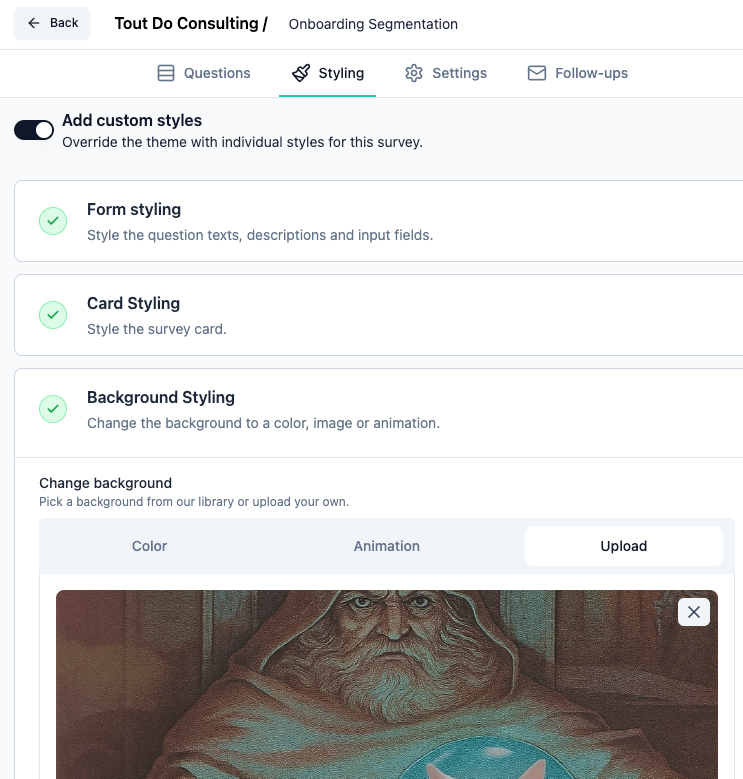
I then uploaded an image for a background in a survey, and it did, and it saved, and I can see it in the bucket. SO, it is working. Good luck!
A life lived in fear is a life half-lived
-
OK, since I like doing this kind of stuff, I installed Formbricks just to see where it might be going wrong. I am using a Minio install using runtipi on another server, made a special bucket and user for this test, plugged that info into the /app/date/env file (including REGION), BUT I also added
# Enable for S3-compatible storage that requires path style
# 0 for disabled, 1 for enabled
S3_FORCE_PATH_STYLE=1
I don't know why or how or what, but there is/was some issue in the Minio/S3 world where an update made all future bucket paths virtual_path_style, or maybe it was the other way around? Anyway, I find I need to include this so that my buckets are https://s3.example.com/bucket, rather than https://bucket.s3.example.com.
I then uploaded an image for a background in a survey, and it did, and it saved, and I can see it in the bucket. SO, it is working. Good luck!
-
@andreasdueren Provider for minio? AT any rate, I posted the above after just installing formbricks to see if I could help the OP, then I uninstalled it. I'm no help now!
-
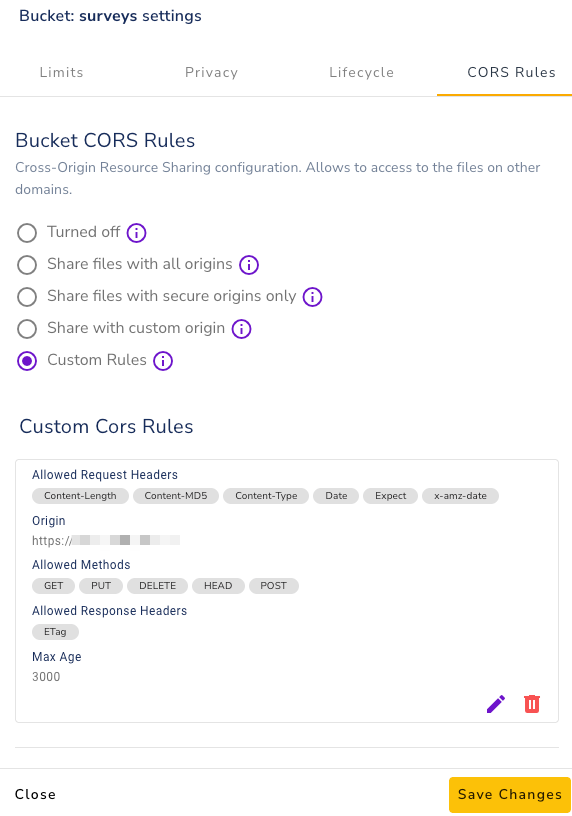
Ok, I finally resolved it on my side, and it was caused by the CORS policy on the S3 buckets. The policies were too restrictive, and obviously it wasn't working.
-
Ok, I finally resolved it on my side, and it was caused by the CORS policy on the S3 buckets. The policies were too restrictive, and obviously it wasn't working.
@Divemasterza Which provider is this? R2 doesn't work, seemingly because it doesn't support the
S3 POST Object operationEdit:
Got Hetzner working with these Settings:
S3_BUCKET_NAME=redacted S3_FORCE_PATH_STYLE=1 S3_ENDPOINT_URL=https://fsn1.your-objectstorage.com S3_REGION=fsn1 S3_ACCESS_KEY=redacted S3_SECRET_KEY=redacted -
@Divemasterza Which provider is this? R2 doesn't work, seemingly because it doesn't support the
S3 POST Object operationEdit:
Got Hetzner working with these Settings:
S3_BUCKET_NAME=redacted S3_FORCE_PATH_STYLE=1 S3_ENDPOINT_URL=https://fsn1.your-objectstorage.com S3_REGION=fsn1 S3_ACCESS_KEY=redacted S3_SECRET_KEY=redacted@andreasdueren said in S3 Compatible Storage:
@Divemasterza Which provider is this? R2 doesn't work, seemingly because it doesn't support the
S3 POST Object operationEdit:
Got Hetzner working with these Settings:
S3_BUCKET_NAME=redacted
S3_FORCE_PATH_STYLE=1
S3_ENDPOINT_URL=https://fsn1.your-objectstorage.com
S3_REGION=fsn1
S3_ACCESS_KEY=redacted
S3_SECRET_KEY=redacted
Glad it sorted, for the info, mine was a S3 compatible supplier
-
@andreasdueren said in S3 Compatible Storage:
@Divemasterza Which provider is this? R2 doesn't work, seemingly because it doesn't support the
S3 POST Object operationEdit:
Got Hetzner working with these Settings:
S3_BUCKET_NAME=redacted
S3_FORCE_PATH_STYLE=1
S3_ENDPOINT_URL=https://fsn1.your-objectstorage.com
S3_REGION=fsn1
S3_ACCESS_KEY=redacted
S3_SECRET_KEY=redacted
Glad it sorted, for the info, mine was a S3 compatible supplier
@Divemasterza I really would have preferred R2 for this use case but oh well.
-
I ended up deploying SeaweedFS on my Cloudron and it worked fine. Still interested in getting this to work with Contabo. Thanks.
Contabo
They only support path style buckets which makes them not work for lots of use cases, see https://forum.cloudron.io/post/96008

 ?
?

Hello! It looks like you're interested in this conversation, but you don't have an account yet.
Getting fed up of having to scroll through the same posts each visit? When you register for an account, you'll always come back to exactly where you were before, and choose to be notified of new replies (either via email, or push notification). You'll also be able to save bookmarks and upvote posts to show your appreciation to other community members.
With your input, this post could be even better 💗
Register Login