
Error status after restart
-
App is up and running fine though. Ignore the error?
WordPress (Developer) 6.8.1
org.wordpress.unmanaged.cloudronapp@3.11.2
CR v8.3.2 (Ubuntu 24.04 LTS)Nginx Error - Error reloading nginx: reverseproxy exited with code 1 signal null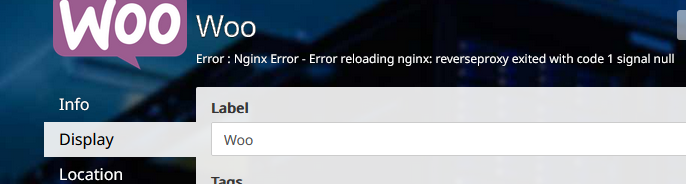
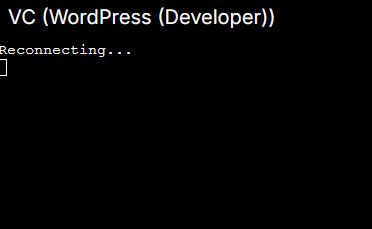
Terminal keeps trying to reconnect:
-
Hello @humptydumpty
Is the app really running or are you seeing just cache?
Maybe it would be a good idea to restart the server once.@james It's running for sure. I'm able to edit the page and view the changes, etc.
I just restarted the server and now it won't come back up. What's the next step?
Edit: I ran the following..
# cloudron-support --troubleshoot
Vendor: Hetzner Product: vServer
Linux: 6.8.0-60-generic
Ubuntu: noble 24.04
Processor: AMD EPYC-Milan Processor
BIOS NotSpecified  CPU @ 2.0GHz x 2
RAM: 7933172KB
Disk: /dev/sda1        45G
[OK]    node version is correct
[OK]    IPv6 is enabled and public IPv6 address is working
[OK]    docker is running
[OK]    docker version is correct
[OK]    MySQL is running
[FAIL]  nginx is down. Removing extraneous dashboard domain configs ...
        /home/yellowtent/platformdata/nginx/cert/_.mydomain.com.cert does not exist. removing /home/yellowtent/platformdata/nginx/applications/d6abef4b-5e43-43d9-8b9f-6e05f0eefa16/dev.mydomain.com.conf
        /home/yellowtent/platformdata/nginx/cert/_.mydomain.com.key does not exist. removing /home/yellowtent/platformdata/nginx/applications/d6abef4b-5e43-43d9-8b9f-6e05f0eefa16/dev.mydomain.com.conf
        Service 'nginx' just started 0 secs ago, checking health again in 10s
[OK]    nginx is running
[OK]    dashboard cert is valid
[OK]    dashboard is reachable via loopback
[OK]    box v8.3.2 is running
[OK]    netplan is good
[OK]    DNS is resolving via systemd-resolved
[OK]    Dashboard is reachable via domain name
connect: Connection refused
[OK]    Domain maindomain.com is valid and has not expired
[OK]    unbound is running
NVM. it's back up all by itself. The Wordpress app status has the same error message as before. I ran the same troubleshooting command again and now the cert errors are gone but there's a connection refused line.
[OK]    node version is correct
[OK]    IPv6 is enabled and public IPv6 address is working
[OK]    docker is running
[OK]    docker version is correct
[OK]    MySQL is running
[OK]    nginx is running
[OK]    dashboard cert is valid
[OK]    dashboard is reachable via loopback
[OK]    box v8.3.2 is running
[OK]    netplan is good
[OK]    DNS is resolving via systemd-resolved
[OK]    Dashboard is reachable via domain name
connect: Connection refused
[OK]    Domain maindomain.com is valid and has not expired
[OK]    unbound is running
The previous cert errors belonged to a stopped WP dev app (last backup was made in 2024). I just finished manually going through all the updates and it's working fine after the last update. I did a manual restart of the app and status is still running.
Then, for the original app with the error code, I did a "retry" from the app settings > Repair > Retry Task and the app status is Running now. All good! Could have the expired certs caused NGINX to go wacky or is it a coincidence?
Either way, all good now. Thank you.
-
Hello @humptydumpty
Is the app really running or are you seeing just cache?
Maybe it would be a good idea to restart the server once.@james It's running for sure. I'm able to edit the page and view the changes, etc.
I just restarted the server and now it won't come back up. What's the next step?
Edit: I ran the following..
# cloudron-support --troubleshoot
Vendor: Hetzner Product: vServer
Linux: 6.8.0-60-generic
Ubuntu: noble 24.04
Processor: AMD EPYC-Milan Processor
BIOS NotSpecified  CPU @ 2.0GHz x 2
RAM: 7933172KB
Disk: /dev/sda1        45G
[OK]    node version is correct
[OK]    IPv6 is enabled and public IPv6 address is working
[OK]    docker is running
[OK]    docker version is correct
[OK]    MySQL is running
[FAIL]  nginx is down. Removing extraneous dashboard domain configs ...
        /home/yellowtent/platformdata/nginx/cert/_.mydomain.com.cert does not exist. removing /home/yellowtent/platformdata/nginx/applications/d6abef4b-5e43-43d9-8b9f-6e05f0eefa16/dev.mydomain.com.conf
        /home/yellowtent/platformdata/nginx/cert/_.mydomain.com.key does not exist. removing /home/yellowtent/platformdata/nginx/applications/d6abef4b-5e43-43d9-8b9f-6e05f0eefa16/dev.mydomain.com.conf
        Service 'nginx' just started 0 secs ago, checking health again in 10s
[OK]    nginx is running
[OK]    dashboard cert is valid
[OK]    dashboard is reachable via loopback
[OK]    box v8.3.2 is running
[OK]    netplan is good
[OK]    DNS is resolving via systemd-resolved
[OK]    Dashboard is reachable via domain name
connect: Connection refused
[OK]    Domain maindomain.com is valid and has not expired
[OK]    unbound is running
NVM. it's back up all by itself. The Wordpress app status has the same error message as before. I ran the same troubleshooting command again and now the cert errors are gone but there's a connection refused line.
[OK]    node version is correct
[OK]    IPv6 is enabled and public IPv6 address is working
[OK]    docker is running
[OK]    docker version is correct
[OK]    MySQL is running
[OK]    nginx is running
[OK]    dashboard cert is valid
[OK]    dashboard is reachable via loopback
[OK]    box v8.3.2 is running
[OK]    netplan is good
[OK]    DNS is resolving via systemd-resolved
[OK]    Dashboard is reachable via domain name
connect: Connection refused
[OK]    Domain maindomain.com is valid and has not expired
[OK]    unbound is running
The previous cert errors belonged to a stopped WP dev app (last backup was made in 2024). I just finished manually going through all the updates and it's working fine after the last update. I did a manual restart of the app and status is still running.
Then, for the original app with the error code, I did a "retry" from the app settings > Repair > Retry Task and the app status is Running now. All good! Could have the expired certs caused NGINX to go wacky or is it a coincidence?
Either way, all good now. Thank you.
-
 H humpty has marked this topic as solved on

Hello! It looks like you're interested in this conversation, but you don't have an account yet.
Getting fed up of having to scroll through the same posts each visit? When you register for an account, you'll always come back to exactly where you were before, and choose to be notified of new replies (either via email, or push notification). You'll also be able to save bookmarks and upvote posts to show your appreciation to other community members.
With your input, this post could be even better 💗
Register Login