
Cloudron 9.0 (beta) bug reports
-
Two UI things:
- If a server requires a reboot, would be nice to be able to do that directly from the notification popup (in 8 you had the dedicated notifications page where you you push the button)
- After deleting a mailbox, I got back to the
/#/mailboxesview but all accounts just show "Loading..." and nothing happens. Would be cool if it remembered the mailbox size or at least start collecting the data again.
@msbt said in Cloudron 9.0 (beta) bug reports:
After deleting a mailbox, I got back to the /#/mailboxes view but all accounts just show "Loading..." and nothing happens. Would be cool if it remembered the mailbox size or at least start collecting the data again.
this is fixed in https://git.cloudron.io/platform/box/-/commit/3a760282f15259f461e0db4181883ac9d82aac06
-
@necrevistonnezr oh! a bad beast

-
@Teiluj thanks for reporting the group overflowing in the users view. We have changed that now to only display the group count for a start until we find some better solution to deal with the vastly varying size that column would require.
@nebulon Some UX-friendly approaches for the several table-related issues:
- Scrollable table wrappers (check)
- Consequently (tables can grow infinitely wide) limit column lengths with CSS to a readable size, e. g.
max-width: 40ch; word-wrap: break-word; - Consequently (rows can then have variable heights) top-align table cells
- Support orientation in table rows with either alternating backgrounds or subtle horizontal borders (hover bg is already helpful - but only when your device has a hover state)
- Wrap all concatenated data with markup (like group names in the users table, unlike aliases in the mailbox table) - reserving us the option to set entries inline or stacked. Ideally, use invisible list markup - commas can be added with CSS
-
@nebulon Some UX-friendly approaches for the several table-related issues:
- Scrollable table wrappers (check)
- Consequently (tables can grow infinitely wide) limit column lengths with CSS to a readable size, e. g.
max-width: 40ch; word-wrap: break-word; - Consequently (rows can then have variable heights) top-align table cells
- Support orientation in table rows with either alternating backgrounds or subtle horizontal borders (hover bg is already helpful - but only when your device has a hover state)
- Wrap all concatenated data with markup (like group names in the users table, unlike aliases in the mailbox table) - reserving us the option to set entries inline or stacked. Ideally, use invisible list markup - commas can be added with CSS
Available screen space
Still focusing on tables, but to consider in general:
- When the task focus is on working with complex tables, the space should not be limited for the sake of the design
-> Let the content width be a subject of user preference: make .content max-width (900px) class-dependent and offer a per-user or per-session toggle to swap a body class. The design looks good without the max-width, so there's really not much to change
- Sidebar consumes too much space in narrow viewports (already mentioned here in this thread)
-> Option to reduce the sidebar width to the width of the icons (see Discourse or GitLab

-
@hexbin thanks a lot for the detailed info. We have reworked those table columns with better widths then and also made some of the tables
table-layout: fixed;to actually be able to control that overflow behavior.For "Wrap all concatenated data with markup", is this similar to the custom option to overwrite style based on user adding custom css? We currently don't have that option to customize like that, but it was also requested for other things already.
Finally for the sidebar, we will see how to make that collapsable. It would certainly help on "nowadays" laptops around the 14" screens.
-
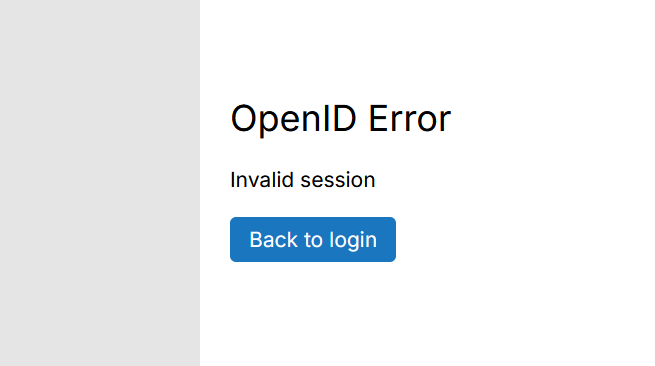
Thank you for adding a "back" button on login pages. I keep my tabs pinned and that causes the OIDC string to expire and I had to manually delete that string from the URL. Now, I can simply click on back and then sign in. Less hassle now.

-
One more suggestion if I may. Clear the search box when you click on the logo in the top left.
Use case: You search for an app. To see the rest of your apps, you have to delete what you searched for or refresh the page which has a "reload" time and isn't instant. Clearing the input search box by pressing on the logo is faster and feels more natural.

Edit: Chatgpt spat out this code, don't shoot me
Clear search when clicking the Cloudron logo
// Clears the dashboard search field on logo click or ESC key
function enableClearSearchIntegration() {
  const searchInput = document.querySelector('input.pankow-text-input[placeholder="Search Apps"]');
  const logo = document.querySelector('.sidebar-logo');

  if (!searchInput) return;

  // ---- LOGO CLICK HANDLER ----
  if (logo && !logo.dataset._cloudronClearSearch) {
    logo.dataset._cloudronClearSearch = "1";

    logo.addEventListener("click", () => {
      clearSearch(searchInput);
    }, true);
  }

  // ---- ESC KEY HANDLER ----
  if (!window._cloudronClearSearchEsc) {
    window._cloudronClearSearchEsc = true;

    document.addEventListener("keydown", (event) => {
      if (event.key === "Escape") {
        clearSearch(searchInput);
      }
    });
  }
}

// Clears the input and triggers Cloudron filtering
function clearSearch(searchInput) {
  searchInput.value = "";
  searchInput.dispatchEvent(new Event("input", { bubbles: true }));
  searchInput.dispatchEvent(new Event("change", { bubbles: true }));
}

// Run once on initial load
enableClearSearchIntegration();

// Re-run when the SPA updates the DOM (Cloudron dashboard is an SPA)
const observer = new MutationObserver(enableClearSearchIntegration);
observer.observe(document.body, { childList: true, subtree: true });
Edit 2: fixed the code as we didn't use the right class selector for the logo. I tested it in the console and the code works as intended!
Edit 3: fixed the code again to use the proper selector for the search box. NOW it's ready
Edit 4: added support for escape key clear action thanks @robi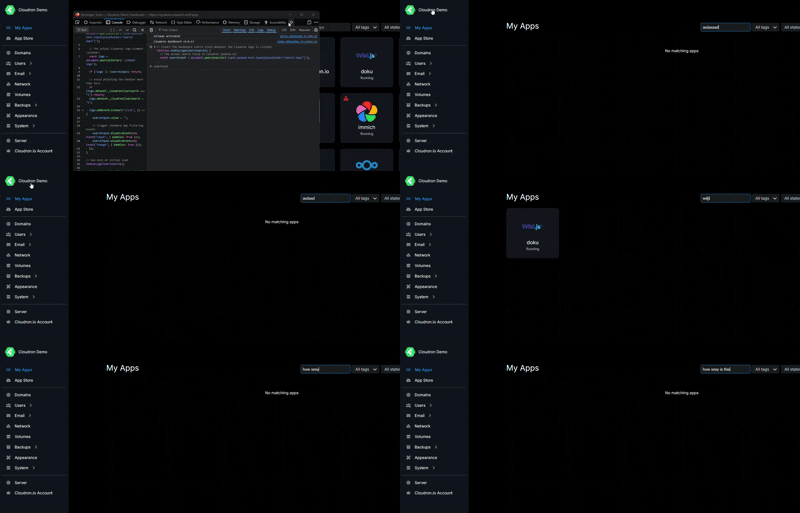
-
One more suggestion if I may. Clear the search box when you click on the logo in the top left.
Use case: You search for an app. To see the rest of your apps, you have to delete what you searched for or refresh the page which has a "reload" time and isn't instant. Clearing the input search box by pressing on the logo is faster and feels more natural.
Edit: Chatgpt spat out this code, don't shoot me
Clear search when clicking the Cloudron logo
// Clears the dashboard search field on logo click or ESC key
function enableClearSearchIntegration() {
  const searchInput = document.querySelector('input.pankow-text-input[placeholder="Search Apps"]');
  const logo = document.querySelector('.sidebar-logo');

  if (!searchInput) return;

  // ---- LOGO CLICK HANDLER ----
  if (logo && !logo.dataset._cloudronClearSearch) {
    logo.dataset._cloudronClearSearch = "1";

    logo.addEventListener("click", () => {
      clearSearch(searchInput);
    }, true);
  }

  // ---- ESC KEY HANDLER ----
  if (!window._cloudronClearSearchEsc) {
    window._cloudronClearSearchEsc = true;

    document.addEventListener("keydown", (event) => {
      if (event.key === "Escape") {
        clearSearch(searchInput);
      }
    });
  }
}

// Clears the input and triggers Cloudron filtering
function clearSearch(searchInput) {
  searchInput.value = "";
  searchInput.dispatchEvent(new Event("input", { bubbles: true }));
  searchInput.dispatchEvent(new Event("change", { bubbles: true }));
}

// Run once on initial load
enableClearSearchIntegration();

// Re-run when the SPA updates the DOM (Cloudron dashboard is an SPA)
const observer = new MutationObserver(enableClearSearchIntegration);
observer.observe(document.body, { childList: true, subtree: true });
Edit 2: fixed the code as we didn't use the right class selector for the logo. I tested it in the console and the code works as intended!
Edit 3: fixed the code again to use the proper selector for the search box. NOW it's ready
Edit 4: added support for escape key clear action thanks @robi@humptydumpty use if the Esc key is also a good way.
-
@humptydumpty use if the Esc key is also a good way.
@robi code revised and escape key support added