
Cloudron makes it easy to run web apps like WordPress, Nextcloud, GitLab on your server. Find out more or install now.


Skip to content
  • Categories
  • Recent
  • Tags
  • Popular
  • Bookmarks
  • Search
Skins
  • Light
  • Brite
  • Cerulean
  • Cosmo
  • Flatly
  • Journal
  • Litera
  • Lumen
  • Lux
  • Materia
  • Minty
  • Morph
  • Pulse
  • Sandstone
  • Simplex
  • Sketchy
  • Spacelab
  • United
  • Yeti
  • Zephyr
  • Dark
  • Cyborg
  • Darkly
  • Quartz
  • Slate
  • Solar
  • Superhero
  • Vapor

  • Default (No Skin)
  • No Skin
Collapse
Brand Logo

Cloudron Forum

Apps | Demo | Docs | Install
  1. Cloudron Forum
  2. Support
  3. Old backup not found when updating app

Old backup not found when updating app

Scheduled Pinned Locked Moved Unsolved Support
backupsupdates
12 Posts 5 Posters 66 Views 5 Watching
  • Oldest to Newest
  • Newest to Oldest
  • Most Votes
Reply
  • Reply as topic
Log in to reply
This topic was forked from Old system backups are not listed joseph
This topic has been deleted. Only users with topic management privileges can see it.
  • F Offline
    F Offline
    FrenchyBear
    wrote last edited by joseph
    #1

    Since update to 9.0.12 (november, 23th), the cloudron update to v9.0.13 and app update doesn't work because of a "BoxError: Old backup not found".
    Same problem with backup. The files are present on the google bucket storage, but get an "Old backup not found".

    1 Reply Last reply
    1
    • J Offline
      J Offline
      joseph
      Staff
      wrote last edited by
      #2

      This topic seems to be in some limbo state in the forum 🤔

      1 Reply Last reply
      0
      • J Offline
        J Offline
        joseph
        Staff
        wrote last edited by
        #3

        @frenchybear Do you have a screenshot? Cloudron does not look for old backups during app updates, so I am a bit confused.

        robiR F 2 Replies Last reply
        0
        • T Offline
          T Offline
          tecbox
          wrote last edited by
          #4

          Hi,
          a bit different, but same error:
          Since my storagebox are full, I added an additional backup site to an s3-bucket.
          After starting backup, it fails shortly with the error FrenchyBear mentioned: "BoxError: Old backup not found"
          For the new-s3-site i'm using rsync with encryption, the bucket is new, so there is nothing for cloudron to reference to.
          The problem was with 9.0.12 and is also there, after installation of new version 9.0.13.

          So my account is new, it seems I can not add a screenshot.

          1 Reply Last reply
          1
          • J joseph

            @frenchybear Do you have a screenshot? Cloudron does not look for old backups during app updates, so I am a bit confused.

            robiR Offline
            robiR Offline
            robi
            wrote last edited by
            #5

            @joseph before an update a backup is performed where it may look at old backups.

            Conscious tech

            1 Reply Last reply
            1
            • J Offline
              J Offline
              joseph
              Staff
              wrote last edited by
              #6

              @frenchybear @tecbox are you able to contact support@cloudron.io ? We can investigate what the issue is.

              F 1 Reply Last reply
              0
              • T Offline
                T Offline
                tecbox
                wrote last edited by
                #7

                @joseph Sure, I wrote an e-mail and attached a log from failed backup task.

                1 Reply Last reply
                1
                • girishG Offline
                  girishG Offline
                  girish
                  Staff
                  wrote last edited by
                  #8

                  @frenchybear I have been interacting with @tecbox on support . I could reproduce it with the specific S3 service that @tecbox is using . Are you able to share which S3 provider you are using?

                  F 1 Reply Last reply
                  0
                  • J joseph

                    @frenchybear Do you have a screenshot? Cloudron does not look for old backups during app updates, so I am a bit confused.

                    F Offline
                    F Offline
                    FrenchyBear
                    wrote last edited by FrenchyBear
                    #9

                    @joseph First, I have this message on system backup
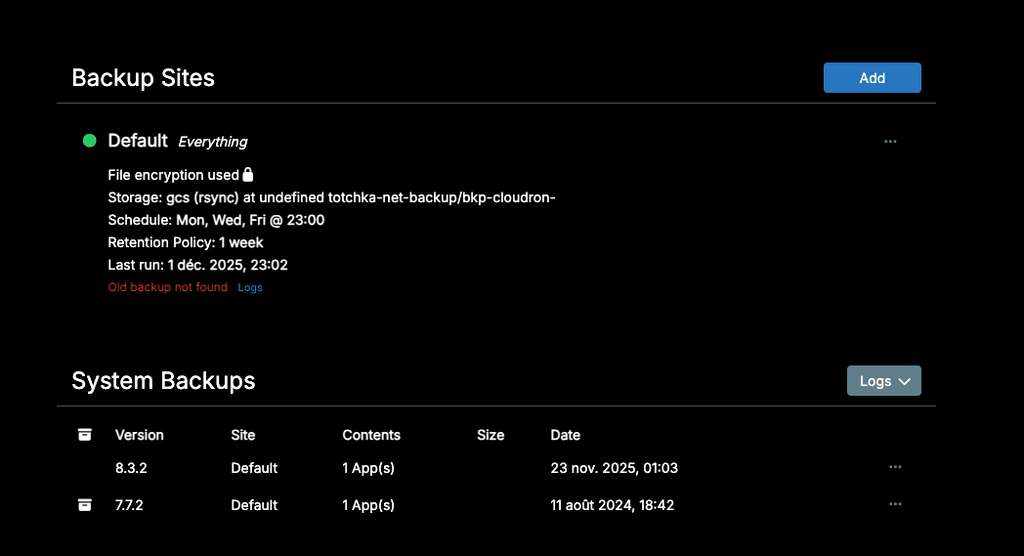
                    Capture d’écran 2025-12-03 à 14.38.47.png
                    The backup files are present on the backup volume (gc bucket), but are not listed.
                    Logs look like this :
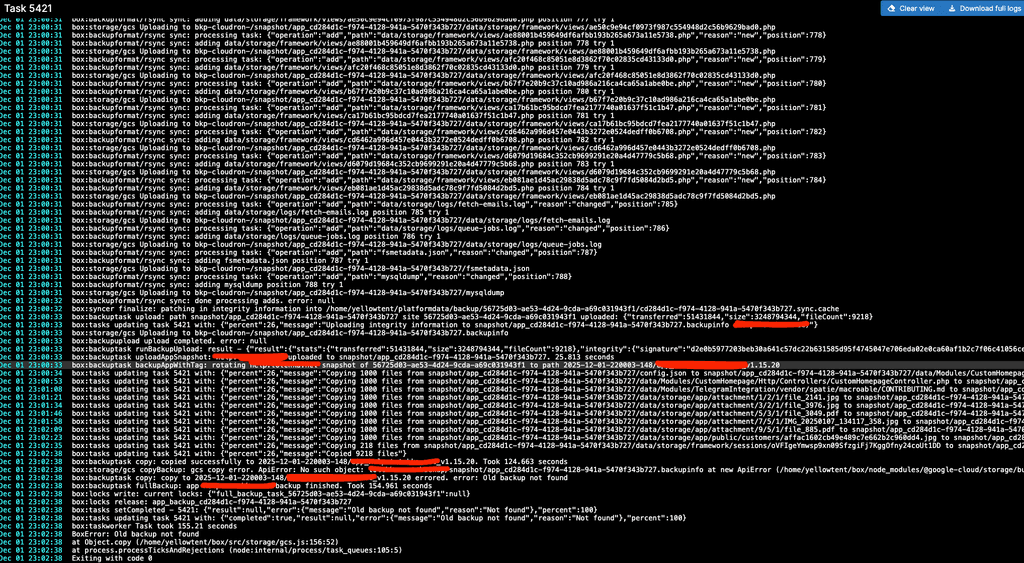
                    Capture d’écran 2025-12-03 à 14.39.png

                    What concerns App update (freescout), I have the same problem. THere's an update available, but the process cannot be completed. After several tries, still have this screen :
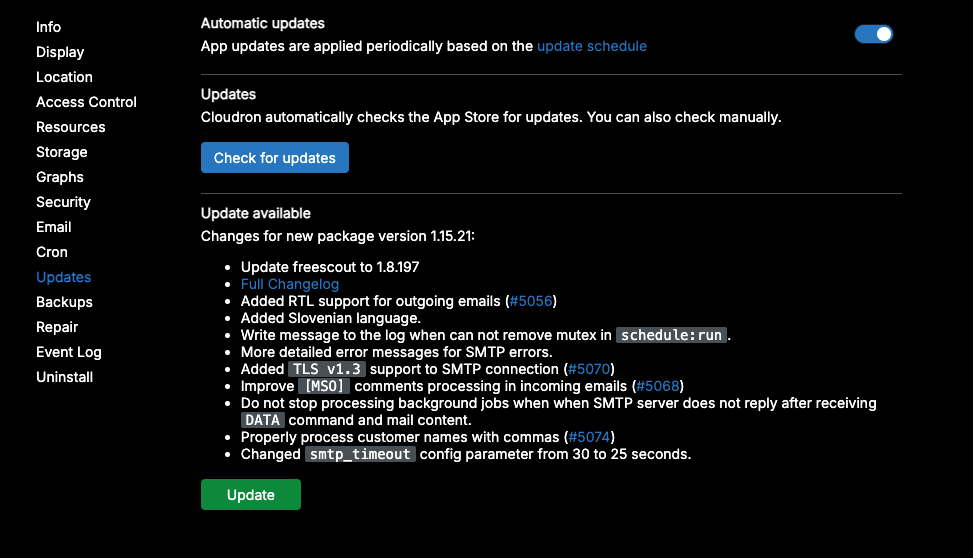
                    Capture d’écran 2025-12-03 à 14.41.57.png
                    In the app logs, same error message "Old backup not found" even if I check the "skip backup" option

                    1 Reply Last reply
                    0
                    • girishG girish

                      @frenchybear I have been interacting with @tecbox on support . I could reproduce it with the specific S3 service that @tecbox is using . Are you able to share which S3 provider you are using?

                      F Offline
                      F Offline
                      FrenchyBear
                      wrote last edited by
                      #10

                      @girish I use a google bucket

                      1 Reply Last reply
                      0
                      • J joseph

                        @frenchybear @tecbox are you able to contact support@cloudron.io ? We can investigate what the issue is.

                        F Offline
                        F Offline
                        FrenchyBear
                        wrote last edited by
                        #11

                        @joseph I received an answer from support asking to write here...

                        1 Reply Last reply
                        0
                        • girishG Offline
                          girishG Offline
                          girish
                          Staff
                          wrote last edited by girish
                          #12

                          @tecbox thanks for the report. The fix is https://git.cloudron.io/platform/box/-/commit/b759fdb6e35762ef5586c3e552a387c4aef15a42#da95ffafbc09b42991a792cd9824d5814e1ec274_373_372 . You just need that one line change.

                          Edit /home/yellowtent/box/src/storage/s3.js . Then change line 372. Basically, remove the leading slash at the front. No need to restart anything after making the change. Make a new backup, it should work. Can you please let me know?

                              return `${bucket}/${output}`;
                          

                          In Cloudron 9, we upgraded the AWS library from v2 to v3. It's possible that v2 library automatically removed this trailing slash. Maybe in v3, they don't do this anymore. Hard to find any info, but it seems in other providers both works.


                          1 Reply Last reply
                          0
                          Reply
                          • Reply as topic
                          Log in to reply
                          • Oldest to Newest
                          • Newest to Oldest
                          • Most Votes


                          • Login

                          • Don't have an account? Register

                          • Login or register to search.
                          • First post
                            Last post
                          0
                          • Categories
                          • Recent
                          • Tags
                          • Popular
                          • Bookmarks
                          • Search
