Cloudron makes it easy to run web apps like WordPress, Nextcloud, GitLab on your server. Find out more or install now.


Skip to content
  • Categories
  • Recent
  • Tags
  • Popular
  • Bookmarks
  • Search
Skins
  • Light
  • Brite
  • Cerulean
  • Cosmo
  • Flatly
  • Journal
  • Litera
  • Lumen
  • Lux
  • Materia
  • Minty
  • Morph
  • Pulse
  • Sandstone
  • Simplex
  • Sketchy
  • Spacelab
  • United
  • Yeti
  • Zephyr
  • Dark
  • Cyborg
  • Darkly
  • Quartz
  • Slate
  • Solar
  • Superhero
  • Vapor

  • Default (No Skin)
  • No Skin
Collapse
Brand Logo

Cloudron Forum

Apps | Demo | Docs | Install
  1. Cloudron Forum
  2. Support
  3. Bloated n8n backup

Bloated n8n backup

Scheduled Pinned Locked Moved Unsolved Support
backups
10 Posts 2 Posters 42 Views 2 Watching
  • Oldest to Newest
  • Newest to Oldest
  • Most Votes
Reply
  • Reply as topic
Log in to reply
This topic was forked from What's coming in Cloudron 9 joseph
This topic has been deleted. Only users with topic management privileges can see it.
  • U Offline
    U Offline
    umnz
    wrote last edited by joseph
    #1

    Just got auto-updated to Cloudron 9.0.13 a few weeks ago and my n8n backups have gone absolutely bonkers.

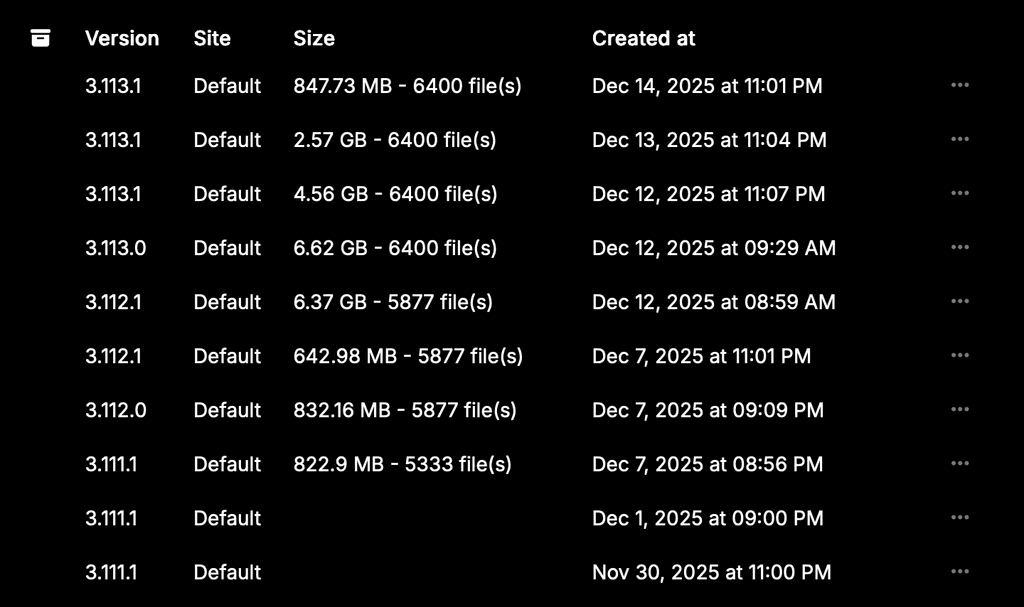
    They jumped from a consistent 800MB-1GB range to 6.37GB. File count stayed the same (5877 files), so something else is getting backed up now.

    Dug into the container and found /usr is 2.8GB and /app is 2.4GB - that's basically the entire 6GB right there.

    Did something change with backup scope in Cloudron 9? Is this a known issue? My backup storage costs just tripled overnight for what looks like redundant system files that shouldn't be in there.

    Anyone else seeing this?

    1 Reply Last reply
    1
    • J Offline
      J Offline
      joseph
      Staff
      wrote last edited by
      #2

      @umnz are you able to check the size of the file in your backup storage directly? Does it match what Cloudron is reporting?

      U 1 Reply Last reply
      0
      • J joseph

        @umnz are you able to check the size of the file in your backup storage directly? Does it match what Cloudron is reporting?

        U Offline
        U Offline
        umnz
        wrote last edited by
        #3

        @Joseph yes, the size matches.

        There appears to be no rhyme or reason to these backup sizes after updating. Nightly is showing a smaller file size now.

        The reason it is noticeable is updating an app is taking 15-20 minutes because of the snapshot+upload to Cloudflare R2. 6GB takes a lot longer than 800mb.
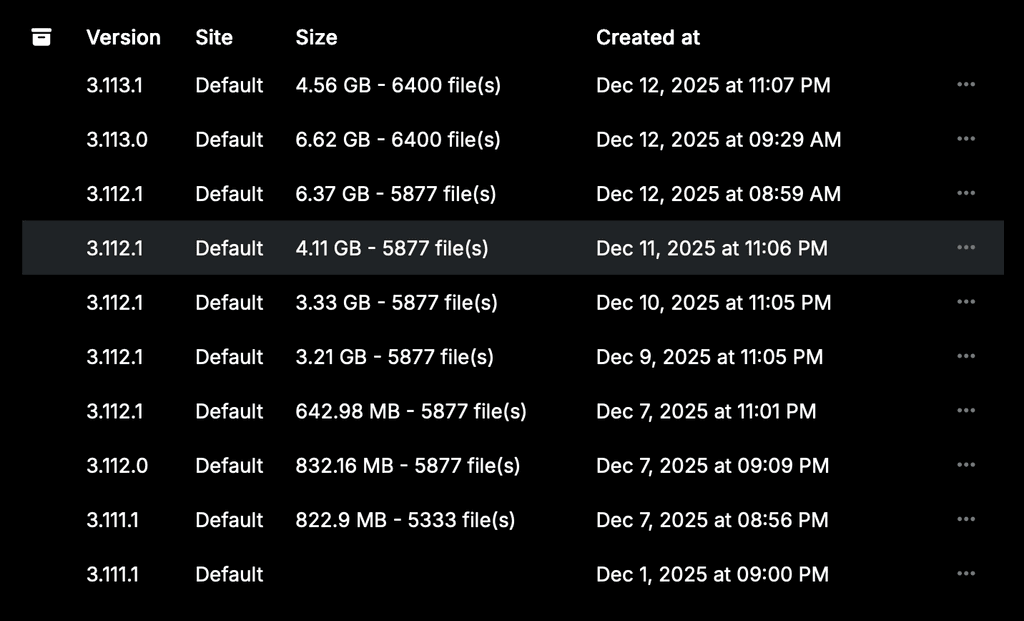
        06d46b8a-dbf4-4d8d-a45f-191e022bca81-image.png

        1 Reply Last reply
        0
        • J Offline
          J Offline
          joseph
          Staff
          wrote last edited by
          #4

          @umnz you should download one of the backups from Cloudflare UI and check what is taking so much space inside the tarball.

          1 Reply Last reply
          0
          • U Offline
            U Offline
            umnz
            wrote last edited by umnz
            #5

            When I try to download the backup from the Cloudron interface I get this error:

            {
              "status": "Conflict",
              "message": "only tgz backups can be downloaded"
            }
            

            Is this because they are encrypted? .tar.gz.enc

            I will try the Cloudflare UI. But still curious to understand why that error occurs.

            J 1 Reply Last reply
            0
            • U umnz

              When I try to download the backup from the Cloudron interface I get this error:

              {
                "status": "Conflict",
                "message": "only tgz backups can be downloaded"
              }
              

              Is this because they are encrypted? .tar.gz.enc

              I will try the Cloudflare UI. But still curious to understand why that error occurs.

              J Offline
              J Offline
              joseph
              Staff
              wrote last edited by
              #6

              @umnz I think that was a bug, it's fixed in 9.0.14 .

              1 Reply Last reply
              1
              • J Offline
                J Offline
                joseph
                Staff
                wrote last edited by
                #7

                @umnz also if you open webterminal of n8n and then cd /app/data and du -hcs . what size do you get?

                U 2 Replies Last reply
                0
                • J joseph

                  @umnz also if you open webterminal of n8n and then cd /app/data and du -hcs . what size do you get?

                  U Offline
                  U Offline
                  umnz
                  wrote last edited by umnz
                  #8

                  @joseph said in Bloated n8n backup:

                  du -hcs .

                  I get 1.5G.

                  Be mindful since posting the above I have restarted my Cloudron instance which had been up (for 5 days) since automatically updating to 9.0.13.

                  Cloudflare won't let me download files over 1G directly so I'll look to update to 9.0.14 now.

                  1 Reply Last reply
                  0
                  • U Offline
                    U Offline
                    umnz
                    wrote last edited by
                    #9

                    Actually I'm going to hold off on updating to 9.0.14 because I don't want to risk it turning into a different problem. I'll wait for 9.0.14 to come out of pre-release or do it this weekend when activity is low.

                    1 Reply Last reply
                    0
                    • J joseph

                      @umnz also if you open webterminal of n8n and then cd /app/data and du -hcs . what size do you get?

                      U Offline
                      U Offline
                      umnz
                      wrote last edited by
                      #10

                      @joseph said in Bloated n8n backup:

                      du -hcs .

                      Sorry, I misread this. I navigated to cd app/data/ and it's 906MB. My other post was running that from app/code

                      1 Reply Last reply
                      0
                      Reply
                      • Reply as topic
                      Log in to reply
                      • Oldest to Newest
                      • Newest to Oldest
                      • Most Votes


                      • Login

                      • Don't have an account? Register

                      • Login or register to search.
                      • First post
                        Last post
                      0
                      • Categories
                      • Recent
                      • Tags
                      • Popular
                      • Bookmarks
                      • Search